Spring

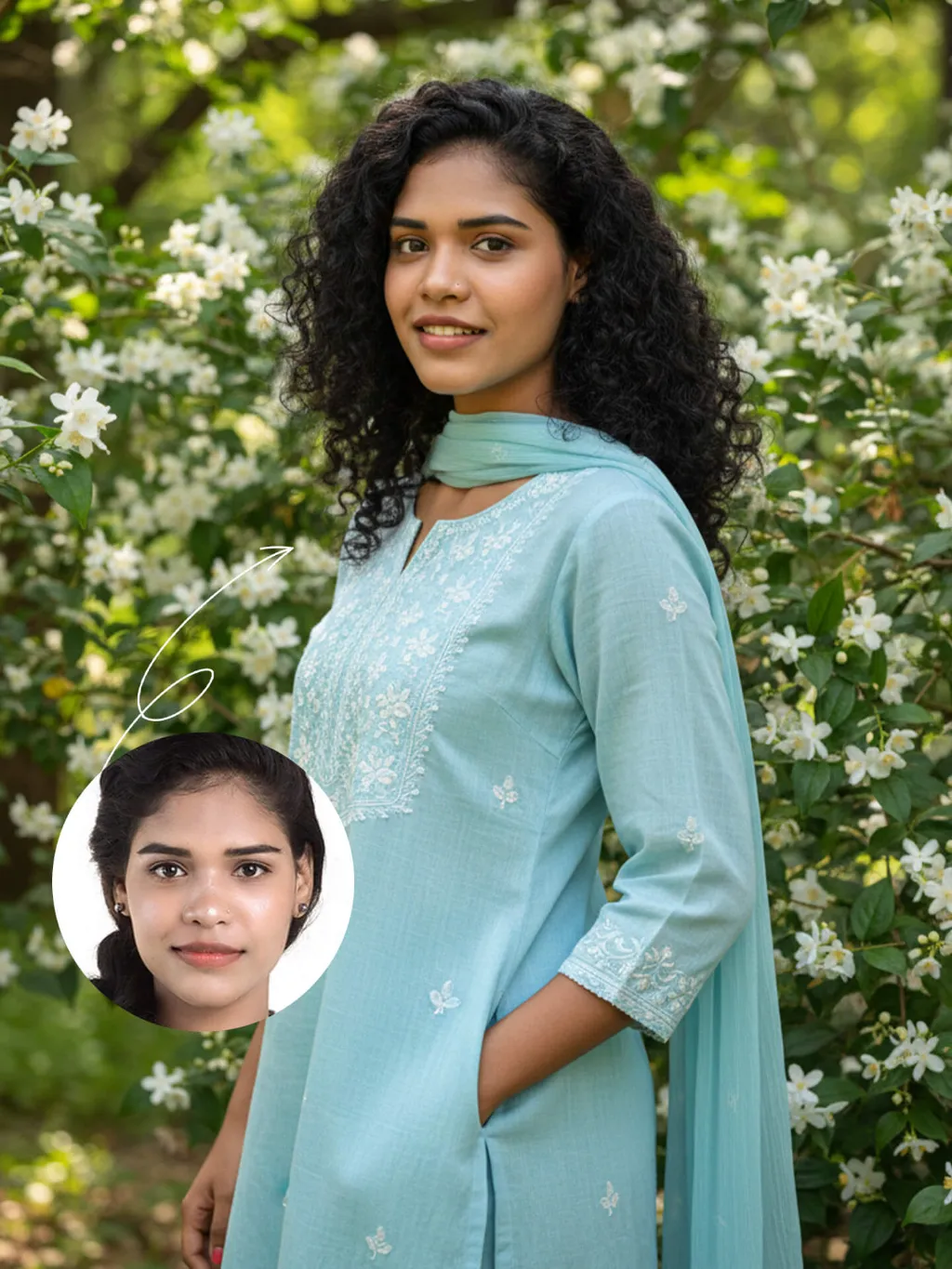
The identity of the uploaded portrait is strictly preserved (retaining facial contours, authentic Indian skin tone, hairstyle and age). This is a bust portrait with a 3:4 aspect ratio, featuring a 20-year-old young Indian woman with naturally voluminous long black curly hair. Her makeup is fresh and dewy: only the lip color and eyebrow shape are refined, the delicate texture of her natural skin is preserved, and her smile is warm and soothing. She is dressed in a light sky-blue cotton and linen Kurta set: the top is a loose-fit style with delicate white thread-embroidered floral patterns adorning the neckline and cuffs, paired with a sheer matching Dupatta draped gently over her shoulders. She stands sideways beside a garden in full bloom with white jasmine, her body leaning slightly, one hand in the pocket, and her eyes looking softly at the camera. The background consists of lush green foliage and clusters of blooming white flowers, with soft natural light filtering through the branches and leaves casting dappled light and shadow on her figure. Fresh and natural outdoor lighting is adopted: backlight from the side outlines the hair silhouette, and soft light illuminates the face, highlighting the gentle hues of the attire and the fresh texture of the flowers. The style is a life-like forest-themed portrait, with an ultra-high-definition and delicate frame and soft, fresh colors, creating a relaxed and soothing atmosphere.

Use Template
arrow
Spring

More From VIVAGO AI

Snow Scene AI effects generated image

Snow Scene

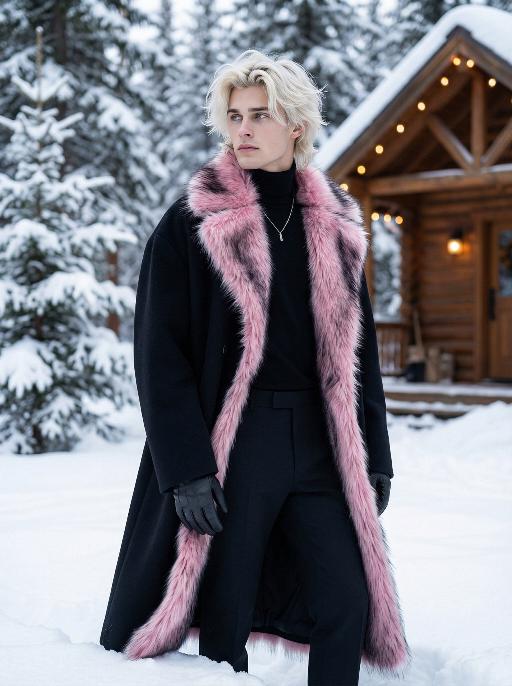
Preserve the facial features of the figure in the image and transform the scene into a photo-realistic romantic winter snow photograph: the figure is wearing a matte black wool knee-length overcoat paired with a thick knit scarf in an interwoven coffee-brown and off-white check pattern (or a matte off-white wool waist-cinched double-breasted coat with gold buttons paired with a matching cashmere mid-length tassel scarf), set against a romantic outdoor scene with heavy snow falling. The lighting is bright natural light (noon sunlight), creating an exquisite and high-end atmosphere. Shoot with a 24mm wide-angle lens to highlight the immersive ambiance of the romantic realistic scene. Scene: Vintage red brick rooftops with light snow traces, frosted silver-toned metal railings with slightly melted snow on the edges; the New York skyline in the background, featuring a scattered mix of light gray glass curtain wall skyscrapers and vintage brownstone buildings with the clear spire of the Empire State Building, and fine snow falling gently. Photography: 85mm f/2.8 lens, winter side light, film texture, cool color tones. Image Quality: 8K ultra-detailed, realistic light and shadow. Atmosphere: A romantic and warm urban architectural snow scene bathed in the afterglow of the setting sun. Shooting Angle: Eye-level with a slight bird's-eye perspective.

Queen of Gold AI effects generated image

Queen of Gold

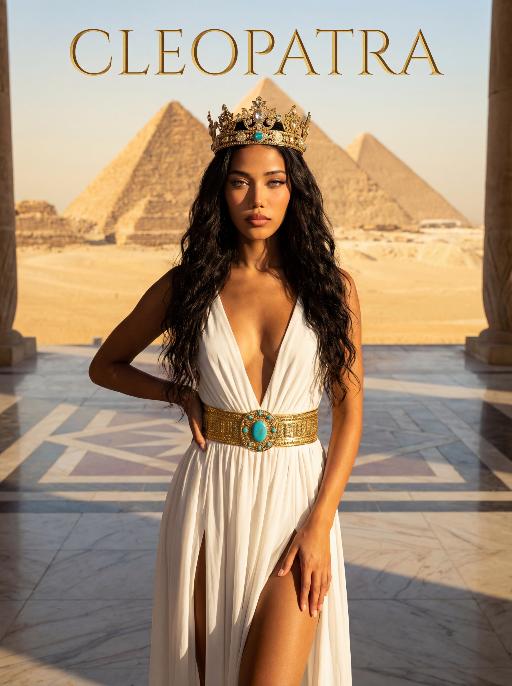
The character in the uploaded picture (unchanged facial features, gender and age). A striking young woman embodying the persona of an ancient Egyptian queen, captured in a hyper-realistic, cinematic portrait. She has voluminous dark curly hair flowing in the wind, a captivating gaze, and a regal, confident expression. She wears an opulent, intricately carved golden crop top with hieroglyphic engravings, paired with a matching golden skirt featuring detailed Egyptian motifs. Layered, flowing off-white fabric drapes over her shoulders, adding movement and elegance. Her accessories are lavish: multiple layered golden necklaces with ornate pendants, large golden earrings, and thick golden bracelets on her wrists. She walks forward with a confident stride, radiating power and grace, as if leading a procession. The setting is the grand courtyard of an ancient Egyptian palace or temple, with massive stone columns and sun-drenched stone floors. Blurred figures of attendants in similar golden attire follow in the background, creating a sense of scale and majesty. The warm, golden light of the setting sun bathes the scene, casting a majestic glow over the entire environment. The image is rendered in a hyper-realistic, epic historical drama style, with dramatic, cinematic lighting that highlights the intricate details of the golden regalia, the texture of the fabric, and the weathered stone of the palace. The color palette is rich and opulent, featuring deep golds, warm earth tones, and the soft off-white of the draped fabric, creating a timeless, majestic, and awe-inspiring atmosphere. The overall aesthetic is detailed, lifelike, and reminiscent of a scene from a grand historical epic film or a high-fashion editorial photoshoot set in ancient Egypt

Flower AI effects generated image

Flower

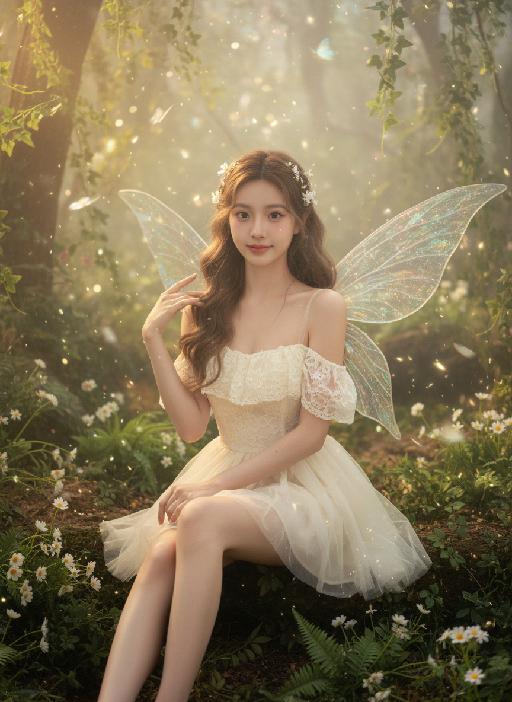
Strictly lock facial features: fully preserving the original facial contours, skin texture, eye shape, lip shape, and youthful appearance with zero deviations allowed. Eye-level perspective, close-up half-body portrait (subject occupies 80% of the frame), a young and sweet East Asian woman with a bright, healing smile showing teeth, eyes bright and gentle; double braid hairstyle with small silver ornaments in the hair; wearing an extremely ornate and intricate Miao silver large-horned headdress with dangling silver tassels swaying subtly; accessorized with multi-layered Miao silver collars and long silver earrings. Natural dynamic pose: Body gently tilted forward, arms positioned naturally: one hand gently holds a small bouquet of fresh flowers (a mix of light pink baby's breath and white daisies), fingers loosely wrapping around the flower stems, the bouquet naturally tilting downward toward the camera, petals slightly fluttering; the other hand rests lightly at her waist for an organic, relaxed feel, shoulders slightly relaxed, no stiff movements. The upper portion of the light blue satin Miao traditional costume’s skirt flows subtly, with the decorative silver trim and embroidery fluttering gently in the breeze—focusing on upper-body movement only. The top has wide sleeves, with large areas of silver embroidery, colorful small bead decorations, and gold trim on the cuffs, neckline, chest, and waistband, catching soft highlights with the gentle movement. Soft natural sunlight shines from the upper left side of the frame, casting warm, translucent highlights on the Miao silver ornaments, flower petals, hair strands, and satin fabric; natural soft shadows form on the neck, collarbone, and the edge of the costume, enhancing the three-dimensional sense of the figure while maintaining the fresh and transparent tone. Background (subtly blurred to emphasize the subject): The stone slab square of Xijiang Qianhu Miao Village in Guizhou (partial concentric circle patterns visible), with a blurred wooden wind-rain bridge and lush green mountains in the distance, under a fresh blue sky with clouds; overall high-definition portrait photography, soft diffused natural light blended with warm sunlight, colors are fresh and transparent, mainly in light blue, silver white, and natural green tones, strictly 1:1 replicate the original image's facial features and clothing details while emphasizing the subject's dominance in the frame

Motorcycle Boy AI effects generated image

Motorcycle Boy

Strict identity verification is performed using the uploaded avatar (maintaining consistency in facial features, hair, skin tone and age). A close-up shot is adopted, focusing on the upper body with the face positioned at a three-quarter angle. Create a realistic portrait of the man in the reference photo sitting on a sleek black sports motorcycle on a midnight street. The background features thick smoke illuminated by high-contrast lighting. He is wearing a loose black T-shirt with a striking white pattern, a black leather jacket, loose black leather pants and black leather boots. His accessories include a black wristwatch, trendy ring accessories and necklaces—a thin chain necklace layered with another chain. His right hand rests on the motorcycle, holding a clean, glossy black helmet with a clear visor. The motorcycle (a high-end, luxury model) is rich in intricate details, featuring a large engine, a sturdy frame and shiny chrome trimmings, which accentuate a modern and powerful impression. His expression is calm and confident as he stares directly at the camera. The overall style boasts a cinematic and fashionable feel, with ultra-high resolution, photorealistic detail, an editorial aesthetic, fashion photography sensibilities, a contemporary fashion portrait style and a high-fashion editorial photography style. The image features dramatic light and shadow contrast, well-defined chiaroscuro on the facial contours, professional studio lighting, trendy and stylish attire, and avant-garde fashion photography artistry.

Night Chat AI effects generated image

Night Chat

The uploaded figure (with unchanged facial features) is lit by a high-intensity flash fired directly at them, creating stark contrast between light and shadow, prominent highlights on the figure’s face, and a dark-toned background with blurred bokeh light spots. This is a medium close-up portrait: the figure leans out of a car window with their upper body, in an off-the-shoulder pose, their long dark brown curly hair tousled and flowing in the wind. They wear a loose white off-the-shoulder knit sweater, gaze straight at the camera with a lazy and cool expression. Shot from an eye-level perspective, the background features a nighttime urban street with slightly blurred traffic flow, warm yellow street lamp glows and red taillight bokeh, and a shallow depth of field with bokeh effects. The overall mood blends a warm color tone with a cool atmosphere, complemented by film texture and film grain, plus ultra-high-definition details. An orange vertical digital date watermark (2026:00:00) is added to the bottom right corner.

Midnight Neon

Professional retro film-style portrait photography, with the first uploaded portrait used in the frame for strict identity consistency (unchanged facial features, hairstyle, skin tone and age). The figure’s face is naturally retouched for a flawless skin texture, paired with dramatic light and shadow contrast on the facial features. In this street photography portrait, the figure stands at the center of a bustling city street on a rainy night (the vibrant night view of Tokyo’s busy thoroughfares), captured in a close-up shot and positioned right at the frame’s center. The traffic flow in the background (vehicles and pedestrians speeding by to create blurred dynamic streaks) and neon lights feature dynamic motion blur effects, with smudged texture overlays to enhance the narrative mood. The dim lighting boasts high contrast; the wet road surfaces reflect warm orange glows and cool-toned neon light, with soft bokeh spots cast by street lamps and car headlights. Color palette: based on black and white tones, the neon hues are processed with high saturation, dominated by dark shades to create a striking contrast between warm and cool tones. The image is enhanced with film grain texture, depth of field breakup details, cinematic black aesthetic, and ultra-realistic, ultra-fine textures, plus a lifelike effect of raindrops splattering on the lens. Shot with a slow shutter speed, a large aperture and a low shutter setting; an orange vertical digital date watermark (2026:00:00) is added to the bottom right corner.

Load more

Next-Gen Multi-Model AI Video Architecture

Vivago AI isn't just one engine—it’s a unified hub for the world’s most advanced video AI. Whether you need cinematic realism or high-speed social content, we provide the right model for your creative vision.

Free Generate

Beauty and Dolphins

Vacation Time

Stellar Tear

Fish Tank Supervisor

Cinematic Quality & Precision Control

Enables 4K resolution with multi-lens motion control, generating delicate scene via text prompts for customized cinematography.​

TRY NOW

Dynamic AV Sync

Auto-generates original audio to avoid copyright issues. Build 3D immersive environments through layered sound design automatically.

TRY NOW

OpenAI Sora 2

​Advanced visual storytelling with unparalleled physics and consistency.

TRY NOW

Kling v2.6 Pro

Industry-leading cinematic image animation and motion control.

TRY NOW

Google Veo 3 & 3.1

Ultra-fast generation with enhanced realism for creative workflows.

TRY NOW

Vivago AI 2.0

Our proprietary model optimized for efficiency, speed, and cost-effective generation.

TRY NOW

Users' Voice

We listen carefully to the opinions of every user.
Free Generate
Contact Us
I tried the Lip Sync feature inside Vivago.ai’s AI Video Generator for my educational podcast, and the results were stunning! The avatar's lip movements perfectly matched my audio recording, creating a professional AI-generated video without complex editing. Compared with tools like OpenAI Sora 2 and Google Veo 3.1, Vivago Image-to-Video delivers fast, studio-quality results online. It saved me hours of post-production work.
ElenaM (Spain)
Vivago’s Image-to-Video AI transformed my marketing workflow. I uploaded a product image and described the launch scene in text, and it generated a 10-second cinematic AI video with background music and dynamic visuals. The output quality rivals Kling v2.6 Pro and Google Veo 3 Fast. It’s now my go-to AI video generator for social media ads and product campaigns.
KenjiT (Japan)
As a digital artist, I use Vivago.ai 2.0 daily for Image-to-Image and AI Image-to-Video creation. The e-book covers and animated visuals I generate for clients look cinematic and professional. Unlike many standalone AI tools, Vivago integrates multiple leading models into one platform, making it easier to create copyright-safe AI images and videos for publishing.
ChenL (China)
I tried the Lip Sync feature inside Vivago.ai’s AI Video Generator for my educational podcast, and the results were stunning! The avatar's lip movements perfectly matched my audio recording, creating a professional AI-generated video without complex editing. Compared with tools like OpenAI Sora 2 and Google Veo 3.1, Vivago Image-to-Video delivers fast, studio-quality results online. It saved me hours of post-production work.
ElenaM (Spain)
Vivago’s Image-to-Video AI transformed my marketing workflow. I uploaded a product image and described the launch scene in text, and it generated a 10-second cinematic AI video with background music and dynamic visuals. The output quality rivals Kling v2.6 Pro and Google Veo 3 Fast. It’s now my go-to AI video generator for social media ads and product campaigns.
KenjiT (Japan)
As a digital artist, I use Vivago.ai 2.0 daily for Image-to-Image and AI Image-to-Video creation. The e-book covers and animated visuals I generate for clients look cinematic and professional. Unlike many standalone AI tools, Vivago integrates multiple leading models into one platform, making it easier to create copyright-safe AI images and videos for publishing.
ChenL (China)
I absolutely love Vivago’s AI Image-to-Video Generator. As a travel blogger, static images often fail to capture real atmosphere, but Vivago helps me turn photos into vivid cinematic AI videos with motion effects. It feels comparable to OpenAI Sora 2 and Google Veo 3.1, but more accessible and faster for creators who need high-quality AI videos online.
LiamK (Australia)
I tried the Lip Sync feature inside Vivago.ai’s AI Video Generator for my educational podcast, and the results were stunning! The avatar's lip movements perfectly matched my audio recording, creating a professional AI-generated video without complex editing. Compared with tools like OpenAI Sora 2 and Google Veo 3.1, Vivago Image-to-Video delivers fast, studio-quality results online. It saved me hours of post-production work.
ElenaM (Spain)
Vivago’s Image-to-Video AI transformed my marketing workflow. I uploaded a product image and described the launch scene in text, and it generated a 10-second cinematic AI video with background music and dynamic visuals. The output quality rivals Kling v2.6 Pro and Google Veo 3 Fast. It’s now my go-to AI video generator for social media ads and product campaigns.
KenjiT (Japan)
As a digital artist, I use Vivago.ai 2.0 daily for Image-to-Image and AI Image-to-Video creation. The e-book covers and animated visuals I generate for clients look cinematic and professional. Unlike many standalone AI tools, Vivago integrates multiple leading models into one platform, making it easier to create copyright-safe AI images and videos for publishing.
ChenL (China)
I absolutely love Vivago’s AI Image-to-Video Generator. As a travel blogger, static images often fail to capture real atmosphere, but Vivago helps me turn photos into vivid cinematic AI videos with motion effects. It feels comparable to OpenAI Sora 2 and Google Veo 3.1, but more accessible and faster for creators who need high-quality AI videos online.
LiamK (Australia)
Using Vivago.ai’s Image-to-Video AI has greatly enhanced my classroom teaching. I transform textbook notes into historical AI videos with cinematic filters and dynamic animations. Compared with tools like Kling v2.6 Pro and Google Veo 3 Fast, Vivago offers faster generation and easier parameter control for educators who need reliable AI video creation.
RajivG (India)
I frequently create AI videos on Vivago and publish them on TikTok and YouTube Shorts. The AI video templates and trending content ideas help me produce viral-ready clips quickly. With Vivago’s integrated models—including advanced video engines similar to OpenAI Sora 2—I can generate anime-style and cinematic social media videos that drive high engagement.
MarieJ (Spain)
What attracts me most about Vivago.ai is not only the powerful AI Video Generator but also the active AIGC creator community. It combines AI Image-to-Video, Text-to-Video, and leading model integrations like Google Veo 3.1 into one creative platform.
TomW (India)
At first, I was hesitant about using AI video tools. But after trying Vivago Image-to-Video, I realized how easy it is to create professional AI-generated videos online. I just upload an image, add a short prompt, and adjust a few settings. The results are cinematic and copyright-safe, which is essential for commercial projects.
HectorC (Mexico)
Using Vivago.ai’s Image-to-Video AI has greatly enhanced my classroom teaching. I transform textbook notes into historical AI videos with cinematic filters and dynamic animations. Compared with tools like Kling v2.6 Pro and Google Veo 3 Fast, Vivago offers faster generation and easier parameter control for educators who need reliable AI video creation.
RajivG (India)
I frequently create AI videos on Vivago and publish them on TikTok and YouTube Shorts. The AI video templates and trending content ideas help me produce viral-ready clips quickly. With Vivago’s integrated models—including advanced video engines similar to OpenAI Sora 2—I can generate anime-style and cinematic social media videos that drive high engagement.
MarieJ (Spain)
What attracts me most about Vivago.ai is not only the powerful AI Video Generator but also the active AIGC creator community. It combines AI Image-to-Video, Text-to-Video, and leading model integrations like Google Veo 3.1 into one creative platform.
TomW (India)
At first, I was hesitant about using AI video tools. But after trying Vivago Image-to-Video, I realized how easy it is to create professional AI-generated videos online. I just upload an image, add a short prompt, and adjust a few settings. The results are cinematic and copyright-safe, which is essential for commercial projects.
HectorC (Mexico)