Image to Video

Transform text into stunning visuals with vivago.ai's AI image/video generator. Explore curated effects, professional editing tools, and seamless creativity for high-quality content. Ideal for innovators and creators.

Recreate
arrow

FAQs

How do I animate static images using vivago.ai?

Upload any image (JPG/PNG), and our AI models will automatically detect content layers and generate 5/10-second video clips with dynamic motion patterns.

Can I control specific movement directions?

Yes. Combine image uploads with text prompts like 'swaying leaves left-to-right' or 'a girl waves her hands'.

What if AI-generated videos don't match my expectation?

Utilize iterative refinement cycles: 1) Try a few more times, 2) Modify prompts, 3) Visit the Explore section to use templates for more consistent results.

What membership benefits does Pro offer?

Pro membership offers better outcomes, more generation credits, and premium features. Details available at: https://vivago.ai/subscribe

More From VIVAGO AI

Advanced Image

Strict identity verification is carried out using the uploaded avatar (maintaining consistency in facial features, hair, skin tone and age). The composition frames the head and shoulders from the top of the head to the upper chest; the face is angled three-quarters to the left and slightly downward, with the chin gently tucked, eyes almost straight to the camera, a stern and cold expression, and lips firmly closed, featuring a sharp jawline and a straight nose. The short black hair is slightly tousled with a few strands falling onto the forehead, styled to have a subtle sheen to its texture. He is wearing a pure black long-sleeved turtleneck sweater with the collar snugly wrapped around the neck. Set against an off-white interior background, his left hand is raised with the index finger touching the temple, the other fingers curled, and a large, prominent silver signet ring adorns his finger, clearly visible against the black sleeve. Soft studio key light streams in from the upper left (the camera’s left), casting intense highlights on the left side of the face and deep shadows on the right side. The background gradients from grey to white, with a faint vertical gradient light strip on the right side. The entire image is in full black and white with no color, only grayscale tones, boasting extremely stark contrast and exquisitely sharp details. It features a studio lighting style, portrait photography aesthetics, and an avant-garde fashion black-and-white photography style.

Christmas Baby

Transform the figure in the uploaded image into a Christmas-themed style, standing upright and dressed in a retro Christmas knit sweater with red and green color-blocking (printed with white snowflake and reindeer patterns), a long red tasseled scarf, a cute Christmas hat, a full set of Christmas-themed clothing with Christmas pants, and cute fluffy slouch socks on its feet.Scene: A warm American home with a Christmas setup, featuring exquisite gift boxes placed on snow-dusted ground; the background is Christmas decor in a dominant red tone, with a Christmas wreath hung above adorned with red and gold baubles and white flowers, and Christmas trees on both sides dusted with a light layer of snow and decorated with red and gold baubles.Texture & Style: The frame is ultra-high-definition and delicate (cinematic texture at 8K level), with soft and bright lighting, vivid and festive colors, and clear details such as the sweater’s knit texture and the luster of apples. Shot in the style of high-end editorial fashion photography.

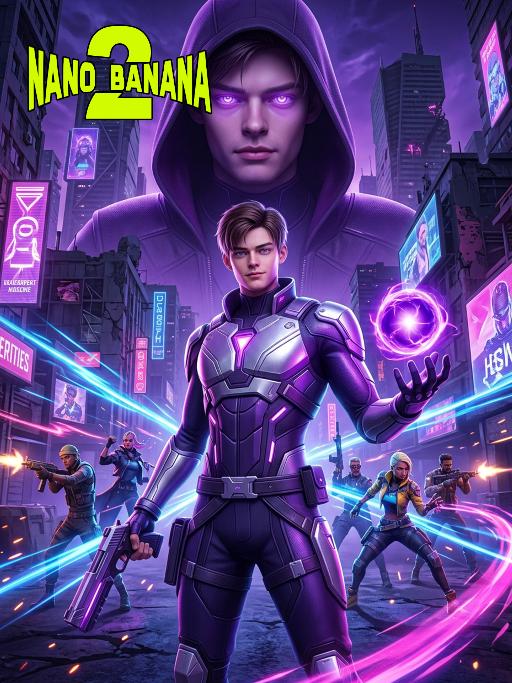
Valorant AI effects generated image

Valorant

This is an epic cyberpunk combat scene digital image art piece (a combination of 3D and 2D rendering style) based on the "Valorant" character. In the center of the picture stands a confident agent (whose facial features are based on the character design provided in the uploaded image, maintaining the gender and age of the facial features), the main character has short hair and is wearing a futuristic combat suit decorated with silver and deep purple elements, holding a dual-energy gun, and summoning a glowing purple ball. Behind the character, a mysterious huge figure wearing a hood and with a face similar to the character in the uploaded image (whose facial features are based on the character design provided in the uploaded image), has bright purple eyes, looking down at a dilapidated futuristic cityscape. In the background of the picture, other agents appear in dynamic postures, accompanied by neon energy trajectories and broken fragments. The entire picture has a dominant color palette of deep purple, indigo blue, and bright pink, with strong lighting effects and cinematic composition. It is rich in details, with clear lines, bright colors, a resolution of up to 8K, and an artistic style similar to game posters, C4D rendering, OC renderer, Blender rendering, top 3D game style.

Pet Samba

Medium shot close-up: In the uploaded photo (while maintaining the facial features, gender, age and species of the person in the uploaded image, and setting the background as a beach scene in Brazil), the main figure presents a super cute anthropomorphic standing posture (with the front two paws raised and the back two legs standing). Accessories: Beach attire in the style of the Brazilian Carnival: Wearing a cute bikini top and a short skirt, with a colorful feather headdress on the head (green and yellow), and a garland around the neck (yellow hibiscus and white flowers); Scene: The scene of a tropical Brazilian beach: - Underfoot is the golden fine sand, the azure waves gently lapping against the shore. In the distance, the palm trees sway in the gentle breeze. Soft white clouds float in the blue sky. In the warm afternoon, the golden sunlight gently falls on the river otters and the beach. Style and lighting: Vivid and cheerful color combination (main colors are yellow, green, blue, and orange), 8K high resolution, highlighting the main subject, shallow depth of field to blur the background of the beach; Composition: Medium shot. The main figure is centered in the frame, wearing small slippers on their feet, which match the color scheme of the clothing."

Goofy AI effects generated image

Goofy

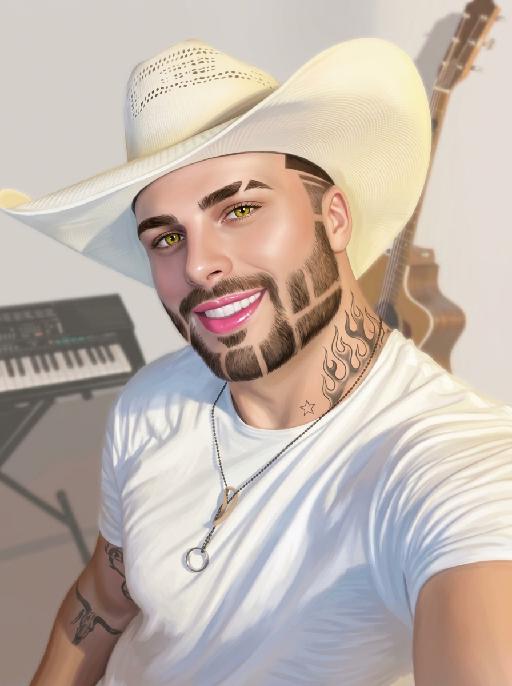
The person's skin has a porcelain-like smoothness with a photo-retouching effect. The posture and facial features of the person in the uploaded picture remain unchanged (the posture is consistent, the hairstyle and clothing have not been modified, the hairstyle and clothing remain the same, and the picture background has not been altered). However, the triangular incision at the hairline + side straight shaving lines, sharp eyebrows + obvious broken eyebrows (with a mid-section cut-off gap) design, and also neat gaps with cut segments on the beard; the overall style of the entire picture has transformed into a portrait style that combines 60% digital painting style and 40% real photography style. The person's skin is as smooth and flawless as porcelain, having undergone deep beauty treatment. The eyes are gold-green contact lenses, the lips are painted with shiny pink lipstick, there is a tribal flame tattoo on the neck, and a small star tattoo on the collarbone. The background is the same as the original picture, with a bright filter added, presenting a low saturation and blurry effect, 8K resolution, and beautiful Instagram filter effect. The lines are simple and smooth, with a low overall contrast, a plain style but with bright and rich colors.

Pet Polaroid

The figure from the uploaded image (with unchanged features) is lying on a winter snowfield, wearing an innocent and cute expression; it has a thick brown knitted scarf around its neck, with a small pile of snow gently resting on the top of its head. The background features a snowfield and pine trees, with a cool color palette and romantic snowflake bokeh lingering all around. The entire frame is a close-up shot composed as a hand (wearing a white knitted glove) holding a white Polaroid photo paper, on which the aforementioned figure and scene are displayed. At the bottom of the photo paper, the artistic handwritten font Cute Baby is printed, and the area outside the photo paper shows the winter pine tree and snowfield scene described above. The overall style is a warm and healing cool tone with high-definition details of film texture, creating a cozy winter fairy-tale atmosphere.

Kimono kiss

Medium-close-up shot: Place the characters from the uploaded two pictures in the same scene, keeping the composition of the characters centered. The main character should occupy 80% of the overall picture. All the characters are wearing traditional Japanese kimonos and standing in front of a magnificent wooden pagoda-style temple. Around them are blooming pink cherry trees. It is a sunny spring day, and the gentle natural sunlight filters through the branches, creating a shallow depth of field effect, causing the background to be blurred (i.e., the "blur" effect), creating a cinematic-like light and shadow effect. Using 8K resolution, the details are extremely rich, making it a professional photography work. The romantic effect of falling cherry blossoms, with some cherry petals in the foreground, the picture softly diffuses light, with a soft focus filter, creating a romantic and peaceful atmosphere. One of the characters is wearing a light pink kimono with exquisite floral embroidery and a luxurious belt with floral patterns. Her hair is loose curls, and there is a pink cherry blossom hairpin on the top. The other character is wearing a light gray kimono, paired with the same belt, standing side by side, looking straight at the camera, with a calm expression. The shooting angle is slightly lower, using a film grain effect, and using Kodak Velvia 400 film material.

Load more

Next-Gen Multi-Model AI Video Architecture

Vivago AI isn't just one engine—it’s a unified hub for the world’s most advanced video AI. Whether you need cinematic realism or high-speed social content, we provide the right model for your creative vision.

Free Generate

Beauty and Dolphins

Vacation Time

Stellar Tear

Fish Tank Supervisor

Cinematic Quality & Precision Control

Enables 4K resolution with multi-lens motion control, generating delicate scene via text prompts for customized cinematography.​

TRY NOW

Dynamic AV Sync

Auto-generates original audio to avoid copyright issues. Build 3D immersive environments through layered sound design automatically.

TRY NOW

OpenAI Sora 2

​Advanced visual storytelling with unparalleled physics and consistency.

TRY NOW

Kling v2.6 Pro

Industry-leading cinematic image animation and motion control.

TRY NOW

Google Veo 3 & 3.1

Ultra-fast generation with enhanced realism for creative workflows.

TRY NOW

Vivago AI 2.0

Our proprietary model optimized for efficiency, speed, and cost-effective generation.
TRY NOW

Users' Voice

We listen carefully to the opinions of every user.
Free Generate
Contact Us
I tried the Lip Sync feature inside Vivago.ai’s AI Video Generator for my educational podcast, and the results were stunning! The avatar's lip movements perfectly matched my audio recording, creating a professional AI-generated video without complex editing. Compared with tools like OpenAI Sora 2 and Google Veo 3.1, Vivago Image-to-Video delivers fast, studio-quality results online. It saved me hours of post-production work.
ElenaM (Spain)
Vivago’s Image-to-Video AI transformed my marketing workflow. I uploaded a product image and described the launch scene in text, and it generated a 10-second cinematic AI video with background music and dynamic visuals. The output quality rivals Kling v2.6 Pro and Google Veo 3 Fast. It’s now my go-to AI video generator for social media ads and product campaigns.
KenjiT (Japan)
As a digital artist, I use Vivago.ai 2.0 daily for Image-to-Image and AI Image-to-Video creation. The e-book covers and animated visuals I generate for clients look cinematic and professional. Unlike many standalone AI tools, Vivago integrates multiple leading models into one platform, making it easier to create copyright-safe AI images and videos for publishing.
ChenL (China)
I tried the Lip Sync feature inside Vivago.ai’s AI Video Generator for my educational podcast, and the results were stunning! The avatar's lip movements perfectly matched my audio recording, creating a professional AI-generated video without complex editing. Compared with tools like OpenAI Sora 2 and Google Veo 3.1, Vivago Image-to-Video delivers fast, studio-quality results online. It saved me hours of post-production work.
ElenaM (Spain)
Vivago’s Image-to-Video AI transformed my marketing workflow. I uploaded a product image and described the launch scene in text, and it generated a 10-second cinematic AI video with background music and dynamic visuals. The output quality rivals Kling v2.6 Pro and Google Veo 3 Fast. It’s now my go-to AI video generator for social media ads and product campaigns.
KenjiT (Japan)
As a digital artist, I use Vivago.ai 2.0 daily for Image-to-Image and AI Image-to-Video creation. The e-book covers and animated visuals I generate for clients look cinematic and professional. Unlike many standalone AI tools, Vivago integrates multiple leading models into one platform, making it easier to create copyright-safe AI images and videos for publishing.
ChenL (China)
I absolutely love Vivago’s AI Image-to-Video Generator. As a travel blogger, static images often fail to capture real atmosphere, but Vivago helps me turn photos into vivid cinematic AI videos with motion effects. It feels comparable to OpenAI Sora 2 and Google Veo 3.1, but more accessible and faster for creators who need high-quality AI videos online.
LiamK (Australia)
I tried the Lip Sync feature inside Vivago.ai’s AI Video Generator for my educational podcast, and the results were stunning! The avatar's lip movements perfectly matched my audio recording, creating a professional AI-generated video without complex editing. Compared with tools like OpenAI Sora 2 and Google Veo 3.1, Vivago Image-to-Video delivers fast, studio-quality results online. It saved me hours of post-production work.
ElenaM (Spain)
Vivago’s Image-to-Video AI transformed my marketing workflow. I uploaded a product image and described the launch scene in text, and it generated a 10-second cinematic AI video with background music and dynamic visuals. The output quality rivals Kling v2.6 Pro and Google Veo 3 Fast. It’s now my go-to AI video generator for social media ads and product campaigns.
KenjiT (Japan)
As a digital artist, I use Vivago.ai 2.0 daily for Image-to-Image and AI Image-to-Video creation. The e-book covers and animated visuals I generate for clients look cinematic and professional. Unlike many standalone AI tools, Vivago integrates multiple leading models into one platform, making it easier to create copyright-safe AI images and videos for publishing.
ChenL (China)
I absolutely love Vivago’s AI Image-to-Video Generator. As a travel blogger, static images often fail to capture real atmosphere, but Vivago helps me turn photos into vivid cinematic AI videos with motion effects. It feels comparable to OpenAI Sora 2 and Google Veo 3.1, but more accessible and faster for creators who need high-quality AI videos online.
LiamK (Australia)
Using Vivago.ai’s Image-to-Video AI has greatly enhanced my classroom teaching. I transform textbook notes into historical AI videos with cinematic filters and dynamic animations. Compared with tools like Kling v2.6 Pro and Google Veo 3 Fast, Vivago offers faster generation and easier parameter control for educators who need reliable AI video creation.
RajivG (India)
I frequently create AI videos on Vivago and publish them on TikTok and YouTube Shorts. The AI video templates and trending content ideas help me produce viral-ready clips quickly. With Vivago’s integrated models—including advanced video engines similar to OpenAI Sora 2—I can generate anime-style and cinematic social media videos that drive high engagement.
MarieJ (Spain)
What attracts me most about Vivago.ai is not only the powerful AI Video Generator but also the active AIGC creator community. It combines AI Image-to-Video, Text-to-Video, and leading model integrations like Google Veo 3.1 into one creative platform.
TomW (India)
At first, I was hesitant about using AI video tools. But after trying Vivago Image-to-Video, I realized how easy it is to create professional AI-generated videos online. I just upload an image, add a short prompt, and adjust a few settings. The results are cinematic and copyright-safe, which is essential for commercial projects.
HectorC (Mexico)
Using Vivago.ai’s Image-to-Video AI has greatly enhanced my classroom teaching. I transform textbook notes into historical AI videos with cinematic filters and dynamic animations. Compared with tools like Kling v2.6 Pro and Google Veo 3 Fast, Vivago offers faster generation and easier parameter control for educators who need reliable AI video creation.
RajivG (India)
I frequently create AI videos on Vivago and publish them on TikTok and YouTube Shorts. The AI video templates and trending content ideas help me produce viral-ready clips quickly. With Vivago’s integrated models—including advanced video engines similar to OpenAI Sora 2—I can generate anime-style and cinematic social media videos that drive high engagement.
MarieJ (Spain)
What attracts me most about Vivago.ai is not only the powerful AI Video Generator but also the active AIGC creator community. It combines AI Image-to-Video, Text-to-Video, and leading model integrations like Google Veo 3.1 into one creative platform.
TomW (India)
At first, I was hesitant about using AI video tools. But after trying Vivago Image-to-Video, I realized how easy it is to create professional AI-generated videos online. I just upload an image, add a short prompt, and adjust a few settings. The results are cinematic and copyright-safe, which is essential for commercial projects.
HectorC (Mexico)