Text to Video

Generate lifelike AI images of a determined white kitten with a bow on a beach chair. Create adorable pet portraits with vivid coastal scenes using Vivago.ai's advanced AI tools for realistic animal photography and playful summer-themed visuals.

Recreate
arrow

FAQs

How to generate images/videos from text prompts?

Describe the visual content in natural language (e.g., 'A cyberpunk cat wearing neon goggles') and our AI models will create outputs. Complex prompts trigger multi-stage NLP parsing for enhanced accuracy.

How to refine unsatisfactory results?

Use our Prompt Bot - an AI-powered optimizer that suggests technical modifiers. Simply describe your ideas, desired changes ('more metallic texture'), then you will get optimized prompt variants.

When should I use reference images?

Upload references to: 1) Guide character consistency (e.g., faces/outfits), 2) Control motion patterns in videos using our feature matching algorithm. Supports JPG/PNG

What's the credit system?

Daily login grants 100 credits. Upgrade options: 1) Premium Membership, 2) Credit Packs. Details: https://vivago.ai/subscribe

More From VIVAGO AI

Image To Video

A stylish 25-year-old Korean man in a room, standing in front of a shoe cabinet filled with numerous shoe boxes. He is wearing a fashionable jacket and denim jeans, exuding a modern yet vintage aesthetic. Use the uploaded image as the hero.He holds the product( (as shown in the uploaded image), facing the camera and confidently showcasing the product, as if introducing them in a casual, fashion blogger-style video. The scene is a close-up, focusing only on his upper body, hands, and the sneakers, without showing his feet. The background has a realistic, lived-in vibe with no blur, mimicking the feel of an iPhone shot. Soft, natural lighting illuminates both the man and the sneakers, creating warmth and balance, typical of smartphone photography with its crisp details and smooth gradients. The atmosphere feels authentic and relatable, with an Instagram-style aesthetic that highlights the mobile phone's natural, clean feel.

Elephant Dance

The features of the figure in the uploaded image remain unchanged, standing in an anthropomorphic pose (upper limbs resting naturally on the waist, lower limbs standing on the ground). Adopting the Disney 3D animation style, bright and highly saturated vivid colors are used to create a soft, cute and chibi cartoon image with oversized bright eyes and long, slender eyelashes, and a sweet, endearing expression. The costume features Indian traditional festive style adornments and styling: a gorgeous forehead ornament with geometric patterns (in green, red, yellow and purple) plus colorful tassel beading; delicate traditional Indian colorful patterns on the face and nose; a shawl with fan-shaped patterns (in primary colors of red, purple and blue) trimmed with golden geometric motifs on the edges; green and white striped bands with golden beading worn on the limbs; and small colorful flower ornaments in the style of yellow base + red center + green trim dotted on the ears and body. The overall adornment is intricate with rich color clashing (blending hues of red, green, yellow, purple, blue and more), boasting ultra-realistic details, cinematic artistic effects and high-end artistic presentation.

Image To Image AI effects generated image

Image To Image

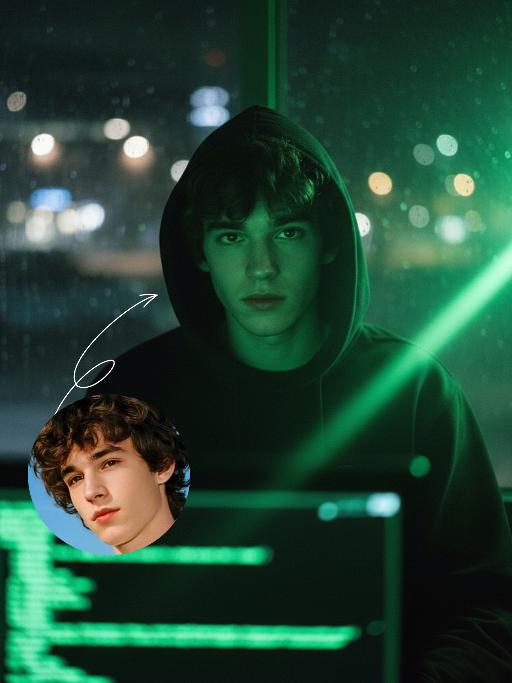
A 3D chibi-style version of the person in the photo is stepping through a glowing portal, reaching out and holding the viewer’s hand. As the character pulls the viewer forward, they turn back with a dynamic glance, inviting the viewer into their world.Behind the portal is the viewer’s real-life environment: a typical programmer’s study with a desk, monitor, and laptop, rendered in realistic detail. Inside the portal lies the character’s 3D chibi world, inspired by the photo, with a cool blue color scheme that sharply contrasts with the real-world surroundings.The portal itself is a perfectly elliptical frame glowing with mysterious blue and purple light, positioned at the center of the image as a gateway between the two worlds.The scene is captured from a third-person perspective, clearly showing the viewer’s hand being pulled into the character’s world.

Elegance AI effects generated image

Elegance

Strictly lock facial features: fully preserving the original facial contours, skin texture, eye shape, lip shape, and youthful appearance with zero deviations allowed. Eye-level perspective, half-body close-up (subject occupies 80% of the frame to optimize proportion and visual focus, with a well-proportioned slender figure that highlights the graceful lines of the body), a young East Asian woman with a cold temperament, lying prone on a thick log beam, hands resting naturally on both sides of the beam, body slightly forward, expression gentle and calm; makeup is a fresh nude look: transparent base, warm bean paste red lips, natural and soft eye makeup; long straight black hair, fluffy and shiny. Wearing: - Headdress: Pearl tassel forehead ornament, main body is a pearl-woven headband with a teardrop-shaped pearl in the center, hanging multiple layers of extra-long white pearl tassels on both sides - Accessories: Multi-layered pearl necklace, strung with pearls of varying sizes, paired with a silver carved pendant Clothing: - White Chinese-style stand-up collar top with jacquard texture and puff short sleeves - Inner wear white lace see-through long sleeves, full of delicate white floral embroidery on the sleeves - Matching white long skirt Background: Plateau meadow scene, foreground is green grass, distant continuous dark gray-blue mountains, sky filled with layered dark clouds; soft golden sunlight breaks through the gaps in the dark clouds, casting warm highlights on the pearl ornaments, hair strands, jacquard fabric and lace embroidery, while leaving soft, faint shadows on the log beam and the grass beneath, adding a three-dimensional contrast to the cool-toned scene. Cool-toned diffused natural light blended with warm sunlight spots, the picture is transparent and clean, presenting a cold and fairy-like atmosphere, strictly 1:1 replicate the original image's movements, clothing details, and light and shadow tones

Red Clothes AI effects generated image

Red Clothes

Strictly lock facial features: fully preserving the original facial contours, skin texture, eye shape, lip shape, and youthful appearance with zero deviations allowed. Slightly upward angle, half-body close-up (subject occupies 80% of the frame), a slender and ethereal young East Asian woman stands facing forward, with slim shoulder and neck lines, exuding a cold and detached aura, eyes half-open with a lazy and melancholic look; makeup is cool-toned and fresh: translucent porcelain base, matte rosewood lips, cool red eye shadow at the outer corners, light pink blush for a subtle flush; extra-fluffy double braid hairstyle with a 'head-wraps-face' effect, high crown, voluminous hair that frames the face to create a slimmer facial contour, with natural messy baby hairs for a casual vibe. Wearing: - Headdress: Eye-catching red-silver color-blocked ethnic headdress (more attractive design), with an intricate silver filigree base, inlaid with glossy red gemstones, turquoise and small pearls, decorated with layered silver tassels of varying lengths (the longest tassels hang down to the collarbone) and a small silver hollowed-out flower ornament in the center, the silver surface reflects light to enhance the sense of hierarchy, perfectly integrating ethnic charm and cool temperament - Earrings: Silver hollow carved earrings, paired with red gemstones and dangling chains - Necklace: Multi-layered colorful beaded necklace (red, blue, brown color block), main pendant is a silver carved plaque (inlaid with red, blue gemstones and turquoise) Clothing: - Wine red stand-up collar ethnic top, front panel spliced with shiny red-gold fabric, neckline and edges trimmed with white piping - Shawl: White long plush shawl, fluffy and thick texture, covering the waist and abdomen area Image texture: CCD flash photography effect combined with natural sunlight, high contrast, slight overexposure, fine film grain, cool-toned flash atmosphere mixed with warm sunlight highlights, saturated colors with retro digital noise, retaining natural grain. Background: Plateau snow mountain scene, azure blue sky (dotted with a few white clouds), distant continuous dark gray-blue snow-capped mountains; bright outdoor sunlight from the upper side illuminates the scene, casting soft and distinct light and shadow: warm highlights on the silver ornaments, hair strands and plush shawl, and natural soft shadows on the neck, collarbone and the edge of the dress, forming a clear light-dark contrast that enhances the three-dimensional sense of the figure; strong outdoor flash effect blended with sunlight, the picture has rich and contrasting colors, strictly 1:1 replicate the original image's movements, clothing details and cold atmosphere

Elegant AI effects generated image

Elegant

The identity of the uploaded portrait is strictly preserved (retaining facial contours, hairline, authentic Indian skin tone and age). A stunning and glamorous Indian woman exuding a rich South Asian charm by nature; she is dressed in an elegant black off-the-shoulder corset dress that accentuates her striking figure, with a delicate mini crown hair ornament inlaid with tiny colorful gemstones adorning the top of her head, fully embodying the elegant and luxurious temperament of an Indian princess. She holds an exquisitely carved silver platter with both hands, on which rests traditional Indian laddu sweets inlaid with gold leaf. Her smile is warm and healing, and her eyes radiate the unique gentle grace inherent to Indian women. The background is a solid dark gray backdrop that makes her silhouette stand out sharply. A strong contrast between light and shadow is adopted, creating a stylish portrait atmosphere that complements the texture of Indian skin tone. The style blends modern minimalism with traditional Indian aesthetics, boasting an extremely minimalist and sophisticated color palette. The image is ultra-high definition and delicate with rich, well-defined details, accurately capturing the unique charm of the Indian woman.

Black Retro AI effects generated image

Black Retro

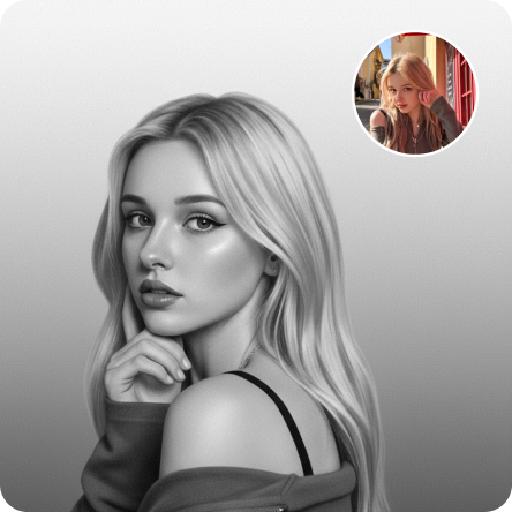
Strictly lock the facial features of the uploaded portrait (preserve facial contours, native Indonesian skin tone, hairstyle and age). photorealistic 3:4 half-body portrait of a delicate young Indonesian woman in her early 20s, with long black wavy hair and soft glamorous makeup, wearing a black mesh fascinator adorned with tiny pearls and a large sparkling diamond flower brooch, a sleek black halter dress with a small diamond accent at the neckline. Model occupies 3/4 of the frame, the model as the absolute dominant subject, close-up half-body portrait with minimal background space, no excessive empty space around the model. She sits on a vintage brown leather chair with intricate Balinese wooden carved details with one hand gently resting on her chin, set against a textured weathered Balinese stone wall adorned with traditional batik wax-print fabric tapestries and tropical palm leaf motifs with a dim warm glowing Indonesian brass table lamp in the background, soft moody ambient lighting creating a mysterious and glamorous Indonesian vintage ambiance, ultra-high detail, cinematic texture, shallow depth of field

Chinese Child

Ultra-realistic 8K portrait photography in ancient Chinese style; the figure from the uploaded image (unchanged facial features, gender and age) is seated on a stone, with two braids adorned with pink hair accessories, wearing a pale pink Hanfu with exquisite dark blue embroidery, hands folded, smiling and looking at the camera. Beside the figure are a cute red fox (also looking at the camera), a mini pine tree and a lantern, captured from a horizontal perspective. The scene is lit by soft photographic lighting plus the warm glow of the lantern. Color palette: pale pink of the Hanfu, orange of the fox, dark green of the pine tree, with a magical and deep forest and pine woodland night scene as the background. The work features an ultra-realistic photographic style, art photography studio aesthetic, professional studio lighting, premium texture, avant-garde artistic photography, and cinematic-level image quality, with special effects of falling leaves and fluttering fireflies added.

Load more

Next-Gen Multi-Model AI Video Architecture

Vivago AI isn't just one engine—it’s a unified hub for the world’s most advanced video AI. Whether you need cinematic realism or high-speed social content, we provide the right model for your creative vision.

Free Generate

Beauty and Dolphins

Vacation Time

Stellar Tear

Fish Tank Supervisor

Cinematic Quality & Precision Control

Enables 4K resolution with multi-lens motion control, generating delicate scene via text prompts for customized cinematography.​

TRY NOW

Dynamic AV Sync

Auto-generates original audio to avoid copyright issues. Build 3D immersive environments through layered sound design automatically.

TRY NOW

OpenAI Sora 2

​Advanced visual storytelling with unparalleled physics and consistency.

TRY NOW

Kling v2.6 Pro

Industry-leading cinematic image animation and motion control.

TRY NOW

Google Veo 3 & 3.1

Ultra-fast generation with enhanced realism for creative workflows.

TRY NOW

Vivago AI 2.0

Our proprietary model optimized for efficiency, speed, and cost-effective generation.

TRY NOW

Users' Voice

We listen carefully to the opinions of every user.
Free Generate
Contact Us
I tried the Lip Sync feature inside Vivago.ai’s AI Video Generator for my educational podcast, and the results were stunning! The avatar's lip movements perfectly matched my audio recording, creating a professional AI-generated video without complex editing. Compared with tools like OpenAI Sora 2 and Google Veo 3.1, Vivago Image-to-Video delivers fast, studio-quality results online. It saved me hours of post-production work.
ElenaM (Spain)
Vivago’s Image-to-Video AI transformed my marketing workflow. I uploaded a product image and described the launch scene in text, and it generated a 10-second cinematic AI video with background music and dynamic visuals. The output quality rivals Kling v2.6 Pro and Google Veo 3 Fast. It’s now my go-to AI video generator for social media ads and product campaigns.
KenjiT (Japan)
As a digital artist, I use Vivago.ai 2.0 daily for Image-to-Image and AI Image-to-Video creation. The e-book covers and animated visuals I generate for clients look cinematic and professional. Unlike many standalone AI tools, Vivago integrates multiple leading models into one platform, making it easier to create copyright-safe AI images and videos for publishing.
ChenL (China)
I tried the Lip Sync feature inside Vivago.ai’s AI Video Generator for my educational podcast, and the results were stunning! The avatar's lip movements perfectly matched my audio recording, creating a professional AI-generated video without complex editing. Compared with tools like OpenAI Sora 2 and Google Veo 3.1, Vivago Image-to-Video delivers fast, studio-quality results online. It saved me hours of post-production work.
ElenaM (Spain)
Vivago’s Image-to-Video AI transformed my marketing workflow. I uploaded a product image and described the launch scene in text, and it generated a 10-second cinematic AI video with background music and dynamic visuals. The output quality rivals Kling v2.6 Pro and Google Veo 3 Fast. It’s now my go-to AI video generator for social media ads and product campaigns.
KenjiT (Japan)
As a digital artist, I use Vivago.ai 2.0 daily for Image-to-Image and AI Image-to-Video creation. The e-book covers and animated visuals I generate for clients look cinematic and professional. Unlike many standalone AI tools, Vivago integrates multiple leading models into one platform, making it easier to create copyright-safe AI images and videos for publishing.
ChenL (China)
I absolutely love Vivago’s AI Image-to-Video Generator. As a travel blogger, static images often fail to capture real atmosphere, but Vivago helps me turn photos into vivid cinematic AI videos with motion effects. It feels comparable to OpenAI Sora 2 and Google Veo 3.1, but more accessible and faster for creators who need high-quality AI videos online.
LiamK (Australia)
I tried the Lip Sync feature inside Vivago.ai’s AI Video Generator for my educational podcast, and the results were stunning! The avatar's lip movements perfectly matched my audio recording, creating a professional AI-generated video without complex editing. Compared with tools like OpenAI Sora 2 and Google Veo 3.1, Vivago Image-to-Video delivers fast, studio-quality results online. It saved me hours of post-production work.
ElenaM (Spain)
Vivago’s Image-to-Video AI transformed my marketing workflow. I uploaded a product image and described the launch scene in text, and it generated a 10-second cinematic AI video with background music and dynamic visuals. The output quality rivals Kling v2.6 Pro and Google Veo 3 Fast. It’s now my go-to AI video generator for social media ads and product campaigns.
KenjiT (Japan)
As a digital artist, I use Vivago.ai 2.0 daily for Image-to-Image and AI Image-to-Video creation. The e-book covers and animated visuals I generate for clients look cinematic and professional. Unlike many standalone AI tools, Vivago integrates multiple leading models into one platform, making it easier to create copyright-safe AI images and videos for publishing.
ChenL (China)
I absolutely love Vivago’s AI Image-to-Video Generator. As a travel blogger, static images often fail to capture real atmosphere, but Vivago helps me turn photos into vivid cinematic AI videos with motion effects. It feels comparable to OpenAI Sora 2 and Google Veo 3.1, but more accessible and faster for creators who need high-quality AI videos online.
LiamK (Australia)
Using Vivago.ai’s Image-to-Video AI has greatly enhanced my classroom teaching. I transform textbook notes into historical AI videos with cinematic filters and dynamic animations. Compared with tools like Kling v2.6 Pro and Google Veo 3 Fast, Vivago offers faster generation and easier parameter control for educators who need reliable AI video creation.
RajivG (India)
I frequently create AI videos on Vivago and publish them on TikTok and YouTube Shorts. The AI video templates and trending content ideas help me produce viral-ready clips quickly. With Vivago’s integrated models—including advanced video engines similar to OpenAI Sora 2—I can generate anime-style and cinematic social media videos that drive high engagement.
MarieJ (Spain)
What attracts me most about Vivago.ai is not only the powerful AI Video Generator but also the active AIGC creator community. It combines AI Image-to-Video, Text-to-Video, and leading model integrations like Google Veo 3.1 into one creative platform.
TomW (India)
At first, I was hesitant about using AI video tools. But after trying Vivago Image-to-Video, I realized how easy it is to create professional AI-generated videos online. I just upload an image, add a short prompt, and adjust a few settings. The results are cinematic and copyright-safe, which is essential for commercial projects.
HectorC (Mexico)
Using Vivago.ai’s Image-to-Video AI has greatly enhanced my classroom teaching. I transform textbook notes into historical AI videos with cinematic filters and dynamic animations. Compared with tools like Kling v2.6 Pro and Google Veo 3 Fast, Vivago offers faster generation and easier parameter control for educators who need reliable AI video creation.
RajivG (India)
I frequently create AI videos on Vivago and publish them on TikTok and YouTube Shorts. The AI video templates and trending content ideas help me produce viral-ready clips quickly. With Vivago’s integrated models—including advanced video engines similar to OpenAI Sora 2—I can generate anime-style and cinematic social media videos that drive high engagement.
MarieJ (Spain)
What attracts me most about Vivago.ai is not only the powerful AI Video Generator but also the active AIGC creator community. It combines AI Image-to-Video, Text-to-Video, and leading model integrations like Google Veo 3.1 into one creative platform.
TomW (India)
At first, I was hesitant about using AI video tools. But after trying Vivago Image-to-Video, I realized how easy it is to create professional AI-generated videos online. I just upload an image, add a short prompt, and adjust a few settings. The results are cinematic and copyright-safe, which is essential for commercial projects.
HectorC (Mexico)