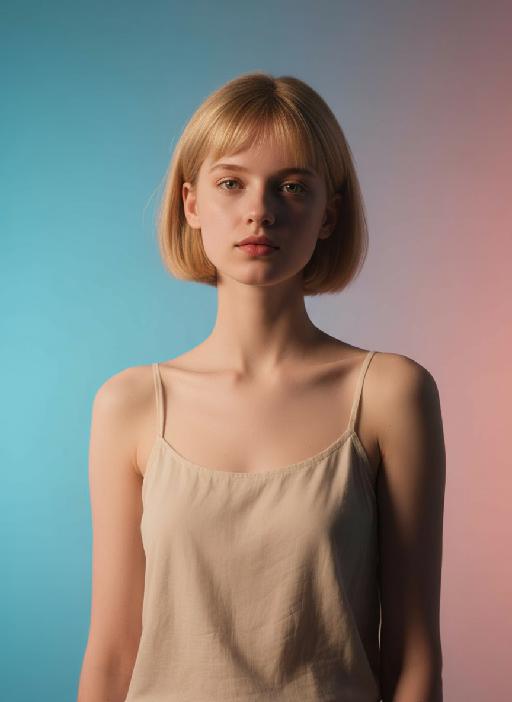
Wanted at Sunset

Transform your photo into something extraordinary with AI. Try this AI transformation effect free on Vivago AI.

Use Template
arrow

FAQs

What are Effect Templates?

Effect Templates are predefined AI workflows that automatically transform static images into specific visual styles or animated formats, delivering consistent, high-quality results without manual adjustments.

How do I apply Effect Templates?

Select your preferred template > Upload an image > Generate. No text prompts required - templates handle all style parameters.

Where can I find more templates?

Explore 1000+ curated templates in our Explore Hub: https://vivago.ai/studio. New templates added weekly across categories.

What's the pricing?

Daily login grants 100 free credits. Exhausted credits? Choose: 1) Subscribe a membership plan, 2) Get a credit pack. Details: https://vivago.ai/subscribe

More From VIVAGO AI

Cowgirl AI effects generated image

Cowgirl

Drawing on the facial structure, three-dimensional facial features, skin tone range and age vibe of the uploaded model’s image (without strict identity replication), a new female figure is created: a confident, warm and approachable woman with a Western cowgirl aesthetic, whose bearing is resilient yet not stern. A soft, natural and restrained smile graces her face – understated, yet enough to convey a poised, confident and gentle sense of strength. She is riding a magnificent white steed, with the horse’s front fully in clear view and its entire face featured in the frame; its coat is clean, bright and glowing with a natural sheen, with realistic texture and accurate proportions. The matching brown leather saddle and reins are exquisitely crafted with neat detailing, and the metal fittings catch the light with a natural shimmer, fully conforming to the structural norms of real equestrian gear. The image adopts a close-up composition, focusing sharply on the woman’s face and upper body to make her the clear focal point, while subtly preserving the natural interactive dynamic between the horse’s head and the rider. She wears a brown cowboy hat with clearly discernible embroidery detailing on the crown, a classic and refined staple of her look. Her top is a light blue denim-style sleeveless piece with a crisp cut and authentic fabric texture, showing natural brightness and tonal gradation in the light. Around her waist is a brown leather belt with distinct metal hardware; the slightly worn finish amplifies the authentic Western texture. She also adorns herself with delicate gold earrings and a necklace, which glimmer softly in the light – not overly showy, but just enough to enhance her feminine grace in perfect measure. The lighting is bright, soft natural daylight, with the key light striking the subject from a slight side angle directly in front, bathing her face in bright, translucent light, making her eyes clear and vivid, and lending her skin a healthy, natural complexion without heavy shadows dimming the midface. The overall color palette features warm earth tones; the woman and the white steed are slightly brighter than the background, naturally emerging as the visual focus. The background retains the vast, hazy ambiance of the Western wilderness – an expanse of arid open land, with distant mountain ranges fading in and out of view and a soft, misty sky, creating a cinematic sense of profound spatial depth. The photographic style is cinematic ultra-realism, echoing the aesthetic hallmarks of classic Western films. A shallow depth of field blurs the background slightly, highlighting the subject while imbuing the frame with a strong narrative quality. Complemented by 8K ultra-high resolution, the image is crisp and sharp, with an overall atmosphere that is warm, free, resilient and hopeful – a flawless portrayal of a bright, compelling cowgirl figure with a powerful sense of narrative and character.

Industry AI effects generated image

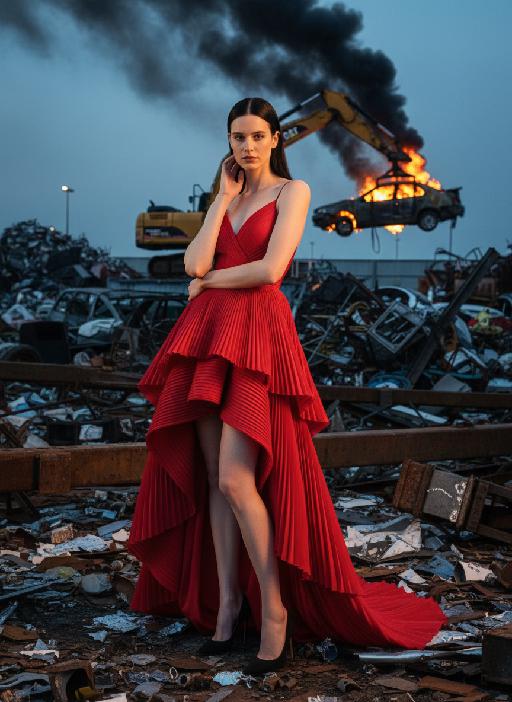
Industry

Panoramic shot: The person in the uploaded picture (with unchanged facial features, age and gender) has a refined makeup style. She stands in a junk recycling station covered with distorted metal fragments, wearing a red high-cut, layered, high-end tailored pleated evening gown. Her black straight hair is neatly and smoothly styled. The makeup is clean and transparent, exuding a cold and elegant atmosphere; the posture is elegant: one hand gently rests on the ear, the other arm crossed over the waist, the body slightly tilting towards the camera, the expression is cold and sharp, giving a sense of detachment. In the background, a yellow excavator lifts a burning car, thick smoke billowing upwards. The shooting uses a professional full-frame camera, a 135mm telephoto lens, horizontal perspective, side backlighting at dusk, a strong contrast between warm and cool light, high contrast, rich colors, a fashionable editing style, surreal industrial aesthetics, cinematic visual tension, ultra-fine and realistic effects, avant-garde fashion photography, cinematic realistic effects. The top-level strong contrast lighting effect (side lighting, the edges of the person's face are illuminated).

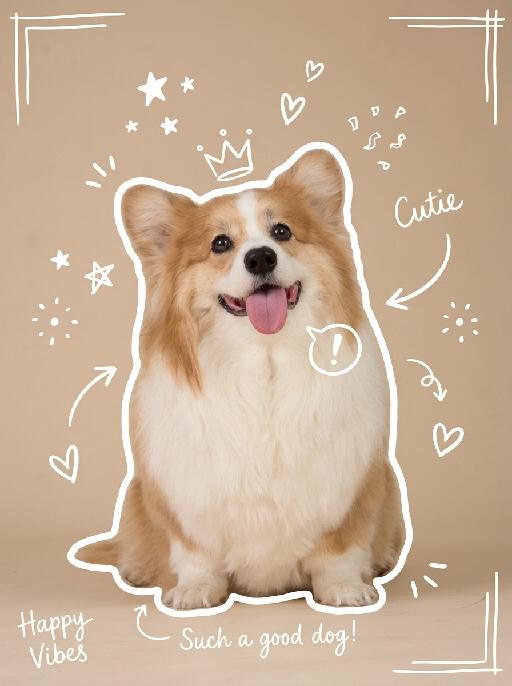
Show Doodle AI effects generated image

Show Doodle

"Keep the original photo fully unchanged, maintain realistic colors, lighting, and texture. Overlay clear, hand-drawn white line doodles on top with a casual marker style, making sure they stand out clearly against the background. 1. Add a **bold, thick, slightly uneven white outline** around the main subject, tracing the full silhouette, making it look like a sticker cutout. 2. Add multiple hand-drawn decorative elements around the subject: stars, sparkles, hearts, arrows, crowns, speech bubbles, confetti, and doodle-style frames, placed in empty corners and around the subject. 3. Add short, playful handwritten text in a thin white cursive font, such as captions, mood words, or fun labels, placed in unobtrusive areas of the image. All doodles are clearly visible, well-balanced, and naturally overlaid on the photo without covering the main subject or overcrowding the image. "

Queen AI effects generated image

Queen

The character in the uploaded picture (unchanged facial features, gender and age).A striking woman embodying the persona of Cleopatra, seated regally on an ornate golden throne. She has a sleek black bob haircut with blunt bangs, a sharp, confident gaze, and a poised, authoritative expression. She wears a form-fitting black velvet spaghetti-strap gown with a high slit, revealing one leg. Her accessories are opulent: a golden pharaoh-style headdress with a central eagle motif, a layered gold necklace culminating in a large, ornate pendant, a wide gold belt with a matching large pendant, gold bracelets on both wrists, and gold ankle bracelets paired with strappy gold sandals. She sits with one leg crossed over the other, one hand resting on the throne's armrest, the other on her lap. The throne is intricately carved with gold accents and topped with golden finials. The setting is a lush, verdant tropical jungle, filled with large, vibrant green palm fronds and broad-leafed ferns that frame the scene. The floor is a polished marble surface with a geometric pattern. Above her, the word "CLEOPATRA" is displayed in an elegant, golden, serif font. The image is rendered in a vintage Hollywood movie poster style, with dramatic, high-contrast lighting that emphasizes the richness of the black velvet and the sheen of the gold. The color palette is rich and saturated, with deep greens, luxurious golds, and stark blacks, creating an opulent, mysterious, and timeless atmosphere. The overall aesthetic is cinematic, detailed, and evocative of ancient Egyptian grandeur.

House On Fire AI effects generated image

House On Fire

This is a realistic breaking news photo. In the middle of the picture is the uploaded figure (with the facial features, gender and age unchanged), standing in the middle of the frame, with coal dust all over his face, looking sad. He is wrapped in a gray and beige striped plush blanket and holding a slice of Italian pepperoni pizza, looking confused and sad. In the background, a two-story suburban house is engulfed in flames, and firefighters are using water hoses to put out the fire. The silhouette of a fire engine can be seen. The scene takes place on a residential street during the day. Above there is a prominent large red and white news headline: "BREAKING NEWS". In the middle and lower part of the picture, there is a news caption that reads: "House on fire while resident 'just started eating'", "LIVE BROADCAST", "11:47 AM".

Three Frames

"Film effect, three-screen split-frame photography (close-up, medium close-up, medium shot or long shot) in upper, middle and lower sections; cinematic Japanese-style film effect with three-screen split-frame photography in upper, middle and lower sections, set in a cold, lonely snowy scene on a clear day. A single figure with soft facial features, wearing an exquisitely tailored high-end red gown, a white mink fur hat and a white scarf, paired with sophisticated and textured accessories, stands in a vast white snowfield with snowflakes falling and snow accumulating on the scarf. The image boasts a strong cinematic texture. Upper screen: Extreme close-up of the head, with distinct individual eyelashes, fair and even skin, and snowflakes dotted on the eyelashes. Middle screen: Solo medium shot of the figure against the snowscape. Lower screen: Close-up of the figure leaning gently against a moose’s head with a soft smile, the details of the face and scarf in sharp focus, with a pale grey-blue sky and a single pine tree in the distance. Cinematic and realistic three-frame split-frame portrait: retain the facial features of the uploaded figure (with a fresh and translucent winter makeup look featuring silver shimmery eyeshadow, pink translucent blusher with fine glitter and light pink lip makeup—all on-trend winter styles in Western fashion, paired with a gentle and innocent expression, and fair, delicate skin). Soft diffused winter natural light highlights the soft texture of the skin and clothing. The figure leans affectionately beside a tame reindeer, with snow resting on the reindeer’s antlers and fur. The background features a snow-covered Christmas tree and an expanse of white snow, with fine snowflakes floating in the air. Soft natural cold light creates a fresh and translucent winter mood; a 50mm standard lens is used to preserve the delicate interactive details between the figure and the reindeer. The overall atmosphere is warm and healing, with ultra-high details and naturally saturated colors, in a horizontal composition. Avoid blurriness, disproportionate figure proportions and cluttered backgrounds."

Jewelry Theft AI effects generated image

Jewelry Theft

An interesting breaking news photo has been released. In the picture, the person depicted (with their facial features, gender and age remaining unchanged) is caught in the act of stealing when she is captured on camera. One hand is holding a string of diamond earrings, and the other hand is holding a lipstick, as if nothing has happened as she is applying it to her lips. The main figure occupies 80% of the overall picture. The jewelry counter is in a mess, with velvet jewelry pads scattered around, and a fallen price tag that reads "$15,000". Outside the frame, a security guard's hand is reaching towards her shoulder. Above the picture, there is a prominent large headline text (blue background with white characters): BREAKING NEWS;Below the picture, there is a news text (in red, blue and black color combination): Suspect just matched my outfit and an astonishing turn has occurred in the mall jewelry theft case.

Happy 2026 AI effects generated image

Happy 2026

"Subject & Posture: The figure from the uploaded image (unchanged facial features, age and gender) gazes at a mirror with a gentle smile, holding a lipstick to write on the mirror surface. The left hand grips a red lipstick with a gold case, writing on the mirror with it; the figure strikes a relaxed off-the-shoulder pose. Attire & Accessories: A burgundy off-the-shoulder fuzzy sweater with fine glitter texture; a red lipstick with a gold case held in hand. Composition & Perspective: Mirror reflection composition, medium close-up shot with the subject centered; shot with a 35mm lens and shallow depth of field (blurred background), the mirror shows partial reflections of the hand and lipstick. Lighting & Color Scheme: Dark, low-key background, with soft key light illuminating the face and clothing, plus tiny bokeh light spots; main color tones: burgundy, black and warm orange-red, creating a warm atmosphere with soft color contrast. Background & Details: In the bottom right corner of the background, the artistic handwritten phrase Be happy every day in 2026 in bold orange-red lipstick lettering; ultra-realistic texture with natural skin grain, and clear fuzzy & fine glitter fabric details of the garment. Natural skin retouching with well-preserved realistic light and shadow transitions, a Fuji film filter effect, and a warm, cozy ambiance enhanced by soft room lighting in the background. The figure’s reflection in the mirror is physically accurate and consistent with the figure outside the mirror."

Cute Meme AI effects generated image

Cute Meme

" Use the original single photo of the subject. Make a viral 9-grid face sticker pack, arranged in 3 rows × 3 columns.Each image is a die-cut sticker with a bold, crisp white edge outline.Keep the subject's original real-looking face, hair/features, and outfit (if present) completely unchanged, strictly maintain realistic photography style, do not cartoonize, do not anime, do not draw stylization.Generate 9 totally different natural real-life expressions + matching hand/appendage gestures, corresponding to nine fixed emotions: Happy, PLAYFUL, CURIOUS, SAD, CRYING, ANGRY, SURPRISED, LOVE, SLEEPY.Add small cute decorative elements like hearts, sparkles, and mood bubble emoticons beside each sticker. Use a flat, soft light peach gradient background for all.High quality, realistic texture, clean aesthetic, consistent style across all 9 stickers."

Crocodile Voyage AI effects generated image

Crocodile Voyage

[Strictly preserve the exact same subjects, same species, same faces, original appearance features, and the full style of clothing and costume details from the reference images unchanged;] photorealistic photograph, the subject from the reference image is straddling and riding on the back of a massive, realistic saltwater crocodile floating in crystal clear tropical turquoise sea water, legs naturally parted to sit across the crocodile body, and waving cheerfully at the camera. If the figure is female, she must wear long-sleeve top, long trousers and white sneakers. The background is a bright blue sky with soft white clouds, a distant lush tropical island shrouded in light mist, bright natural sunlight, sharp focus, ultra-detailed crocodile scales, realistic water reflections, 4K resolution, cinematic lighting, no deformities, consistent lighting on the subject matching the environment.

Load more

Next-Gen Multi-Model AI Video Architecture

Vivago AI isn't just one engine—it’s a unified hub for the world’s most advanced video AI. Whether you need cinematic realism or high-speed social content, we provide the right model for your creative vision.
Free Generate


Beauty and Dolphins

Vacation Time

Stellar Tear

Fish Tank Supervisor

Cinematic Quality & Precision Control

Enables 4K resolution with multi-lens motion control, generating delicate scene via text prompts for customized cinematography.​

TRY NOW

Dynamic AV Sync

Auto-generates original audio to avoid copyright issues. Build 3D immersive environments through layered sound design automatically.

TRY NOW

OpenAI Sora 2

​Advanced visual storytelling with unparalleled physics and consistency.

TRY NOW

Kling v2.6 Pro

Industry-leading cinematic image animation and motion control.

TRY NOW

Google Veo 3 & 3.1

Ultra-fast generation with enhanced realism for creative workflows.

TRY NOW

Vivago AI 2.0

Our proprietary model optimized for efficiency, speed, and cost-effective generation.

TRY NOW

Users' Voice

We listen carefully to the opinions of every user.
Free Generate
Contact Us
I tried the Lip Sync feature inside Vivago.ai’s AI Video Generator for my educational podcast, and the results were stunning! The avatar's lip movements perfectly matched my audio recording, creating a professional AI-generated video without complex editing. Compared with tools like OpenAI Sora 2 and Google Veo 3.1, Vivago Image-to-Video delivers fast, studio-quality results online. It saved me hours of post-production work.
ElenaM (Spain)
Vivago’s Image-to-Video AI transformed my marketing workflow. I uploaded a product image and described the launch scene in text, and it generated a 10-second cinematic AI video with background music and dynamic visuals. The output quality rivals Kling v2.6 Pro and Google Veo 3 Fast. It’s now my go-to AI video generator for social media ads and product campaigns.
KenjiT (Japan)
As a digital artist, I use Vivago.ai 2.0 daily for Image-to-Image and AI Image-to-Video creation. The e-book covers and animated visuals I generate for clients look cinematic and professional. Unlike many standalone AI tools, Vivago integrates multiple leading models into one platform, making it easier to create copyright-safe AI images and videos for publishing.
ChenL (China)
I tried the Lip Sync feature inside Vivago.ai’s AI Video Generator for my educational podcast, and the results were stunning! The avatar's lip movements perfectly matched my audio recording, creating a professional AI-generated video without complex editing. Compared with tools like OpenAI Sora 2 and Google Veo 3.1, Vivago Image-to-Video delivers fast, studio-quality results online. It saved me hours of post-production work.
ElenaM (Spain)
Vivago’s Image-to-Video AI transformed my marketing workflow. I uploaded a product image and described the launch scene in text, and it generated a 10-second cinematic AI video with background music and dynamic visuals. The output quality rivals Kling v2.6 Pro and Google Veo 3 Fast. It’s now my go-to AI video generator for social media ads and product campaigns.
KenjiT (Japan)
As a digital artist, I use Vivago.ai 2.0 daily for Image-to-Image and AI Image-to-Video creation. The e-book covers and animated visuals I generate for clients look cinematic and professional. Unlike many standalone AI tools, Vivago integrates multiple leading models into one platform, making it easier to create copyright-safe AI images and videos for publishing.
ChenL (China)
I absolutely love Vivago’s AI Image-to-Video Generator. As a travel blogger, static images often fail to capture real atmosphere, but Vivago helps me turn photos into vivid cinematic AI videos with motion effects. It feels comparable to OpenAI Sora 2 and Google Veo 3.1, but more accessible and faster for creators who need high-quality AI videos online.
LiamK (Australia)
I tried the Lip Sync feature inside Vivago.ai’s AI Video Generator for my educational podcast, and the results were stunning! The avatar's lip movements perfectly matched my audio recording, creating a professional AI-generated video without complex editing. Compared with tools like OpenAI Sora 2 and Google Veo 3.1, Vivago Image-to-Video delivers fast, studio-quality results online. It saved me hours of post-production work.
ElenaM (Spain)
Vivago’s Image-to-Video AI transformed my marketing workflow. I uploaded a product image and described the launch scene in text, and it generated a 10-second cinematic AI video with background music and dynamic visuals. The output quality rivals Kling v2.6 Pro and Google Veo 3 Fast. It’s now my go-to AI video generator for social media ads and product campaigns.
KenjiT (Japan)
As a digital artist, I use Vivago.ai 2.0 daily for Image-to-Image and AI Image-to-Video creation. The e-book covers and animated visuals I generate for clients look cinematic and professional. Unlike many standalone AI tools, Vivago integrates multiple leading models into one platform, making it easier to create copyright-safe AI images and videos for publishing.
ChenL (China)
I absolutely love Vivago’s AI Image-to-Video Generator. As a travel blogger, static images often fail to capture real atmosphere, but Vivago helps me turn photos into vivid cinematic AI videos with motion effects. It feels comparable to OpenAI Sora 2 and Google Veo 3.1, but more accessible and faster for creators who need high-quality AI videos online.
LiamK (Australia)
Using Vivago.ai’s Image-to-Video AI has greatly enhanced my classroom teaching. I transform textbook notes into historical AI videos with cinematic filters and dynamic animations. Compared with tools like Kling v2.6 Pro and Google Veo 3 Fast, Vivago offers faster generation and easier parameter control for educators who need reliable AI video creation.
RajivG (India)
I frequently create AI videos on Vivago and publish them on TikTok and YouTube Shorts. The AI video templates and trending content ideas help me produce viral-ready clips quickly. With Vivago’s integrated models—including advanced video engines similar to OpenAI Sora 2—I can generate anime-style and cinematic social media videos that drive high engagement.
MarieJ (Spain)
What attracts me most about Vivago.ai is not only the powerful AI Video Generator but also the active AIGC creator community. It combines AI Image-to-Video, Text-to-Video, and leading model integrations like Google Veo 3.1 into one creative platform.
TomW (India)
At first, I was hesitant about using AI video tools. But after trying Vivago Image-to-Video, I realized how easy it is to create professional AI-generated videos online. I just upload an image, add a short prompt, and adjust a few settings. The results are cinematic and copyright-safe, which is essential for commercial projects.
HectorC (Mexico)
Using Vivago.ai’s Image-to-Video AI has greatly enhanced my classroom teaching. I transform textbook notes into historical AI videos with cinematic filters and dynamic animations. Compared with tools like Kling v2.6 Pro and Google Veo 3 Fast, Vivago offers faster generation and easier parameter control for educators who need reliable AI video creation.
RajivG (India)
I frequently create AI videos on Vivago and publish them on TikTok and YouTube Shorts. The AI video templates and trending content ideas help me produce viral-ready clips quickly. With Vivago’s integrated models—including advanced video engines similar to OpenAI Sora 2—I can generate anime-style and cinematic social media videos that drive high engagement.
MarieJ (Spain)
What attracts me most about Vivago.ai is not only the powerful AI Video Generator but also the active AIGC creator community. It combines AI Image-to-Video, Text-to-Video, and leading model integrations like Google Veo 3.1 into one creative platform.
TomW (India)
At first, I was hesitant about using AI video tools. But after trying Vivago Image-to-Video, I realized how easy it is to create professional AI-generated videos online. I just upload an image, add a short prompt, and adjust a few settings. The results are cinematic and copyright-safe, which is essential for commercial projects.
HectorC (Mexico)