Image to Video

A steady, static frame captures roaring flames engulfing the screenintense, vibrant tongues of crimson and gold dance and undulate with primal energy. A fire beast wanders through a burning industrial site, its body covered in flames, the fire reflecting in its glowing eyes, as it moves with predatory grace, leaving a trail of destruction in its wakeFlames maintain hypnotic rhythm without camera movement, their chaotic elegance framed by stabilitya contained wildfire breathing against eternal stillness, heat almost tangible through the screen.

Recreate
arrow

More From VIVAGO AI

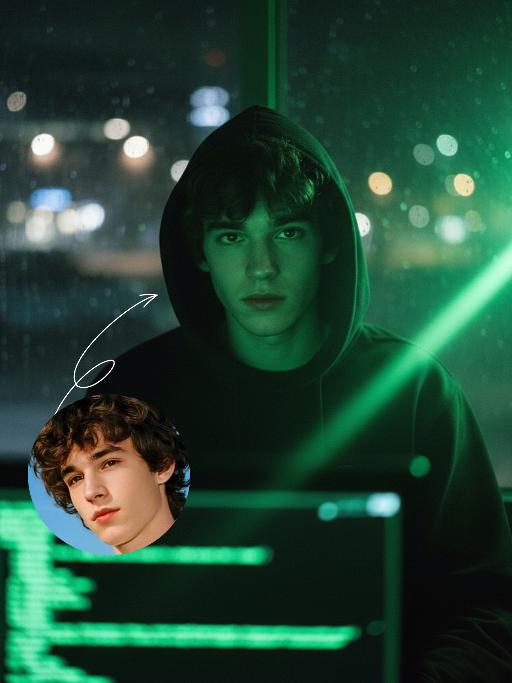
Hacker AI effects generated image

Hacker

A straight-on close-up headshot of the figure from the uploaded image (with unchanged facial features, age and gender), who sits centered and faces the camera directly, wearing a black hoodie with the hood up, their expression calm and focused. The figure’s face is cast in the green glow of code from a computer screen. A broad wash of soft, bright green side light slants in from the right side of the frame, creating a large-scale Tyndall effect that outlines their facial contours. The background features a blurred night view of the city in the rain outside the window (with traces of raindrops sliding down the glass), accompanied by warm bokeh lights; the foreground consists of a computer screen with glowing green code on it. Shot at eye level with a low-light, dark-toned palette, it embodies the dark-toned aesthetic of cyberpunk style. Main colors: black, blue-gray, neon green, low-saturation cool tones. Shallow depth of field blurs both the foreground and background, with the face in sharp focus. The work features an avant-garde fashion photography style, a film-like filter effect, and dramatic contrast between light and shadow.

Indonesian Sari

Use the uploaded reference image as the primary identity reference. Create a high-end Indonesian fashion editorial portrait of the same person, preserving facial features, skin tone, expression, and body proportions exactly. The subject wears a luxurious traditional Indonesian kebaya in deep green with intricate gold embroidery, paired with a matching songket skirt with rich golden batik patterns and a red silk inner camisole with delicate gold trim. Exquisitely crafted Indonesian traditional jewelry set including a statement golden Balinese necklace, chandelier gem-encrusted earrings, stacked gold bangles, and gem-set rings. Seductive and glamorous makeup with smoky cat eyes, vivid bold red lips and contoured cheekbones, exuding irresistible striking feminine allure, Graceful standing pose, one hand resting near the waist, front-facing or slightly angled body posture. Soft cinematic lighting, realistic texture of kebaya and songket fabric, delicate embroidery details. Background inspired by classic Indonesian palace interiors with intricate Balinese wooden carvings and batik heritage murals, warm and luxurious atmosphere with refined cultural charm. Ultra-realistic photography, high-end fashion magazine style, natural skin texture with subtle shimmer, ultra-high detail, sharp focus, the portrait exudes premium Indonesian cultural elegance and bold attractive femininity

Bags

A realistic Instagram-style lifestyle photo. A model is sitting casually in a modern walk-in closet, surrounded by neatly arranged clothes, handbags, and shoes. Model faces the camera naturally, holding a product (Refer to the pictures uploaded by the user) and introducing it with expressive hand gestures. Model`s mouth is slightly open, suggesting model is speaking to the viewer. The camera angle is slightly zoomed-in, showing model`s upper body, the product, and part of the stylish closet behind model. The background should remain clear and detailed, not blurred, so that the clothes, shelves, and accessories in the closet are visible. Lighting is soft and natural, enhancing the cozy and elegant atmosphere. The overall look should feel candid, authentic, and Instagram-worthy, as if part of a product introduction in a real closet setting.

Fighting Giant

This is a scene of a combat competition ring with bright spotlights in the arena; photorealistic, high-definition details, natural colors, and the camera captures the close-quarters confrontation. The uploaded character, with an exaggerated expression, shouts loudly with an open mouth, stands barefoot on the left side of the combat ring in a fighting stance. On the right side of the ring is a tall, muscular tattooed combatant. Both of them glare and roar aggressively, facing off before the fight. The uploaded character suddenly jumps into the air, spins around to the right, and viciously kicks the combatant's head with their feet and legs. After being viciously kicked three times, the combatant is finally defeated and falls to the ground. The uploaded character smiles triumphantly and joyfully, stands in the middle of the ring to cheer and celebrate, with the surrounding audience clapping. The camera zooms in to a medium close-up to show the character's upper body.

Moving Figure

Create a 1/7 scale commercialized figure of the character in the illustration, in a realistic style and environment. Render the exact hairstyle and the same outfit with the uploaded figure. Render garments as molded plastic with engraved seams and sculpted folds; keep accessories as plastic parts. Fictionalize any brand text/logos while keeping layout and colors. Place the figure on a computer desk, using a circular transparent acrylic base without any text. On the Apple computer screen, display the Z Brush modeling process of the figure. Next to the Apple computer screen, place a BANDAl-style toy packaging box printed with the original artwork. The background shows a modern realistic room furnished with contemporary furniture, including a display cabinet filled with books, dolls, and scale figures, adding a casual and everyday atmosphere. Behind the Apple computer, place a desk lamp to add detail and depth to the scene.

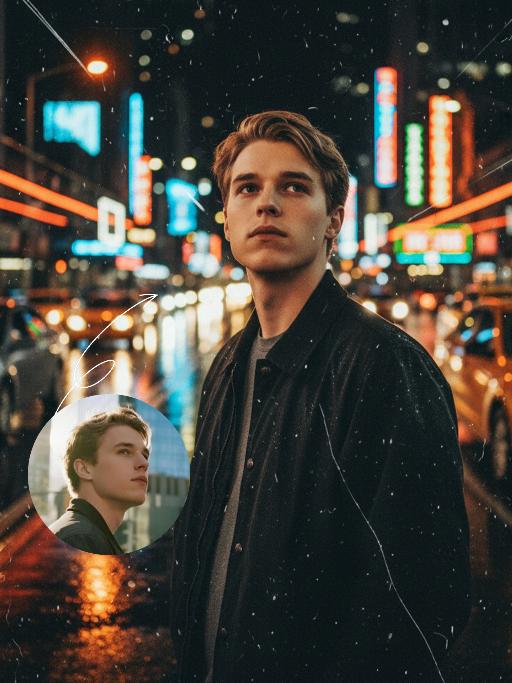
Midnight Neon AI effects generated image

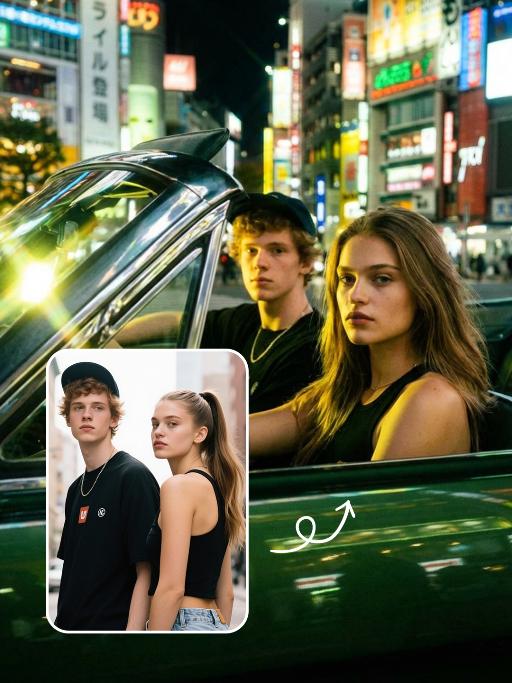
Midnight Neon

Professional retro film-style portrait photography, with the first uploaded portrait used in the frame for strict identity consistency (unchanged facial features, hairstyle, skin tone and age). The figure’s face is naturally retouched for a flawless skin texture, paired with dramatic light and shadow contrast on the facial features. In this street photography portrait, the figure stands at the center of a bustling city street on a rainy night (the vibrant night view of Tokyo’s busy thoroughfares), captured in a close-up shot and positioned right at the frame’s center. The traffic flow in the background (vehicles and pedestrians speeding by to create blurred dynamic streaks) and neon lights feature dynamic motion blur effects, with smudged texture overlays to enhance the narrative mood. The dim lighting boasts high contrast; the wet road surfaces reflect warm orange glows and cool-toned neon light, with soft bokeh spots cast by street lamps and car headlights. Color palette: based on black and white tones, the neon hues are processed with high saturation, dominated by dark shades to create a striking contrast between warm and cool tones. The image is enhanced with film grain texture, depth of field breakup details, cinematic black aesthetic, and ultra-realistic, ultra-fine textures, plus a lifelike effect of raindrops splattering on the lens. Shot with a slow shutter speed, a large aperture and a low shutter setting; an orange vertical digital date watermark (2026:00:00) is added to the bottom right corner.

Royalty AI effects generated image

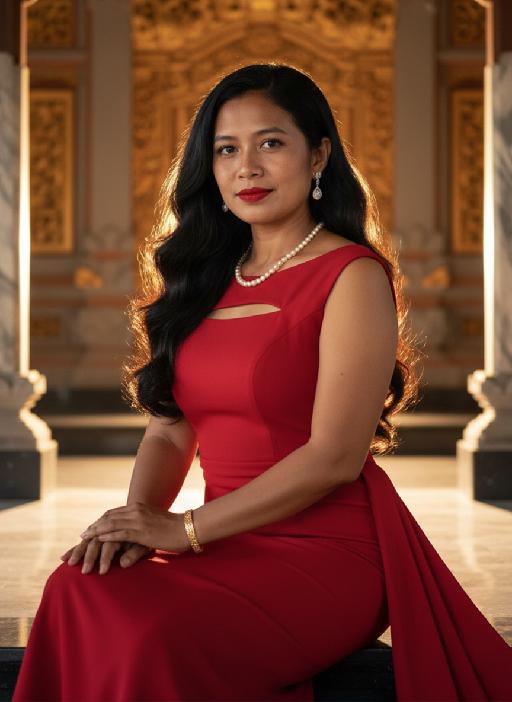
Royalty

Strictly lock the facial features of the uploaded portrait (preserve facial contours, native Indonesian skin tone, hairstyle and age). A glamorous half-body portrait of a young Indonesian lady in her 20s, with striking facial features, vivid red lips and long flowing black wavy hair that shimmers under warm light. She dons a glamorous red evening gown with a sleek figure-hugging silhouette, subtle cutout details and a flowing train, exuding sensuality and graceful allure, paired with delicate pearl necklace, drop earrings and gold bracelet. Bathed in soft golden backlight that creates a stunning hair glow effect, set against a grand and opulent Indonesian palace interior with intricate Balinese wooden carvings, gilded golden ornaments, marble columns, traditional Javanese architectural details and soft ambient palace lighting, exuding timeless elegance, retro charm and majestic Indonesian royal ambiance, 3:4 aspect ratio, ultra-high detail, photorealistic, cinematic texture

Magazine Cover AI effects generated image

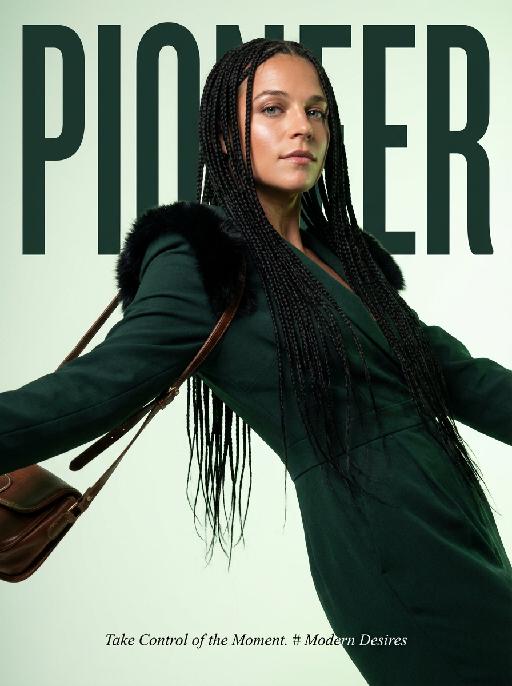
Magazine Cover

This is the cover of the high-end fashion magazine series, with the title in a large, dark green font: "PIONEER". The figure is in front of the text, captured in a medium close-up shot. The cover showcases a radiant image (with no changes in facial features, gender, or age), presented through the uploaded picture. She has several flowing and slender black braids, wearing a well-tailored dark green outfit, with soft black fur decorations on the shoulders, holding a retro high-end custom cross-body bag, her body in an inclined hanging position, arms stretched out, with an enchanting expression and exquisite makeup. The background is a gradient of pale green, the strong contrast of light highlights the facial contours and hair texture. The focal length is 50mm, captured with a professional portrait camera, clear focus, using an elegant editing style, with modern and avant-garde aesthetics. The small and exquisite text layout adds the content: "Take Control of the Moment. # Modern Desires"

Follow Me Portal AI effects generated image

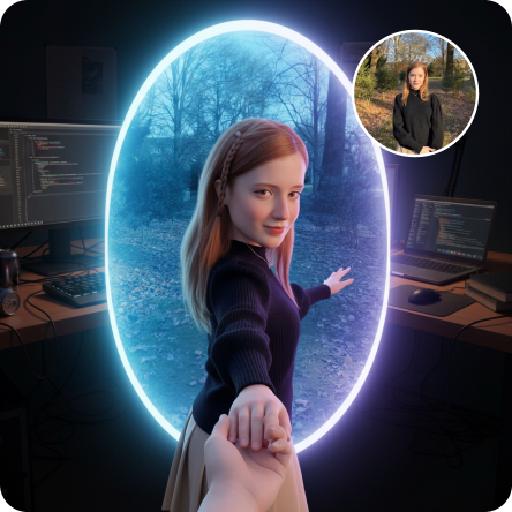
Follow Me Portal

A 3D chibi-style version of the person in the photo is stepping through a glowing portal, reaching out and holding the viewer’s hand. As the character pulls the viewer forward, they turn back with a dynamic glance, inviting the viewer into their world.Behind the portal is the viewer’s real-life environment: a typical programmer’s study with a desk, monitor, and laptop, rendered in realistic detail. Inside the portal lies the character’s 3D chibi world, inspired by the photo, with a cool blue color scheme that sharply contrasts with the real-world surroundings.The portal itself is a perfectly elliptical frame glowing with mysterious blue and purple light, positioned at the center of the image as a gateway between the two worlds.The scene is captured from a third-person perspective, clearly showing the viewer’s hand being pulled into the character’s world.

Load more

Next-Gen Multi-Model AI Video Architecture

Vivago AI isn't just one engine—it’s a unified hub for the world’s most advanced video AI. Whether you need cinematic realism or high-speed social content, we provide the right model for your creative vision.

Free Generate

Beauty and Dolphins

Vacation Time

Stellar Tear

Fish Tank Supervisor

Cinematic Quality & Precision Control

Enables 4K resolution with multi-lens motion control, generating delicate scene via text prompts for customized cinematography.​

TRY NOW

Dynamic AV Sync

Auto-generates original audio to avoid copyright issues. Build 3D immersive environments through layered sound design automatically.

TRY NOW

OpenAI Sora 2

​Advanced visual storytelling with unparalleled physics and consistency.

TRY NOW

Kling v2.6 Pro

Industry-leading cinematic image animation and motion control.

TRY NOW

Google Veo 3 & 3.1

Ultra-fast generation with enhanced realism for creative workflows.

TRY NOW

Vivago AI 2.0

Our proprietary model optimized for efficiency, speed, and cost-effective generation.

TRY NOW

Users' Voice

We listen carefully to the opinions of every user.
Free Generate
Contact Us
I tried the Lip Sync feature inside Vivago.ai’s AI Video Generator for my educational podcast, and the results were stunning! The avatar's lip movements perfectly matched my audio recording, creating a professional AI-generated video without complex editing. Compared with tools like OpenAI Sora 2 and Google Veo 3.1, Vivago Image-to-Video delivers fast, studio-quality results online. It saved me hours of post-production work.
ElenaM (Spain)
Vivago’s Image-to-Video AI transformed my marketing workflow. I uploaded a product image and described the launch scene in text, and it generated a 10-second cinematic AI video with background music and dynamic visuals. The output quality rivals Kling v2.6 Pro and Google Veo 3 Fast. It’s now my go-to AI video generator for social media ads and product campaigns.
KenjiT (Japan)
As a digital artist, I use Vivago.ai 2.0 daily for Image-to-Image and AI Image-to-Video creation. The e-book covers and animated visuals I generate for clients look cinematic and professional. Unlike many standalone AI tools, Vivago integrates multiple leading models into one platform, making it easier to create copyright-safe AI images and videos for publishing.
ChenL (China)
I tried the Lip Sync feature inside Vivago.ai’s AI Video Generator for my educational podcast, and the results were stunning! The avatar's lip movements perfectly matched my audio recording, creating a professional AI-generated video without complex editing. Compared with tools like OpenAI Sora 2 and Google Veo 3.1, Vivago Image-to-Video delivers fast, studio-quality results online. It saved me hours of post-production work.
ElenaM (Spain)
Vivago’s Image-to-Video AI transformed my marketing workflow. I uploaded a product image and described the launch scene in text, and it generated a 10-second cinematic AI video with background music and dynamic visuals. The output quality rivals Kling v2.6 Pro and Google Veo 3 Fast. It’s now my go-to AI video generator for social media ads and product campaigns.
KenjiT (Japan)
As a digital artist, I use Vivago.ai 2.0 daily for Image-to-Image and AI Image-to-Video creation. The e-book covers and animated visuals I generate for clients look cinematic and professional. Unlike many standalone AI tools, Vivago integrates multiple leading models into one platform, making it easier to create copyright-safe AI images and videos for publishing.
ChenL (China)
I absolutely love Vivago’s AI Image-to-Video Generator. As a travel blogger, static images often fail to capture real atmosphere, but Vivago helps me turn photos into vivid cinematic AI videos with motion effects. It feels comparable to OpenAI Sora 2 and Google Veo 3.1, but more accessible and faster for creators who need high-quality AI videos online.
LiamK (Australia)
I tried the Lip Sync feature inside Vivago.ai’s AI Video Generator for my educational podcast, and the results were stunning! The avatar's lip movements perfectly matched my audio recording, creating a professional AI-generated video without complex editing. Compared with tools like OpenAI Sora 2 and Google Veo 3.1, Vivago Image-to-Video delivers fast, studio-quality results online. It saved me hours of post-production work.
ElenaM (Spain)
Vivago’s Image-to-Video AI transformed my marketing workflow. I uploaded a product image and described the launch scene in text, and it generated a 10-second cinematic AI video with background music and dynamic visuals. The output quality rivals Kling v2.6 Pro and Google Veo 3 Fast. It’s now my go-to AI video generator for social media ads and product campaigns.
KenjiT (Japan)
As a digital artist, I use Vivago.ai 2.0 daily for Image-to-Image and AI Image-to-Video creation. The e-book covers and animated visuals I generate for clients look cinematic and professional. Unlike many standalone AI tools, Vivago integrates multiple leading models into one platform, making it easier to create copyright-safe AI images and videos for publishing.
ChenL (China)
I absolutely love Vivago’s AI Image-to-Video Generator. As a travel blogger, static images often fail to capture real atmosphere, but Vivago helps me turn photos into vivid cinematic AI videos with motion effects. It feels comparable to OpenAI Sora 2 and Google Veo 3.1, but more accessible and faster for creators who need high-quality AI videos online.
LiamK (Australia)
Using Vivago.ai’s Image-to-Video AI has greatly enhanced my classroom teaching. I transform textbook notes into historical AI videos with cinematic filters and dynamic animations. Compared with tools like Kling v2.6 Pro and Google Veo 3 Fast, Vivago offers faster generation and easier parameter control for educators who need reliable AI video creation.
RajivG (India)
I frequently create AI videos on Vivago and publish them on TikTok and YouTube Shorts. The AI video templates and trending content ideas help me produce viral-ready clips quickly. With Vivago’s integrated models—including advanced video engines similar to OpenAI Sora 2—I can generate anime-style and cinematic social media videos that drive high engagement.
MarieJ (Spain)
What attracts me most about Vivago.ai is not only the powerful AI Video Generator but also the active AIGC creator community. It combines AI Image-to-Video, Text-to-Video, and leading model integrations like Google Veo 3.1 into one creative platform.
TomW (India)
At first, I was hesitant about using AI video tools. But after trying Vivago Image-to-Video, I realized how easy it is to create professional AI-generated videos online. I just upload an image, add a short prompt, and adjust a few settings. The results are cinematic and copyright-safe, which is essential for commercial projects.
HectorC (Mexico)
Using Vivago.ai’s Image-to-Video AI has greatly enhanced my classroom teaching. I transform textbook notes into historical AI videos with cinematic filters and dynamic animations. Compared with tools like Kling v2.6 Pro and Google Veo 3 Fast, Vivago offers faster generation and easier parameter control for educators who need reliable AI video creation.
RajivG (India)
I frequently create AI videos on Vivago and publish them on TikTok and YouTube Shorts. The AI video templates and trending content ideas help me produce viral-ready clips quickly. With Vivago’s integrated models—including advanced video engines similar to OpenAI Sora 2—I can generate anime-style and cinematic social media videos that drive high engagement.
MarieJ (Spain)
What attracts me most about Vivago.ai is not only the powerful AI Video Generator but also the active AIGC creator community. It combines AI Image-to-Video, Text-to-Video, and leading model integrations like Google Veo 3.1 into one creative platform.
TomW (India)
At first, I was hesitant about using AI video tools. But after trying Vivago Image-to-Video, I realized how easy it is to create professional AI-generated videos online. I just upload an image, add a short prompt, and adjust a few settings. The results are cinematic and copyright-safe, which is essential for commercial projects.
HectorC (Mexico)