Image to Video

A steady, static frame captures roaring flames engulfing the screenintense, vibrant tongues of crimson and gold dance and undulate with primal energy. A medieval village ablaze, with flames consuming everything in their path. Thatch roofs are reduced to charred remains, and the cobbled streets are covered in ash. Townsfolk flee in terror, their cries echoing through the smoky dusk. The camera follows the fire's relentless advance, capturing the raw power and devastation of the blaze. The sound of roaring flames and clanging metal creates a haunting and immersive experience.Flames maintain hypnotic rhythm without camera movement, their chaotic elegance framed by stabilitya contained wildfire breathing against eternal stillness, heat almost tangible through the screen.

Recreate
arrow

More From VIVAGO AI

Love Yourself AI effects generated image

Love Yourself

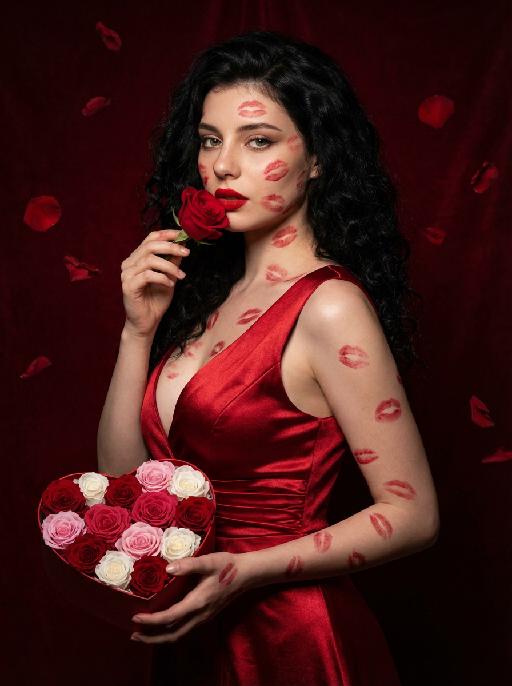
A charming and alluring figure in the uploaded picture (with unchanged facial features, gender and age), stands sideways and turns around, looking at the camera. She has long, fluffy, jet-black curly hair, exquisite eye makeup and a bright matte red lipstick. Red lipstick marks are all over her face, neck, chest and arms. She is wearing a luxurious deep V-neck red satin dress. One hand holds a heart-shaped box filled with various colored roses, and the other hand holds a rose placed near her mouth. Background: A dark red velvet texture studio background. Several red rose petals float slowly in the air in the background. Lighting hint: Low-key high-contrast dramatic light, soft directional highlights shining on her facial features and the satin dress, deep velvet-like shadows to enhance the sexy effect, with a cinematic sense of melancholy and depth. Tone hint: Rich, saturated deep red contrasts with dark black and soft charcoal gray, warm and passionate color combination, with subtle velvet texture in the shadow areas. Style: High-end fashion editing photography, highly realistic detail depiction, precise capture of skin texture and fabric luster, full of charm and allure Valentine's Day theme, with professional photography studio level, fashion pioneer photography.

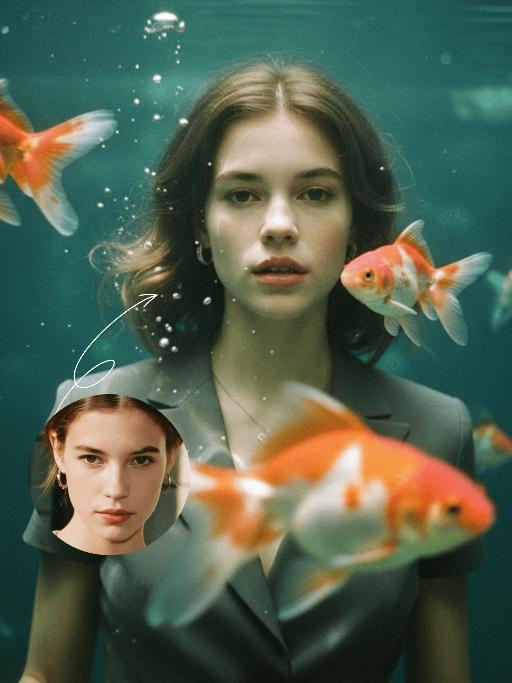
Goldfish AI effects generated image

Goldfish

Underwater scene inside a large ecological fish tank, featuring the figure from the uploaded image (unchanged facial features, age and gender) with faint small freckles on the cheeks. Their hair floats and fans out in soft curls due to water buoyancy, with tiny water droplets clinging to the tips. Expression: Gaze fixed on the camera, lips slightly parted with a subtle breathy quality; eyebrows droop gently, conveying alienation and loneliness, with a taut jawline. Attire: Exquisitely tailored high-end summer couture, the fabric forming natural folds from water buoyancy, paired with sophisticated and delicate accessories. Composition: Close-up facial shot (the figure’s face occupies 80% of the frame). Multiple large orange-white/silver-white goldfish nuzzle the cheeks and circle the hair tips in an interactive way, with tiny air bubbles rising slowly beside the figure’s profile. Goldfish swim in the foreground with a blurred effect, and water ripples blur and smudge softly in the background. Shooting Angle: Eye-level close-up underwater perspective, with the lens positioned 3cm below the water surface to capture the broken light spots refracted by the water. Light & Shadow: Kodak Portra 400 film texture with fine yet distinct film grain and slight vignetting. Soft diffused cool cyan-green light filters through the underwater environment, with diamond-shaped light spots piercing through the water surface; weak light and shadow contrast yet gentle layered tones, with edges slightly blurred and smudged. Color Palette: A base of low-saturation dark tones (deep cyan + jet black + grayish green), accented by the warm orange-white/silver-white of the goldfish. A retro film tone with a subtle cyan-yellow cast, creating an overall hazy and lonely atmosphere, with striking contrast between light and shadow underwater.

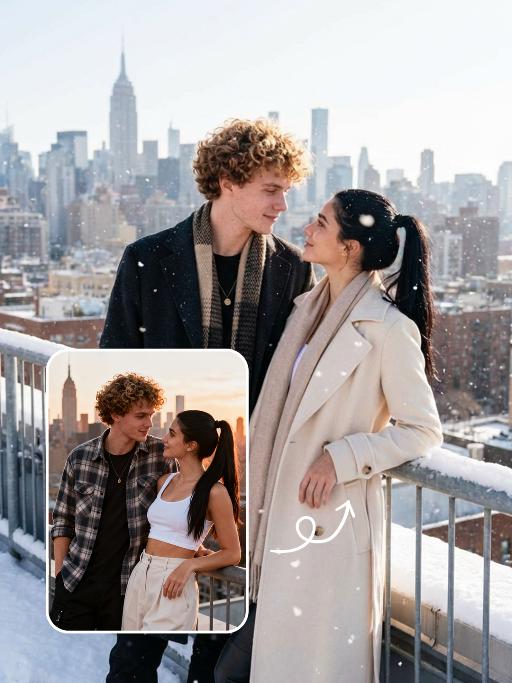
Snow Scene AI effects generated image

Snow Scene

Preserve the facial features of the figure in the image and transform the scene into a photo-realistic romantic winter snow photograph: the figure is wearing a matte black wool knee-length overcoat paired with a thick knit scarf in an interwoven coffee-brown and off-white check pattern (or a matte off-white wool waist-cinched double-breasted coat with gold buttons paired with a matching cashmere mid-length tassel scarf), set against a romantic outdoor scene with heavy snow falling. The lighting is bright natural light (noon sunlight), creating an exquisite and high-end atmosphere. Shoot with a 24mm wide-angle lens to highlight the immersive ambiance of the romantic realistic scene. Scene: Vintage red brick rooftops with light snow traces, frosted silver-toned metal railings with slightly melted snow on the edges; the New York skyline in the background, featuring a scattered mix of light gray glass curtain wall skyscrapers and vintage brownstone buildings with the clear spire of the Empire State Building, and fine snow falling gently. Photography: 85mm f/2.8 lens, winter side light, film texture, cool color tones. Image Quality: 8K ultra-detailed, realistic light and shadow. Atmosphere: A romantic and warm urban architectural snow scene bathed in the afterglow of the setting sun. Shooting Angle: Eye-level with a slight bird's-eye perspective.

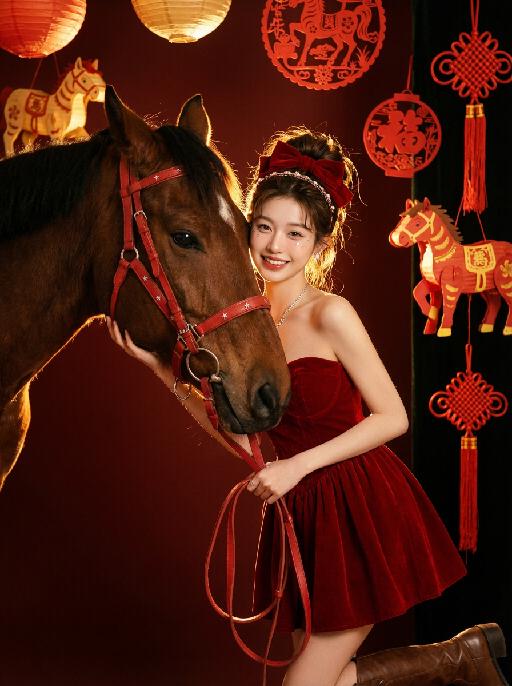
Horse Year AI effects generated image

Horse Year

Medium and long shot: The image in the uploaded picture (with unchanged facial features, gender and age, with hair coiled and wearing a red bow and hairband ornaments) is located on the right side of the frame, while the side head of a brown thoroughbred horse is on the left side. This work presents a sweet and dreamy theme characteristic of the Chinese Year of the Horse. The picture has a delicate film texture, with some exquisite and high-end decorations from indoor shooting, a thick festive atmosphere (paper lanterns, red paper cuttings, horse-year lanterns, Chinese knots, etc.) in the background; Color: Using professional indoor lighting, high-contrast warm light illuminates the face of the person and the side head of the horse, the highlighted hair light (contour light) forms a golden halo at the edge of the hair, the color is clean and bright, the horse contrasts strongly with the richly saturated white background, the light contrast is intense, creating a dreamy and warm atmosphere, with a fashionable and avant-garde photography artistic atmosphere; Color: The main color is a low-saturation clean dark red background, the horse, red leather (horses' reins, stars on the dress), low-saturation, high-quality and warm harmonious colors; Shooting angle: Horizontal perspective, the camera is at the same level as the face of the person in the uploaded picture and the side head of the horse, creating a natural and friendly interaction feeling; Character posture: The body slightly tilts towards the camera, holding a red leather strap in hand, the upper body gently leans against the brown horse, the head is close to the horse's face, with a sweet and brilliant smile, looking straight at the camera, the arms are naturally placed in front of the body, the posture is relaxed and intimate; Clothing: A high-end custom-designed red velvet strapless dress, wearing small and exquisite hair ornaments, around the eyes there is a delicate silver star powder makeup, wearing exquisite high-end custom accessories, wearing retro brown leather boots, fashionable and avant-garde, exquisite and elegant; The authenticity, artistry of the film, film-level ultra-high-definition 8K image quality, fashion magazine style, photography pioneer fashion artistic style, top lighting effects.

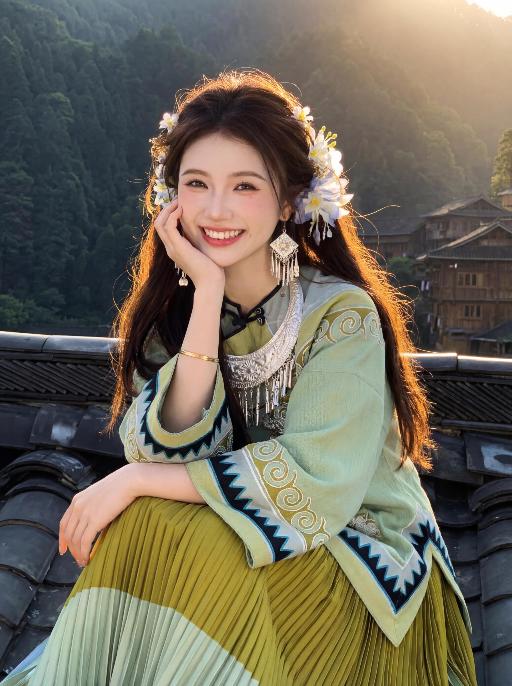
Sunny Smile AI effects generated image

Sunny Smile

Strictly lock the facial features of the uploaded portrait (completely preserve facial contours, native skin tone, hairstyle and age). From a high-angle, tilted perspective, a young and sweet East Asian woman sits sideways on a dark wooden tile roof, her left hand resting gently on her cheek with her elbow naturally propped up, her body relaxed and slightly reclined. She wears a bright, healing smile, with bright eyes full of warmth and joy. On her head is a Miao headdress adorned with small white flowers and silver ornaments, and she has multi-layered Miao silver earrings and a collar. She is dressed in a light green wide-sleeved Miao top decorated with black geometric patterns, paired with a yellow-green gradient pleated skirt, and a silver bracelet on her wrist. The background features dense dark green mountains and ancient wooden buildings in the distance. The image is shot against the light, with golden sunlight slanting from behind the figure, creating a soft halo and glowing hair effect. The overall effect is a high-definition portrait photograph with warm and gentle tones, exuding a healing ethnic atmosphere.

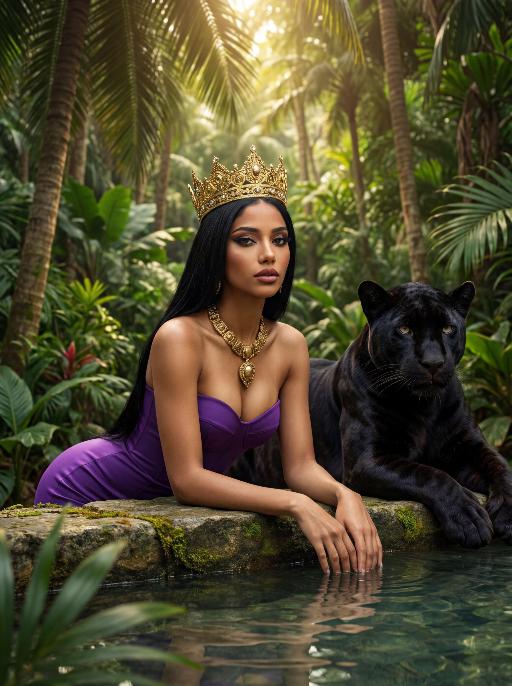
Jungle Queen AI effects generated image

Jungle Queen

The character in the uploaded picture (unchanged facial features, gender and age). A striking woman with long, sleek black straight hair, embodying a powerful jungle queen, captured in a hyper-realistic, cinematic portrait. She has a regal, intense gaze, and bold, dramatic makeup. She wears a form-fitting, strapless purple bustier dress that accentuates her curvy, graceful figure. She is adorned with a large, imposing golden crown on her head, and a thick, ornate golden necklace with a prominent pendant around her neck. She leans forward, resting her forearms on a weathered stone ledge at the edge of a shallow pool, her hands submerged in the clear, still water. A majestic black panther with sleek, glossy black fur rests calmly beside her, its body partially visible behind her, exuding a sense of primal power and quiet companionship. The setting is a lush, dense tropical jungle. Towering palm trees and broad-leafed plants fill the background, their vibrant green leaves creating a dense, verdant canopy. Soft, dappled sunlight filters through the foliage, casting a warm, golden glow on the scene and creating a serene, otherworldly atmosphere. The image is rendered in a hyper-realistic, cinematic style, with sharp focus on the subject, soft bokeh on the background, and dramatic, natural lighting that accentuates the rich purple of her dress, the glossy black of the panther's fur, and the intricate details of the golden crown and necklace. The color palette is rich and vibrant, featuring deep purples, glossy blacks, radiant golds, and lush greens, creating a timeless, powerful, and awe-inspiring atmosphere. The overall aesthetic is detailed, lifelike, and reminiscent of a scene from a grand fantasy epic, blending primal power with regal elegance

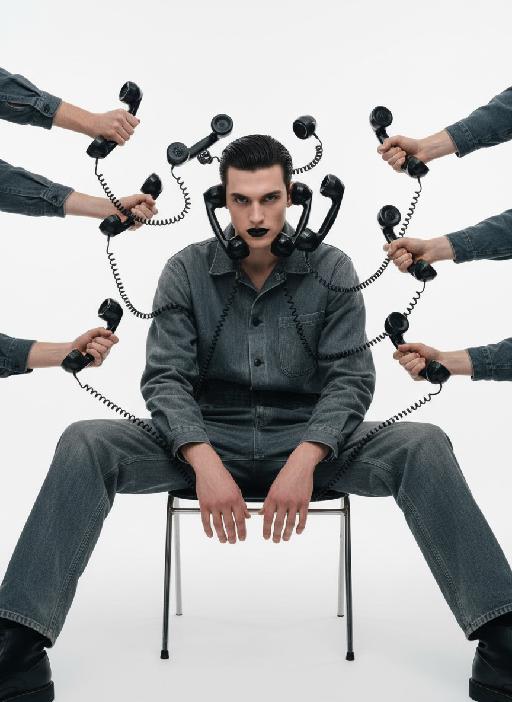
Telephone Ring AI effects generated image

Telephone Ring

"Shooting perspective and focal length: Frontal level view, using a medium telephoto lens (approximately 50mm), with an appropriate focal length, medium close-up shot, able to clearly present the upper body and hand details of the characters, and the picture has no obvious distortion. Equipment: Professional studio camera (such as Canon 5D series or Sony A7 series), combined with a studio lighting system. Character pose: The character is in a sitting position, with legs apart and knees bent, the upper body leaning forward and the head close to the camera; multiple arms extend from all around the frame, each hand holding an old-fashioned black wired telephone, multiple receivers randomly surround the character's head, creating a visual effect of being surrounded. Character expression: Eyes gaze at the camera, the gaze is slightly distant and cold, the facial expression is calm and undisturbed, conveying a restrained emotional tension. Lighting: Use studio hard light, the main light source comes from the front, supplemented by side lighting, forming a clear contrast of light and shade, highlighting the fabric texture and facial contours, the background is pure white, clean and without any color impurities. Style: Pioneer fashion photography, integrating surrealism and minimalism, creating an absurd yet highly tense atmosphere through strong visual impact. Clothing: A set of gray-blue distressed texture workwear, the fabric has fine textures, the fit is loose and firm, the lapel design combines toughness and retro charm. Hair style: Black short hair, using hair gel to comb backward, revealing a full forehead, the style is clean and neat with a sense of lines. Makeup: Matte texture pure black lipstick as the visual focus, the facial base makeup is even and transparent, only highlighting the lip color, the overall makeup is avant-garde and has a distinctive characteristic."

Flower AI effects generated image

Flower

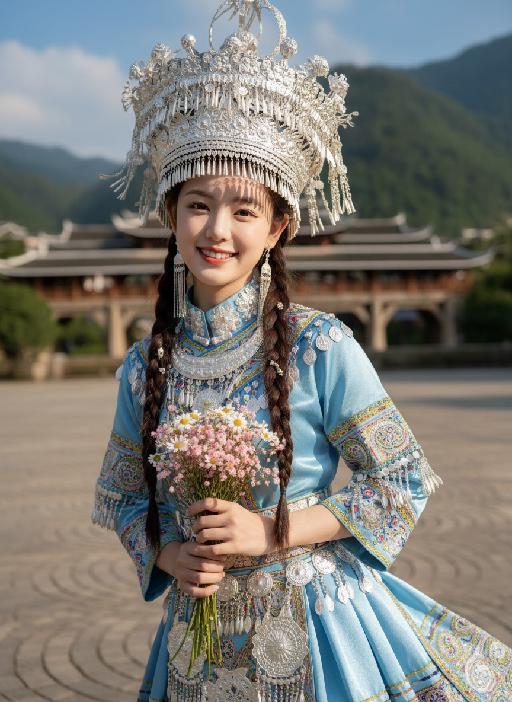
Strictly lock facial features: fully preserving the original facial contours, skin texture, eye shape, lip shape, and youthful appearance with zero deviations allowed. Eye-level perspective, close-up half-body portrait (subject occupies 80% of the frame), a young and sweet East Asian woman with a bright, healing smile showing teeth, eyes bright and gentle; double braid hairstyle with small silver ornaments in the hair; wearing an extremely ornate and intricate Miao silver large-horned headdress with dangling silver tassels swaying subtly; accessorized with multi-layered Miao silver collars and long silver earrings. Natural dynamic pose: Body gently tilted forward, arms positioned naturally: one hand gently holds a small bouquet of fresh flowers (a mix of light pink baby's breath and white daisies), fingers loosely wrapping around the flower stems, the bouquet naturally tilting downward toward the camera, petals slightly fluttering; the other hand rests lightly at her waist for an organic, relaxed feel, shoulders slightly relaxed, no stiff movements. The upper portion of the light blue satin Miao traditional costume’s skirt flows subtly, with the decorative silver trim and embroidery fluttering gently in the breeze—focusing on upper-body movement only. The top has wide sleeves, with large areas of silver embroidery, colorful small bead decorations, and gold trim on the cuffs, neckline, chest, and waistband, catching soft highlights with the gentle movement. Soft natural sunlight shines from the upper left side of the frame, casting warm, translucent highlights on the Miao silver ornaments, flower petals, hair strands, and satin fabric; natural soft shadows form on the neck, collarbone, and the edge of the costume, enhancing the three-dimensional sense of the figure while maintaining the fresh and transparent tone. Background (subtly blurred to emphasize the subject): The stone slab square of Xijiang Qianhu Miao Village in Guizhou (partial concentric circle patterns visible), with a blurred wooden wind-rain bridge and lush green mountains in the distance, under a fresh blue sky with clouds; overall high-definition portrait photography, soft diffused natural light blended with warm sunlight, colors are fresh and transparent, mainly in light blue, silver white, and natural green tones, strictly 1:1 replicate the original image's facial features and clothing details while emphasizing the subject's dominance in the frame

Throne of Noir AI effects generated image

Throne of Noir

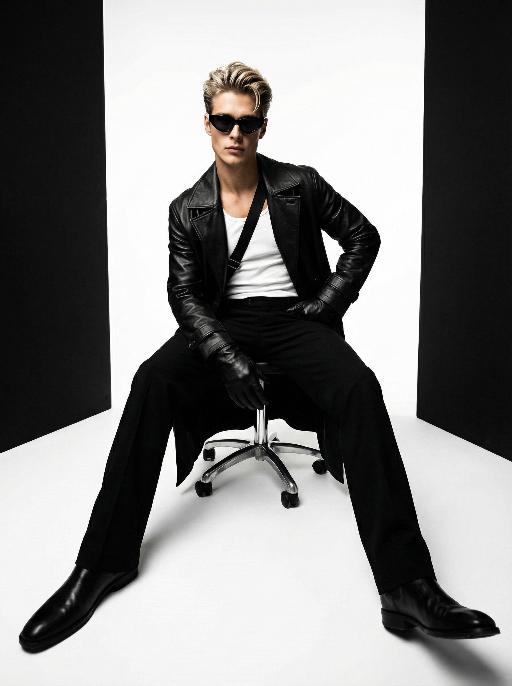
Use the exact same facial features, gender, and age as the character in the uploaded image. Low-angle wide-angle shot, avant-garde art photography, high-end men's fashion portrait, handsome East Asian male, sleek back-combed messy hair, futuristic cat-eye black sunglasses, long black leather trench coat with strong drape, white tank top inner wear, black diagonal strap across the chest, black leather gloves, sitting on a metallic silver swivel office chair, one hand on hip, the other resting on the chair leg, legs spread and extended forward to emphasize long legs, minimalist studio, seamless pure white floor, symmetrical vertical black background panels on both sides, cinematic lighting with subtle warm and cool tonal contrast, rich black and white tones with natural depth and texture, ultra-sharp focus, commercial blockbuster texture, 8K, ultra-detailed, no redundant elements, vertical composition

Load more

Next-Gen Multi-Model AI Video Architecture

Vivago AI isn't just one engine—it’s a unified hub for the world’s most advanced video AI. Whether you need cinematic realism or high-speed social content, we provide the right model for your creative vision.

Free Generate

Beauty and Dolphins

Vacation Time

Stellar Tear

Fish Tank Supervisor

Cinematic Quality & Precision Control

Enables 4K resolution with multi-lens motion control, generating delicate scene via text prompts for customized cinematography.​

TRY NOW

Dynamic AV Sync

Auto-generates original audio to avoid copyright issues. Build 3D immersive environments through layered sound design automatically.

TRY NOW

OpenAI Sora 2

​Advanced visual storytelling with unparalleled physics and consistency.

TRY NOW

Kling v2.6 Pro

Industry-leading cinematic image animation and motion control.

TRY NOW

Google Veo 3 & 3.1

Ultra-fast generation with enhanced realism for creative workflows.

TRY NOW

Vivago AI 2.0

Our proprietary model optimized for efficiency, speed, and cost-effective generation.

TRY NOW

Users' Voice

We listen carefully to the opinions of every user.
Free Generate
Contact Us
I tried the Lip Sync feature inside Vivago.ai’s AI Video Generator for my educational podcast, and the results were stunning! The avatar's lip movements perfectly matched my audio recording, creating a professional AI-generated video without complex editing. Compared with tools like OpenAI Sora 2 and Google Veo 3.1, Vivago Image-to-Video delivers fast, studio-quality results online. It saved me hours of post-production work.
ElenaM (Spain)
Vivago’s Image-to-Video AI transformed my marketing workflow. I uploaded a product image and described the launch scene in text, and it generated a 10-second cinematic AI video with background music and dynamic visuals. The output quality rivals Kling v2.6 Pro and Google Veo 3 Fast. It’s now my go-to AI video generator for social media ads and product campaigns.
KenjiT (Japan)
As a digital artist, I use Vivago.ai 2.0 daily for Image-to-Image and AI Image-to-Video creation. The e-book covers and animated visuals I generate for clients look cinematic and professional. Unlike many standalone AI tools, Vivago integrates multiple leading models into one platform, making it easier to create copyright-safe AI images and videos for publishing.
ChenL (China)
I tried the Lip Sync feature inside Vivago.ai’s AI Video Generator for my educational podcast, and the results were stunning! The avatar's lip movements perfectly matched my audio recording, creating a professional AI-generated video without complex editing. Compared with tools like OpenAI Sora 2 and Google Veo 3.1, Vivago Image-to-Video delivers fast, studio-quality results online. It saved me hours of post-production work.
ElenaM (Spain)
Vivago’s Image-to-Video AI transformed my marketing workflow. I uploaded a product image and described the launch scene in text, and it generated a 10-second cinematic AI video with background music and dynamic visuals. The output quality rivals Kling v2.6 Pro and Google Veo 3 Fast. It’s now my go-to AI video generator for social media ads and product campaigns.
KenjiT (Japan)
As a digital artist, I use Vivago.ai 2.0 daily for Image-to-Image and AI Image-to-Video creation. The e-book covers and animated visuals I generate for clients look cinematic and professional. Unlike many standalone AI tools, Vivago integrates multiple leading models into one platform, making it easier to create copyright-safe AI images and videos for publishing.
ChenL (China)
I absolutely love Vivago’s AI Image-to-Video Generator. As a travel blogger, static images often fail to capture real atmosphere, but Vivago helps me turn photos into vivid cinematic AI videos with motion effects. It feels comparable to OpenAI Sora 2 and Google Veo 3.1, but more accessible and faster for creators who need high-quality AI videos online.
LiamK (Australia)
I tried the Lip Sync feature inside Vivago.ai’s AI Video Generator for my educational podcast, and the results were stunning! The avatar's lip movements perfectly matched my audio recording, creating a professional AI-generated video without complex editing. Compared with tools like OpenAI Sora 2 and Google Veo 3.1, Vivago Image-to-Video delivers fast, studio-quality results online. It saved me hours of post-production work.
ElenaM (Spain)
Vivago’s Image-to-Video AI transformed my marketing workflow. I uploaded a product image and described the launch scene in text, and it generated a 10-second cinematic AI video with background music and dynamic visuals. The output quality rivals Kling v2.6 Pro and Google Veo 3 Fast. It’s now my go-to AI video generator for social media ads and product campaigns.
KenjiT (Japan)
As a digital artist, I use Vivago.ai 2.0 daily for Image-to-Image and AI Image-to-Video creation. The e-book covers and animated visuals I generate for clients look cinematic and professional. Unlike many standalone AI tools, Vivago integrates multiple leading models into one platform, making it easier to create copyright-safe AI images and videos for publishing.
ChenL (China)
I absolutely love Vivago’s AI Image-to-Video Generator. As a travel blogger, static images often fail to capture real atmosphere, but Vivago helps me turn photos into vivid cinematic AI videos with motion effects. It feels comparable to OpenAI Sora 2 and Google Veo 3.1, but more accessible and faster for creators who need high-quality AI videos online.
LiamK (Australia)
Using Vivago.ai’s Image-to-Video AI has greatly enhanced my classroom teaching. I transform textbook notes into historical AI videos with cinematic filters and dynamic animations. Compared with tools like Kling v2.6 Pro and Google Veo 3 Fast, Vivago offers faster generation and easier parameter control for educators who need reliable AI video creation.
RajivG (India)
I frequently create AI videos on Vivago and publish them on TikTok and YouTube Shorts. The AI video templates and trending content ideas help me produce viral-ready clips quickly. With Vivago’s integrated models—including advanced video engines similar to OpenAI Sora 2—I can generate anime-style and cinematic social media videos that drive high engagement.
MarieJ (Spain)
What attracts me most about Vivago.ai is not only the powerful AI Video Generator but also the active AIGC creator community. It combines AI Image-to-Video, Text-to-Video, and leading model integrations like Google Veo 3.1 into one creative platform.
TomW (India)
At first, I was hesitant about using AI video tools. But after trying Vivago Image-to-Video, I realized how easy it is to create professional AI-generated videos online. I just upload an image, add a short prompt, and adjust a few settings. The results are cinematic and copyright-safe, which is essential for commercial projects.
HectorC (Mexico)
Using Vivago.ai’s Image-to-Video AI has greatly enhanced my classroom teaching. I transform textbook notes into historical AI videos with cinematic filters and dynamic animations. Compared with tools like Kling v2.6 Pro and Google Veo 3 Fast, Vivago offers faster generation and easier parameter control for educators who need reliable AI video creation.
RajivG (India)
I frequently create AI videos on Vivago and publish them on TikTok and YouTube Shorts. The AI video templates and trending content ideas help me produce viral-ready clips quickly. With Vivago’s integrated models—including advanced video engines similar to OpenAI Sora 2—I can generate anime-style and cinematic social media videos that drive high engagement.
MarieJ (Spain)
What attracts me most about Vivago.ai is not only the powerful AI Video Generator but also the active AIGC creator community. It combines AI Image-to-Video, Text-to-Video, and leading model integrations like Google Veo 3.1 into one creative platform.
TomW (India)
At first, I was hesitant about using AI video tools. But after trying Vivago Image-to-Video, I realized how easy it is to create professional AI-generated videos online. I just upload an image, add a short prompt, and adjust a few settings. The results are cinematic and copyright-safe, which is essential for commercial projects.
HectorC (Mexico)