Animal and Turkey

Generate vibrant animal visuals like turkey images with AI. Vivago.ai transforms text-based prompts into high-quality, photorealistic and creative poultry visuals using advanced AI image generation. Create custom birds, flocks or Thanksgiving motifs effortlessly.

Use Template
arrow

FAQs

What are Effect Templates?

Effect Templates are predefined AI workflows that automatically transform static images into specific visual styles or animated formats, delivering consistent, high-quality results without manual adjustments.

How do I apply Effect Templates?

Select your preferred template > Upload an image > Generate. No text prompts required - templates handle all style parameters.

Where can I find more templates?

Explore 1000+ curated templates in our Explore Hub: https://vivago.ai/studio. New templates added weekly across categories.

What's the pricing?

Daily login grants 100 free credits. Exhausted credits? Choose: 1) Subscribe a membership plan, 2) Get a credit pack. Details: https://vivago.ai/subscribe

More From VIVAGO AI

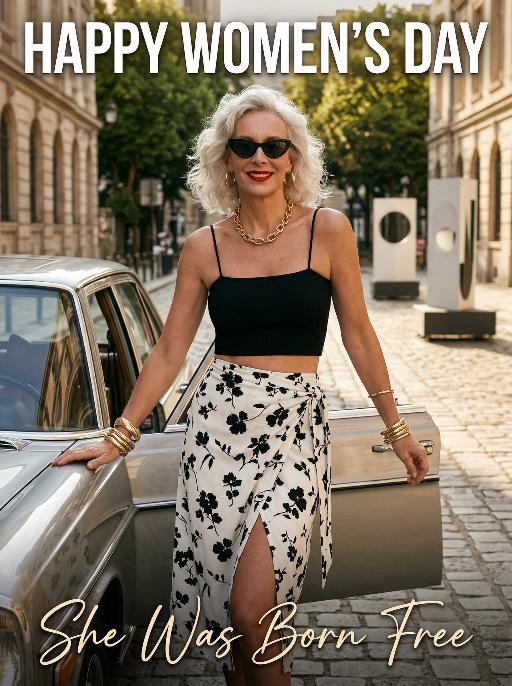
Street Glow AI effects generated image

Street Glow

Use the exact same facial features, gender, and age as the uploaded image. Full-body portrait, stylish magazine cover-style portrait, elegant and artistic high-end aesthetic. Elegant stylish woman in her 60s, voluminous wavy silver-white hair, bold red lipstick, black cat-eye sunglasses. She wears a form-fitting black ribbed thin-strap crop top, high-waisted wrap midi skirt (white background with black floral pattern, thigh-high slit), thick chunky gold chain necklace, large gold hoop earrings, stacked gold bangles on both wrists. She stands confidently next to a classic vintage silver sedan, one hand on open car door, one hand on car fender. She looks directly at the camera with a warm and gentle smile. Background: sun-drenched cobblestone European city street, historic stone buildings, lush green trees, modern minimalist artistic elements, clean and sophisticated composition. At the top of the image: "Happy Women's Day" in elegant, bold white sans-serif font. At the bottom of the image: "She Was Born Free" as stylized artistic font, elegant and prominent, matching the high-end fashion style. Overall style: cinematic, modern, high-end fashion photography, retro-chic, effortless glamour. Bright warm golden afternoon light, soft shadows, cool and warm color contrast, shallow depth of field (focus on woman, blurred background), high resolution, film-like texture, rich details, exquisite and luxurious atmosphere.

Kebaya AI effects generated image

Kebaya

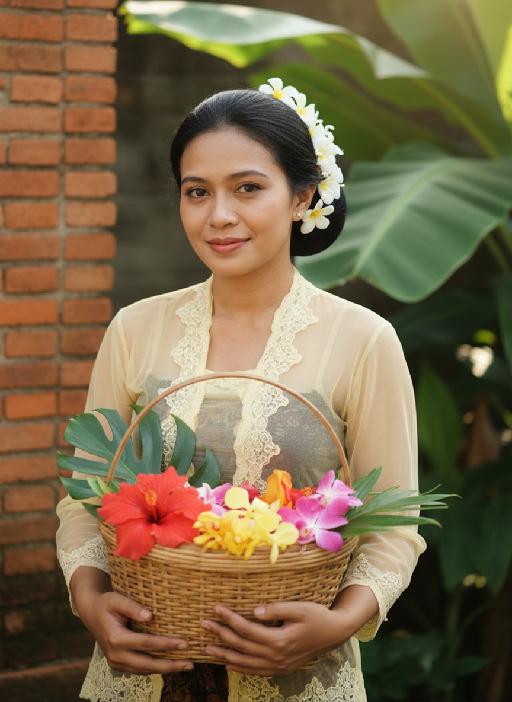
Strictly lock the facial features of the uploaded portrait (preserve facial contours, native Indonesian skin tone, hairstyle and age). model occupies 3/4 of the frame, the model as the absolute dominant subject, close-up half-body portrait with minimal background space, no excessive empty space around the model, a charming half-body portrait of a young Indonesian lady in her early 20s, with a gentle smile and black hair elegantly updo decorated with white tiny flowers, dressed in a soft pale yellow sheer kebaya featuring delicate lace edging. She holds a rustic rattan basket brimming with colorful fresh blooms, set against a backdrop of a classic Indonesian red-brick dwelling with sprawling tropical banana foliage, bathed in soft golden natural sunlight, exuding a fresh, idyllic and authentic Indonesian rural charm, 3:4 aspect ratio, ultra-high detail, photorealistic

Cool Boss AI effects generated image

Cool Boss

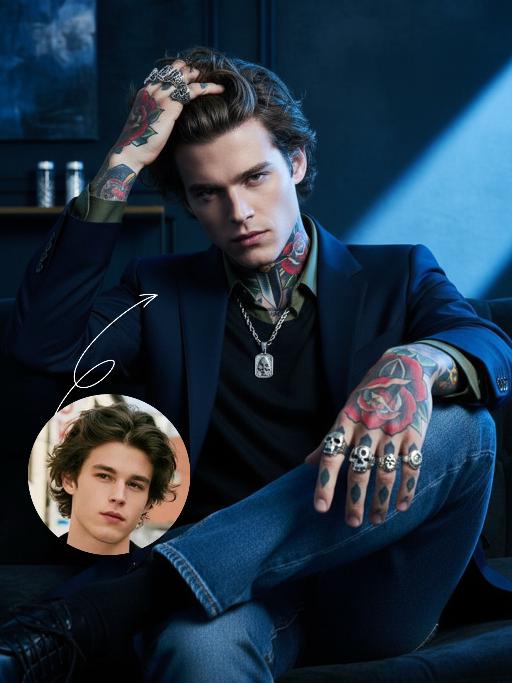
The first uploaded portrait is used for strict identity consistency (with unchanged facial features, hairstyle, skin tone and age). His body is covered in traditional American realistic tattoos – an intricate rose and dagger pattern adorns his neck, and delicate skull and poker card motifs feature on both hands, with sharp lines and rich, saturated colors. He wears multiple heavy metal-style rings on his fingers and a silver necklace. The frame employs dramatic lighting in bold blue and dark tones, with a large wash of soft side light slanting in from the right side of the frame to create an extensive tintype effect, which outlines his facial contours and the fine details of his tattoos. His facial expression is fraught with tension, and his eyes are as sharp as an eagle’s. Boasting 8K resolution, the overall style embodies high-end, fashion-forward artistic photography. The man, dressed in a tailored suit blazer set with a dark green shirt and matching suit trousers, sits on a sofa in an utterly relaxed posture. He stares directly at the camera, exuding poise and confidence. He then slowly shifts his weight, crossing one leg over the other, before running his fingers through his hair. The camera pans slightly to the left, capturing his subtle movements and the way light casts over his tattoos, further amplifying the dynamic feel of the frame.

Shark Dance

Main scene: The image in the uploaded picture (species, age, gender remain unchanged, presented in an anthropomorphic standing posture with the front two paws raised and the back two legs standing), beside it are four similar cute cats in an anthropomorphic standing posture standing neatly and evenly beside it (including Persian cats, orange cats, silver gradient cats and golden gradient cats), all characters (height proportions remain consistent) are wearing different cute cartoon jumpsuits (cartoon character pajamas, with bees, tigers, dinosaurs, seals, pandas) in plush fabric (revealing the characters' faces), ultra-realistic three-dimensional rendering, cute and soothing style, the protagonist occupies 80% of the main space of the picture, evenly distributed in the center of the picture, presented in a frontal standing posture, with natural front-back layers; using mid-shot horizontal composition, shot from a horizontal perspective at the same height as the protagonist's image; the light is a soft indoor diffusion effect, the transition of light and shadow is natural, without strong contrast, overall bright and warm; the clothing uses fresh and bright colors (yellow, green, blue, brown), the background is a warm and cute living room environment, background elements account for 20% of the picture; rich details, fluffy and fine fur texture, clear clothing texture, 8K high resolution, bright and harmonious picture colors.

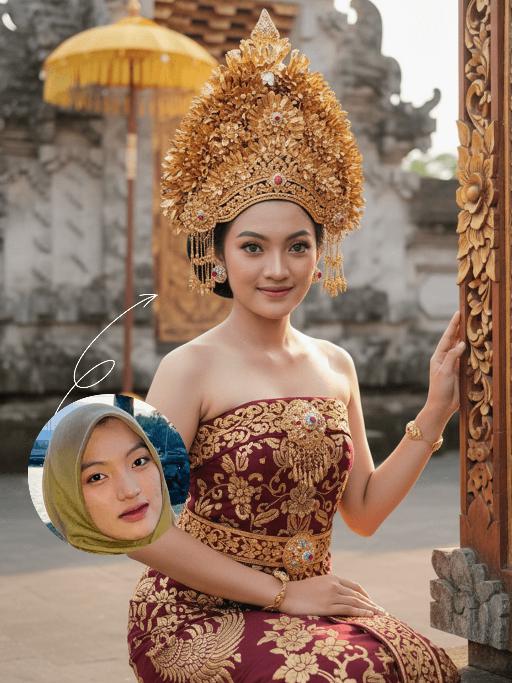
Bali Bride AI effects generated image

Bali Bride

Strictly lock the facial features of the uploaded portrait (preserve facial contours, native Indonesian skin tone, hairstyle and age). Extremely minimal negative space, the subject occupies 90% of the vertical frame, tight half-body portrait photography, hyper-realistic style, 4K ultra-high definition, soft warm tropical daylight, authentic Balinese cultural ceremony atmosphere . A young Indonesian Balinese woman with delicate features and a gentle warm smile, half-squatting in a sacred Balinese temple courtyard (close framing) . She wears an elaborate traditional Balinese ceremonial outfit: deep maroon strapless dress with intricate golden floral & phoenix embroidery, ornate hand-carved golden headdress, golden necklace, drop earrings and bracelet . Her right hand rests on an intricately carved Balinese wooden frame decorated with gold, blue and pink floral motifs . Background (weathered temple stone walls, traditional yellow Balinese payung) is extremely softly blurred to highlight the subject. Warm diffused sunlight creates a glowing golden tone throughout the scene, sharp focus on her facial expression, the rich texture of the golden embroidery and intricate headdress details. Capture the vibrant authentic Balinese cultural ambiance

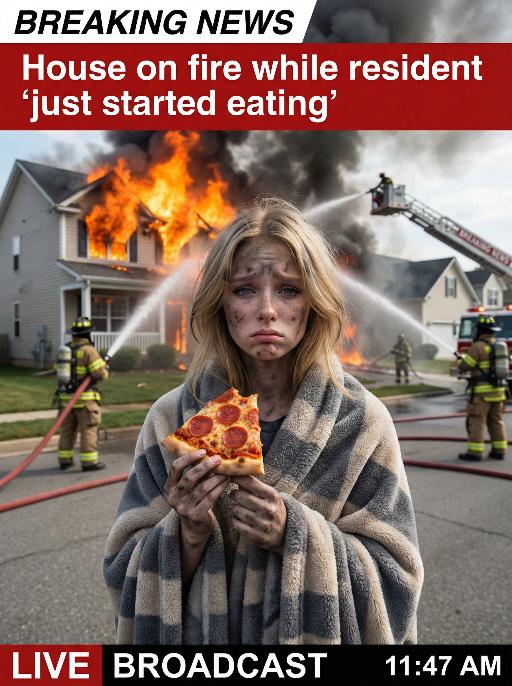
House On Fire AI effects generated image

House On Fire

This is a realistic breaking news photo. In the middle of the picture is the uploaded figure (with the facial features, gender and age unchanged), standing in the middle of the frame, with coal dust all over his face, looking sad. He is wrapped in a gray and beige striped plush blanket and holding a slice of Italian pepperoni pizza, looking confused and sad. In the background, a two-story suburban house is engulfed in flames, and firefighters are using water hoses to put out the fire. The silhouette of a fire engine can be seen. The scene takes place on a residential street during the day. Above there is a prominent large red and white news headline: "BREAKING NEWS". In the middle and lower part of the picture, there is a news caption that reads: "House on fire while resident 'just started eating'", "LIVE BROADCAST", "11:47 AM".

Load more

Next-Gen Multi-Model AI Video Architecture

Vivago AI isn't just one engine—it’s a unified hub for the world’s most advanced video AI. Whether you need cinematic realism or high-speed social content, we provide the right model for your creative vision.

Free Generate

Beauty and Dolphins

Vacation Time

Stellar Tear

Fish Tank Supervisor

Cinematic Quality & Precision Control

Enables 4K resolution with multi-lens motion control, generating delicate scene via text prompts for customized cinematography.​

TRY NOW

Dynamic AV Sync

Auto-generates original audio to avoid copyright issues. Build 3D immersive environments through layered sound design automatically.

TRY NOW

OpenAI Sora 2

​Advanced visual storytelling with unparalleled physics and consistency.

TRY NOW

Kling v2.6 Pro

Industry-leading cinematic image animation and motion control.

TRY NOW

Google Veo 3 & 3.1

Ultra-fast generation with enhanced realism for creative workflows.

TRY NOW

Vivago AI 2.0

Our proprietary model optimized for efficiency, speed, and cost-effective generation.

TRY NOW

Users' Voice

We listen carefully to the opinions of every user.
Free Generate
Contact Us
I tried the Lip Sync feature inside Vivago.ai’s AI Video Generator for my educational podcast, and the results were stunning! The avatar's lip movements perfectly matched my audio recording, creating a professional AI-generated video without complex editing. Compared with tools like OpenAI Sora 2 and Google Veo 3.1, Vivago Image-to-Video delivers fast, studio-quality results online. It saved me hours of post-production work.
ElenaM (Spain)
Vivago’s Image-to-Video AI transformed my marketing workflow. I uploaded a product image and described the launch scene in text, and it generated a 10-second cinematic AI video with background music and dynamic visuals. The output quality rivals Kling v2.6 Pro and Google Veo 3 Fast. It’s now my go-to AI video generator for social media ads and product campaigns.
KenjiT (Japan)
As a digital artist, I use Vivago.ai 2.0 daily for Image-to-Image and AI Image-to-Video creation. The e-book covers and animated visuals I generate for clients look cinematic and professional. Unlike many standalone AI tools, Vivago integrates multiple leading models into one platform, making it easier to create copyright-safe AI images and videos for publishing.
ChenL (China)
I tried the Lip Sync feature inside Vivago.ai’s AI Video Generator for my educational podcast, and the results were stunning! The avatar's lip movements perfectly matched my audio recording, creating a professional AI-generated video without complex editing. Compared with tools like OpenAI Sora 2 and Google Veo 3.1, Vivago Image-to-Video delivers fast, studio-quality results online. It saved me hours of post-production work.
ElenaM (Spain)
Vivago’s Image-to-Video AI transformed my marketing workflow. I uploaded a product image and described the launch scene in text, and it generated a 10-second cinematic AI video with background music and dynamic visuals. The output quality rivals Kling v2.6 Pro and Google Veo 3 Fast. It’s now my go-to AI video generator for social media ads and product campaigns.
KenjiT (Japan)
As a digital artist, I use Vivago.ai 2.0 daily for Image-to-Image and AI Image-to-Video creation. The e-book covers and animated visuals I generate for clients look cinematic and professional. Unlike many standalone AI tools, Vivago integrates multiple leading models into one platform, making it easier to create copyright-safe AI images and videos for publishing.
ChenL (China)
I absolutely love Vivago’s AI Image-to-Video Generator. As a travel blogger, static images often fail to capture real atmosphere, but Vivago helps me turn photos into vivid cinematic AI videos with motion effects. It feels comparable to OpenAI Sora 2 and Google Veo 3.1, but more accessible and faster for creators who need high-quality AI videos online.
LiamK (Australia)
I tried the Lip Sync feature inside Vivago.ai’s AI Video Generator for my educational podcast, and the results were stunning! The avatar's lip movements perfectly matched my audio recording, creating a professional AI-generated video without complex editing. Compared with tools like OpenAI Sora 2 and Google Veo 3.1, Vivago Image-to-Video delivers fast, studio-quality results online. It saved me hours of post-production work.
ElenaM (Spain)
Vivago’s Image-to-Video AI transformed my marketing workflow. I uploaded a product image and described the launch scene in text, and it generated a 10-second cinematic AI video with background music and dynamic visuals. The output quality rivals Kling v2.6 Pro and Google Veo 3 Fast. It’s now my go-to AI video generator for social media ads and product campaigns.
KenjiT (Japan)
As a digital artist, I use Vivago.ai 2.0 daily for Image-to-Image and AI Image-to-Video creation. The e-book covers and animated visuals I generate for clients look cinematic and professional. Unlike many standalone AI tools, Vivago integrates multiple leading models into one platform, making it easier to create copyright-safe AI images and videos for publishing.
ChenL (China)
I absolutely love Vivago’s AI Image-to-Video Generator. As a travel blogger, static images often fail to capture real atmosphere, but Vivago helps me turn photos into vivid cinematic AI videos with motion effects. It feels comparable to OpenAI Sora 2 and Google Veo 3.1, but more accessible and faster for creators who need high-quality AI videos online.
LiamK (Australia)
Using Vivago.ai’s Image-to-Video AI has greatly enhanced my classroom teaching. I transform textbook notes into historical AI videos with cinematic filters and dynamic animations. Compared with tools like Kling v2.6 Pro and Google Veo 3 Fast, Vivago offers faster generation and easier parameter control for educators who need reliable AI video creation.
RajivG (India)
I frequently create AI videos on Vivago and publish them on TikTok and YouTube Shorts. The AI video templates and trending content ideas help me produce viral-ready clips quickly. With Vivago’s integrated models—including advanced video engines similar to OpenAI Sora 2—I can generate anime-style and cinematic social media videos that drive high engagement.
MarieJ (Spain)
What attracts me most about Vivago.ai is not only the powerful AI Video Generator but also the active AIGC creator community. It combines AI Image-to-Video, Text-to-Video, and leading model integrations like Google Veo 3.1 into one creative platform.
TomW (India)
At first, I was hesitant about using AI video tools. But after trying Vivago Image-to-Video, I realized how easy it is to create professional AI-generated videos online. I just upload an image, add a short prompt, and adjust a few settings. The results are cinematic and copyright-safe, which is essential for commercial projects.
HectorC (Mexico)
Using Vivago.ai’s Image-to-Video AI has greatly enhanced my classroom teaching. I transform textbook notes into historical AI videos with cinematic filters and dynamic animations. Compared with tools like Kling v2.6 Pro and Google Veo 3 Fast, Vivago offers faster generation and easier parameter control for educators who need reliable AI video creation.
RajivG (India)
I frequently create AI videos on Vivago and publish them on TikTok and YouTube Shorts. The AI video templates and trending content ideas help me produce viral-ready clips quickly. With Vivago’s integrated models—including advanced video engines similar to OpenAI Sora 2—I can generate anime-style and cinematic social media videos that drive high engagement.
MarieJ (Spain)
What attracts me most about Vivago.ai is not only the powerful AI Video Generator but also the active AIGC creator community. It combines AI Image-to-Video, Text-to-Video, and leading model integrations like Google Veo 3.1 into one creative platform.
TomW (India)
At first, I was hesitant about using AI video tools. But after trying Vivago Image-to-Video, I realized how easy it is to create professional AI-generated videos online. I just upload an image, add a short prompt, and adjust a few settings. The results are cinematic and copyright-safe, which is essential for commercial projects.
HectorC (Mexico)