AlmondJoy

Create this AI visual effect from any photo or image. Upload your image and generate your AI effect free on Vivago AI.

Use Template
arrow

More From VIVAGO AI

Dawn AI effects generated image

Dawn

Strictly preserve the identity of the uploaded portrait (retain facial contours, native Indian skin tone, hairstyle, and age). A half-body hyper-realistic cinematic portrait of a handsome South Asian groom with a well-groomed thick black beard and a deep, confident gaze. He is dressed in a luxurious dark emerald green traditional Sherwani, with the front placket and shoulders adorned with intricate and elaborate hand-embroidered golden floral and scroll patterns, paired with a matching opulent gold turban embellished with full diamonds. The scene is set in a palm tree alley during golden hour sunset, with warm backlighting creating dreamy lens flares and a soft bokeh effect, and the background is blurred to highlight the subject. The overall atmosphere is luxurious, noble, and romantic, dominated by rich gold and emerald green tones. The image features ultra-high-definition details, 8K resolution, professional photography quality, and rich, delicate layers of light and shadow

Throne of Noir AI effects generated image

Throne of Noir

Use the exact same facial features, gender, and age as the character in the uploaded image. Low-angle wide-angle shot, avant-garde art photography, high-end men's fashion portrait, handsome East Asian male, sleek back-combed messy hair, futuristic cat-eye black sunglasses, long black leather trench coat with strong drape, white tank top inner wear, black diagonal strap across the chest, black leather gloves, sitting on a metallic silver swivel office chair, one hand on hip, the other resting on the chair leg, legs spread and extended forward to emphasize long legs, minimalist studio, seamless pure white floor, symmetrical vertical black background panels on both sides, cinematic lighting with subtle warm and cool tonal contrast, rich black and white tones with natural depth and texture, ultra-sharp focus, commercial blockbuster texture, 8K, ultra-detailed, no redundant elements, vertical composition

Toy Lost AI effects generated image

Toy Lost

This is a genuine screenshot of a live news report. The picture shows the uploaded image (with no changes in facial features, age, and gender), featuring a shocked expression on the face of the person, standing in the middle of the bright toy store aisle, holding a large toy box tightly. The main character occupies 80% of the overall picture. This shot is a close-up. The panoramic shot is slightly tilted upwards, looking down on the protagonist. The shelves on both sides are filled with colorful toy packages, and there are fluorescent lights on the ceiling. At the bottom of the picture, there is a news headline (in the style consistent with America news): Toy Thief Caught by Camera! Local Store Attacked by Thief. At the top of the picture, there is a large headline (in the style consistent with BBC news): LIVE NEWS. In the corner, there is a timestamp: 10:37 A.M. LIVE BROADCAST. It adopts a real news photography style, with rich details, a resolution of 8K, and has the aesthetic appeal similar to a movie-style surveillance camera, simulating a real-time news scene.

Trendy Stickers AI effects generated image

Trendy Stickers

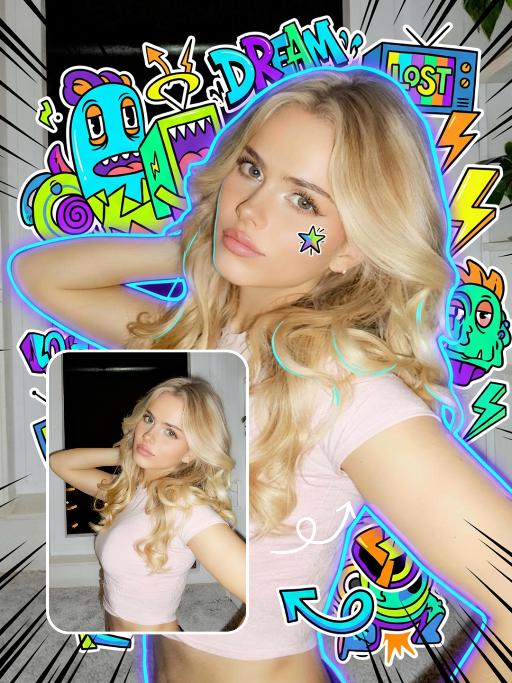
Expand the uploaded image into a 3:4 2K ultra-high resolution size first. Then, add creative doodle content on the image: do not use fixed elements, but generate illustrative elements that match the visual theme you identify. If it is a cool/edgy style: use arrows, bolts, graffiti tags, distorted shapes, boomboxes, or abstract street art monsters. If it is a cute/sweet style: use unique characters, hearts, stars, candy, glitter effects, and rounded organic shapes. If a "fantasy" style is chosen: apply fluid lines, petals, celestial bodies, and magical swirl elements. Style of added elements: flat 2D vector graphics, bold outlines, sticker-like aesthetic. Vivid colors that contrast with or complement the realistic photo. Add a small amount of short, random, black, dynamic comic-style speed lines to the four corners of the frame. Add a cyber neon glowing effect around the character. Add a small doodle element to the character's face. Apply slight skin smoothing to the character, with a natural skin beautification effect. Change the face makeup to a realistic, popular, natural, and trendy Western style. The realistic character and realistic scene style remain unchanged.

Diwali AI effects generated image

Diwali

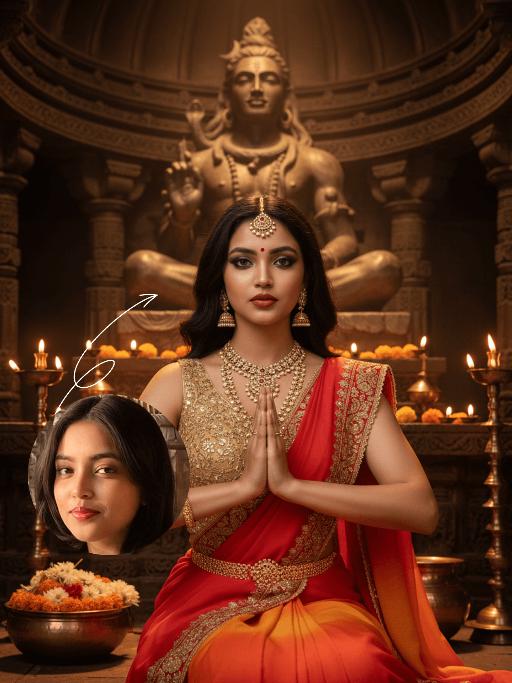
The identity of the uploaded portrait is strictly preserved (retaining facial contours, authentic Indian skin tone, hairstyle and age). This is a bust portrait that captures the original natural features of the Indian woman in the reference image: she has a delicate and fair face with a vermilion red bindi on her forehead and a colorful gemstone maang tikka adorning her brow, complemented by exquisitely elaborate eye makeup and full, vivid lip color, with a gentle and devout expression. She is dressed in a traditional sari with intricate golden embroidery, its edges adorned with elaborate patterns and paired with a matching headscarf; the overall color palette echoes the warm luminous ambiance of Diwali. Leaning forward gently, she places a lit brass oil lamp carefully with both hands, her gaze fixed intently on the wick, her expression serene and filled with reverence. Her face takes up a moderate proportion of the frame, allowing the delicate makeup details and her devout demeanor to be seen clearly. Set in an indoor space on Diwali night, the floor is covered with lit brass oil lamps, whose warm yellow candlelight casts a soft halo all around. The background is softly blurred to highlight the figure’s interaction with the oil lamp. With the warm glow of the oil lamps as the primary light source, the light gently outlines her facial contours and the textured details of her attire, creating a warm and tranquil festive atmosphere with rich, warm hues. Boasting 8K ultra-high definition resolution and commercial-grade portrait quality, the image features crisp, sharp details and rich color layering, emphasizing the theme of "light" in Diwali and the profound piety of the figure.

Motorcycle Boy AI effects generated image

Motorcycle Boy

Strict identity verification is performed using the uploaded avatar (maintaining consistency in facial features, hair, skin tone and age). A close-up shot is adopted, focusing on the upper body with the face positioned at a three-quarter angle. Create a realistic portrait of the man in the reference photo sitting on a sleek black sports motorcycle on a midnight street. The background features thick smoke illuminated by high-contrast lighting. He is wearing a loose black T-shirt with a striking white pattern, a black leather jacket, loose black leather pants and black leather boots. His accessories include a black wristwatch, trendy ring accessories and necklaces—a thin chain necklace layered with another chain. His right hand rests on the motorcycle, holding a clean, glossy black helmet with a clear visor. The motorcycle (a high-end, luxury model) is rich in intricate details, featuring a large engine, a sturdy frame and shiny chrome trimmings, which accentuate a modern and powerful impression. His expression is calm and confident as he stares directly at the camera. The overall style boasts a cinematic and fashionable feel, with ultra-high resolution, photorealistic detail, an editorial aesthetic, fashion photography sensibilities, a contemporary fashion portrait style and a high-fashion editorial photography style. The image features dramatic light and shadow contrast, well-defined chiaroscuro on the facial contours, professional studio lighting, trendy and stylish attire, and avant-garde fashion photography artistry.

Princess AI effects generated image

Princess

Strictly lock the facial features of the uploaded portrait (preserve facial contours, native Indonesian skin tone, hairstyle and age). Extreme close-up composition, maximum frame filling, the subject’s face and upper body completely fill the vertical frame with zero negative space above the head, seamless top edge; the crown of the head is slightly cropped to maximize the facial close-up. Strictly lock the facial features of the uploaded portrait (preserve facial contours, native Indonesian skin tone, hairstyle and age). Tight Bust Shot, hyper-realistic style, 4K ultra-high definition, soft diffused natural daylight (post-rain outdoor lighting), authentic Indonesian rural cultural festival atmosphere | An 8-10 year old Indonesian girl, facing the camera with a sweet and gentle smile, wearing a vibrant purple traditional Indonesian children’s top with blue, orange and green floral patterns, paired with a bright yellow fabric waist sash (only the upper edge visible), an exquisite gold embroidered brooch at the neckline, a sparkling silver mini tiara on her head, small delicate silver drop earrings, and her hair styled up with metallic feather-shaped hair ornaments. She stands on a wet dark gray stone-paved alley in a traditional Indonesian village, with the background (traditional wooden houses and lush tropical greenery) rendered with extreme bokeh blur to draw the visual focus entirely to her oversized facial close-up. Focus on her vivid and warm facial features, the rich texture of the traditional fabric, and the fresh, natural colors of the frame

Princess AI effects generated image

Princess

Strictly lock the facial features of the uploaded portrait (completely preserve facial contours, native skin tone, hairstyle and age); medium shot (bust-up), young girl with light golden long curly hair, Korean sweet style looks, delicate facial features with clear nude makeup and light pink blush, proud and elegant princess demeanor, sitting gracefully on an ornate throne with one hand resting lightly on the armrest and the other gently holding a delicate scepter/flower, head tilted slightly with a haughty yet gentle gaze; wearing a white strapless tulle dress with multi-layered flowing tulle skirt, delicate white lace embroidery and subtle pearl decorations, exuding a noble and dreamy fairy-tale princess aura; background is a magnificent and dreamy royal palace hall with towering marble columns, intricate golden carvings, soft warm chandelier light casting a glowing halo around her, sheer white tulle curtains fluttering gently, scattered rose petals on the marble floor, distant palace arches blurred into a soft bokeh effect, air filled with sparkling light particles; overall **dreamy fairy-tale + French retro + royal palace princess atmosphere photo, soft and ethereal ambient light, warm romantic film texture, high saturation dreamy tones, cinematic lighting with glowing rim light, motion blur (light particles/curtains), rich texture details, 8K ultra-clear, realistic human photography, flawless, full of magical and noble royal princess charm

Lens Heartbeat AI effects generated image

Lens Heartbeat

The uploaded figure (with unchanged facial features) forms a heart shape with both hands in front of the lens for a framed composition, featuring a shallow depth of field (the large, tilted hands in the foreground are slightly blurred). This is a portrait photoshoot in the ppgalclub style, with Japanese Shibuya Y2K fashion styling. Captured in a fisheye lens close-up (strong fisheye distortion with slight stretching at the frame edges) from a slightly low-angle perspective, the figure is centered to fill the entire frame. The figure has short, curly golden bob hair and bold makeup (thick black eyeliner + plump red lips + translucent pink-toned blush), leaning forward with the face facing the camera directly. The outfit includes a black leather vest with a fur collar, a white camisole, a red stud-embellished belt (with a cropped waist design), a golden cross necklace paired with multi-layered metal chokers, sequin-embellished nail art, pearl-encircled rings, and a small golden chain bag. The scene is set in a Shibuya underground passage at night, with dim artificial lighting and a high-intensity flash fired directly at the figure (creating stark light and shadow contrast, prominent highlights on the figure’s face, and a dark-toned background), plus blurred bokeh light spots in the background. The image features film grain texture, a highly saturated black/gold/red color scheme, and ultra-high-definition details; a black fisheye lens vignetting frames the entire image, and an orange vertical digital date watermark (2026:00:00) is added to the bottom right corner.

Load more

Next-Gen Multi-Model AI Video Architecture

Vivago AI isn't just one engine—it’s a unified hub for the world’s most advanced video AI. Whether you need cinematic realism or high-speed social content, we provide the right model for your creative vision.
Free Generate


Beauty and Dolphins

Vacation Time

Stellar Tear

Fish Tank Supervisor

Cinematic Quality & Precision Control

Enables 4K resolution with multi-lens motion control, generating delicate scene via text prompts for customized cinematography.​

TRY NOW

Dynamic AV Sync

Auto-generates original audio to avoid copyright issues. Build 3D immersive environments through layered sound design automatically.

TRY NOW

OpenAI Sora 2

​Advanced visual storytelling with unparalleled physics and consistency.

TRY NOW

Kling v2.6 Pro

Industry-leading cinematic image animation and motion control.

TRY NOW

Google Veo 3 & 3.1

Ultra-fast generation with enhanced realism for creative workflows.

TRY NOW

Vivago AI 2.0

Our proprietary model optimized for efficiency, speed, and cost-effective generation.
TRY NOW

Users' Voice

We listen carefully to the opinions of every user.
Free Generate
Contact Us
I tried the Lip Sync feature inside Vivago.ai’s AI Video Generator for my educational podcast, and the results were stunning! The avatar's lip movements perfectly matched my audio recording, creating a professional AI-generated video without complex editing. Compared with tools like OpenAI Sora 2 and Google Veo 3.1, Vivago Image-to-Video delivers fast, studio-quality results online. It saved me hours of post-production work.
ElenaM (Spain)
Vivago’s Image-to-Video AI transformed my marketing workflow. I uploaded a product image and described the launch scene in text, and it generated a 10-second cinematic AI video with background music and dynamic visuals. The output quality rivals Kling v2.6 Pro and Google Veo 3 Fast. It’s now my go-to AI video generator for social media ads and product campaigns.
KenjiT (Japan)
As a digital artist, I use Vivago.ai 2.0 daily for Image-to-Image and AI Image-to-Video creation. The e-book covers and animated visuals I generate for clients look cinematic and professional. Unlike many standalone AI tools, Vivago integrates multiple leading models into one platform, making it easier to create copyright-safe AI images and videos for publishing.
ChenL (China)
I tried the Lip Sync feature inside Vivago.ai’s AI Video Generator for my educational podcast, and the results were stunning! The avatar's lip movements perfectly matched my audio recording, creating a professional AI-generated video without complex editing. Compared with tools like OpenAI Sora 2 and Google Veo 3.1, Vivago Image-to-Video delivers fast, studio-quality results online. It saved me hours of post-production work.
ElenaM (Spain)
Vivago’s Image-to-Video AI transformed my marketing workflow. I uploaded a product image and described the launch scene in text, and it generated a 10-second cinematic AI video with background music and dynamic visuals. The output quality rivals Kling v2.6 Pro and Google Veo 3 Fast. It’s now my go-to AI video generator for social media ads and product campaigns.
KenjiT (Japan)
As a digital artist, I use Vivago.ai 2.0 daily for Image-to-Image and AI Image-to-Video creation. The e-book covers and animated visuals I generate for clients look cinematic and professional. Unlike many standalone AI tools, Vivago integrates multiple leading models into one platform, making it easier to create copyright-safe AI images and videos for publishing.
ChenL (China)
I absolutely love Vivago’s AI Image-to-Video Generator. As a travel blogger, static images often fail to capture real atmosphere, but Vivago helps me turn photos into vivid cinematic AI videos with motion effects. It feels comparable to OpenAI Sora 2 and Google Veo 3.1, but more accessible and faster for creators who need high-quality AI videos online.
LiamK (Australia)
I tried the Lip Sync feature inside Vivago.ai’s AI Video Generator for my educational podcast, and the results were stunning! The avatar's lip movements perfectly matched my audio recording, creating a professional AI-generated video without complex editing. Compared with tools like OpenAI Sora 2 and Google Veo 3.1, Vivago Image-to-Video delivers fast, studio-quality results online. It saved me hours of post-production work.
ElenaM (Spain)
Vivago’s Image-to-Video AI transformed my marketing workflow. I uploaded a product image and described the launch scene in text, and it generated a 10-second cinematic AI video with background music and dynamic visuals. The output quality rivals Kling v2.6 Pro and Google Veo 3 Fast. It’s now my go-to AI video generator for social media ads and product campaigns.
KenjiT (Japan)
As a digital artist, I use Vivago.ai 2.0 daily for Image-to-Image and AI Image-to-Video creation. The e-book covers and animated visuals I generate for clients look cinematic and professional. Unlike many standalone AI tools, Vivago integrates multiple leading models into one platform, making it easier to create copyright-safe AI images and videos for publishing.
ChenL (China)
I absolutely love Vivago’s AI Image-to-Video Generator. As a travel blogger, static images often fail to capture real atmosphere, but Vivago helps me turn photos into vivid cinematic AI videos with motion effects. It feels comparable to OpenAI Sora 2 and Google Veo 3.1, but more accessible and faster for creators who need high-quality AI videos online.
LiamK (Australia)
Using Vivago.ai’s Image-to-Video AI has greatly enhanced my classroom teaching. I transform textbook notes into historical AI videos with cinematic filters and dynamic animations. Compared with tools like Kling v2.6 Pro and Google Veo 3 Fast, Vivago offers faster generation and easier parameter control for educators who need reliable AI video creation.
RajivG (India)
I frequently create AI videos on Vivago and publish them on TikTok and YouTube Shorts. The AI video templates and trending content ideas help me produce viral-ready clips quickly. With Vivago’s integrated models—including advanced video engines similar to OpenAI Sora 2—I can generate anime-style and cinematic social media videos that drive high engagement.
MarieJ (Spain)
What attracts me most about Vivago.ai is not only the powerful AI Video Generator but also the active AIGC creator community. It combines AI Image-to-Video, Text-to-Video, and leading model integrations like Google Veo 3.1 into one creative platform.
TomW (India)
At first, I was hesitant about using AI video tools. But after trying Vivago Image-to-Video, I realized how easy it is to create professional AI-generated videos online. I just upload an image, add a short prompt, and adjust a few settings. The results are cinematic and copyright-safe, which is essential for commercial projects.
HectorC (Mexico)
Using Vivago.ai’s Image-to-Video AI has greatly enhanced my classroom teaching. I transform textbook notes into historical AI videos with cinematic filters and dynamic animations. Compared with tools like Kling v2.6 Pro and Google Veo 3 Fast, Vivago offers faster generation and easier parameter control for educators who need reliable AI video creation.
RajivG (India)
I frequently create AI videos on Vivago and publish them on TikTok and YouTube Shorts. The AI video templates and trending content ideas help me produce viral-ready clips quickly. With Vivago’s integrated models—including advanced video engines similar to OpenAI Sora 2—I can generate anime-style and cinematic social media videos that drive high engagement.
MarieJ (Spain)
What attracts me most about Vivago.ai is not only the powerful AI Video Generator but also the active AIGC creator community. It combines AI Image-to-Video, Text-to-Video, and leading model integrations like Google Veo 3.1 into one creative platform.
TomW (India)
At first, I was hesitant about using AI video tools. But after trying Vivago Image-to-Video, I realized how easy it is to create professional AI-generated videos online. I just upload an image, add a short prompt, and adjust a few settings. The results are cinematic and copyright-safe, which is essential for commercial projects.
HectorC (Mexico)