Image to Video

Transform manga to reality with this AI effect. See a stylized Rolls-Royce transition from bold ink lines to photorealistic Sydney. Watch comic textures dissolve into glossy car reflections and natural sunlight on iconic Opera House streets. AI-powered transformation generator for stunning visual storytelling.

Recreate
arrow

FAQs

How to generate images/videos from text prompts?

Describe the visual content in natural language (e.g., 'A cyberpunk cat wearing neon goggles') and our AI models will create outputs. Complex prompts trigger multi-stage NLP parsing for enhanced accuracy.

How to refine unsatisfactory results?

Use our Prompt Bot - an AI-powered optimizer that suggests technical modifiers. Simply describe your ideas, desired changes ('more metallic texture'), then you will get optimized prompt variants.

When should I use reference images?

Upload references to: 1) Guide character consistency (e.g., faces/outfits), 2) Control motion patterns in videos using our feature matching algorithm. Supports JPG/PNG

What's the credit system?

Daily login grants 100 credits. Upgrade options: 1) Premium Membership, 2) Credit Packs. Details: https://vivago.ai/subscribe

More From VIVAGO AI

Glam Dance

"Create an AI-generated image based on the provided reference image. The subject's appearance (facial features, hairstyle, clothing, and overall temperament) should remain unchanged, as provided by the user, and the background must stay identical to the one in the reference image without modification. The posture of the subject should closely resemble the gesture in reference image 2, with the following detailed description: both hands are fully open, raised to shoulder height, with the palms facing forward and fingers spread out towards the screen. The left hand is slightly raised, with fingers slightly curled, while the palm remains open. A small amount of yellow paint is applied, evenly spread across the palm and part of the fingertips. The right hand is positioned similarly to the left, slightly more parallel to the body, with less finger curvature, and the palm faces the screen. A small amount of red paint is applied, evenly spread across the palm and fingertips. The paint on both hands should be evenly applied and natural, without excess, maintaining a relaxed and natural gesture. The background should match the environment from the reference image. The resulting image should have a higher resolution and finer textures, ensuring the paint on the hands looks natural and not overdone, while maintaining an artistic and relaxed style."

Dance Softly

Strictly lock the subject identity from the reference image: preserve the original species, original identity, original face/facial structure, fur color or skin tone, markings/patterns, body proportions, age impression, gender vibe, eye color, ear/nose/mouth details, hairstyle or fur length and texture, and all unique recognizable traits. The generated result must remain instantly recognizable as the exact same subject from the reference image. Do not change the species, do not replace the subject with another person or another animal, do not lose likeness, do not replace the face. Only transform pose, clothing, accessories, environment, and cinematic presentation. Transform the subject into a full-body standing pose on top of a modern desktop, facing the camera, centered in frame, standing upright on both feet or hind legs, with both arms/front limbs slightly raised in a cute dancing, playful bouncing, or charming interactive pose. The expression should be soft, adorable, natural, and camera-facing. The overall mood should be cute, polished, healing, stylish, lightly anthropomorphic in pose only, while fully preserving the original species and recognizable appearance. Clothing rule must be strict: If the reference subject is a pet, animal, bird, or non-human creature, it must wear a cute full top and small pants/shorts/overalls/full little outfit. The outfit should be adorable, clean, stylish, modest, and properly fitted to the subject’s body. No nudity, no exposed private areas, no bare body presentation, no “only accessories without clothing.” Prefer soft colors such as cream, blush pink, light gray, beige. Keep the outfit simple and refined, and do not hide the subject’s key facial features or recognizable traits. If the reference subject is a human, keep them in a tasteful, cute, clean, stylish full outfit that matches the same adorable desk-setup aesthetic, with no revealing clothing and no identity distortion. Add a pair of soft pink glowing cat-ear over-ear headphones. The headphones should feel premium, dreamy, cute, slightly futuristic, and fashionable, with subtle clean glow accents. Do not let the headphones cover the eyes, face, or key recognizable features. Environment: place the subject in a premium modern computer desk setup scene. The subject stands on the center of the desk, with a large monitor behind them showing a dark or black screen. Add a clean keyboard, elegant small tech accessories, optional crystal or glass decorative objects, and a tidy minimalist desktop environment. The overall atmosphere should be clean, stylish, luxurious, soft, cozy, social-media-friendly, streamer/gaming desk aesthetic. Use a palette of cream white, soft gray, blush pink, and silver, with a gentle feminine tech vibe and minimalist premium styling. Composition: vertical 9:16, full-body visible, no cropping of feet, head, ears, or limbs, subject centered, slightly low-angle or subtly upward eye-level perspective to enhance the cute standing pose. Use shallow depth of field, with the subject sharp and crisp, and the background softly blurred while still readable as a premium desk setup. Lighting and rendering: use soft studio lighting, clear facial illumination, refined body contour light, highly realistic fur/skin/clothing/material textures. The overall style should be ultra detailed, photorealistic, cinematic, high-end commercial quality, cute but realistic. Quality tags: ultra detailed, photorealistic, realistic fur or skin texture, detailed clothing fabric, premium accessories, soft studio lighting, soft shadows, cinematic realism, adorable aesthetic, high-end commercial render, clean luxury desk setup. Style emphasis keywords: same subject, same species, identity preserved, original appearance locked, cute standing pose, playful dance pose, pink glowing cat-ear headphones, pets wearing a cute top and small pants, full outfit, premium computer desk setup, monitor background, minimalist luxury desktop, soft studio lighting, realistic kawaii aesthetic, healing and polished visual style. English Negative Prompt: do not change species, do not replace the subject with another person or another animal, no face replacement, no identity loss, no lost markings, no wrong fur color, no wrong skin tone, no extra limbs, no extra heads, no deformed anatomy, no fused limbs, no asymmetrical eyes, no distorted ears, no face collapse, no blur, no low resolution, no body crop, no messy background, no dirty desk, no horror, no uncanny expression, no excessive cartoon style, no nudity, no exposed private areas, no bare pet body, no accessories-only styling, no overly short clothes, no visible sensitive parts, do not let the headphones block the eyes or key facial features, no watermark, no text, no logo, no overexposure, no underexposure.

Christmas Card

Warm Christmas living room background: A fireplace glowing with warm light, a Christmas tree decorated with fairy lights and gifts, a beige sofa and coffee table, all bathed in soft, warm lighting. In the foreground, a pair of hands holds a holographic 3D Christmas greeting card (with a subtle glowing effect). Exquisite greeting card details: Framed with golden embossed patterns, the bottom is adorned with white Christmas elements (wooden cabins, cedar trees, reindeer, snowflakes). Inside the card, the uploaded character’s facial features remain unchanged in a holographic 3D form—dressed in a red velvet Christmas coat trimmed with white fluff and a Santa hat, holding a golden gift box tied with a red bow, and surrounded by a warm yellow halo. Background text design: A large piece of golden handwritten art that reads Merry Christmas sits in the background, decorated with snowflake and star patterns around it, featuring a metallic three-dimensional texture and a sophisticated artistic design. Overall visual effects: Added glowing particle effects, 8K ultra-realistic quality, warm color palette (red/gold/off-white), clear textures (velvet, glossy finish, holographic transparency), soft light and shadow, creating a cozy Christmas atmosphere. The image exudes a sense of sophistication, design, artistic flair, and cinematic texture.

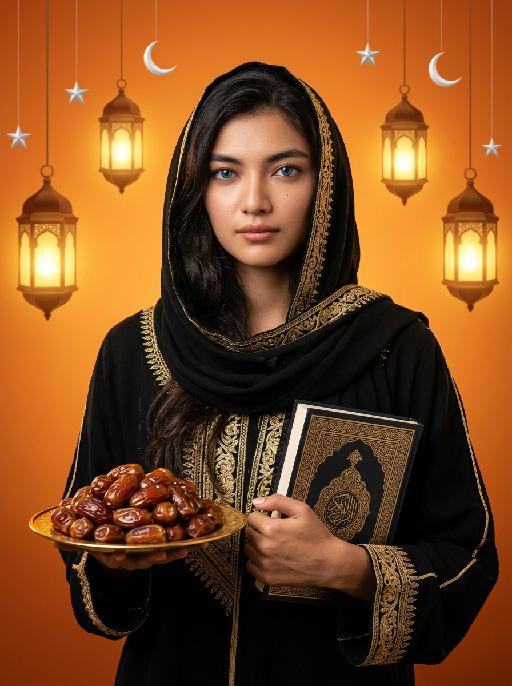
Dates&Quran AI effects generated image

Dates&Quran

Maintain the exact same facial features, gender, and age as the person in the uploaded image. Elegant black abaya with intricate gold embroidery along edges, cuffs, and headscarf border. Long dark hair partially covered by black headscarf, striking blue eyes, soft natural makeup. Slightly sideways standing pose, gaze directed straight at the camera with extreme piety and reverence, soft devout expression, as if in quiet prayer or contemplation. One hand holds a golden plate filled with plump, glossy dates; the other hand rests gently on a decorated Quran with elaborate Islamic geometric and floral patterns. Background: warm gradient orange, hanging ornate glowing Arabic lanterns (fanous), scattered white crescent moon and silver stars. Cinematic warm lighting, soft golden glow, high contrast, detailed textures, 8K photorealistic portrait, elegant and serene, deeply reverent atmosphere.

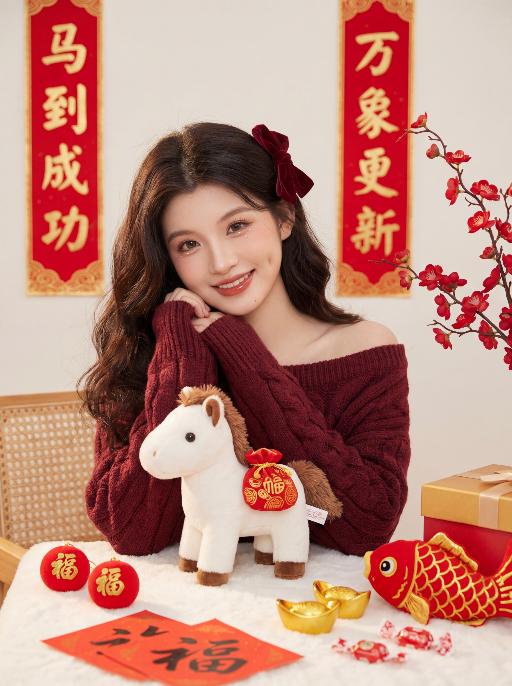
Joyous AI effects generated image

Joyous

Core Character: Zero deviation from uploaded facial features (contours, eyes, lips, youthful look); young East Asian sweet girl, half-body sitting (elbows on table, body slightly right-tilted, head gently tilted), sweet smile with shallow dimples, looking directly at the camera; white plush pony (brown mane, red pouch with golden patterns) placed on the table, natural and lively posture. Makeup: Flawless "born-perfect" base makeup; brownish-black wild eyebrows; earth-tone eye makeup + teardrop-shaped pearlescent under-eye highlights + sunflower-like curled long lashes; peach blush; mirror-finish reddish-brown lip glaze with highlighter on cupid’s bow; clean and light, no heavy texture. Hairstyle & Accessories: Voluminous dark brown loose waves; a burgundy velvet bow fixed slightly to the right of the top of the head. Clothing: Burgundy chunky cable-knit off-shoulder sweater, loose and slouchy, wide cuffs, waist-length. Props: White fluffy tablecloth; red balls printed with golden 福 characters, golden ingots, red fish plush toy with golden scales, red paper with handwritten 福 characters, red and white candies, corner of a red and gold gift box. Background: Traditional Chinese New Year scene, off-white matte wall; a red vertical couplet with golden borders (马到成功) hangs on the left side of the character, and another red vertical couplet with golden borders (万象更新) hangs on the right side—positions fixed, no character modifications allowed; red plum blossom branch on the right of the couplets, edge of a rattan chair on the left of the couplets; strong festive vibe, clean background. Lighting & Atmosphere: Soft warm natural light from the front side, no harsh shadows, highlighting textures; color palette of red, gold and off-white; festive, warm and healing, full of Year of the Horse charm. Image Quality: 8K ultra HD, photorealistic, ultra-detailed, film texture, noise-free, clear and transparent 负向提示词: Do not modify the content of the couplet characters, do not make typos, do not add or delete any strokes, do not use cursive script, do not use blurry fonts, do not distort the characters, do not add extra text, do not change the positions of the couplets, do not alter any characters in "马到成功" and "万象更新", do not cartoonize the characters, and do not artistically deform the characters.

Horse Year AI effects generated image

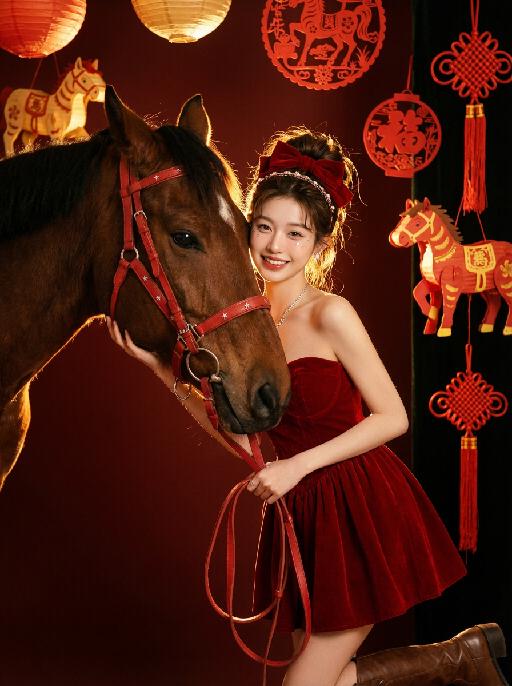
Horse Year

Medium and long shot: The image in the uploaded picture (with unchanged facial features, gender and age, with hair coiled and wearing a red bow and hairband ornaments) is located on the right side of the frame, while the side head of a brown thoroughbred horse is on the left side. This work presents a sweet and dreamy theme characteristic of the Chinese Year of the Horse. The picture has a delicate film texture, with some exquisite and high-end decorations from indoor shooting, a thick festive atmosphere (paper lanterns, red paper cuttings, horse-year lanterns, Chinese knots, etc.) in the background; Color: Using professional indoor lighting, high-contrast warm light illuminates the face of the person and the side head of the horse, the highlighted hair light (contour light) forms a golden halo at the edge of the hair, the color is clean and bright, the horse contrasts strongly with the richly saturated white background, the light contrast is intense, creating a dreamy and warm atmosphere, with a fashionable and avant-garde photography artistic atmosphere; Color: The main color is a low-saturation clean dark red background, the horse, red leather (horses' reins, stars on the dress), low-saturation, high-quality and warm harmonious colors; Shooting angle: Horizontal perspective, the camera is at the same level as the face of the person in the uploaded picture and the side head of the horse, creating a natural and friendly interaction feeling; Character posture: The body slightly tilts towards the camera, holding a red leather strap in hand, the upper body gently leans against the brown horse, the head is close to the horse's face, with a sweet and brilliant smile, looking straight at the camera, the arms are naturally placed in front of the body, the posture is relaxed and intimate; Clothing: A high-end custom-designed red velvet strapless dress, wearing small and exquisite hair ornaments, around the eyes there is a delicate silver star powder makeup, wearing exquisite high-end custom accessories, wearing retro brown leather boots, fashionable and avant-garde, exquisite and elegant; The authenticity, artistry of the film, film-level ultra-high-definition 8K image quality, fashion magazine style, photography pioneer fashion artistic style, top lighting effects.

Goofy AI effects generated image

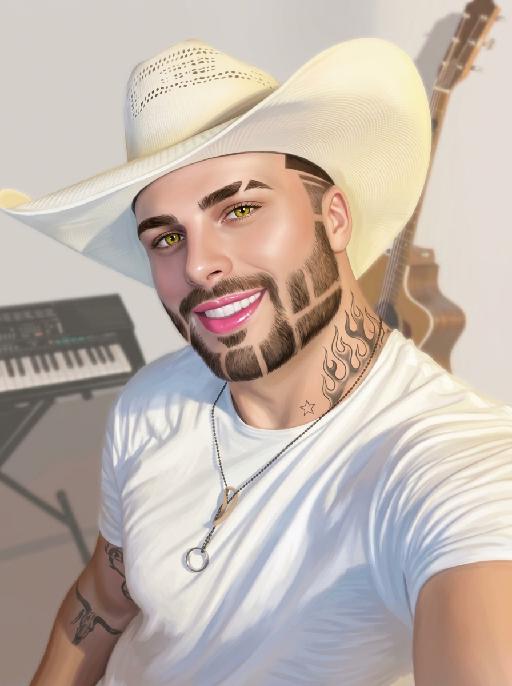
Goofy

The person's skin has a porcelain-like smoothness with a photo-retouching effect. The posture and facial features of the person in the uploaded picture remain unchanged (the posture is consistent, the hairstyle and clothing have not been modified, the hairstyle and clothing remain the same, and the picture background has not been altered). However, the triangular incision at the hairline + side straight shaving lines, sharp eyebrows + obvious broken eyebrows (with a mid-section cut-off gap) design, and also neat gaps with cut segments on the beard; the overall style of the entire picture has transformed into a portrait style that combines 60% digital painting style and 40% real photography style. The person's skin is as smooth and flawless as porcelain, having undergone deep beauty treatment. The eyes are gold-green contact lenses, the lips are painted with shiny pink lipstick, there is a tribal flame tattoo on the neck, and a small star tattoo on the collarbone. The background is the same as the original picture, with a bright filter added, presenting a low saturation and blurry effect, 8K resolution, and beautiful Instagram filter effect. The lines are simple and smooth, with a low overall contrast, a plain style but with bright and rich colors.

Samba

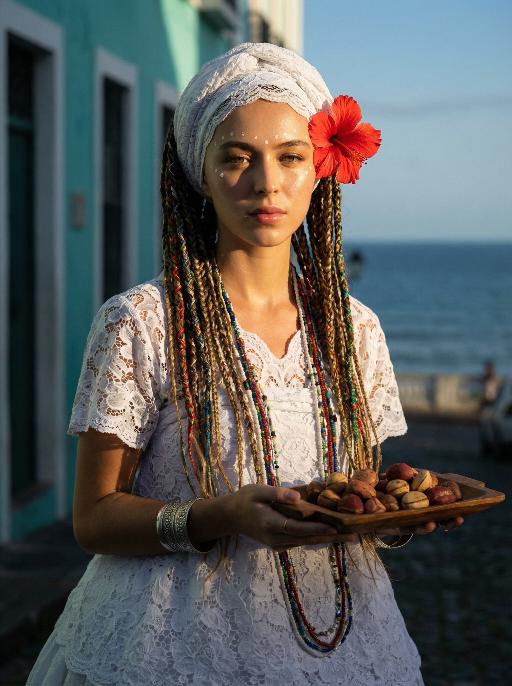
The image of a Brazilian samba dancer, with the same facial features, gender and age as in the uploaded picture. Fair and healthy skin, well-defined and exquisite facial features, thick black long curly hair, vibrant Carnival makeup, red lip with sequins; wearing classic Brazilian Carnival samba costume, in green, yellow and blue colors of the Brazilian flag, sequin feather bikini top, colorful fringed maxi skirt, golden feather headwear, metal waist chain accessory; dynamic samba dance posture, twisting waist and hips, flowing skirt, extended arms, dynamic vitality, graceful body lines; the background is the Rio Carnival scene, colorful floats, tropical palm trees, warm yellow stage lights. No other people should appear except the main figure. 8K ultra-high definition, realistic photography, cinematic texture, rich details, clear skin texture, high saturation colors, side backlighting to outline the outline, commercial blockbuster texture.

Load more

Next-Gen Multi-Model AI Video Architecture

Vivago AI isn't just one engine—it’s a unified hub for the world’s most advanced video AI. Whether you need cinematic realism or high-speed social content, we provide the right model for your creative vision.

Free Generate

Beauty and Dolphins

Vacation Time

Stellar Tear

Fish Tank Supervisor

Cinematic Quality & Precision Control

Enables 4K resolution with multi-lens motion control, generating delicate scene via text prompts for customized cinematography.​

TRY NOW

Dynamic AV Sync

Auto-generates original audio to avoid copyright issues. Build 3D immersive environments through layered sound design automatically.

TRY NOW

OpenAI Sora 2

​Advanced visual storytelling with unparalleled physics and consistency.

TRY NOW

Kling v2.6 Pro

Industry-leading cinematic image animation and motion control.

TRY NOW

Google Veo 3 & 3.1

Ultra-fast generation with enhanced realism for creative workflows.

TRY NOW

Vivago AI 2.0

Our proprietary model optimized for efficiency, speed, and cost-effective generation.

TRY NOW

Users' Voice

We listen carefully to the opinions of every user.
Free Generate
Contact Us
I tried the Lip Sync feature inside Vivago.ai’s AI Video Generator for my educational podcast, and the results were stunning! The avatar's lip movements perfectly matched my audio recording, creating a professional AI-generated video without complex editing. Compared with tools like OpenAI Sora 2 and Google Veo 3.1, Vivago Image-to-Video delivers fast, studio-quality results online. It saved me hours of post-production work.
ElenaM (Spain)
Vivago’s Image-to-Video AI transformed my marketing workflow. I uploaded a product image and described the launch scene in text, and it generated a 10-second cinematic AI video with background music and dynamic visuals. The output quality rivals Kling v2.6 Pro and Google Veo 3 Fast. It’s now my go-to AI video generator for social media ads and product campaigns.
KenjiT (Japan)
As a digital artist, I use Vivago.ai 2.0 daily for Image-to-Image and AI Image-to-Video creation. The e-book covers and animated visuals I generate for clients look cinematic and professional. Unlike many standalone AI tools, Vivago integrates multiple leading models into one platform, making it easier to create copyright-safe AI images and videos for publishing.
ChenL (China)
I tried the Lip Sync feature inside Vivago.ai’s AI Video Generator for my educational podcast, and the results were stunning! The avatar's lip movements perfectly matched my audio recording, creating a professional AI-generated video without complex editing. Compared with tools like OpenAI Sora 2 and Google Veo 3.1, Vivago Image-to-Video delivers fast, studio-quality results online. It saved me hours of post-production work.
ElenaM (Spain)
Vivago’s Image-to-Video AI transformed my marketing workflow. I uploaded a product image and described the launch scene in text, and it generated a 10-second cinematic AI video with background music and dynamic visuals. The output quality rivals Kling v2.6 Pro and Google Veo 3 Fast. It’s now my go-to AI video generator for social media ads and product campaigns.
KenjiT (Japan)
As a digital artist, I use Vivago.ai 2.0 daily for Image-to-Image and AI Image-to-Video creation. The e-book covers and animated visuals I generate for clients look cinematic and professional. Unlike many standalone AI tools, Vivago integrates multiple leading models into one platform, making it easier to create copyright-safe AI images and videos for publishing.
ChenL (China)
I absolutely love Vivago’s AI Image-to-Video Generator. As a travel blogger, static images often fail to capture real atmosphere, but Vivago helps me turn photos into vivid cinematic AI videos with motion effects. It feels comparable to OpenAI Sora 2 and Google Veo 3.1, but more accessible and faster for creators who need high-quality AI videos online.
LiamK (Australia)
I tried the Lip Sync feature inside Vivago.ai’s AI Video Generator for my educational podcast, and the results were stunning! The avatar's lip movements perfectly matched my audio recording, creating a professional AI-generated video without complex editing. Compared with tools like OpenAI Sora 2 and Google Veo 3.1, Vivago Image-to-Video delivers fast, studio-quality results online. It saved me hours of post-production work.
ElenaM (Spain)
Vivago’s Image-to-Video AI transformed my marketing workflow. I uploaded a product image and described the launch scene in text, and it generated a 10-second cinematic AI video with background music and dynamic visuals. The output quality rivals Kling v2.6 Pro and Google Veo 3 Fast. It’s now my go-to AI video generator for social media ads and product campaigns.
KenjiT (Japan)
As a digital artist, I use Vivago.ai 2.0 daily for Image-to-Image and AI Image-to-Video creation. The e-book covers and animated visuals I generate for clients look cinematic and professional. Unlike many standalone AI tools, Vivago integrates multiple leading models into one platform, making it easier to create copyright-safe AI images and videos for publishing.
ChenL (China)
I absolutely love Vivago’s AI Image-to-Video Generator. As a travel blogger, static images often fail to capture real atmosphere, but Vivago helps me turn photos into vivid cinematic AI videos with motion effects. It feels comparable to OpenAI Sora 2 and Google Veo 3.1, but more accessible and faster for creators who need high-quality AI videos online.
LiamK (Australia)
Using Vivago.ai’s Image-to-Video AI has greatly enhanced my classroom teaching. I transform textbook notes into historical AI videos with cinematic filters and dynamic animations. Compared with tools like Kling v2.6 Pro and Google Veo 3 Fast, Vivago offers faster generation and easier parameter control for educators who need reliable AI video creation.
RajivG (India)
I frequently create AI videos on Vivago and publish them on TikTok and YouTube Shorts. The AI video templates and trending content ideas help me produce viral-ready clips quickly. With Vivago’s integrated models—including advanced video engines similar to OpenAI Sora 2—I can generate anime-style and cinematic social media videos that drive high engagement.
MarieJ (Spain)
What attracts me most about Vivago.ai is not only the powerful AI Video Generator but also the active AIGC creator community. It combines AI Image-to-Video, Text-to-Video, and leading model integrations like Google Veo 3.1 into one creative platform.
TomW (India)
At first, I was hesitant about using AI video tools. But after trying Vivago Image-to-Video, I realized how easy it is to create professional AI-generated videos online. I just upload an image, add a short prompt, and adjust a few settings. The results are cinematic and copyright-safe, which is essential for commercial projects.
HectorC (Mexico)
Using Vivago.ai’s Image-to-Video AI has greatly enhanced my classroom teaching. I transform textbook notes into historical AI videos with cinematic filters and dynamic animations. Compared with tools like Kling v2.6 Pro and Google Veo 3 Fast, Vivago offers faster generation and easier parameter control for educators who need reliable AI video creation.
RajivG (India)
I frequently create AI videos on Vivago and publish them on TikTok and YouTube Shorts. The AI video templates and trending content ideas help me produce viral-ready clips quickly. With Vivago’s integrated models—including advanced video engines similar to OpenAI Sora 2—I can generate anime-style and cinematic social media videos that drive high engagement.
MarieJ (Spain)
What attracts me most about Vivago.ai is not only the powerful AI Video Generator but also the active AIGC creator community. It combines AI Image-to-Video, Text-to-Video, and leading model integrations like Google Veo 3.1 into one creative platform.
TomW (India)
At first, I was hesitant about using AI video tools. But after trying Vivago Image-to-Video, I realized how easy it is to create professional AI-generated videos online. I just upload an image, add a short prompt, and adjust a few settings. The results are cinematic and copyright-safe, which is essential for commercial projects.
HectorC (Mexico)