Dance

Give your photo viral AI dance moves. Try this AI dance effect free – upload any photo on Vivago AI.

Use Template
arrow

FAQs

What are Effect Templates?

Effect Templates are predefined AI workflows that automatically transform static images into specific visual styles or animated formats, delivering consistent, high-quality results without manual adjustments.

How do I apply Effect Templates?

Select your preferred template > Upload an image > Generate. No text prompts required - templates handle all style parameters.

Where can I find more templates?

Explore 1000+ curated templates in our Explore Hub: https://vivago.ai/studio. New templates added weekly across categories.

What's the pricing?

Daily login grants 100 free credits. Exhausted credits? Choose: 1) Subscribe a membership plan, 2) Get a credit pack. Details: https://vivago.ai/subscribe

More From VIVAGO AI

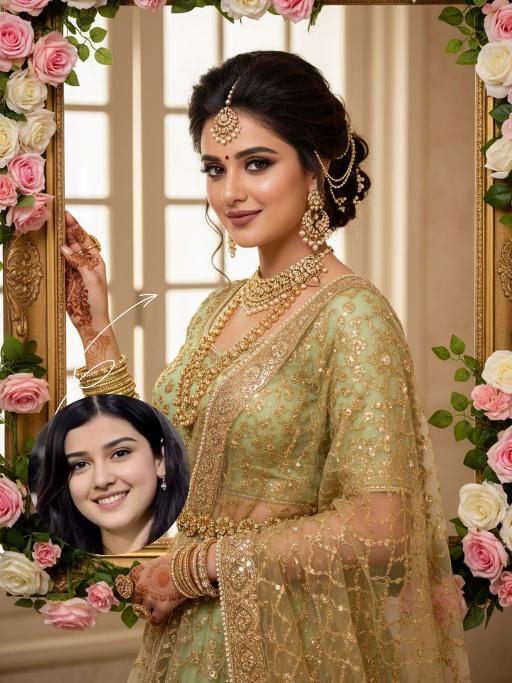
Blossom Queen AI effects generated image

Blossom Queen

"The identity of the uploaded portrait is strictly preserved (retaining facial contours, authentic Indian skin tone, hairstyle and age). This is a bust portrait with a 3:4 aspect ratio, featuring a stunning Indian bride with exquisitely delicate makeup: deep defined eye makeup paired with a matte bean paste red lip, and a red crystal bindi adorned on her forehead. Her hair is styled into a vintage voluminous updo dotted with golden beading, and an ornate maang tikka inlaid with pearls and micro-diamonds sits atop her head. She is dressed in a fresh light-luxury teal Lehenga Choli: the blouse is a slim-fit short-sleeve style fully embellished with intricate golden heavy hand-embroidery and tiny crystal accents, edged with a delicate pearl trim. A golden tulle dupatta is draped over her shoulders and back, emanating a soft inherent luster; a matching golden carved waist chain cinches her waist. Around her neck, she wears layered gold beaded necklaces, with dangling openwork gold earrings at her ears, and more than ten layers of golden bangles and rings adorning her hands. She strikes an elegant pose, lifting one hand to gently brush the edge of a golden photo frame, her eyes looking softly at the camera. The backdrop features a large vintage carved golden photo frame encircled by pink-and-white gradient roses and fresh green vines, set against a soft indoor space where natural light filtering through the window lattice creates a bright and fresh atmosphere. Soft natural lighting is adopted: warm-toned light illuminates the bride’s face and attire, highlighting the luster of the embroidery and the translucency of the tulle dupatta, crafting an overall romantic and fresh ambiance. The style is a light-luxury romantic Indian bridal portrait, boasting ultra-high definition and delicate details, fresh and soft hues, and rich, well-rounded textures that perfectly capture the dreamy and elegant atmosphere."

Darkroom Flash

Subject & Makeup: The figure from the uploaded image (unchanged facial features) with a cold and natural expression and a light, translucent makeup look; Shooting & Atmosphere: soft pink blush on the apples of the cheeks, nude pink lip gloss, long and curled false eyelashes, natural eyebrow shape; taking a selfie with a Canon retro point-and-shoot camera, with the camera’s flash shining directly into the lens (creating a distinct white lens flare), shot from a selfie perspective in front of an indoor mirror; a dim everyday room background (blurred furniture and decorations), a relaxed edgy-sweet portrait style, dark natural color tones, film photography texture, a retro natural film filter and film grain; Detail Embellishments: add an orange digital date watermark (2026.00.00) plus a small starburst decoration at the bottom right corner.

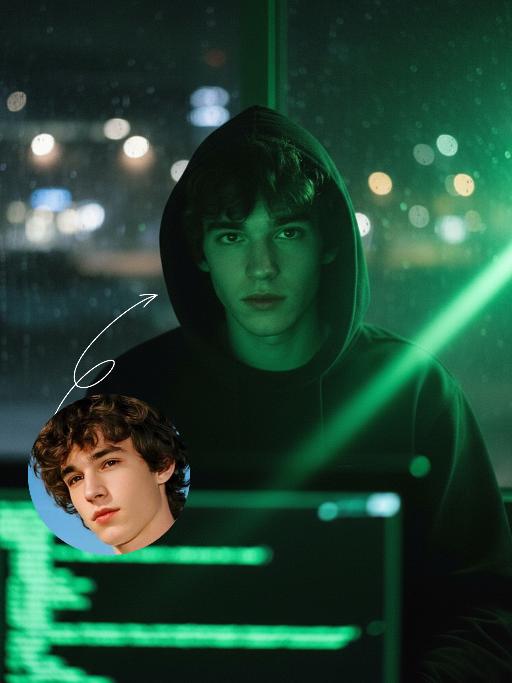
Hacker AI effects generated image

Hacker

A straight-on close-up headshot of the figure from the uploaded image (with unchanged facial features, age and gender), who sits centered and faces the camera directly, wearing a black hoodie with the hood up, their expression calm and focused. The figure’s face is cast in the green glow of code from a computer screen. A broad wash of soft, bright green side light slants in from the right side of the frame, creating a large-scale Tyndall effect that outlines their facial contours. The background features a blurred night view of the city in the rain outside the window (with traces of raindrops sliding down the glass), accompanied by warm bokeh lights; the foreground consists of a computer screen with glowing green code on it. Shot at eye level with a low-light, dark-toned palette, it embodies the dark-toned aesthetic of cyberpunk style. Main colors: black, blue-gray, neon green, low-saturation cool tones. Shallow depth of field blurs both the foreground and background, with the face in sharp focus. The work features an avant-garde fashion photography style, a film-like filter effect, and dramatic contrast between light and shadow.

Foot Star

" Strictly keep the same species, the same face, and all original appearance features of the reference image completely unchanged, with all clothing/equipment including the blue checkered Nike-sponsored jersey, white V-neck with red edges, ""90"" badge, silver necklace and earrings in the reference image retained 1:1 without any changes; Scene: Open-air stadium during the day, edge of the training ground, sunny community stadium; the character performs a seamlessly connected preparatory action before a volley shot, facing the direction of the incoming ball sideways with a lowered center of gravity, legs in a lunge pushing off the ground, core muscles tightened, arms naturally spread to maintain balance, ready to use the foot to kick the flying football hard into the distance, sweating profusely, looking straight ahead with firm and sharp eyes, focused and serious expression without a smile, professional football dynamic capture, 8K ultra-high definition, cinematic realistic lighting, full of sports tension, clearly capturing the leg pushing off ground trajectory and the moment of body weight shift, blurred background to highlight the subject, lush green stadium lawn, natural diffused sunlight, high detail and sharpness, real skin texture, professional sports portrait photography"

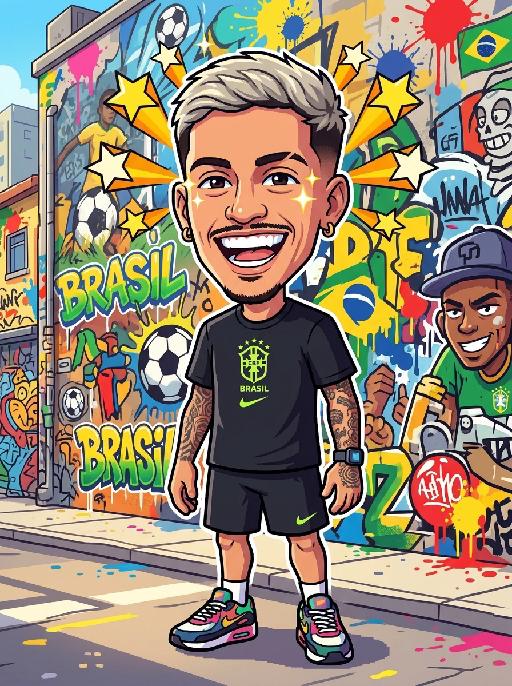
Ball Angel

Strictly maintain the same object, same species, same face and original appearance features in the reference picture completely unchanged, the clothes in the reference picture must also remain unchanged; if it is an animal, adopt an anthropomorphic upright standing posture, must wear cute clothes, no exposed private parts, but still must be recognized at a glance as the same object in the reference picture. Hyper-realistic photography, 8K HD, extremely detailed, natural lighting, cinematic feeling, slightly low-angle upward shot to appear taller, portrait composition, outdoor football stadium at night, Brazilian-style cheerleader, face facing the center of the frame, fair skin, long loose wavy hair, standing and dancing, full-body shot, outfit: green short-sleeve cropped navel-baring top with a complete and clear Brazilian flag pattern printed on the chest (green background with yellow rhombus, blue circle with white stars, "ORDEM E PROGRESSO" ribbon design), yellow high-waisted pleated mini skirt, white knee-high socks and white sneakers, a few colorful streamers scattered on the ground, clean stadium, no extra brand logos, text, watermarks, political symbols or sensitive markings, blurred background

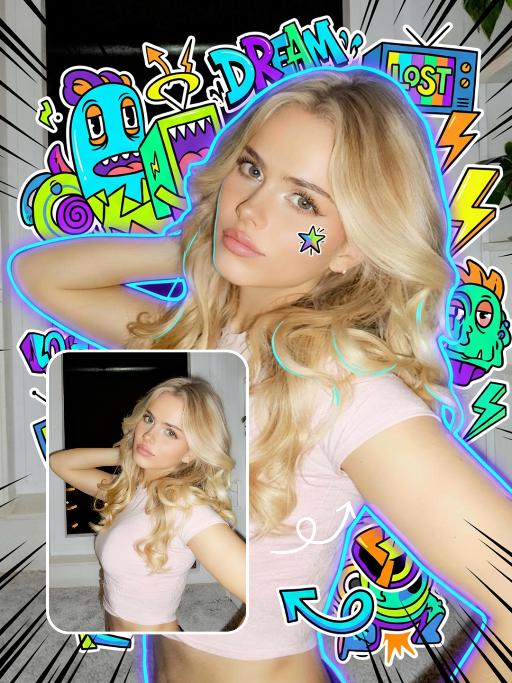
Trendy Stickers AI effects generated image

Trendy Stickers

Expand the uploaded image into a 3:4 2K ultra-high resolution size first. Then, add creative doodle content on the image: do not use fixed elements, but generate illustrative elements that match the visual theme you identify. If it is a cool/edgy style: use arrows, bolts, graffiti tags, distorted shapes, boomboxes, or abstract street art monsters. If it is a cute/sweet style: use unique characters, hearts, stars, candy, glitter effects, and rounded organic shapes. If a "fantasy" style is chosen: apply fluid lines, petals, celestial bodies, and magical swirl elements. Style of added elements: flat 2D vector graphics, bold outlines, sticker-like aesthetic. Vivid colors that contrast with or complement the realistic photo. Add a small amount of short, random, black, dynamic comic-style speed lines to the four corners of the frame. Add a cyber neon glowing effect around the character. Add a small doodle element to the character's face. Apply slight skin smoothing to the character, with a natural skin beautification effect. Change the face makeup to a realistic, popular, natural, and trendy Western style. The realistic character and realistic scene style remain unchanged.

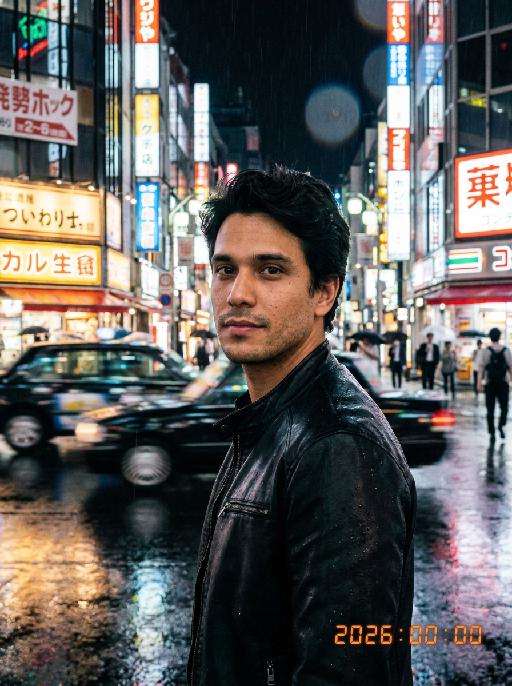
Men Pix AI effects generated image

Men Pix

Professional retro film-style portrait photography, with the first uploaded portrait used in the frame for strict identity consistency (unchanged facial features, hairstyle, skin tone and age). The figure has naturally delicate and handsome facial features with a flawless skin texture from natural retouching, paired with dramatic light and shadow contrast on the facial features, with clear and visible facial details without over-sharpening. In this street photography portrait, the figure is captured in a half-body shot standing at the center of a bustling city street on a rainy night (the vibrant night view of Tokyo’s busy thoroughfares), positioned right at the frame’s center, looking straight ahead with a confident gaze, striking a handsome and stylish male pose. The figure is dressed in a leather jacket. The traffic flow in the background (vehicles and pedestrians speeding by to create blurred dynamic streaks) and neon lights feature dynamic motion blur effects, with smudged texture overlays to enhance the narrative mood. The dim lighting boasts high contrast; the wet road surfaces reflect warm orange glows and cool-toned neon light, with soft bokeh spots cast by street lamps and car headlights. Color palette: based on black and white tones, the neon hues are processed with high saturation, dominated by dark shades to create a striking contrast between warm and cool tones. The image is enhanced with film grain texture, depth of field breakup details, cinematic black aesthetic, and ultra-realistic, ultra-fine textures, plus a lifelike effect of raindrops splattering on the lens. Shot with a slow shutter speed, a large aperture and a low shutter setting; an orange vertical digital date watermark (2026:00:00) is added to the bottom right corner.

Travelling pets

The features of the figure in the uploaded image remain unchanged (the animal stands fully upright on its hind legs with a vertical torso and forelimbs hanging naturally at its sides; the original animal’s species, facial features and texture details are strictly preserved). The animal is dressed in a well-fitted black jacket, a matching pair of khaki cropped pants, retro hiking boots, and also wears a bucket hat with black-rimmed windproof sunglasses. The background is replaced with the scene of the Golden Mountains bathed in sunlight in Western Sichuan, with a glistening lake in front of the mountains reflecting the golden peaks. The figure stands on the shore in front of the lake, in an ultra-realistic photography style that blends avant-garde and fashion-forward pet photography aesthetics.

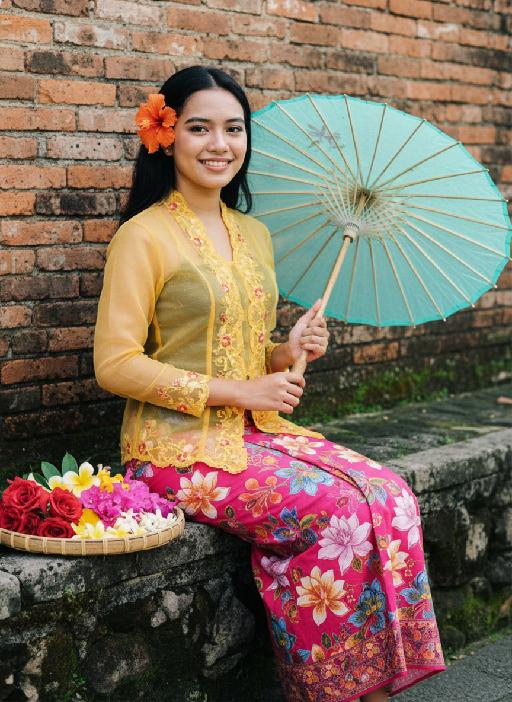
Parasol AI effects generated image

Parasol

Strictly lock the facial features of the uploaded portrait (preserve facial contours, native Indonesian skin tone, hairstyle and age). photorealistic full-body portrait of a glamorous 20-year-old Peranakan (Nyonya) woman, wearing a vibrant yellow sheer Kebaya with intricate floral embroidery on the collar and cuffs, paired with a bold pink batik sarong skirt with large colorful flower patterns. Her long wavy black hair is adorned with a bright orange hibiscus hairpin, and she wears dramatic makeup with long lashes. She sits on a weathered stone ledge against a rustic red brick wall, holding a translucent light blue-green oiled paper umbrella in one hand, with a woven bamboo tray filled with colorful flower blooms beside her. **Extra bright, crisp natural daylight with strong, even illumination**, the entire figure has a subtle, luminous pearlescent sheen on skin and fabric that catches the light, vivid and saturated colors, retro Nyonya aesthetic, 4:5 aspect ratio, cinematic texture

Load more

Next-Gen Multi-Model AI Video Architecture

Vivago AI isn't just one engine—it’s a unified hub for the world’s most advanced video AI. Whether you need cinematic realism or high-speed social content, we provide the right model for your creative vision.
Free Generate


Beauty and Dolphins

Vacation Time

Stellar Tear

Fish Tank Supervisor

Cinematic Quality & Precision Control

Enables 4K resolution with multi-lens motion control, generating delicate scene via text prompts for customized cinematography.​

TRY NOW

Dynamic AV Sync

Auto-generates original audio to avoid copyright issues. Build 3D immersive environments through layered sound design automatically.

TRY NOW

OpenAI Sora 2

​Advanced visual storytelling with unparalleled physics and consistency.

TRY NOW

Kling v2.6 Pro

Industry-leading cinematic image animation and motion control.

TRY NOW

Google Veo 3 & 3.1

Ultra-fast generation with enhanced realism for creative workflows.

TRY NOW

Vivago AI 2.0

Our proprietary model optimized for efficiency, speed, and cost-effective generation.
TRY NOW

Users' Voice

We listen carefully to the opinions of every user.
Free Generate
Contact Us
I tried the Lip Sync feature inside Vivago.ai’s AI Video Generator for my educational podcast, and the results were stunning! The avatar's lip movements perfectly matched my audio recording, creating a professional AI-generated video without complex editing. Compared with tools like OpenAI Sora 2 and Google Veo 3.1, Vivago Image-to-Video delivers fast, studio-quality results online. It saved me hours of post-production work.
ElenaM (Spain)
Vivago’s Image-to-Video AI transformed my marketing workflow. I uploaded a product image and described the launch scene in text, and it generated a 10-second cinematic AI video with background music and dynamic visuals. The output quality rivals Kling v2.6 Pro and Google Veo 3 Fast. It’s now my go-to AI video generator for social media ads and product campaigns.
KenjiT (Japan)
As a digital artist, I use Vivago.ai 2.0 daily for Image-to-Image and AI Image-to-Video creation. The e-book covers and animated visuals I generate for clients look cinematic and professional. Unlike many standalone AI tools, Vivago integrates multiple leading models into one platform, making it easier to create copyright-safe AI images and videos for publishing.
ChenL (China)
I tried the Lip Sync feature inside Vivago.ai’s AI Video Generator for my educational podcast, and the results were stunning! The avatar's lip movements perfectly matched my audio recording, creating a professional AI-generated video without complex editing. Compared with tools like OpenAI Sora 2 and Google Veo 3.1, Vivago Image-to-Video delivers fast, studio-quality results online. It saved me hours of post-production work.
ElenaM (Spain)
Vivago’s Image-to-Video AI transformed my marketing workflow. I uploaded a product image and described the launch scene in text, and it generated a 10-second cinematic AI video with background music and dynamic visuals. The output quality rivals Kling v2.6 Pro and Google Veo 3 Fast. It’s now my go-to AI video generator for social media ads and product campaigns.
KenjiT (Japan)
As a digital artist, I use Vivago.ai 2.0 daily for Image-to-Image and AI Image-to-Video creation. The e-book covers and animated visuals I generate for clients look cinematic and professional. Unlike many standalone AI tools, Vivago integrates multiple leading models into one platform, making it easier to create copyright-safe AI images and videos for publishing.
ChenL (China)
I absolutely love Vivago’s AI Image-to-Video Generator. As a travel blogger, static images often fail to capture real atmosphere, but Vivago helps me turn photos into vivid cinematic AI videos with motion effects. It feels comparable to OpenAI Sora 2 and Google Veo 3.1, but more accessible and faster for creators who need high-quality AI videos online.
LiamK (Australia)
I tried the Lip Sync feature inside Vivago.ai’s AI Video Generator for my educational podcast, and the results were stunning! The avatar's lip movements perfectly matched my audio recording, creating a professional AI-generated video without complex editing. Compared with tools like OpenAI Sora 2 and Google Veo 3.1, Vivago Image-to-Video delivers fast, studio-quality results online. It saved me hours of post-production work.
ElenaM (Spain)
Vivago’s Image-to-Video AI transformed my marketing workflow. I uploaded a product image and described the launch scene in text, and it generated a 10-second cinematic AI video with background music and dynamic visuals. The output quality rivals Kling v2.6 Pro and Google Veo 3 Fast. It’s now my go-to AI video generator for social media ads and product campaigns.
KenjiT (Japan)
As a digital artist, I use Vivago.ai 2.0 daily for Image-to-Image and AI Image-to-Video creation. The e-book covers and animated visuals I generate for clients look cinematic and professional. Unlike many standalone AI tools, Vivago integrates multiple leading models into one platform, making it easier to create copyright-safe AI images and videos for publishing.
ChenL (China)
I absolutely love Vivago’s AI Image-to-Video Generator. As a travel blogger, static images often fail to capture real atmosphere, but Vivago helps me turn photos into vivid cinematic AI videos with motion effects. It feels comparable to OpenAI Sora 2 and Google Veo 3.1, but more accessible and faster for creators who need high-quality AI videos online.
LiamK (Australia)
Using Vivago.ai’s Image-to-Video AI has greatly enhanced my classroom teaching. I transform textbook notes into historical AI videos with cinematic filters and dynamic animations. Compared with tools like Kling v2.6 Pro and Google Veo 3 Fast, Vivago offers faster generation and easier parameter control for educators who need reliable AI video creation.
RajivG (India)
I frequently create AI videos on Vivago and publish them on TikTok and YouTube Shorts. The AI video templates and trending content ideas help me produce viral-ready clips quickly. With Vivago’s integrated models—including advanced video engines similar to OpenAI Sora 2—I can generate anime-style and cinematic social media videos that drive high engagement.
MarieJ (Spain)
What attracts me most about Vivago.ai is not only the powerful AI Video Generator but also the active AIGC creator community. It combines AI Image-to-Video, Text-to-Video, and leading model integrations like Google Veo 3.1 into one creative platform.
TomW (India)
At first, I was hesitant about using AI video tools. But after trying Vivago Image-to-Video, I realized how easy it is to create professional AI-generated videos online. I just upload an image, add a short prompt, and adjust a few settings. The results are cinematic and copyright-safe, which is essential for commercial projects.
HectorC (Mexico)
Using Vivago.ai’s Image-to-Video AI has greatly enhanced my classroom teaching. I transform textbook notes into historical AI videos with cinematic filters and dynamic animations. Compared with tools like Kling v2.6 Pro and Google Veo 3 Fast, Vivago offers faster generation and easier parameter control for educators who need reliable AI video creation.
RajivG (India)
I frequently create AI videos on Vivago and publish them on TikTok and YouTube Shorts. The AI video templates and trending content ideas help me produce viral-ready clips quickly. With Vivago’s integrated models—including advanced video engines similar to OpenAI Sora 2—I can generate anime-style and cinematic social media videos that drive high engagement.
MarieJ (Spain)
What attracts me most about Vivago.ai is not only the powerful AI Video Generator but also the active AIGC creator community. It combines AI Image-to-Video, Text-to-Video, and leading model integrations like Google Veo 3.1 into one creative platform.
TomW (India)
At first, I was hesitant about using AI video tools. But after trying Vivago Image-to-Video, I realized how easy it is to create professional AI-generated videos online. I just upload an image, add a short prompt, and adjust a few settings. The results are cinematic and copyright-safe, which is essential for commercial projects.
HectorC (Mexico)