Text to Video

Create a hilarious AI-generated video of a sneaky rat roaring like a lion with sharp teeth, static wide shot, and smooth animation. Vivago.ai transforms text-to-video with dramatic lighting, black backgrounds, and playful AI effects for professional-grade visuals. Perfect for comical Metro-Goldwyn-Mayer parodies or exaggerated animal transformations.

Recreate
arrow

FAQs

How to generate images/videos from text prompts?

Describe the visual content in natural language (e.g., 'A cyberpunk cat wearing neon goggles') and our AI models will create outputs. Complex prompts trigger multi-stage NLP parsing for enhanced accuracy.

How to refine unsatisfactory results?

Use our Prompt Bot - an AI-powered optimizer that suggests technical modifiers. Simply describe your ideas, desired changes ('more metallic texture'), then you will get optimized prompt variants.

When should I use reference images?

Upload references to: 1) Guide character consistency (e.g., faces/outfits), 2) Control motion patterns in videos using our feature matching algorithm. Supports JPG/PNG

What's the credit system?

Daily login grants 100 credits. Upgrade options: 1) Premium Membership, 2) Credit Packs. Details: https://vivago.ai/subscribe

More From VIVAGO AI

Home Appliance

A realistic Instagram-style lifestyle photo. A model (man) faces the camera naturally, introducing a product at its true everyday scale. The product must always appear proportional to real-world use: small items (like a shaver or skincare bottle) are held naturally in one hand; medium items (like a laptop or backpack) are held with both hands, placed on a table, or on the lap; large items (like a refrigerator, washing machine, or furniture) are shown beside the model, with the model standing or sitting next to it, gesturing naturally. The model uses expressive gestures and a speaking expression (mouth slightly open as if explaining). Background is a realistic everyday setting (walk-in closet, bedroom, kitchen, street, or living room), clear and not blurred. Lighting is soft and natural, highlighting both the model and the product. The overall feel is candid, elegant, and Instagram-worthy.

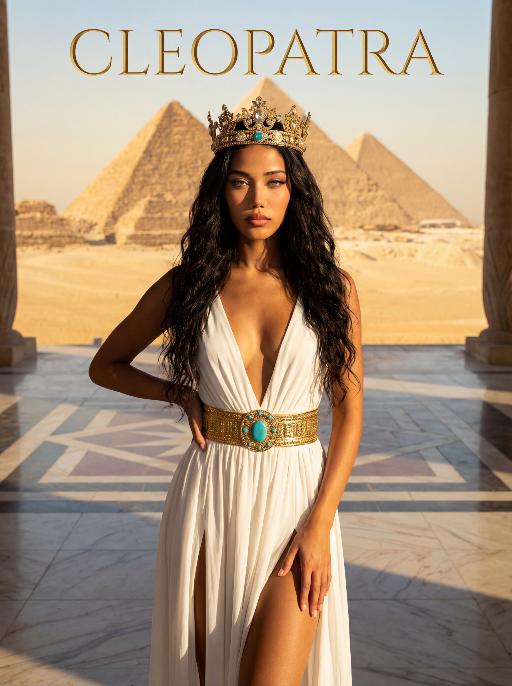
Pyramids AI effects generated image

Pyramids

The character in the uploaded picture (unchanged facial features, gender and age). A striking woman embodying the persona of Cleopatra, captured in a medium shot . She stands regally in an ancient Egyptian landscape, her body angled gracefully to accentuate her figure. One hand lightly brushes the flowing fabric of her gown, while the other rests gently on her hip, exuding a sense of poised elegance and allure. She has long, wavy black hair cascading in soft waves, her eyes wide open, head held high, radiating supreme confidence and regal authority. On her head, she wears an ornate golden Egyptian crown, adorned with intricate details and gemstones. She wears a flowing, form-fitting white gown with a deep V-neckline and high slits, cinched at the waist with a wide, ornate golden belt featuring a large turquoise gem at its center. The setting is the vast, sun-drenched desert of ancient Egypt, with the iconic Egyptian pyramids rising majestically in the distance against a clear, golden sky. The air is warm and hazy, with the desert sand stretching out to the horizon. The floor is a polished marble surface with a geometric pattern. Above her, the word "CLEOPATRA" is displayed in an elegant, golden, serif font. The image is rendered in a cinematic, epic historical drama style, with dramatic, high-contrast lighting that highlights the sheen of the golden crown and belt, the flowing texture of the white gown, and the stark beauty of the desert and pyramids. The color palette is rich and warm, featuring golden sands, deep blues of the sky, and the pure white of the gown, creating a timeless, majestic, and awe-inspiring atmosphere. The overall aesthetic is detailed, evocative, and reminiscent of a grand historical epic

Midnight Neon

Professional retro film-style portrait photography, with the first uploaded portrait used in the frame for strict identity consistency (unchanged facial features, hairstyle, skin tone and age). The figure’s face is naturally retouched for a flawless skin texture, paired with dramatic light and shadow contrast on the facial features. In this street photography portrait, the figure stands at the center of a bustling city street on a rainy night (the vibrant night view of Tokyo’s busy thoroughfares), captured in a close-up shot and positioned right at the frame’s center. The traffic flow in the background (vehicles and pedestrians speeding by to create blurred dynamic streaks) and neon lights feature dynamic motion blur effects, with smudged texture overlays to enhance the narrative mood. The dim lighting boasts high contrast; the wet road surfaces reflect warm orange glows and cool-toned neon light, with soft bokeh spots cast by street lamps and car headlights. Color palette: based on black and white tones, the neon hues are processed with high saturation, dominated by dark shades to create a striking contrast between warm and cool tones. The image is enhanced with film grain texture, depth of field breakup details, cinematic black aesthetic, and ultra-realistic, ultra-fine textures, plus a lifelike effect of raindrops splattering on the lens. Shot with a slow shutter speed, a large aperture and a low shutter setting; an orange vertical digital date watermark (2026:00:00) is added to the bottom right corner.

Santa Claus

The facial features of the uploaded character remain unchanged. The scene transitions with both camera rotation and stunning explosive magic element effects—incorporating dazzling special effects during the transition, including shimmering golden particles, brilliant golden explosive magic effects, falling snowflakes, and swirling red ribbons. After spinning rapidly on the spot, the character’s outfit transforms into a cool version of Santa Claus attire. The character beams with a happy smile, dressed in a classic red-and-white Christmas suit trimmed with white fluff, wearing black sunglasses, a Santa hat, and carrying a large-capacity Christmas backpack stuffed with gifts on the back. The character rides a retro cruising motorcycle (Harley-style) speeding from the distance to the front of the screen. The motorcycle boasts a deep burgundy color paired with a metallic chrome finish, with its wheels in a burnout state and white smoke billowing from the ground. Scene: A nighttime European-style urban street lined with vintage buildings and warm yellow street lamps. The background features blurred vehicles and pedestrians, with the lights creating a beautiful bokeh effect. Style & Texture: Ultra-realistic style with high details and strong light-shadow contrast. Dynamic blur enhances the sense of motion, and the fluffy texture of the clothing as well as the metallic luster of the motorcycle are depicted in exquisite detail. The overall style showcases cutting-edge fashion photography and avant-garde art, reaching a film-level realistic standard.

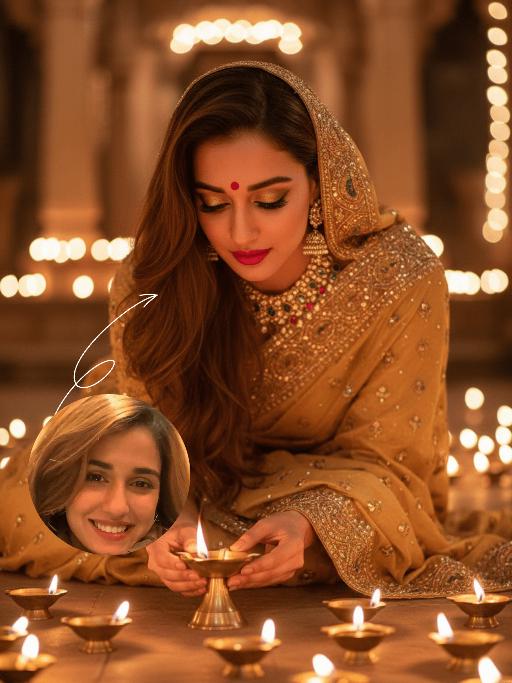
Diwali AI effects generated image

Diwali

The identity of the uploaded portrait is strictly preserved (retaining facial contours, authentic Indian skin tone, hairstyle and age). This is a bust portrait that captures the original natural features of the Indian woman in the reference image: she has a delicate and fair face with a vermilion red bindi on her forehead and a colorful gemstone maang tikka adorning her brow, complemented by exquisitely elaborate eye makeup and full, vivid lip color, with a gentle and devout expression. She is dressed in a traditional sari with intricate golden embroidery, its edges adorned with elaborate patterns and paired with a matching headscarf; the overall color palette echoes the warm luminous ambiance of Diwali. Leaning forward gently, she places a lit brass oil lamp carefully with both hands, her gaze fixed intently on the wick, her expression serene and filled with reverence. Her face takes up a moderate proportion of the frame, allowing the delicate makeup details and her devout demeanor to be seen clearly. Set in an indoor space on Diwali night, the floor is covered with lit brass oil lamps, whose warm yellow candlelight casts a soft halo all around. The background is softly blurred to highlight the figure’s interaction with the oil lamp. With the warm glow of the oil lamps as the primary light source, the light gently outlines her facial contours and the textured details of her attire, creating a warm and tranquil festive atmosphere with rich, warm hues. Boasting 8K ultra-high definition resolution and commercial-grade portrait quality, the image features crisp, sharp details and rich color layering, emphasizing the theme of "light" in Diwali and the profound piety of the figure.

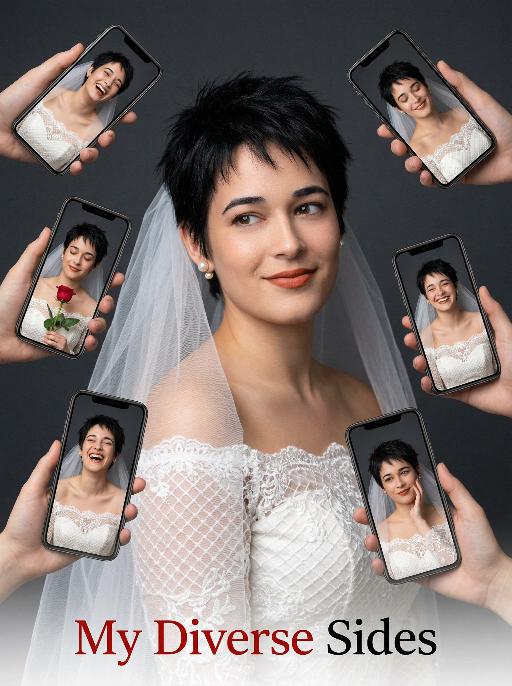
Diverse Faces AI effects generated image

Diverse Faces

Use the exact same facial features, gender, and age as the uploaded image. Hyper-realistic portrait photography, 8K resolution, high detail, clean minimalist aesthetic. A woman with short, spiky black hair, wearing a delicate off-shoulder white wedding dress with lace grid patterns and a sheer white veil. She has pearl stud earrings and warm terracotta lipstick, smiling gently while looking slightly to the side. Surrounding her, multiple hands hold smartphones (various iPhone models) that display different expressions and angles of her face: some show her laughing, some with closed eyes, with a red rose, others with varied joyful or pensive expressions, all in the same white wedding dress. The background is a smooth, matte dark charcoal gray studio backdrop, creating a strong contrast with the bright white sheer veil to make it stand out prominently. The lighting is soft and directional, with gentle highlights on the veil’s translucent texture to emphasize its delicate, airy appearance, while evenly illuminating the lace texture of the dress and her skin, focusing attention on the subject and the multi-screen collage effect. The overall atmosphere is playful, modern, and celebratory. Text at the bottom of the image: "My Diverse Sides", with the font color in red and black.

SereneNook

Shoot a 10-second (9:16) vertical one-take video showcasing a serene, sunlit indoor lounge area. The shot begins with a slightly elevated wide-angle view, presenting the entire scene: two wooden rocking chairs with beige cushions, a small side table with fruits and coffee cups, a floor lamp, and a large potted plant by the window. A young man in a simple white top and black pants enters the frame, holding a glass water jug. He walks to the table, bends down, and gently and steadily pours water into a small succulent plant on the table. After pouring, he straightens up, smiles slightly, and steps back to admire the scene. Natural light filters through sheer curtains into the room, casting soft shadows on the wooden floor and carpet. The camera remains stable for 10 seconds, smoothly capturing all actions in one continuous take, creating a warm, peaceful, and comfortable atmosphere. Add the sound of flowing water and soft background music to enhance the calm ambiance.

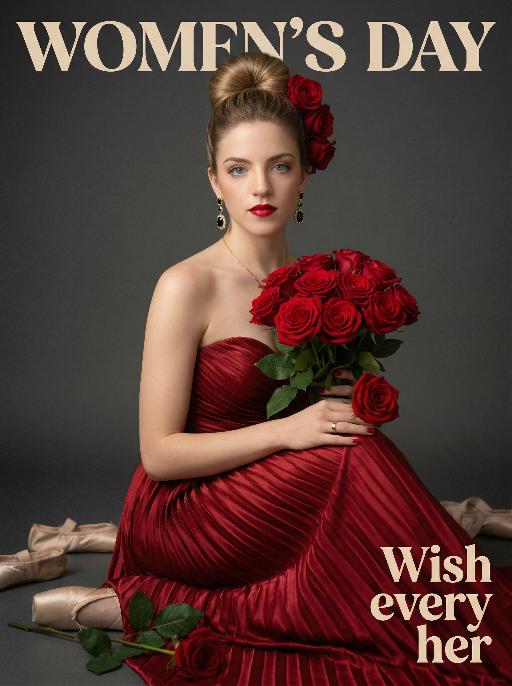
Queen AI effects generated image

Queen

Use the exact same facial features, gender, and age as the uploaded image.Hyper-realistic half-body portrait photography, cinematic lighting, 8K resolution, shallow depth of field, rich and warm color palette. her hair styled in an elegant high bun with a few red roses tucked into the side of her hair. She wears dangling gold earrings with black gemstones, a thin gold necklace, and a gold ring on her right hand. Her makeup is sophisticated, featuring bold red lipstick and defined eyes. She is dressed in a strapless, floor-length gown made of deep red pleated satin fabric, the texture of the folds is extremely detailed. She holds a lush bouquet of fully bloomed red roses with green leaves in her arms, one rose resting gently on her right hand. She sits gracefully, looking directly at the camera with a calm and alluring expression. The background is a smooth, matte dark gray studio backdrop. On the dark floor around her, there are scattered ballet pointe shoes and a single fallen rose with green leaves. The overall style is vintage and luxurious, with soft directional lighting highlighting the sheen of the satin and the velvety texture of the rose petals, creating a strong sense of drama and elegance..The text "WOMEN'S DAY" is displayed at the top in large, bold, stylized artistic font.The text "Wish every her" is positioned in the lower right corner in a complementary artistic font.

Forest Walk AI effects generated image

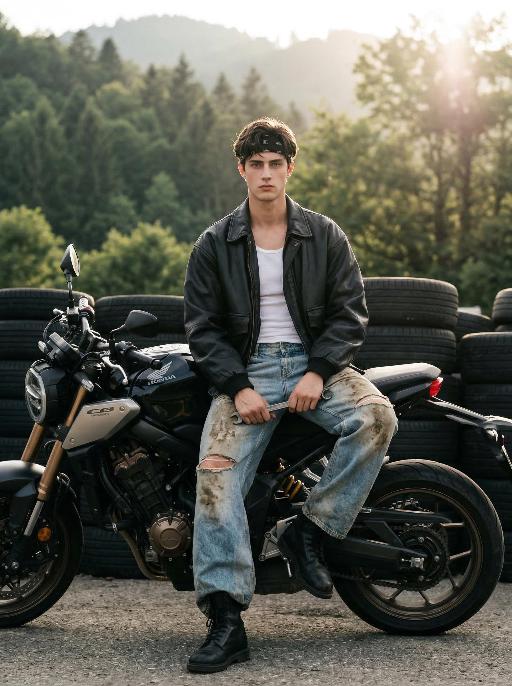
Forest Walk

Maintain the exact same facial features, gender, and age as the person in the uploaded image. Photorealistic editorial photo of a handsome young man in his early 20s, sitting casually on a larger, more aggressive black Honda CB650R motorcycle at an outdoor tire yard. He wears a black bandana on his head, an oversized black leather jacket over a white slim tank top, heavily distressed and mud-stained wide-leg light blue jeans with knee rips, and black combat boots. He holds a metal wrench in one hand, facing directly toward the camera, making his facial features clearly visible, with a calm and pensive expression. Background: stacked black rubber tires, lush green forested hills, soft golden hour backlighting with lens flare, hazy sunlight filtering through trees. Cinematic atmosphere, film grain, natural muted color grading, shallow depth of field, shot with Sony A7R V, 85mm f/1.4 lens, hyper-detailed textures of leather, denim, and motorcycle mechanics, 8K resolution.

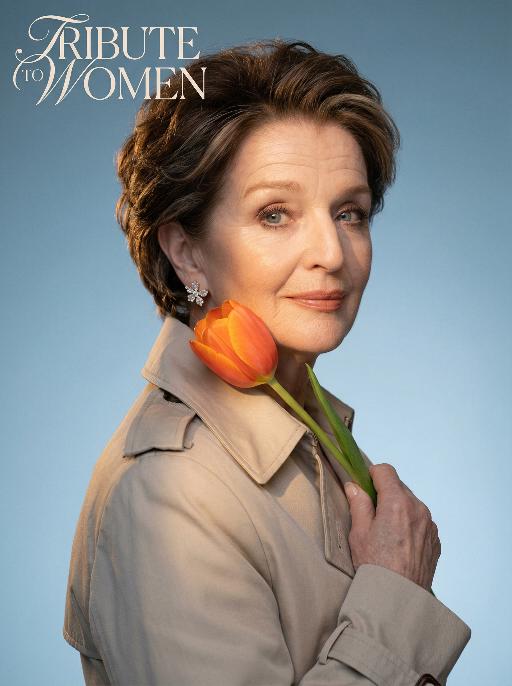
Elegant AI effects generated image

Elegant

Use the exact same facial features, gender, and age as the uploaded image.Studio portrait, half-body shot. standing sideways, holding a vibrant orange tulip gently against the cheek. Wearing a light beige trench coat with a structured collar, adorned with delicate sparkling floral earrings. The background is a smooth cool blue gradient, creating a minimalist and sophisticated atmosphere.Soft warm side lighting casts gentle shadows on the face, highlighting the skin texture and the luster of the tulip petals. Medium close-up composition, focusing on the calm and gentle expression of the subject, as well as the strong color contrast between the warm tones of the flower and clothing against the cool background. The image features cinematic color grading, high detail, and ultra-realistic quality. The text “TRIBUTE TO WOMEN” is artistically integrated into the upper left corner as stylized art font, harmonizing with the portrait’s elegant tone without overwhelming the visual.

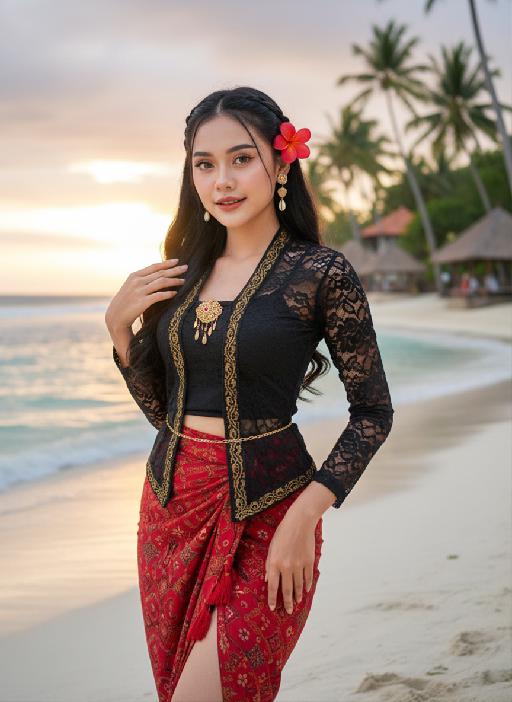
Bali style AI effects generated image

Bali style

Strictly lock the facial features of the uploaded portrait (preserve facial contours, native Indonesian skin tone, hairstyle and age completely)Strictly restore the classic Indonesian facial features and warm native medium wheat skin tone, young stunning Indonesian beauty in her 20s, three-dimensional delicate features, bright charming eyes, glossy honey lips with a slight smile, healthy glowing skin with natural tropical luster; half bohemian braided long black wavy hair, a bright red plumeria (Indonesian national flower) pinned behind the ear, a few loose hair strands framing the face; wearing a sexy improved Indonesian traditional costume - slim cropped black lace kebaya top with gold batik trim, high-waisted split-side red batik sarong skirt with tassel details, wrapping the graceful curvy figure, accessorized with delicate Balinese gold shell drop earrings, a thin gold waist chain, and hand-woven Indonesian beaded anklets; standing on the white sand beach of Bali Indonesia, with turquoise rolling ocean waves, swaying tall coconut trees, and a few Balinese traditional thatched pavilions in the background, soft tropical sunset golden glow spreading over the sea, the figure is in the center of the frame with a large proportion, close-up shot from the thigh up, confident and charming posture with one hand lightly lifting the sarong skirt and the other hand touching the plumeria behind the ear; dappled coconut leaf shadows falling on the body, soft backlight outlining the figure's delicate silhouette, warm orange-pink tropical sunset light, rich saturated colors with Indonesian tropical style; 3:4 vertical composition, ultra-realistic photography style, 8K high definition, hyper-detailed fabric texture (lace/ batik/ sarong), clear water and sand details, cinematic soft focus, sexy tropical allure, bold and hot temperament, strong authentic Indonesian exotic charm, classic Bali beach romantic atmosphere

Load more

Next-Gen Multi-Model AI Video Architecture

Vivago AI isn't just one engine—it’s a unified hub for the world’s most advanced video AI. Whether you need cinematic realism or high-speed social content, we provide the right model for your creative vision.

Free Generate

Beauty and Dolphins

Vacation Time

Stellar Tear

Fish Tank Supervisor

Cinematic Quality & Precision Control

Enables 4K resolution with multi-lens motion control, generating delicate scene via text prompts for customized cinematography.​

TRY NOW

Dynamic AV Sync

Auto-generates original audio to avoid copyright issues. Build 3D immersive environments through layered sound design automatically.

TRY NOW

OpenAI Sora 2

​Advanced visual storytelling with unparalleled physics and consistency.

TRY NOW

Kling v2.6 Pro

Industry-leading cinematic image animation and motion control.

TRY NOW

Google Veo 3 & 3.1

Ultra-fast generation with enhanced realism for creative workflows.

TRY NOW

Vivago AI 2.0

Our proprietary model optimized for efficiency, speed, and cost-effective generation.

TRY NOW

Users' Voice

We listen carefully to the opinions of every user.
Free Generate
Contact Us
I tried the Lip Sync feature inside Vivago.ai’s AI Video Generator for my educational podcast, and the results were stunning! The avatar's lip movements perfectly matched my audio recording, creating a professional AI-generated video without complex editing. Compared with tools like OpenAI Sora 2 and Google Veo 3.1, Vivago Image-to-Video delivers fast, studio-quality results online. It saved me hours of post-production work.
ElenaM (Spain)
Vivago’s Image-to-Video AI transformed my marketing workflow. I uploaded a product image and described the launch scene in text, and it generated a 10-second cinematic AI video with background music and dynamic visuals. The output quality rivals Kling v2.6 Pro and Google Veo 3 Fast. It’s now my go-to AI video generator for social media ads and product campaigns.
KenjiT (Japan)
As a digital artist, I use Vivago.ai 2.0 daily for Image-to-Image and AI Image-to-Video creation. The e-book covers and animated visuals I generate for clients look cinematic and professional. Unlike many standalone AI tools, Vivago integrates multiple leading models into one platform, making it easier to create copyright-safe AI images and videos for publishing.
ChenL (China)
I tried the Lip Sync feature inside Vivago.ai’s AI Video Generator for my educational podcast, and the results were stunning! The avatar's lip movements perfectly matched my audio recording, creating a professional AI-generated video without complex editing. Compared with tools like OpenAI Sora 2 and Google Veo 3.1, Vivago Image-to-Video delivers fast, studio-quality results online. It saved me hours of post-production work.
ElenaM (Spain)
Vivago’s Image-to-Video AI transformed my marketing workflow. I uploaded a product image and described the launch scene in text, and it generated a 10-second cinematic AI video with background music and dynamic visuals. The output quality rivals Kling v2.6 Pro and Google Veo 3 Fast. It’s now my go-to AI video generator for social media ads and product campaigns.
KenjiT (Japan)
As a digital artist, I use Vivago.ai 2.0 daily for Image-to-Image and AI Image-to-Video creation. The e-book covers and animated visuals I generate for clients look cinematic and professional. Unlike many standalone AI tools, Vivago integrates multiple leading models into one platform, making it easier to create copyright-safe AI images and videos for publishing.
ChenL (China)
I absolutely love Vivago’s AI Image-to-Video Generator. As a travel blogger, static images often fail to capture real atmosphere, but Vivago helps me turn photos into vivid cinematic AI videos with motion effects. It feels comparable to OpenAI Sora 2 and Google Veo 3.1, but more accessible and faster for creators who need high-quality AI videos online.
LiamK (Australia)
I tried the Lip Sync feature inside Vivago.ai’s AI Video Generator for my educational podcast, and the results were stunning! The avatar's lip movements perfectly matched my audio recording, creating a professional AI-generated video without complex editing. Compared with tools like OpenAI Sora 2 and Google Veo 3.1, Vivago Image-to-Video delivers fast, studio-quality results online. It saved me hours of post-production work.
ElenaM (Spain)
Vivago’s Image-to-Video AI transformed my marketing workflow. I uploaded a product image and described the launch scene in text, and it generated a 10-second cinematic AI video with background music and dynamic visuals. The output quality rivals Kling v2.6 Pro and Google Veo 3 Fast. It’s now my go-to AI video generator for social media ads and product campaigns.
KenjiT (Japan)
As a digital artist, I use Vivago.ai 2.0 daily for Image-to-Image and AI Image-to-Video creation. The e-book covers and animated visuals I generate for clients look cinematic and professional. Unlike many standalone AI tools, Vivago integrates multiple leading models into one platform, making it easier to create copyright-safe AI images and videos for publishing.
ChenL (China)
I absolutely love Vivago’s AI Image-to-Video Generator. As a travel blogger, static images often fail to capture real atmosphere, but Vivago helps me turn photos into vivid cinematic AI videos with motion effects. It feels comparable to OpenAI Sora 2 and Google Veo 3.1, but more accessible and faster for creators who need high-quality AI videos online.
LiamK (Australia)
Using Vivago.ai’s Image-to-Video AI has greatly enhanced my classroom teaching. I transform textbook notes into historical AI videos with cinematic filters and dynamic animations. Compared with tools like Kling v2.6 Pro and Google Veo 3 Fast, Vivago offers faster generation and easier parameter control for educators who need reliable AI video creation.
RajivG (India)
I frequently create AI videos on Vivago and publish them on TikTok and YouTube Shorts. The AI video templates and trending content ideas help me produce viral-ready clips quickly. With Vivago’s integrated models—including advanced video engines similar to OpenAI Sora 2—I can generate anime-style and cinematic social media videos that drive high engagement.
MarieJ (Spain)
What attracts me most about Vivago.ai is not only the powerful AI Video Generator but also the active AIGC creator community. It combines AI Image-to-Video, Text-to-Video, and leading model integrations like Google Veo 3.1 into one creative platform.
TomW (India)
At first, I was hesitant about using AI video tools. But after trying Vivago Image-to-Video, I realized how easy it is to create professional AI-generated videos online. I just upload an image, add a short prompt, and adjust a few settings. The results are cinematic and copyright-safe, which is essential for commercial projects.
HectorC (Mexico)
Using Vivago.ai’s Image-to-Video AI has greatly enhanced my classroom teaching. I transform textbook notes into historical AI videos with cinematic filters and dynamic animations. Compared with tools like Kling v2.6 Pro and Google Veo 3 Fast, Vivago offers faster generation and easier parameter control for educators who need reliable AI video creation.
RajivG (India)
I frequently create AI videos on Vivago and publish them on TikTok and YouTube Shorts. The AI video templates and trending content ideas help me produce viral-ready clips quickly. With Vivago’s integrated models—including advanced video engines similar to OpenAI Sora 2—I can generate anime-style and cinematic social media videos that drive high engagement.
MarieJ (Spain)
What attracts me most about Vivago.ai is not only the powerful AI Video Generator but also the active AIGC creator community. It combines AI Image-to-Video, Text-to-Video, and leading model integrations like Google Veo 3.1 into one creative platform.
TomW (India)
At first, I was hesitant about using AI video tools. But after trying Vivago Image-to-Video, I realized how easy it is to create professional AI-generated videos online. I just upload an image, add a short prompt, and adjust a few settings. The results are cinematic and copyright-safe, which is essential for commercial projects.
HectorC (Mexico)