Bali style

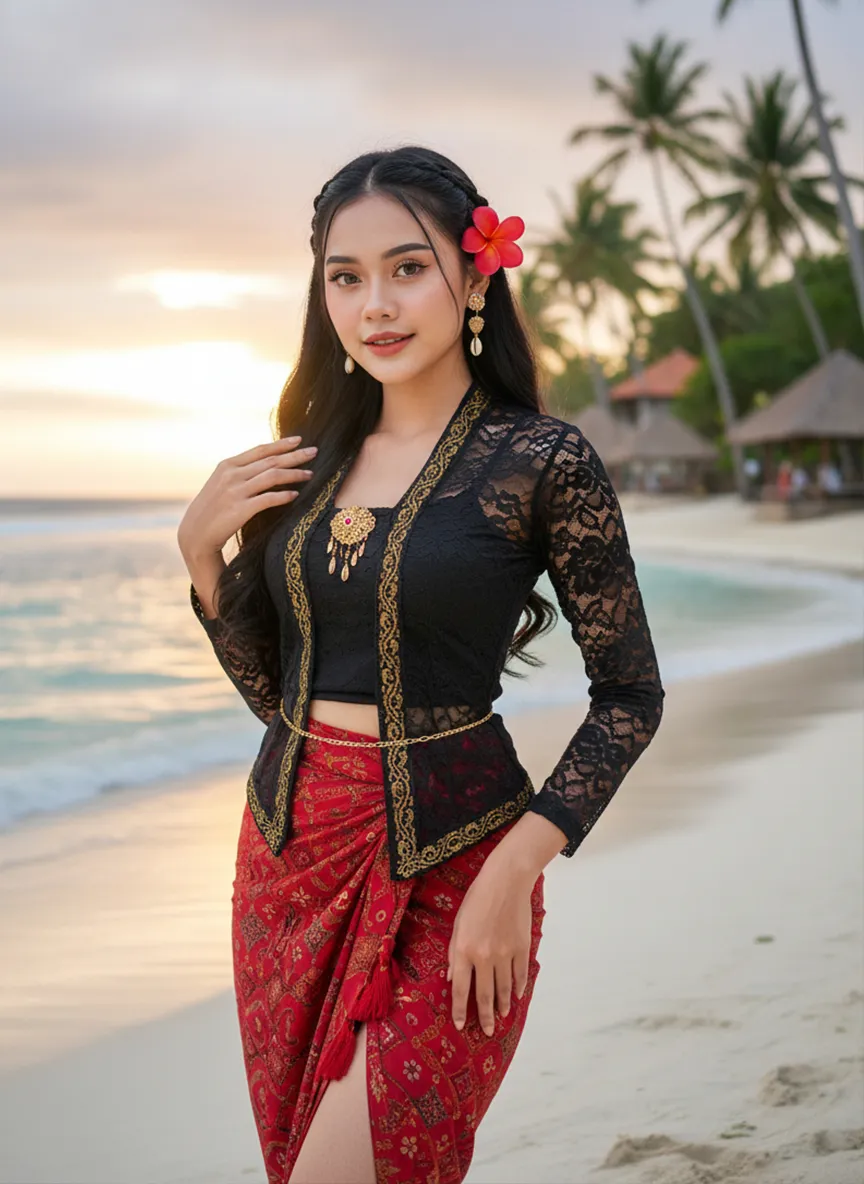
Strictly lock the facial features of the uploaded portrait (preserve facial contours, native Indonesian skin tone, hairstyle and age completely)Strictly restore the classic Indonesian facial features and warm native medium wheat skin tone, young stunning Indonesian beauty in her 20s, three-dimensional delicate features, bright charming eyes, glossy honey lips with a slight smile, healthy glowing skin with natural tropical luster; half bohemian braided long black wavy hair, a bright red plumeria (Indonesian national flower) pinned behind the ear, a few loose hair strands framing the face; wearing a sexy improved Indonesian traditional costume - slim cropped black lace kebaya top with gold batik trim, high-waisted split-side red batik sarong skirt with tassel details, wrapping the graceful curvy figure, accessorized with delicate Balinese gold shell drop earrings, a thin gold waist chain, and hand-woven Indonesian beaded anklets; standing on the white sand beach of Bali Indonesia, with turquoise rolling ocean waves, swaying tall coconut trees, and a few Balinese traditional thatched pavilions in the background, soft tropical sunset golden glow spreading over the sea, the figure is in the center of the frame with a large proportion, close-up shot from the thigh up, confident and charming posture with one hand lightly lifting the sarong skirt and the other hand touching the plumeria behind the ear; dappled coconut leaf shadows falling on the body, soft backlight outlining the figure's delicate silhouette, warm orange-pink tropical sunset light, rich saturated colors with Indonesian tropical style; 3:4 vertical composition, ultra-realistic photography style, 8K high definition, hyper-detailed fabric texture (lace/ batik/ sarong), clear water and sand details, cinematic soft focus, sexy tropical allure, bold and hot temperament, strong authentic Indonesian exotic charm, classic Bali beach romantic atmosphere

Use Template
arrow
Bali style

More From VIVAGO AI

Street Carnival AI effects generated image

Street Carnival

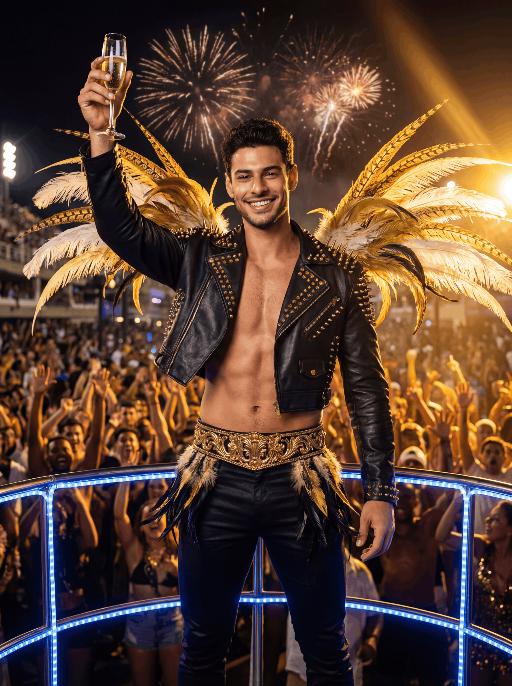
The character in the uploaded picture (unchanged facial features, gender and age). Avant-garde portrait photography of a young Brazilian Carnival dancer, sharp focus on the subject, front-facing dynamic pose. has short wavy dark hair, warm brown eyes, and a genuine, joyful smile with visible teeth. wears an opulent Carnival costume: a towering, structured headdress crafted with layered iridescent teal, vivid tangerine, and sunflower yellow feathers, accented with polished gold metalwork and teal gemstone inlays. outfit features a form-fitting teal satin crop top with gold filigree trim, matching teal feather fringe mini skirt with gold hardware, and gold arm cuffs with teal bead detailing. Captured mid-dance on a sun-drenched Rio de Janeiro street during Carnival, one arm extended outward, the other bent at the elbow in a lively gesture. The background is heavily stylized with experimental shallow depth of field—blurred Carnival revellers in colorful costumes and festive street decorations create an abstract, textured backdrop. Pioneering photographic techniques: high-contrast natural daylight, bold color grading, hard directional light casting dramatic shadows, film grain texture, 35mm prime lens, f/1.4 aperture. The overall style is edgy, high-fashion avant-garde portraiture, ultra-detailed, 8K resolution, museum-quality, raw photographic aesthetic.

Colosseum AI effects generated image

Colosseum

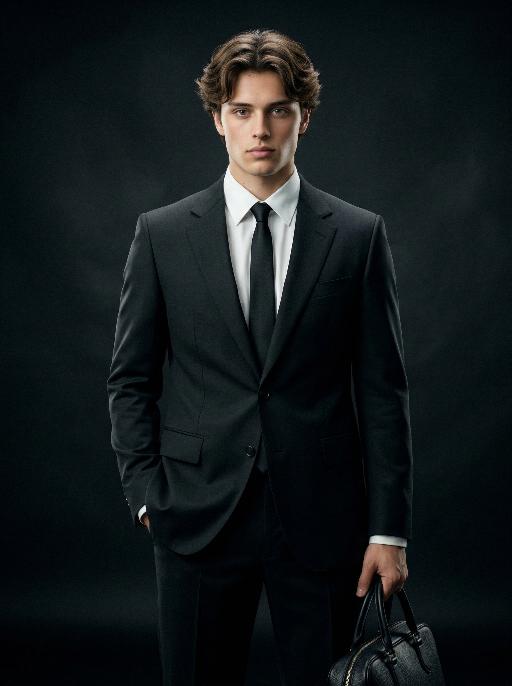
Medium-close-up shot (showing the upper body of the protagonist, shot from above the thighs, with the main character accounting for 70% of the overall picture): Facial features, gender and age are exactly the same as the uploaded picture. The angular facial contour, dark and messy hair, deep and melancholic eyes, one hand in the pocket, confident posture. Wearing a black avant-garde custom suit with deconstructed details, a white shirt, a black tie, and a prominent metal skull brooch at the neckline. Background: The rainy night of Rome, the soaked Roman Colosseum, wet pebbled roads, a stormy sky accompanied by lightning, foggy rain and dark smoke swirling around. Strong contrast of light and dark, dramatic side light, cinematic edge light, high contrast, gloomy and terrifying atmosphere. Avant-garde fashion photography, edited fashion shooting, dark and cool aesthetic, hyper-realism, 8K, ultra-fine, sharp focus, cinematic color grading with dramatic color grading, desaturated tones, dark and rough tones, some raindrops on the character's face, hyper-realistic, fashion avant-garde photography

 Golden Leopard AI effects generated image

Golden Leopard

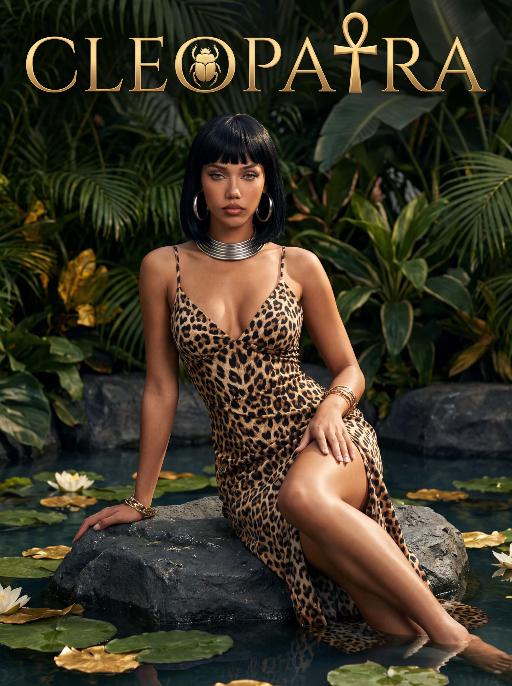
A striking woman embodying the persona of Cleopatra, kneeling gracefully beside a majestic leopard. She has a sleek black bob haircut with blunt bangs, a captivating gaze, and a regal, alluring expression. The leopard, with golden-brown fur and distinct black spots, lies calmly at her side, looking directly at the viewer with a calm, powerful demeanor. She wears a black spaghetti-strap gown with a leopard-print bodice, intricately trimmed with gold filigree and a large turquoise gem pendant at the center. A flowing black drape falls from her shoulders. Her head is adorned with a golden pharaoh-style crown set with a central blue gemstone. She kneels on a polished marble floor, one hand resting lightly on the ground beside her. The leopard rests at her knee, exuding a sense of quiet power and companionship. The setting is a lush, ancient Egyptian-inspired courtyard, framed by large, vibrant green tropical foliage (like palm fronds and monstera leaves) and flanked by tall, golden marble columns. Above her, the word "CLEOPATRA" is displayed in an elegant, golden serif font against the greenery. The image is rendered in a vintage Hollywood movie poster style, with dramatic, high-contrast lighting that highlights the sheen of the gold, the texture of the leopard's fur, and the richness of the black fabric. The color palette is opulent, featuring deep greens, luxurious golds, bold black, and the warm tones of the leopard's coat, creating a mysterious, regal, and timeless atmosphere. The overall aesthetic is cinematic, detailed, and evocative of ancient Egyptian grandeur and untamed power.

Follow Me Portal AI effects generated image

Follow Me Portal

A 3D chibi-style version of the person in the photo is stepping through a glowing portal, reaching out and holding the viewer’s hand. As the character pulls the viewer forward, they turn back with a dynamic glance, inviting the viewer into their world.Behind the portal is the viewer’s real-life environment: a typical programmer’s study with a desk, monitor, and laptop, rendered in realistic detail. Inside the portal lies the character’s 3D chibi world, inspired by the photo, with a cool blue color scheme that sharply contrasts with the real-world surroundings.The portal itself is a perfectly elliptical frame glowing with mysterious blue and purple light, positioned at the center of the image as a gateway between the two worlds.The scene is captured from a third-person perspective, clearly showing the viewer’s hand being pulled into the character’s world.

Trendy Stickers AI effects generated image

Trendy Stickers

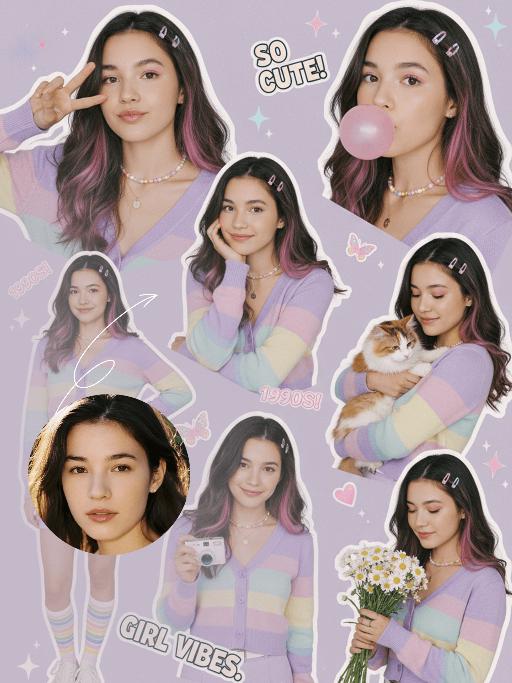
先将上传的图片扩图成3:4的2k超轻尺寸,然后在图片上加入创意涂鸦内容:不要使用固定元素,而是生成与您所识别的视觉主题相匹配的插画元素。如果是酷炫/前卫风格:可以使用箭头、螺栓、涂鸦标签、失真形状、广播盒或抽象的街头艺术怪兽。如果是可爱/甜蜜风格:可以使用独特的角色、心形、星星、糖果、闪光效果和圆形的有机形状。如果选择“虚幻”风格:运用流畅的线条、花瓣、天体以及神奇的漩涡元素。加入的元素风格:平面二维矢量图,粗犷的轮廓,类似贴纸的美感。鲜艳的色彩与写实照片形成对比或相得益彰。 画面的四个边角加入少量的短小的随机黑色动感的漫画式速度线条;人物的周围加上赛博的霓虹发光光效,人物的面部加入一个小涂鸦元素,人物的皮肤轻微磨皮,皮肤自然美颜效果,面部妆容改成欧美流行风格的自然写实的潮流的妆容;写实的人物与写实的场景风格保持不变。

3D OOTD AI effects generated image

3D OOTD

Generate a Q-style 3D C4D-rendered character based on the person in the photo, dressed in a fashion-forward “outfit of the day” (OOTD) inspired by a specific profession.Profession: Fashion Designer – Keep the original facial features and character pose – Stylize the character with a cute, long-legged chibi proportion – Outfit and accessories should reflect the profession, including trendy designer wear, glasses, sketchbook or tablet, and stylish shoes – Match the outfit with fashion accessories to complete the look – Use a solid background color that complements the character’s overall color palette (no gradients or textures) Top text: “OOTD” Left side: the full-body chibi character wearing the complete outfit Right side: individual clothing items and accessories laid out separately, as if in a style breakdown

Football AI effects generated image

Football

Use the exact same facial features, gender, and age as the character in the uploaded image. Photorealistic street soccer portrait in Rio de Janeiro, vibrant and intense atmosphere, full-body dynamic action shot. Setting: outdoor soccer pitch next to Copacabana Beach, distant coastline and mountain silhouettes visible, sandy or concrete ground, colorful graffiti wall in background, turquoise ocean under clear sky. Style: barefoot or worn soccer cleats, casual sportswear with Brazilian national team colors — yellow and green accents, open training jacket, not full team jersey, natural muscle definition, subtle sweat sheen on sunlit skin. Action: dynamic dribbling moment frozen in time, head tilted up with confident wild gaze toward camera, slight squint under strong sunlight, full body tension and natural physicality. Lighting: bright golden hour sunlight, high saturation, warm color palette, strong highlights and soft shadows, cinematic contrast. Composition: low-angle shot for powerful presence, horizontal framing, sharp focus on subject, slight motion blur for dynamism, shallow depth of field, 8K ultra-detailed, realistic skin texture, no text or watermarks.

Become Star

Medium-close-up shot (showing the upper body of the protagonist): The scene shown in the uploaded picture (retaining the protagonist's facial features, gender and age), a fashionable and exquisite hairstyle, exquisite clothing, wearing a complete set of high-end custom leather fashion clothing, wearing exquisite accessories, wearing cool and fashionable sunglasses, a natural standing posture. There are many paparazzi holding cameras surrounding and taking pictures of the protagonist. The flashes are flashing. The artistic style is fashionable and avant-garde, the photography style is realistic, the background is the São Paulo Cathedral in Brazil, the magnificent church building, clear perspective effect, night lighting, high detail level, high-definition quality, fashionable photography style, avant-garde photography art, film-like photography style, film texture, top-notch film lighting effect.

Load more

Next-Gen Multi-Model AI Video Architecture

Vivago AI isn't just one engine—it’s a unified hub for the world’s most advanced video AI. Whether you need cinematic realism or high-speed social content, we provide the right model for your creative vision.

Free Generate

Beauty and Dolphins

Vacation Time

Stellar Tear

Fish Tank Supervisor

Cinematic Quality & Precision Control

Enables 4K resolution with multi-lens motion control, generating delicate scene via text prompts for customized cinematography.​

TRY NOW

Dynamic AV Sync

Auto-generates original audio to avoid copyright issues. Build 3D immersive environments through layered sound design automatically.

TRY NOW

OpenAI Sora 2

​Advanced visual storytelling with unparalleled physics and consistency.

TRY NOW

Kling v2.6 Pro

Industry-leading cinematic image animation and motion control.

TRY NOW

Google Veo 3 & 3.1

Ultra-fast generation with enhanced realism for creative workflows.

TRY NOW

Vivago AI 2.0

Our proprietary model optimized for efficiency, speed, and cost-effective generation.

TRY NOW

Users' Voice

We listen carefully to the opinions of every user.
Free Generate
Contact Us
I tried the Lip Sync feature inside Vivago.ai’s AI Video Generator for my educational podcast, and the results were stunning! The avatar's lip movements perfectly matched my audio recording, creating a professional AI-generated video without complex editing. Compared with tools like OpenAI Sora 2 and Google Veo 3.1, Vivago Image-to-Video delivers fast, studio-quality results online. It saved me hours of post-production work.
ElenaM (Spain)
Vivago’s Image-to-Video AI transformed my marketing workflow. I uploaded a product image and described the launch scene in text, and it generated a 10-second cinematic AI video with background music and dynamic visuals. The output quality rivals Kling v2.6 Pro and Google Veo 3 Fast. It’s now my go-to AI video generator for social media ads and product campaigns.
KenjiT (Japan)
As a digital artist, I use Vivago.ai 2.0 daily for Image-to-Image and AI Image-to-Video creation. The e-book covers and animated visuals I generate for clients look cinematic and professional. Unlike many standalone AI tools, Vivago integrates multiple leading models into one platform, making it easier to create copyright-safe AI images and videos for publishing.
ChenL (China)
I tried the Lip Sync feature inside Vivago.ai’s AI Video Generator for my educational podcast, and the results were stunning! The avatar's lip movements perfectly matched my audio recording, creating a professional AI-generated video without complex editing. Compared with tools like OpenAI Sora 2 and Google Veo 3.1, Vivago Image-to-Video delivers fast, studio-quality results online. It saved me hours of post-production work.
ElenaM (Spain)
Vivago’s Image-to-Video AI transformed my marketing workflow. I uploaded a product image and described the launch scene in text, and it generated a 10-second cinematic AI video with background music and dynamic visuals. The output quality rivals Kling v2.6 Pro and Google Veo 3 Fast. It’s now my go-to AI video generator for social media ads and product campaigns.
KenjiT (Japan)
As a digital artist, I use Vivago.ai 2.0 daily for Image-to-Image and AI Image-to-Video creation. The e-book covers and animated visuals I generate for clients look cinematic and professional. Unlike many standalone AI tools, Vivago integrates multiple leading models into one platform, making it easier to create copyright-safe AI images and videos for publishing.
ChenL (China)
I absolutely love Vivago’s AI Image-to-Video Generator. As a travel blogger, static images often fail to capture real atmosphere, but Vivago helps me turn photos into vivid cinematic AI videos with motion effects. It feels comparable to OpenAI Sora 2 and Google Veo 3.1, but more accessible and faster for creators who need high-quality AI videos online.
LiamK (Australia)
I tried the Lip Sync feature inside Vivago.ai’s AI Video Generator for my educational podcast, and the results were stunning! The avatar's lip movements perfectly matched my audio recording, creating a professional AI-generated video without complex editing. Compared with tools like OpenAI Sora 2 and Google Veo 3.1, Vivago Image-to-Video delivers fast, studio-quality results online. It saved me hours of post-production work.
ElenaM (Spain)
Vivago’s Image-to-Video AI transformed my marketing workflow. I uploaded a product image and described the launch scene in text, and it generated a 10-second cinematic AI video with background music and dynamic visuals. The output quality rivals Kling v2.6 Pro and Google Veo 3 Fast. It’s now my go-to AI video generator for social media ads and product campaigns.
KenjiT (Japan)
As a digital artist, I use Vivago.ai 2.0 daily for Image-to-Image and AI Image-to-Video creation. The e-book covers and animated visuals I generate for clients look cinematic and professional. Unlike many standalone AI tools, Vivago integrates multiple leading models into one platform, making it easier to create copyright-safe AI images and videos for publishing.
ChenL (China)
I absolutely love Vivago’s AI Image-to-Video Generator. As a travel blogger, static images often fail to capture real atmosphere, but Vivago helps me turn photos into vivid cinematic AI videos with motion effects. It feels comparable to OpenAI Sora 2 and Google Veo 3.1, but more accessible and faster for creators who need high-quality AI videos online.
LiamK (Australia)
Using Vivago.ai’s Image-to-Video AI has greatly enhanced my classroom teaching. I transform textbook notes into historical AI videos with cinematic filters and dynamic animations. Compared with tools like Kling v2.6 Pro and Google Veo 3 Fast, Vivago offers faster generation and easier parameter control for educators who need reliable AI video creation.
RajivG (India)
I frequently create AI videos on Vivago and publish them on TikTok and YouTube Shorts. The AI video templates and trending content ideas help me produce viral-ready clips quickly. With Vivago’s integrated models—including advanced video engines similar to OpenAI Sora 2—I can generate anime-style and cinematic social media videos that drive high engagement.
MarieJ (Spain)
What attracts me most about Vivago.ai is not only the powerful AI Video Generator but also the active AIGC creator community. It combines AI Image-to-Video, Text-to-Video, and leading model integrations like Google Veo 3.1 into one creative platform.
TomW (India)
At first, I was hesitant about using AI video tools. But after trying Vivago Image-to-Video, I realized how easy it is to create professional AI-generated videos online. I just upload an image, add a short prompt, and adjust a few settings. The results are cinematic and copyright-safe, which is essential for commercial projects.
HectorC (Mexico)
Using Vivago.ai’s Image-to-Video AI has greatly enhanced my classroom teaching. I transform textbook notes into historical AI videos with cinematic filters and dynamic animations. Compared with tools like Kling v2.6 Pro and Google Veo 3 Fast, Vivago offers faster generation and easier parameter control for educators who need reliable AI video creation.
RajivG (India)
I frequently create AI videos on Vivago and publish them on TikTok and YouTube Shorts. The AI video templates and trending content ideas help me produce viral-ready clips quickly. With Vivago’s integrated models—including advanced video engines similar to OpenAI Sora 2—I can generate anime-style and cinematic social media videos that drive high engagement.
MarieJ (Spain)
What attracts me most about Vivago.ai is not only the powerful AI Video Generator but also the active AIGC creator community. It combines AI Image-to-Video, Text-to-Video, and leading model integrations like Google Veo 3.1 into one creative platform.
TomW (India)
At first, I was hesitant about using AI video tools. But after trying Vivago Image-to-Video, I realized how easy it is to create professional AI-generated videos online. I just upload an image, add a short prompt, and adjust a few settings. The results are cinematic and copyright-safe, which is essential for commercial projects.
HectorC (Mexico)