Pikki Pikki

The image uploaded (with the facial features of the species remaining unchanged) shows a natural standing pose (the front two paws are lifted, the rear two legs are upright, and the torso is upright), with the background remaining the same, in a realistic photography style, and of a cinematic level of realism.

Use Template
arrow

More From VIVAGO AI

Nobleman

"Cinematic shot transition with frontal angle throughout, capturing the full process smoothly: starting with the uploaded character standing frontally on the deck of a luxury cruise ship, one beautiful Indonesian woman stands directly beside him (frontal view) and attentively helps him put on a black and gold haute couture suit—gently slipping the jacket over his shoulders from the front, adjusting the lapel face-on, fastening cufflinks with delicate frontal movements, and arranging the black bow tie in full frontal perspective. Four other beautiful Indonesian women stand quietly in a neat frontal formation beside them, wearing luxurious gold sequined and embroidered traditional kebaya with matching songket skirts, holding small accessories to assist in the frontal frame. The scene transitions naturally in the same frontal angle: the character, now fully dressed, sits down slowly on a gold-embellished throne-like armchair (frontal view of the chair and character), picking up a champagne glass in one hand. The five Indonesian women then gather around him in a frontal arrangement—one stays directly beside him to tidy the suit hem from the front, while the others take elegant frontal postures around the armchair, forming a graceful frontal cluster. All people are adorned with exquisite gold jewelry and ornaments, fully displayed in frontal perspective. Bright natural daylight bathes the frontal scene, high-quality commercial photography, opulent and noble atmosphere, high-end luxury magazine cover style, cinematic lighting and shadows that highlight the frontal dynamic process and details. Dynamic and vivid frontal character movements, 4K ultra-high definition intricate details—capturing fabric texture, jewelry luster, and subtle facial expressions from the front. Photorealistic texture, steady focus that follows the frontal action flow, ensuring smooth shot transition without any circling or walking movements, emphasizing the frontal suit-fitting process, seating action, and final frontal clustered composition."

Cowgirl AI effects generated image

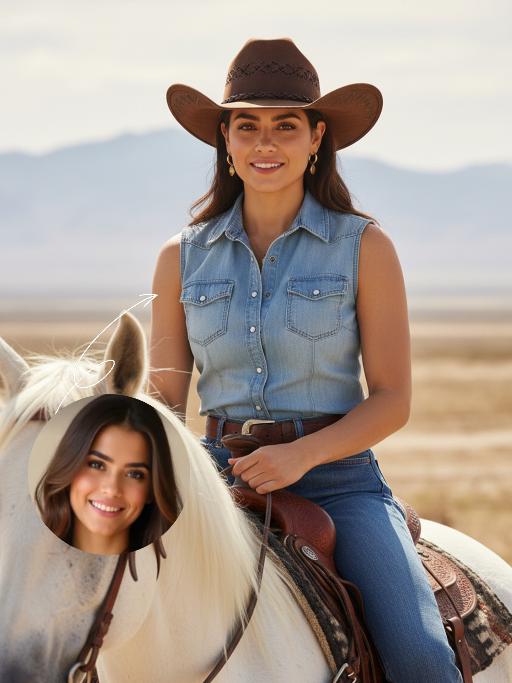
Cowgirl

"Drawing on the facial structure, three-dimensional facial features, skin tone range and age vibe of the uploaded model’s image (without strict identity replication), a new female figure is created: a confident, warm and approachable woman with a Western cowgirl aesthetic, whose bearing is resilient yet not stern. A soft, natural and restrained smile graces her face – understated, yet enough to convey a poised, confident and gentle sense of strength. She is riding a magnificent white steed, with the horse’s front fully in clear view and its entire face featured in the frame; its coat is clean, bright and glowing with a natural sheen, with realistic texture and accurate proportions. The matching brown leather saddle and reins are exquisitely crafted with neat detailing, and the metal fittings catch the light with a natural shimmer, fully conforming to the structural norms of real equestrian gear. The image adopts a close-up composition, focusing sharply on the woman’s face and upper body to make her the clear focal point, while subtly preserving the natural interactive dynamic between the horse’s head and the rider. She wears a brown cowboy hat with clearly discernible embroidery detailing on the crown, a classic and refined staple of her look. Her top is a light blue denim-style sleeveless piece with a crisp cut and authentic fabric texture, showing natural brightness and tonal gradation in the light. Around her waist is a brown leather belt with distinct metal hardware; the slightly worn finish amplifies the authentic Western texture. She also adorns herself with delicate gold earrings and a necklace, which glimmer softly in the light – not overly showy, but just enough to enhance her feminine grace in perfect measure. The lighting is bright, soft natural daylight, with the key light striking the subject from a slight side angle directly in front, bathing her face in bright, translucent light, making her eyes clear and vivid, and lending her skin a healthy, natural complexion without heavy shadows dimming the midface. The overall color palette features warm earth tones; the woman and the white steed are slightly brighter than the background, naturally emerging as the visual focus. The background retains the vast, hazy ambiance of the Western wilderness – an expanse of arid open land, with distant mountain ranges fading in and out of view and a soft, misty sky, creating a cinematic sense of profound spatial depth. The photographic style is cinematic ultra-realism, echoing the aesthetic hallmarks of classic Western films. A shallow depth of field blurs the background slightly, highlighting the subject while imbuing the frame with a strong narrative quality. Complemented by 8K ultra-high resolution, the image is crisp and sharp, with an overall atmosphere that is warm, free, resilient and hopeful – a flawless portrayal of a bright, compelling cowgirl figure with a powerful sense of narrative and character."

Cyber Couple AI effects generated image

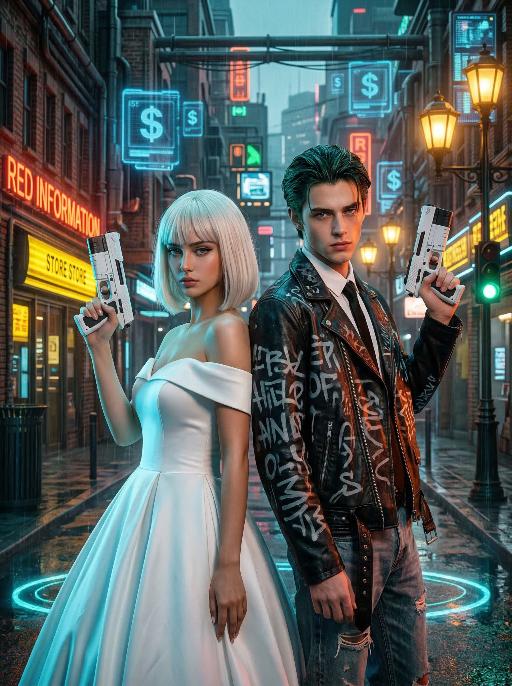
Cyber Couple

"High-end photorealistic cyberpunk-style portrait, strictly preserving the original facial features, gender, and age of the two individuals: The woman has short platinum-blonde hair with blunt bangs, delicate makeup, and a cold, sharp gaze; the man has dark greenish-black slicked-back hair, sharp facial features, and a stern expression. They stand back-to-back, each holding a futuristic white sci-fi firearm raised in their hands, looking directly at the camera with a cool, slightly detached demeanor. The woman wears a white off-the-shoulder ball gown wedding dress, elegant and minimalist, creating a stark contrast with the cyberpunk style. The man dons a black vintage riveted leather jacket printed with graffiti letters, layered over a white shirt and black tie, paired with vintage ripped jeans for a strong streetwear vibe. Background: A rainy neon-lit cyberpunk city street blending retro and futuristic elements: old brick buildings, glowing neon signs (red ""RED INFORMATION"", yellow reflective store signs, green traffic lights), floating blue holographic projections (dollar sign UI elements) in the air, warm yellow vintage street lamps interwoven with cool-toned electronic lights, and wet ground reflecting neon halos. Dense pipelines, electronic screens, and retro architectural details create a dystopian urban atmosphere. Lighting: High-contrast neon cyberpunk lighting, dominated by cyan-blue, orange-red, and warm yellow tones: cool side lighting outlines the figures, warm neon lights illuminate their faces, the ambient light is filled with grain and halos to simulate the diffuse reflection of humid rainy air, and strong light-dark contrast emphasizes the layering between the characters and the neon background. 8K ultra-realistic, cinematic quality, cyberpunk aesthetic, shot with a Sony A7R V camera paired with an 85mm f/1.4 lens, shallow depth of field, ultra-clear details of skin, hair, and clothing textures, with subtle film grain, no watermarks, no text, and no logos."

Dawn AI effects generated image

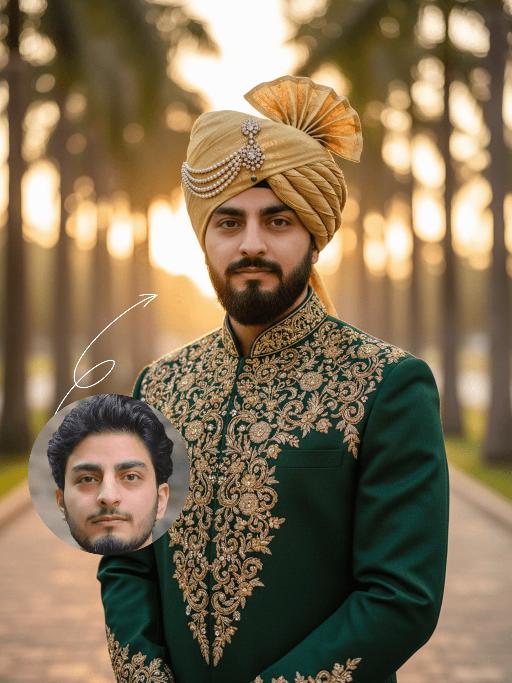
Dawn

Strictly preserve the identity of the uploaded portrait (retain facial contours, native Indian skin tone, hairstyle, and age). A half-body hyper-realistic cinematic portrait of a handsome South Asian groom with a well-groomed thick black beard and a deep, confident gaze. He is dressed in a luxurious dark emerald green traditional Sherwani, with the front placket and shoulders adorned with intricate and elaborate hand-embroidered golden floral and scroll patterns, paired with a matching opulent gold turban embellished with full diamonds. The scene is set in a palm tree alley during golden hour sunset, with warm backlighting creating dreamy lens flares and a soft bokeh effect, and the background is blurred to highlight the subject. The overall atmosphere is luxurious, noble, and romantic, dominated by rich gold and emerald green tones. The image features ultra-high-definition details, 8K resolution, professional photography quality, and rich, delicate layers of light and shadow

Pet Polaroid

The figure from the uploaded image (with unchanged features) is lying on a winter snowfield, wearing an innocent and cute expression; it has a thick brown knitted scarf around its neck, with a small pile of snow gently resting on the top of its head. The background features a snowfield and pine trees, with a cool color palette and romantic snowflake bokeh lingering all around. The entire frame is a close-up shot composed as a hand (wearing a white knitted glove) holding a white Polaroid photo paper, on which the aforementioned figure and scene are displayed. At the bottom of the photo paper, the artistic handwritten font Cute Baby is printed, and the area outside the photo paper shows the winter pine tree and snowfield scene described above. The overall style is a warm and healing cool tone with high-definition details of film texture, creating a cozy winter fairy-tale atmosphere.

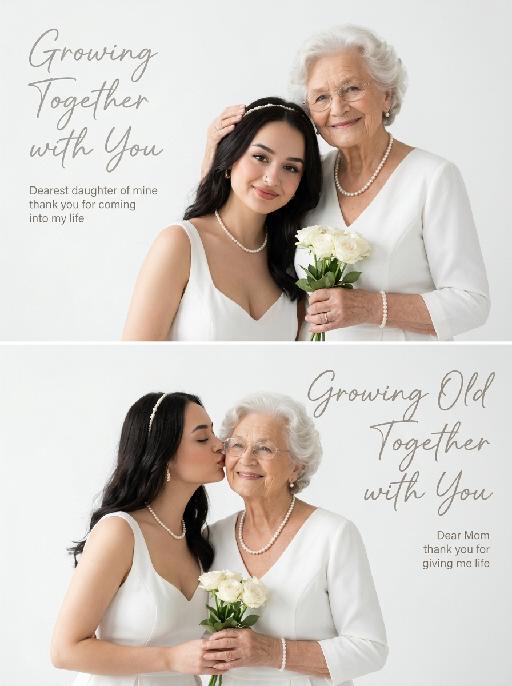
Love Mom AI effects generated image

Love Mom

"A vertical dual-screen combined portrait painting (with the effect of a top-notch photography studio), with a minimalist white background and top-notch photography studio lighting effects. The main subjects of the high-end photography portrait are the figures in the uploaded two pictures (with unchanged facial features, gender and age). Upper part: The figures in the uploaded pictures are in the same scene, all wearing elegant white dresses, wearing pearl accessories and delicate hair bands, with gentle smiles on their faces. The first figure gently strokes the hair of the second figure and holds a small bunch of white roses in their hand; The artistic English handwritten text uses a delicate cursive font, with a color of soft light gray, not obscuring the main subject: 1. Left-aligned large title (top left corner, above the main text, largest font): ""Growing Together with You"" 2. Left-aligned short sans-serif body text (below the title, with the same font size as the title): ""Dearest daughter of mine thank you for coming into my life"" Lower part: The people in the uploaded picture are in the same scene, all wearing matching white dresses and pearl necklaces. The second person gently kisses the cheek of the first person, holding a small bunch of white roses. The pure white seamless background, soft diffused lighting, uniform bright light, no strong shadows, a warm and touching scene, Mother's Day theme, high-end editing aesthetics, like a film-like soft focus effect, 8K high resolution, clear details, bright and pure color grading, natural and soft skin texture, romantic and pure atmosphere; The text uses a matching exquisite cursive handwriting font, soft warm gray tone, and the text does not cover the main subject: 1. Large right-aligned title (top right corner, above the main text, the same size as the title of the top panel): ""Growing Old Together with You"" 2. Small right-aligned sans-serif body text (below the title, the same font size as the title): ""Dear Mom thank you for giving me life"" The soft and natural skin texture, the romantic and pure atmosphere, the balanced blank space that matches the reference layout, the harmonious proportion of text size and visual unity, the elegant and understated font design of the top-level master graphic design, complementing the portrait without making it too prominent."

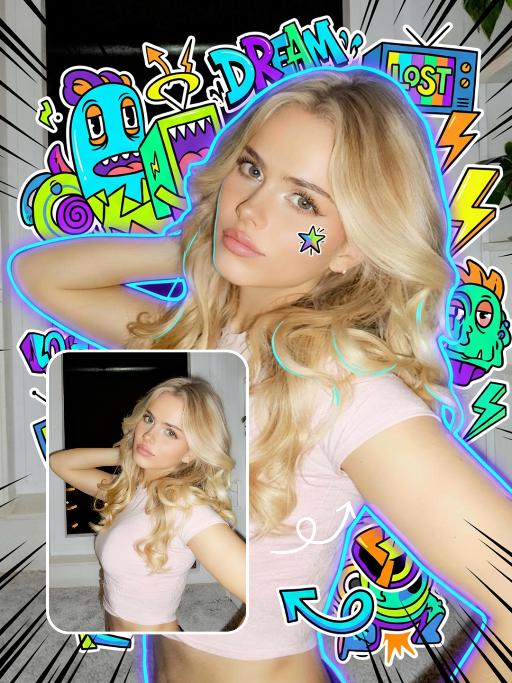
Trendy Stickers AI effects generated image

Trendy Stickers

Expand the uploaded image into a 3:4 2K ultra-high resolution size first. Then, add creative doodle content on the image: do not use fixed elements, but generate illustrative elements that match the visual theme you identify. If it is a cool/edgy style: use arrows, bolts, graffiti tags, distorted shapes, boomboxes, or abstract street art monsters. If it is a cute/sweet style: use unique characters, hearts, stars, candy, glitter effects, and rounded organic shapes. If a "fantasy" style is chosen: apply fluid lines, petals, celestial bodies, and magical swirl elements. Style of added elements: flat 2D vector graphics, bold outlines, sticker-like aesthetic. Vivid colors that contrast with or complement the realistic photo. Add a small amount of short, random, black, dynamic comic-style speed lines to the four corners of the frame. Add a cyber neon glowing effect around the character. Add a small doodle element to the character's face. Apply slight skin smoothing to the character, with a natural skin beautification effect. Change the face makeup to a realistic, popular, natural, and trendy Western style. The realistic character and realistic scene style remain unchanged.

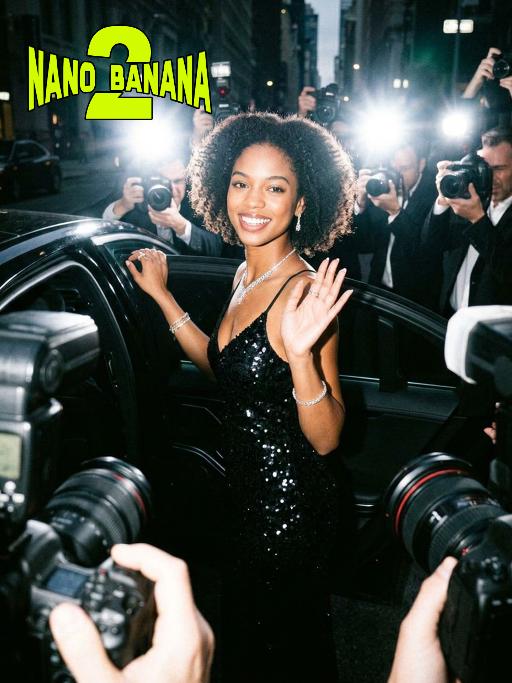
Hollywood Star AI effects generated image

Hollywood Star

A medium close-up shot from a frontal perspective with a slight upward tilt, the camera angle is slightly tilted forward. This shot was taken using a professional full-frame digital SLR camera and a 50mm f/1.2 wide-angle fixed-focus lens. The uploaded image shows a person (with unchanged facial features, gender, age, and hairstyle), wearing a tight black sequined sexy dress and wearing high-end custom accessories. This figure is preparing to get into a black luxury car with open doors. The figure turns halfway and looks at the camera, raising one hand and making a gentle waving or shielding gesture. The person has a relaxed and confident smile on their face, with bright and expressive eyes. The scene is on a night-time city street, illuminated by a group of paparazzi and a large number of flashes, creating a high-contrast light and shadow effect, with shadows and bright highlights, and the foreground also includes cameras and flashes, creating the feeling that the celebrity figure is surrounded by paparazzi and cameras. This aesthetic style is the street style of Hollywood celebrity paparazzi, featuring grainy film texture, clear focus on the subject, blurred background and dark tones. The person's face is illuminated by the flash, and the makeup characteristic of the figure is exaggerated false eyelashes, clear cheekbones, nude matte lip color and bright highlights used to enhance the three-dimensionality; the picture adds dark corners at the four corners and bright parts in the middle, creating a strong contrast between light and shadow.

Sky Rocket AI effects generated image

Sky Rocket

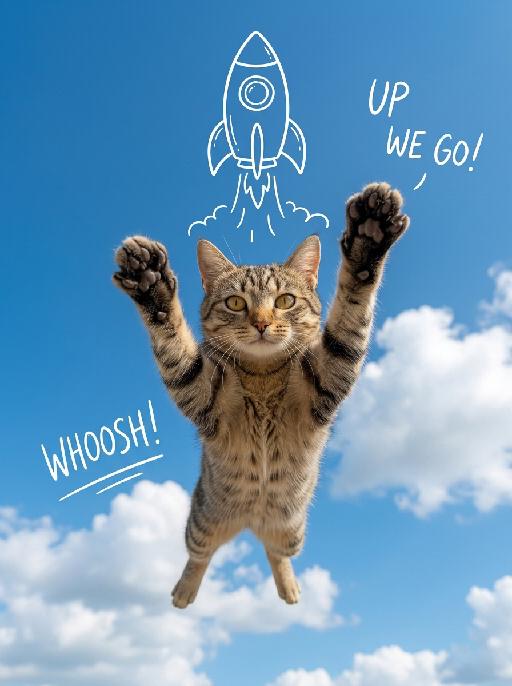
A realistic, high-quality mixed-media photograph. The central image is a photorealistic subject [Note: Placeholder for image reference subject and pose extraction] suspended in mid-air and looking directly at the camera. The pose is a joyfully lifted, fully extended pose with both arms or paws stretched upwards. The background is a vibrant, clear bright blue sky filled with soft white cumulus clouds. Directly above the central subject is a stable, clean, hand-drawn white line art doodle of a whimsical cartoon rocket ship, with simplified white smoke lines trailing downwards towards the subject. Minimalist, hand-drawn English script text doodles in white are present: text read 'UP WE GO!' (positioned to the top-right of the subject), and text reads 'WHOOSH!' (positioned to the left of the subject). Bright, even natural daylight. The overall composition is clean, optimistic, centered, and has a whimsical 'photo with doodles' mixed-media effect.

Load more

Next-Gen Multi-Model AI Video Architecture

Vivago AI isn't just one engine—it’s a unified hub for the world’s most advanced video AI. Whether you need cinematic realism or high-speed social content, we provide the right model for your creative vision.

Free Generate

Beauty and Dolphins

Vacation Time

Stellar Tear

Fish Tank Supervisor

Cinematic Quality & Precision Control

Enables 4K resolution with multi-lens motion control, generating delicate scene via text prompts for customized cinematography.​

TRY NOW

Dynamic AV Sync

Auto-generates original audio to avoid copyright issues. Build 3D immersive environments through layered sound design automatically.

TRY NOW

OpenAI Sora 2

​Advanced visual storytelling with unparalleled physics and consistency.

TRY NOW

Kling v2.6 Pro

Industry-leading cinematic image animation and motion control.

TRY NOW

Google Veo 3 & 3.1

Ultra-fast generation with enhanced realism for creative workflows.

TRY NOW

Vivago AI 2.0

Our proprietary model optimized for efficiency, speed, and cost-effective generation.

TRY NOW

Users' Voice

We listen carefully to the opinions of every user.
Free Generate
Contact Us
I tried the Lip Sync feature inside Vivago.ai’s AI Video Generator for my educational podcast, and the results were stunning! The avatar's lip movements perfectly matched my audio recording, creating a professional AI-generated video without complex editing. Compared with tools like OpenAI Sora 2 and Google Veo 3.1, Vivago Image-to-Video delivers fast, studio-quality results online. It saved me hours of post-production work.
ElenaM (Spain)
Vivago’s Image-to-Video AI transformed my marketing workflow. I uploaded a product image and described the launch scene in text, and it generated a 10-second cinematic AI video with background music and dynamic visuals. The output quality rivals Kling v2.6 Pro and Google Veo 3 Fast. It’s now my go-to AI video generator for social media ads and product campaigns.
KenjiT (Japan)
As a digital artist, I use Vivago.ai 2.0 daily for Image-to-Image and AI Image-to-Video creation. The e-book covers and animated visuals I generate for clients look cinematic and professional. Unlike many standalone AI tools, Vivago integrates multiple leading models into one platform, making it easier to create copyright-safe AI images and videos for publishing.
ChenL (China)
I tried the Lip Sync feature inside Vivago.ai’s AI Video Generator for my educational podcast, and the results were stunning! The avatar's lip movements perfectly matched my audio recording, creating a professional AI-generated video without complex editing. Compared with tools like OpenAI Sora 2 and Google Veo 3.1, Vivago Image-to-Video delivers fast, studio-quality results online. It saved me hours of post-production work.
ElenaM (Spain)
Vivago’s Image-to-Video AI transformed my marketing workflow. I uploaded a product image and described the launch scene in text, and it generated a 10-second cinematic AI video with background music and dynamic visuals. The output quality rivals Kling v2.6 Pro and Google Veo 3 Fast. It’s now my go-to AI video generator for social media ads and product campaigns.
KenjiT (Japan)
As a digital artist, I use Vivago.ai 2.0 daily for Image-to-Image and AI Image-to-Video creation. The e-book covers and animated visuals I generate for clients look cinematic and professional. Unlike many standalone AI tools, Vivago integrates multiple leading models into one platform, making it easier to create copyright-safe AI images and videos for publishing.
ChenL (China)
I absolutely love Vivago’s AI Image-to-Video Generator. As a travel blogger, static images often fail to capture real atmosphere, but Vivago helps me turn photos into vivid cinematic AI videos with motion effects. It feels comparable to OpenAI Sora 2 and Google Veo 3.1, but more accessible and faster for creators who need high-quality AI videos online.
LiamK (Australia)
I tried the Lip Sync feature inside Vivago.ai’s AI Video Generator for my educational podcast, and the results were stunning! The avatar's lip movements perfectly matched my audio recording, creating a professional AI-generated video without complex editing. Compared with tools like OpenAI Sora 2 and Google Veo 3.1, Vivago Image-to-Video delivers fast, studio-quality results online. It saved me hours of post-production work.
ElenaM (Spain)
Vivago’s Image-to-Video AI transformed my marketing workflow. I uploaded a product image and described the launch scene in text, and it generated a 10-second cinematic AI video with background music and dynamic visuals. The output quality rivals Kling v2.6 Pro and Google Veo 3 Fast. It’s now my go-to AI video generator for social media ads and product campaigns.
KenjiT (Japan)
As a digital artist, I use Vivago.ai 2.0 daily for Image-to-Image and AI Image-to-Video creation. The e-book covers and animated visuals I generate for clients look cinematic and professional. Unlike many standalone AI tools, Vivago integrates multiple leading models into one platform, making it easier to create copyright-safe AI images and videos for publishing.
ChenL (China)
I absolutely love Vivago’s AI Image-to-Video Generator. As a travel blogger, static images often fail to capture real atmosphere, but Vivago helps me turn photos into vivid cinematic AI videos with motion effects. It feels comparable to OpenAI Sora 2 and Google Veo 3.1, but more accessible and faster for creators who need high-quality AI videos online.
LiamK (Australia)
Using Vivago.ai’s Image-to-Video AI has greatly enhanced my classroom teaching. I transform textbook notes into historical AI videos with cinematic filters and dynamic animations. Compared with tools like Kling v2.6 Pro and Google Veo 3 Fast, Vivago offers faster generation and easier parameter control for educators who need reliable AI video creation.
RajivG (India)
I frequently create AI videos on Vivago and publish them on TikTok and YouTube Shorts. The AI video templates and trending content ideas help me produce viral-ready clips quickly. With Vivago’s integrated models—including advanced video engines similar to OpenAI Sora 2—I can generate anime-style and cinematic social media videos that drive high engagement.
MarieJ (Spain)
What attracts me most about Vivago.ai is not only the powerful AI Video Generator but also the active AIGC creator community. It combines AI Image-to-Video, Text-to-Video, and leading model integrations like Google Veo 3.1 into one creative platform.
TomW (India)
At first, I was hesitant about using AI video tools. But after trying Vivago Image-to-Video, I realized how easy it is to create professional AI-generated videos online. I just upload an image, add a short prompt, and adjust a few settings. The results are cinematic and copyright-safe, which is essential for commercial projects.
HectorC (Mexico)
Using Vivago.ai’s Image-to-Video AI has greatly enhanced my classroom teaching. I transform textbook notes into historical AI videos with cinematic filters and dynamic animations. Compared with tools like Kling v2.6 Pro and Google Veo 3 Fast, Vivago offers faster generation and easier parameter control for educators who need reliable AI video creation.
RajivG (India)
I frequently create AI videos on Vivago and publish them on TikTok and YouTube Shorts. The AI video templates and trending content ideas help me produce viral-ready clips quickly. With Vivago’s integrated models—including advanced video engines similar to OpenAI Sora 2—I can generate anime-style and cinematic social media videos that drive high engagement.
MarieJ (Spain)
What attracts me most about Vivago.ai is not only the powerful AI Video Generator but also the active AIGC creator community. It combines AI Image-to-Video, Text-to-Video, and leading model integrations like Google Veo 3.1 into one creative platform.
TomW (India)
At first, I was hesitant about using AI video tools. But after trying Vivago Image-to-Video, I realized how easy it is to create professional AI-generated videos online. I just upload an image, add a short prompt, and adjust a few settings. The results are cinematic and copyright-safe, which is essential for commercial projects.
HectorC (Mexico)