Grace

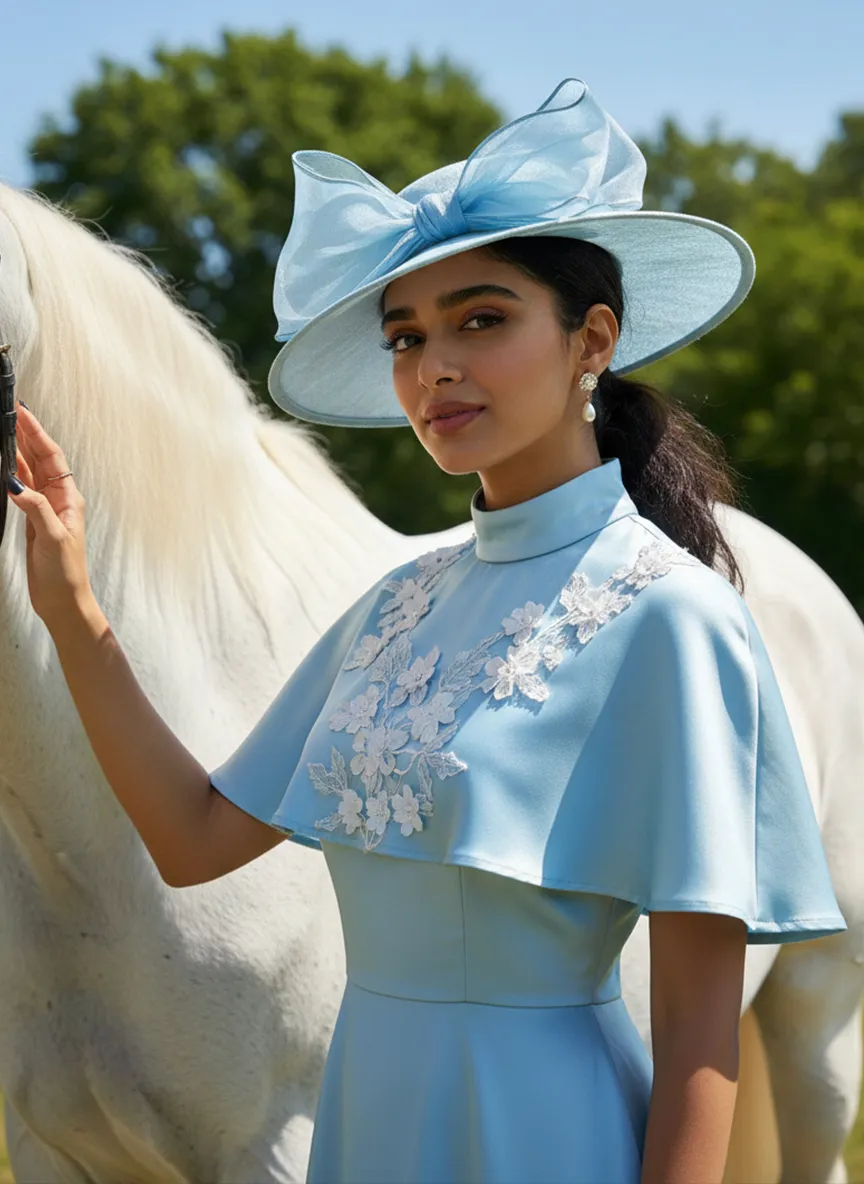
Strictly lock the facial features of the uploaded portrait (preserve facial contours, native Indonesian skin tone, hairstyle and age). photorealistic 3:4 half-body portrait of a graceful young woman in her early 20s, with delicate facial features, wearing a light blue satin vintage-style dress with a matching wide-brimmed hat adorned with a sheer blue bow, white floral embellishments on the dress and capelet, pearl drop earrings. She stands beside a majestic white horse, gently touching the horse's neck, set against a clear bright blue sky with lush green trees in the background, bright natural sunlight, fresh equestrian vintage ambiance, ultra-high detail, cinematic texture

Use Template
arrow
Grace

More From VIVAGO AI

Pet Movies

Based on the pet in the reference image, create a three-frame film montage storyboard with a vertical three-screen split composition (close-up, medium close-up, medium shot or long shot). Frame 1: A winter snow scene, with a vintage train heading into the distance through wind and snow. The pet stands by the railway tracks, its fur dusted with snowflakes, eyes fixed on the train’s direction. The frame exudes a cold and lonely mood, with the text Another winter has come centered on the image. Frame 2: In the snow, the pet tilts its head upward as snowflakes flutter down gently. The background is pure white and minimalist, striking a healing yet wistful atmosphere, with the text Can the new winter surpass the old winter centered on the image. Frame 3: A close-up of the pet, with clear and bright eyes, a snowflake dusted nose, and snowflakes swirling all around. The frame focuses on the dog’s expression, brimming with tenderness and longing, with the cinematic subtitle hope that you are well centered on the image. Overall Style: Winter narrative feeling, healing pet photography, cinematic storyboard composition, an atmosphere of subtle longing, cool color tones, and a calm and elegant mood.

SereneNook

Shoot a 10-second (9:16) vertical one-take video showcasing a serene, sunlit indoor lounge area. The shot begins with a slightly elevated wide-angle view, presenting the entire scene: two wooden rocking chairs with beige cushions, a small side table with fruits and coffee cups, a floor lamp, and a large potted plant by the window. A young man in a simple white top and black pants enters the frame, holding a glass water jug. He walks to the table, bends down, and gently and steadily pours water into a small succulent plant on the table. After pouring, he straightens up, smiles slightly, and steps back to admire the scene. Natural light filters through sheer curtains into the room, casting soft shadows on the wooden floor and carpet. The camera remains stable for 10 seconds, smoothly capturing all actions in one continuous take, creating a warm, peaceful, and comfortable atmosphere. Add the sound of flowing water and soft background music to enhance the calm ambiance.

Pet Belly Dance

"The scene begins with a medium or close-up shot, clearly revealing the subject(s) from the image standing and dancing within the frame.\nAs the camera slowly pulls back, the full bodies of all the animals are gradually revealed. At the same time, they all stand upright and are dressed in bunny-girl-inspired outfits.\nThey begin to dance in an anthropomorphic manner: standing on two legs with their front paws placed on their hips, elegantly swaying their hips from side to side with a soft, subtly seductive rhythm. Their facial expressions are lively and playful, maintaining direct eye contact with the camera, accompanied by slight nods or head tilts to enhance the sense of interaction with the viewer.\nAll animals wear coordinated bunny-girl-themed costumes (with possible slight variations in color and details), which include:\nA form-fitting, waist-cinching bunny-style corset\nA veil or bunny ear accessory worn on the head\nA light, sheer scarf tied around the waist that flutters naturally with their dance movements\nNote:\nThe exact number of subjects must be determined based on the uploaded image.\nThe subject count could be one or multiple—please identify the precise number and use it clearly in the description."

Blue Ocean AI effects generated image

Blue Ocean

Strictly lock the facial features of the uploaded portrait (completely preserve facial contours, native skin tone, hairstyle and age); young girl with light golden long curly hair, Korean sweet style looks, delicate facial features with clear nude makeup and light pink blush, gentle and lively eyes, smiling and looking back sideways, hair fluttering in the sea breeze; wearing a light pink lace halter tulle dress with a flowing skirt and pink ribbons fluttering in the wind; background is the blue Erhai Lake/seaside, sparkling sea with white waves, fluffy white clouds in the sky, flocks of seagulls flying freely, light cyan mountains in the distance; overall fresh and healing seaside atmosphere photo, soft and transparent natural light, high saturation fresh tones, cinematic lighting, motion blur (seagulls/hair), full of details, 8K ultra-clear, realistic human photography, flawless, Japanese fresh + Korean pictorial style

With Deceased

Place the two characters from the uploaded pictures (with strict control over gender, age, clothing, and expression of sadness) in the same scene. The background is a beautiful scene of a warm yellow flower sea with a beautiful sunset. The sunlight shines on the characters' faces, illuminating them with a warm light, creating a warm and romantic atmosphere. The characters stand facing the camera in the middle of the frame, in a half-body close-up shot (the two shots uploaded are of them standing facing the camera). There is a bright light edge effect on the outline, with a smooth and natural transition. The picture quality is of a film level, with a realistic texture. It presents the texture of a reunion and memory. The shooting was done using a Canon 5D Mark IV full-frame camera and a 55mm f/1.4 wide-angle lens. The shallow depth of field effect was used. The warm-toned sunset natural light (golden dusk side backlight) was used to create a warm atmosphere. The high-resolution quality

Princess AI effects generated image

Princess

Strictly lock the facial features of the uploaded portrait (preserve facial contours, native Indonesian skin tone, hairstyle and age). Extreme close-up composition, maximum frame filling, the subject’s face and upper body completely fill the vertical frame with zero negative space above the head, seamless top edge; the crown of the head is slightly cropped to maximize the facial close-up. Strictly lock the facial features of the uploaded portrait (preserve facial contours, native Indonesian skin tone, hairstyle and age). Tight Bust Shot, hyper-realistic style, 4K ultra-high definition, soft diffused natural daylight (post-rain outdoor lighting), authentic Indonesian rural cultural festival atmosphere | An 8-10 year old Indonesian girl, facing the camera with a sweet and gentle smile, wearing a vibrant purple traditional Indonesian children’s top with blue, orange and green floral patterns, paired with a bright yellow fabric waist sash (only the upper edge visible), an exquisite gold embroidered brooch at the neckline, a sparkling silver mini tiara on her head, small delicate silver drop earrings, and her hair styled up with metallic feather-shaped hair ornaments. She stands on a wet dark gray stone-paved alley in a traditional Indonesian village, with the background (traditional wooden houses and lush tropical greenery) rendered with extreme bokeh blur to draw the visual focus entirely to her oversized facial close-up. Focus on her vivid and warm facial features, the rich texture of the traditional fabric, and the fresh, natural colors of the frame

Load more

Next-Gen Multi-Model AI Video Architecture

Vivago AI isn't just one engine—it’s a unified hub for the world’s most advanced video AI. Whether you need cinematic realism or high-speed social content, we provide the right model for your creative vision.

Free Generate

Beauty and Dolphins

Vacation Time

Stellar Tear

Fish Tank Supervisor

Cinematic Quality & Precision Control

Enables 4K resolution with multi-lens motion control, generating delicate scene via text prompts for customized cinematography.​

TRY NOW

Dynamic AV Sync

Auto-generates original audio to avoid copyright issues. Build 3D immersive environments through layered sound design automatically.

TRY NOW

OpenAI Sora 2

​Advanced visual storytelling with unparalleled physics and consistency.

TRY NOW

Kling v2.6 Pro

Industry-leading cinematic image animation and motion control.

TRY NOW

Google Veo 3 & 3.1

Ultra-fast generation with enhanced realism for creative workflows.

TRY NOW

Vivago AI 2.0

Our proprietary model optimized for efficiency, speed, and cost-effective generation.

TRY NOW

Users' Voice

We listen carefully to the opinions of every user.
Free Generate
Contact Us
I tried the Lip Sync feature inside Vivago.ai’s AI Video Generator for my educational podcast, and the results were stunning! The avatar's lip movements perfectly matched my audio recording, creating a professional AI-generated video without complex editing. Compared with tools like OpenAI Sora 2 and Google Veo 3.1, Vivago Image-to-Video delivers fast, studio-quality results online. It saved me hours of post-production work.
ElenaM (Spain)
Vivago’s Image-to-Video AI transformed my marketing workflow. I uploaded a product image and described the launch scene in text, and it generated a 10-second cinematic AI video with background music and dynamic visuals. The output quality rivals Kling v2.6 Pro and Google Veo 3 Fast. It’s now my go-to AI video generator for social media ads and product campaigns.
KenjiT (Japan)
As a digital artist, I use Vivago.ai 2.0 daily for Image-to-Image and AI Image-to-Video creation. The e-book covers and animated visuals I generate for clients look cinematic and professional. Unlike many standalone AI tools, Vivago integrates multiple leading models into one platform, making it easier to create copyright-safe AI images and videos for publishing.
ChenL (China)
I tried the Lip Sync feature inside Vivago.ai’s AI Video Generator for my educational podcast, and the results were stunning! The avatar's lip movements perfectly matched my audio recording, creating a professional AI-generated video without complex editing. Compared with tools like OpenAI Sora 2 and Google Veo 3.1, Vivago Image-to-Video delivers fast, studio-quality results online. It saved me hours of post-production work.
ElenaM (Spain)
Vivago’s Image-to-Video AI transformed my marketing workflow. I uploaded a product image and described the launch scene in text, and it generated a 10-second cinematic AI video with background music and dynamic visuals. The output quality rivals Kling v2.6 Pro and Google Veo 3 Fast. It’s now my go-to AI video generator for social media ads and product campaigns.
KenjiT (Japan)
As a digital artist, I use Vivago.ai 2.0 daily for Image-to-Image and AI Image-to-Video creation. The e-book covers and animated visuals I generate for clients look cinematic and professional. Unlike many standalone AI tools, Vivago integrates multiple leading models into one platform, making it easier to create copyright-safe AI images and videos for publishing.
ChenL (China)
I absolutely love Vivago’s AI Image-to-Video Generator. As a travel blogger, static images often fail to capture real atmosphere, but Vivago helps me turn photos into vivid cinematic AI videos with motion effects. It feels comparable to OpenAI Sora 2 and Google Veo 3.1, but more accessible and faster for creators who need high-quality AI videos online.
LiamK (Australia)
I tried the Lip Sync feature inside Vivago.ai’s AI Video Generator for my educational podcast, and the results were stunning! The avatar's lip movements perfectly matched my audio recording, creating a professional AI-generated video without complex editing. Compared with tools like OpenAI Sora 2 and Google Veo 3.1, Vivago Image-to-Video delivers fast, studio-quality results online. It saved me hours of post-production work.
ElenaM (Spain)
Vivago’s Image-to-Video AI transformed my marketing workflow. I uploaded a product image and described the launch scene in text, and it generated a 10-second cinematic AI video with background music and dynamic visuals. The output quality rivals Kling v2.6 Pro and Google Veo 3 Fast. It’s now my go-to AI video generator for social media ads and product campaigns.
KenjiT (Japan)
As a digital artist, I use Vivago.ai 2.0 daily for Image-to-Image and AI Image-to-Video creation. The e-book covers and animated visuals I generate for clients look cinematic and professional. Unlike many standalone AI tools, Vivago integrates multiple leading models into one platform, making it easier to create copyright-safe AI images and videos for publishing.
ChenL (China)
I absolutely love Vivago’s AI Image-to-Video Generator. As a travel blogger, static images often fail to capture real atmosphere, but Vivago helps me turn photos into vivid cinematic AI videos with motion effects. It feels comparable to OpenAI Sora 2 and Google Veo 3.1, but more accessible and faster for creators who need high-quality AI videos online.
LiamK (Australia)
Using Vivago.ai’s Image-to-Video AI has greatly enhanced my classroom teaching. I transform textbook notes into historical AI videos with cinematic filters and dynamic animations. Compared with tools like Kling v2.6 Pro and Google Veo 3 Fast, Vivago offers faster generation and easier parameter control for educators who need reliable AI video creation.
RajivG (India)
I frequently create AI videos on Vivago and publish them on TikTok and YouTube Shorts. The AI video templates and trending content ideas help me produce viral-ready clips quickly. With Vivago’s integrated models—including advanced video engines similar to OpenAI Sora 2—I can generate anime-style and cinematic social media videos that drive high engagement.
MarieJ (Spain)
What attracts me most about Vivago.ai is not only the powerful AI Video Generator but also the active AIGC creator community. It combines AI Image-to-Video, Text-to-Video, and leading model integrations like Google Veo 3.1 into one creative platform.
TomW (India)
At first, I was hesitant about using AI video tools. But after trying Vivago Image-to-Video, I realized how easy it is to create professional AI-generated videos online. I just upload an image, add a short prompt, and adjust a few settings. The results are cinematic and copyright-safe, which is essential for commercial projects.
HectorC (Mexico)
Using Vivago.ai’s Image-to-Video AI has greatly enhanced my classroom teaching. I transform textbook notes into historical AI videos with cinematic filters and dynamic animations. Compared with tools like Kling v2.6 Pro and Google Veo 3 Fast, Vivago offers faster generation and easier parameter control for educators who need reliable AI video creation.
RajivG (India)
I frequently create AI videos on Vivago and publish them on TikTok and YouTube Shorts. The AI video templates and trending content ideas help me produce viral-ready clips quickly. With Vivago’s integrated models—including advanced video engines similar to OpenAI Sora 2—I can generate anime-style and cinematic social media videos that drive high engagement.
MarieJ (Spain)
What attracts me most about Vivago.ai is not only the powerful AI Video Generator but also the active AIGC creator community. It combines AI Image-to-Video, Text-to-Video, and leading model integrations like Google Veo 3.1 into one creative platform.
TomW (India)
At first, I was hesitant about using AI video tools. But after trying Vivago Image-to-Video, I realized how easy it is to create professional AI-generated videos online. I just upload an image, add a short prompt, and adjust a few settings. The results are cinematic and copyright-safe, which is essential for commercial projects.
HectorC (Mexico)