Fast horse
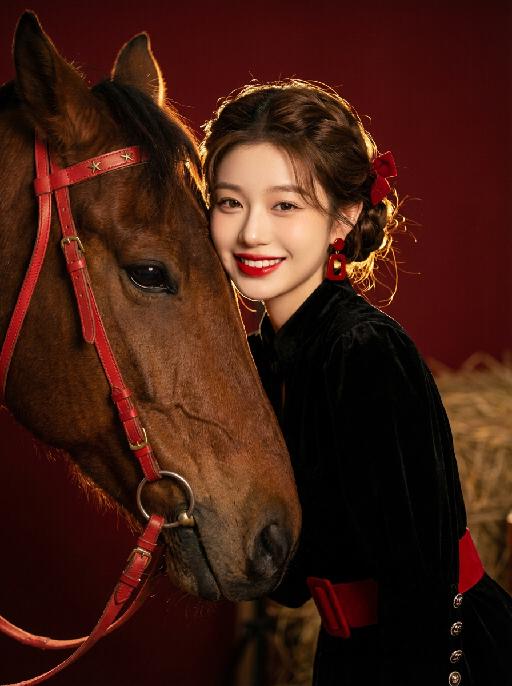
Medium close-up shot: The image in the uploaded picture (with facial features, gender and age unchanged) has its hair coiled (with a small red bow accessory), located on the right side of the frame, while a close-up of the side head of a brown horse is on the left side of the frame. This work presents a sweet and dreamy theme characteristic of the Chinese Year of the Horse. The picture has a delicate film texture; Tone: Professional indoor lighting is used, with high-contrast warm light illuminating the face of the person and the horse, the highlighted hair light (contour light) forming a golden halo at the edge of the hair, the tone is clean and bright, the horse contrasts strongly with the richly saturated dark red background, the contrast between light and shadow is intense, creating a dreamy and warm atmosphere, with a fashionable and avant-garde photography art atmosphere; Color: The main color is a low-saturation clean dark red background, the horse, red leather (horses' reins, stars on the skirt), low-saturation, high-quality and warm harmonious color; Composition: Balanced medium close-up composition. The brown horse (one side of the head) occupies the left half of the frame (about 45% - 50%), the person (upper body + head) occupies the right half of the frame (about 40% - 45%), the person and the horse are closely embraced, forming the visual center; Shooting angle: Horizontal perspective, the camera is at the same level as the person's face in the uploaded picture and the side head of the horse, creating a natural and friendly interaction feeling; Person's posture: The body tilts slightly towards the camera, the upper body leans lightly against the brown horse, the head is close to the horse's face, with a sweet and brilliant smile, looking straight at the camera, the arms are naturally placed in front of the body, the posture is relaxed and intimate; Clothing: Wearing a black velvet stand-up collar and puff sleeve mini dress, with a wide red belt and exquisite metal cuff buttons, paired with retro red geometric-shaped earrings and bright red lip makeup, wearing exquisite high-end custom accessories, fashionable and avant-garde, delicate and elegant; Image content ratio: Horse (45% - 50%), person (40% - 45%), the retro scene background of the outdoor haystack and stable (about 10%). Image content ratio: Horse (45% - 50%), person (40% - 45%), the authenticity, artistry of the film, film-level ultra-high-definition 8K image quality, fashion magazine style, photography pioneer fashion art style, top-notch lighting effects.