Text to Image

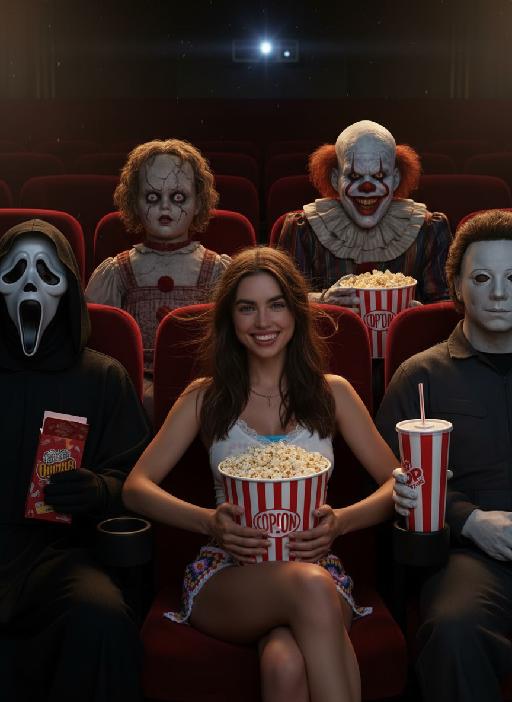
A fierce huntress with long flowing hair, wearing a deep blue bikini and intricate gold jewelry. She holds a magical bow, standing amidst a field of flowers. Lavender blooms and gentle breezes frame the scene. The card border integrates floral patterns and delicate designs, accented with light pink and shimmering gold, and adorned with precious sapphires.

Recreate
arrow
Text to Image

More From VIVAGO AI

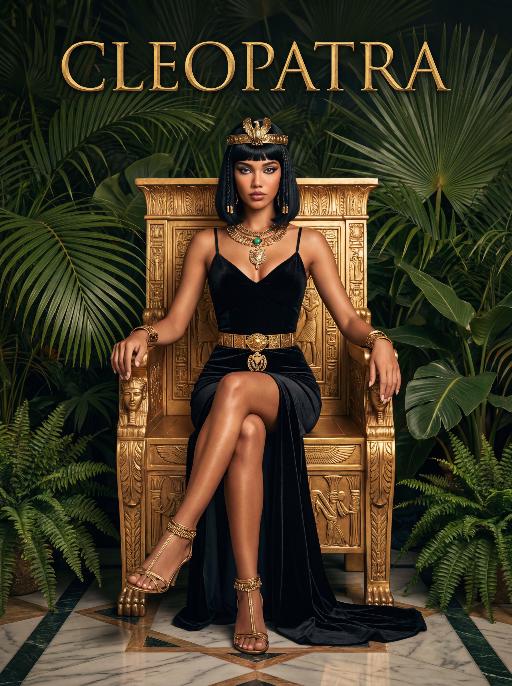
Queen AI effects generated image

Queen

The character in the uploaded picture (unchanged facial features, gender and age).A striking woman embodying the persona of Cleopatra, seated regally on an ornate golden throne. She has a sleek black bob haircut with blunt bangs, a sharp, confident gaze, and a poised, authoritative expression. She wears a form-fitting black velvet spaghetti-strap gown with a high slit, revealing one leg. Her accessories are opulent: a golden pharaoh-style headdress with a central eagle motif, a layered gold necklace culminating in a large, ornate pendant, a wide gold belt with a matching large pendant, gold bracelets on both wrists, and gold ankle bracelets paired with strappy gold sandals. She sits with one leg crossed over the other, one hand resting on the throne's armrest, the other on her lap. The throne is intricately carved with gold accents and topped with golden finials. The setting is a lush, verdant tropical jungle, filled with large, vibrant green palm fronds and broad-leafed ferns that frame the scene. The floor is a polished marble surface with a geometric pattern. Above her, the word "CLEOPATRA" is displayed in an elegant, golden, serif font. The image is rendered in a vintage Hollywood movie poster style, with dramatic, high-contrast lighting that emphasizes the richness of the black velvet and the sheen of the gold. The color palette is rich and saturated, with deep greens, luxurious golds, and stark blacks, creating an opulent, mysterious, and timeless atmosphere. The overall aesthetic is cinematic, detailed, and evocative of ancient Egyptian grandeur.

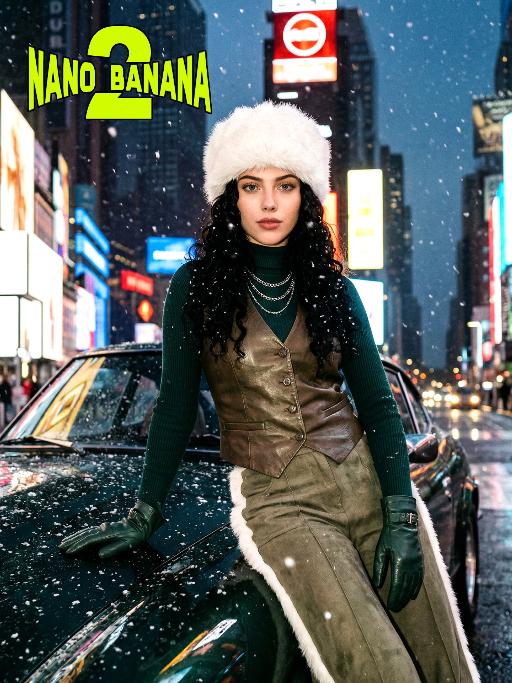
Times Square AI effects generated image

Times Square

[Scene] In the dark, snowy New York Times Square, during the winter night when it gets dark, heavy snow is falling, with snowflakes falling clearly. The iconic neon advertisements are shining in the background. The damp asphalt reflects the light of the neon lights. The towering skyscrapers are clearly visible in the snow and fog, with snowflakes flying all around. [Subject] The person in the uploaded picture (with facial features, gender, and age unchanged) has long black curly hair, is wearing a white fluffy artificial fur hat in a European style, has a European minimalist makeup look, and the golden light outlines a soft and natural expression, with a calm demeanor, presenting a handsome posture. Snowflakes fall on the person's hair and coat, and also on the person's body. [Posture] - Body: Sideways leaning against the engine hood of a dark green luxury retro sports car, the body's center of gravity tilts to the right, the torso slightly twisting to face the camera - Legs: Right knee bent; left leg straight down, foot on the ground - Arms: Right arm stretched downward, palm flat against the car hood to provide support, fingers slightly spread; left arm relaxed, hand on the left thigh - Head and gaze: Head remains upright, facing the camera directly, eyes forward, expression confident - Overall: A relaxed but energetic fashion editor posture, casual and cool atmosphere, elongated body lines to enhance visual effect [Clothing] Leading-edge autumn design: 1. Outer layer: A well-tailored leather fabric vest with silver chain details and perforated patterns, worn over a fitted dark green high-neck sweater; 2. Bottom: High-waisted dark green wide-leg work pants, with a white fur trim (coordinated with the white fur belt); 3. Accessories: Dark green long leather gloves, brim with white artificial fur trim, multi-layer silver chain necklace; 4. Footwear: Simple black ankle boots (partly visible), Y2K style, retro style, leather and metal texture. [Photography and Lighting] Mid-close-up shot, dark environment, using 35mm film photography style, Kodak Gold 200 film, warm golden backlight to outline the hair and snowflakes, soft fill light to retain the natural skin texture of the face, shallow depth of field blurs the background advertisements, film grain and soft bokeh effect when snow falls, strong light contrast, foreground with a lot of blurred and clear snowflakes falling. [Style] The image style is portrait, the edges of the picture add a similar film graininess effect, dark atmosphere, high-end fashion editor, hyper-realistic details, fashion avant-garde photography art, 8K resolution, no excessive smoothing processing, using blue-green and orange contrast for color grading - the style has a cinematic feel.


Christmas Baby

Transform the figure in the uploaded image into a Christmas-themed style, standing upright and dressed in a retro Christmas knit sweater with red and green color-blocking (printed with white snowflake and reindeer patterns), a long red tasseled scarf, a cute Christmas hat, a full set of Christmas-themed clothing with Christmas pants, and cute fluffy slouch socks on its feet.Scene: A warm American home with a Christmas setup, featuring exquisite gift boxes placed on snow-dusted ground; the background is Christmas decor in a dominant red tone, with a Christmas wreath hung above adorned with red and gold baubles and white flowers, and Christmas trees on both sides dusted with a light layer of snow and decorated with red and gold baubles.Texture & Style: The frame is ultra-high-definition and delicate (cinematic texture at 8K level), with soft and bright lighting, vivid and festive colors, and clear details such as the sweater’s knit texture and the luster of apples. Shot in the style of high-end editorial fashion photography.

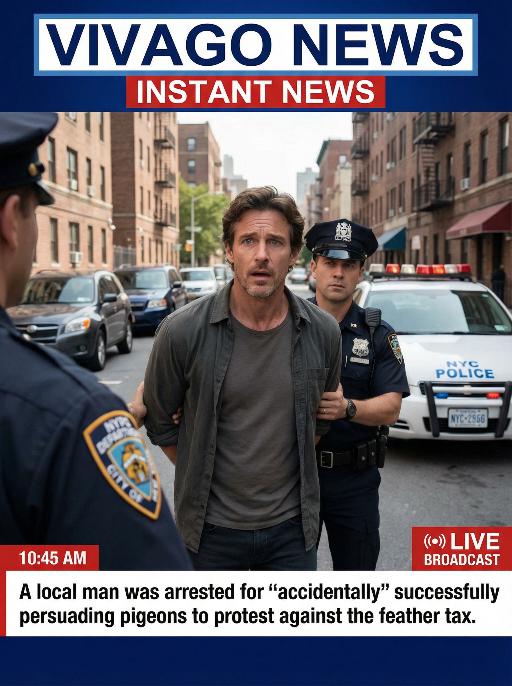
Arrest AI effects generated image

Arrest

Realistic real-time news screenshot: The main subject is the depicted person (with unchanged facial features, gender and age). The expression is shocked and confused. The person was arrested by two New York City police officers on a street in the city. The police tied his hands behind his back. The main figure occupies 80% of the overall picture. The background is a typical New York City street, featuring brick apartment buildings, parked vehicles and a New York City police car. Daylight natural light, over-the-shoulder news camera angle. There is a news caption at the bottom of the picture, stating: A local man was arrested for 'accidentally' successfully persuading pigeons to protest against the feather tax. There is a large title caption at the top of the picture: VIVAGO NEWS INSTANT NEWS. At the corner, there is a timestamp: 10:45 AM. Live broadcast. With a realistic news photography style, rich details, 8K resolution, and a cinematic aesthetic of news clips.

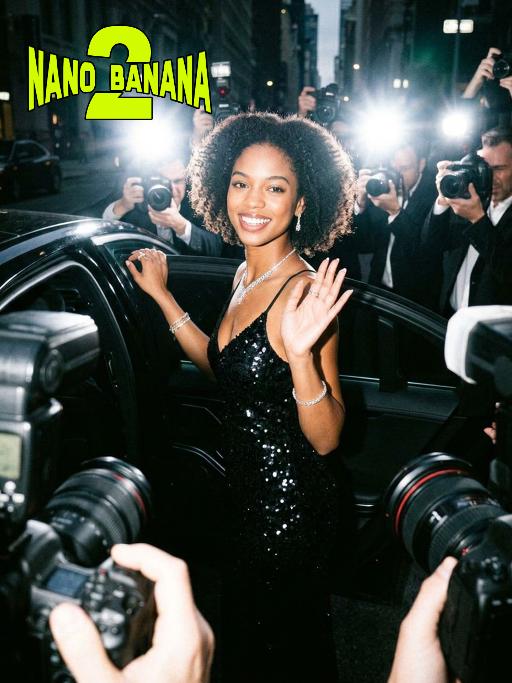
Hollywood Star AI effects generated image

Hollywood Star

A medium close-up shot from a frontal perspective with a slight upward tilt, the camera angle is slightly tilted forward. This shot was taken using a professional full-frame digital SLR camera and a 50mm f/1.2 wide-angle fixed-focus lens. The uploaded image shows a person (with unchanged facial features, gender, age, and hairstyle), wearing a tight black sequined sexy dress and wearing high-end custom accessories. This figure is preparing to get into a black luxury car with open doors. The figure turns halfway and looks at the camera, raising one hand and making a gentle waving or shielding gesture. The person has a relaxed and confident smile on their face, with bright and expressive eyes. The scene is on a night-time city street, illuminated by a group of paparazzi and a large number of flashes, creating a high-contrast light and shadow effect, with shadows and bright highlights, and the foreground also includes cameras and flashes, creating the feeling that the celebrity figure is surrounded by paparazzi and cameras. This aesthetic style is the street style of Hollywood celebrity paparazzi, featuring grainy film texture, clear focus on the subject, blurred background and dark tones. The person's face is illuminated by the flash, and the makeup characteristic of the figure is exaggerated false eyelashes, clear cheekbones, nude matte lip color and bright highlights used to enhance the three-dimensionality; the picture adds dark corners at the four corners and bright parts in the middle, creating a strong contrast between light and shadow.

Banana Man AI effects generated image

Banana Man

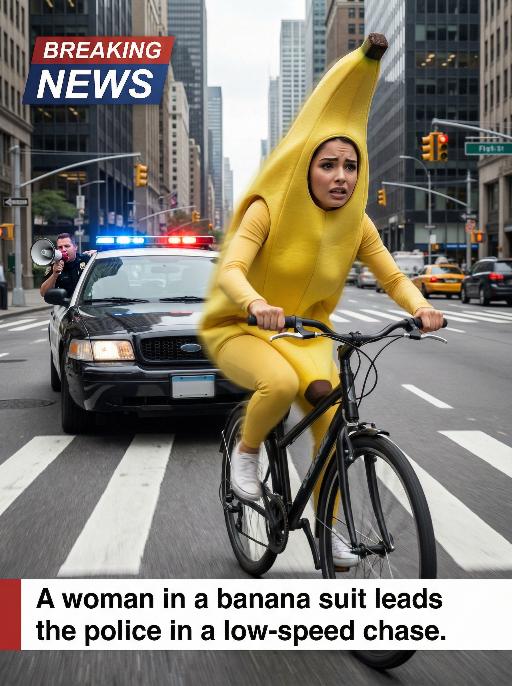
Ultra-realistic breaking news photo: In this uploaded photo, the figure (with unchanged facial features, gender and age) is wearing a full-body banana costume and is frantically riding a bicycle at high speed on a busy city street, with a frightened but determined expression on their face. The main subject is centered and prominent, and the main character occupies 80% of the frame, being closely pursued by a black police car with blue and red flashing lights. A police officer leans out of the car window and shouts loudly through a megaphone. The scene is set in the daytime, with skyscrapers, crosswalks and traffic signals in the background. The dynamic blur effect of the bicycle wheels and the police car conveys the tense atmosphere during the low-speed chase. There is a large title text in the upper left corner of the picture (with a style consistent with the design style of news live broadcasts): BREAKING NEWS; At the bottom, there is a text title layout (with a style consistent with the design style of news live broadcasts): A woman in a banana suit leads the police in a low-speed chase. Style: Ultra-realistic, cinematic, comedy style, high detail, 4K resolution.

Load more

Next-Gen Multi-Model AI Video Architecture

Vivago AI isn't just one engine—it’s a unified hub for the world’s most advanced video AI. Whether you need cinematic realism or high-speed social content, we provide the right model for your creative vision.

Free Generate

Beauty and Dolphins

Vacation Time

Stellar Tear

Fish Tank Supervisor

Cinematic Quality & Precision Control

Enables 4K resolution with multi-lens motion control, generating delicate scene via text prompts for customized cinematography.​

TRY NOW

Dynamic AV Sync

Auto-generates original audio to avoid copyright issues. Build 3D immersive environments through layered sound design automatically.

TRY NOW

OpenAI Sora 2

​Advanced visual storytelling with unparalleled physics and consistency.

TRY NOW

Kling v2.6 Pro

Industry-leading cinematic image animation and motion control.

TRY NOW

Google Veo 3 & 3.1

Ultra-fast generation with enhanced realism for creative workflows.

TRY NOW

Vivago AI 2.0

Our proprietary model optimized for efficiency, speed, and cost-effective generation.

TRY NOW

Users' Voice

We listen carefully to the opinions of every user.
Free Generate
Contact Us
I tried the Lip Sync feature inside Vivago.ai’s AI Video Generator for my educational podcast, and the results were stunning! The avatar's lip movements perfectly matched my audio recording, creating a professional AI-generated video without complex editing. Compared with tools like OpenAI Sora 2 and Google Veo 3.1, Vivago Image-to-Video delivers fast, studio-quality results online. It saved me hours of post-production work.
ElenaM (Spain)
Vivago’s Image-to-Video AI transformed my marketing workflow. I uploaded a product image and described the launch scene in text, and it generated a 10-second cinematic AI video with background music and dynamic visuals. The output quality rivals Kling v2.6 Pro and Google Veo 3 Fast. It’s now my go-to AI video generator for social media ads and product campaigns.
KenjiT (Japan)
As a digital artist, I use Vivago.ai 2.0 daily for Image-to-Image and AI Image-to-Video creation. The e-book covers and animated visuals I generate for clients look cinematic and professional. Unlike many standalone AI tools, Vivago integrates multiple leading models into one platform, making it easier to create copyright-safe AI images and videos for publishing.
ChenL (China)
I tried the Lip Sync feature inside Vivago.ai’s AI Video Generator for my educational podcast, and the results were stunning! The avatar's lip movements perfectly matched my audio recording, creating a professional AI-generated video without complex editing. Compared with tools like OpenAI Sora 2 and Google Veo 3.1, Vivago Image-to-Video delivers fast, studio-quality results online. It saved me hours of post-production work.
ElenaM (Spain)
Vivago’s Image-to-Video AI transformed my marketing workflow. I uploaded a product image and described the launch scene in text, and it generated a 10-second cinematic AI video with background music and dynamic visuals. The output quality rivals Kling v2.6 Pro and Google Veo 3 Fast. It’s now my go-to AI video generator for social media ads and product campaigns.
KenjiT (Japan)
As a digital artist, I use Vivago.ai 2.0 daily for Image-to-Image and AI Image-to-Video creation. The e-book covers and animated visuals I generate for clients look cinematic and professional. Unlike many standalone AI tools, Vivago integrates multiple leading models into one platform, making it easier to create copyright-safe AI images and videos for publishing.
ChenL (China)
I absolutely love Vivago’s AI Image-to-Video Generator. As a travel blogger, static images often fail to capture real atmosphere, but Vivago helps me turn photos into vivid cinematic AI videos with motion effects. It feels comparable to OpenAI Sora 2 and Google Veo 3.1, but more accessible and faster for creators who need high-quality AI videos online.
LiamK (Australia)
I tried the Lip Sync feature inside Vivago.ai’s AI Video Generator for my educational podcast, and the results were stunning! The avatar's lip movements perfectly matched my audio recording, creating a professional AI-generated video without complex editing. Compared with tools like OpenAI Sora 2 and Google Veo 3.1, Vivago Image-to-Video delivers fast, studio-quality results online. It saved me hours of post-production work.
ElenaM (Spain)
Vivago’s Image-to-Video AI transformed my marketing workflow. I uploaded a product image and described the launch scene in text, and it generated a 10-second cinematic AI video with background music and dynamic visuals. The output quality rivals Kling v2.6 Pro and Google Veo 3 Fast. It’s now my go-to AI video generator for social media ads and product campaigns.
KenjiT (Japan)
As a digital artist, I use Vivago.ai 2.0 daily for Image-to-Image and AI Image-to-Video creation. The e-book covers and animated visuals I generate for clients look cinematic and professional. Unlike many standalone AI tools, Vivago integrates multiple leading models into one platform, making it easier to create copyright-safe AI images and videos for publishing.
ChenL (China)
I absolutely love Vivago’s AI Image-to-Video Generator. As a travel blogger, static images often fail to capture real atmosphere, but Vivago helps me turn photos into vivid cinematic AI videos with motion effects. It feels comparable to OpenAI Sora 2 and Google Veo 3.1, but more accessible and faster for creators who need high-quality AI videos online.
LiamK (Australia)
Using Vivago.ai’s Image-to-Video AI has greatly enhanced my classroom teaching. I transform textbook notes into historical AI videos with cinematic filters and dynamic animations. Compared with tools like Kling v2.6 Pro and Google Veo 3 Fast, Vivago offers faster generation and easier parameter control for educators who need reliable AI video creation.
RajivG (India)
I frequently create AI videos on Vivago and publish them on TikTok and YouTube Shorts. The AI video templates and trending content ideas help me produce viral-ready clips quickly. With Vivago’s integrated models—including advanced video engines similar to OpenAI Sora 2—I can generate anime-style and cinematic social media videos that drive high engagement.
MarieJ (Spain)
What attracts me most about Vivago.ai is not only the powerful AI Video Generator but also the active AIGC creator community. It combines AI Image-to-Video, Text-to-Video, and leading model integrations like Google Veo 3.1 into one creative platform.
TomW (India)
At first, I was hesitant about using AI video tools. But after trying Vivago Image-to-Video, I realized how easy it is to create professional AI-generated videos online. I just upload an image, add a short prompt, and adjust a few settings. The results are cinematic and copyright-safe, which is essential for commercial projects.
HectorC (Mexico)
Using Vivago.ai’s Image-to-Video AI has greatly enhanced my classroom teaching. I transform textbook notes into historical AI videos with cinematic filters and dynamic animations. Compared with tools like Kling v2.6 Pro and Google Veo 3 Fast, Vivago offers faster generation and easier parameter control for educators who need reliable AI video creation.
RajivG (India)
I frequently create AI videos on Vivago and publish them on TikTok and YouTube Shorts. The AI video templates and trending content ideas help me produce viral-ready clips quickly. With Vivago’s integrated models—including advanced video engines similar to OpenAI Sora 2—I can generate anime-style and cinematic social media videos that drive high engagement.
MarieJ (Spain)
What attracts me most about Vivago.ai is not only the powerful AI Video Generator but also the active AIGC creator community. It combines AI Image-to-Video, Text-to-Video, and leading model integrations like Google Veo 3.1 into one creative platform.
TomW (India)
At first, I was hesitant about using AI video tools. But after trying Vivago Image-to-Video, I realized how easy it is to create professional AI-generated videos online. I just upload an image, add a short prompt, and adjust a few settings. The results are cinematic and copyright-safe, which is essential for commercial projects.
HectorC (Mexico)