Image to Image

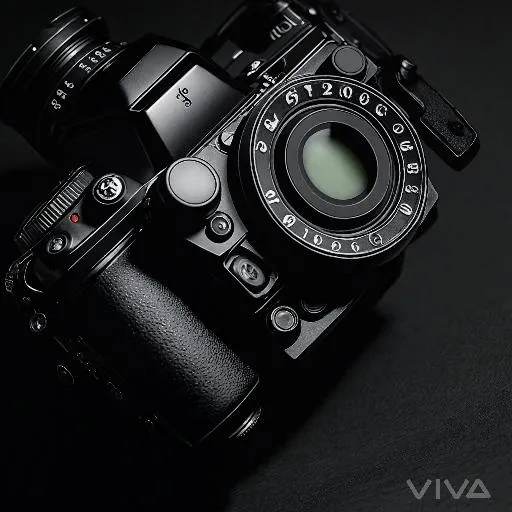
Explore professional camera details with this close-up of advanced buttons, dials, and ergonomic design. Ideal for photographers and videographers, this sleek device enhances product photography, capturing precision engineering for high-quality visuals. Perfect for creative storytelling in photography projects.

Recreate
arrow
Image to Image

FAQs

How to generate images/videos from text prompts?

Describe the visual content in natural language (e.g., 'A cyberpunk cat wearing neon goggles') and our AI models will create outputs. Complex prompts trigger multi-stage NLP parsing for enhanced accuracy.

How to refine unsatisfactory results?

Use our Prompt Bot - an AI-powered optimizer that suggests technical modifiers. Simply describe your ideas, desired changes ('more metallic texture'), then you will get optimized prompt variants.

When should I use reference images?

Upload references to: 1) Guide character consistency (e.g., faces/outfits), 2) Control motion patterns in videos using our feature matching algorithm. Supports JPG/PNG

What's the credit system?

Daily login grants 100 credits. Upgrade options: 1) Premium Membership, 2) Credit Packs. Details: https://vivago.ai/subscribe

More From VIVAGO AI

With Deceased

Place the two characters from the uploaded pictures (with strict control over gender, age, clothing, and expression of sadness) in the same scene. The background is a beautiful scene of a warm yellow flower sea with a beautiful sunset. The sunlight shines on the characters' faces, illuminating them with a warm light, creating a warm and romantic atmosphere. The characters stand facing the camera in the middle of the frame, in a half-body close-up shot (the two shots uploaded are of them standing facing the camera). There is a bright light edge effect on the outline, with a smooth and natural transition. The picture quality is of a film level, with a realistic texture. It presents the texture of a reunion and memory. The shooting was done using a Canon 5D Mark IV full-frame camera and a 55mm f/1.4 wide-angle lens. The shallow depth of field effect was used. The warm-toned sunset natural light (golden dusk side backlight) was used to create a warm atmosphere. The high-resolution quality

Indian Dancer

The figure in the uploaded image (with unchanged facial features) has smooth, luminous skin and a well-defined facial contour, with sleek, glossy hair styled in loose waves. She wears understated burgundy lipstick, has deep brown almond-shaped eyes with subtle smoky eye makeup, and a small red bindi on her forehead. Standing front-on and gazing at the camera, her long black curly hair cascades over her shoulders. She is dressed in an exquisite choli (blouse) with golden thread embroidery, adorned with numerous turquoise/red gemstones, pearl inlays, black spaghetti straps and beaded tassels; exuding intense sexiness, the outfit bares her waist and bust line, paired with a flowy turquoise silk lehenga (traditional Indian long skirt) and a wide, opulent kamarband (golden waist belt) inlaid with red gemstones and strung with golden bells. A full set of golden accessories adorns her: a maang tikka (forehead ornament with gemstones and pearls) in her hair, large chandelier earrings, a fitted pearl and gemstone necklace, bangles (bajuband), and delicate bracelets. Background: Luxurious blurred golden bokeh (flash lighting), warm and dramatic side lighting, studio portrait, 8K resolution, rich details on the face and accessories, and a sharp, clear frame.

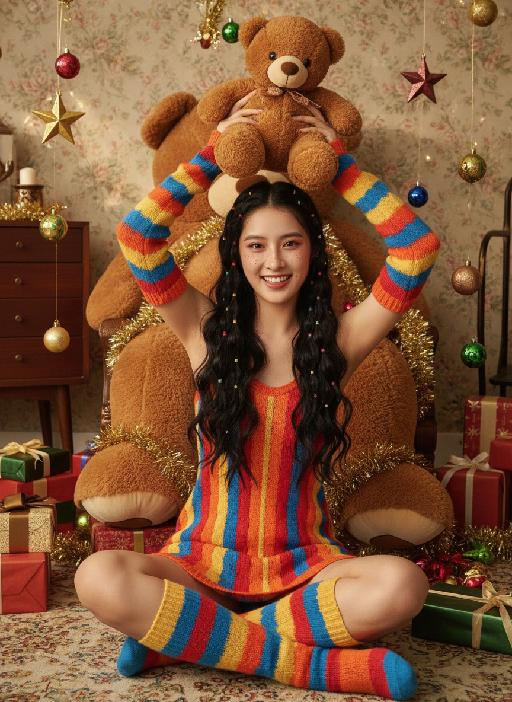
Teddy bear AI effects generated image

Teddy bear

Strictly lock the facial features of the uploaded portrait (completely preserve facial contours, native skin tone, hairstyle and age); Christmas sweet and cool girl with long black curly hair and colorful hair ties, freckle makeup + reddish-brown eye makeup + glass lips, lively and playful expression, sitting cross-legged on the carpet, holding a brown teddy bear above her head with both hands, lively posture; wearing a red-orange-yellow-blue colorful striped knitted slip dress, paired with colorful striped knitted sleeves + color-block knitted long socks, full of retro childishness; background is a retro Christmas-style room with floral wallpaper + vintage wooden furniture, a giant brown plush teddy bear dominates the background, surrounded by scattered Christmas gift boxes, star ornaments, colorful balls and golden tinsel, soft warm light illuminating, full of Christmas atmosphere; overall retro Christmas + sweet and cool girl style photo, high saturation retro tones, high-definition texture, 8K ultra-clear, realistic human photography,

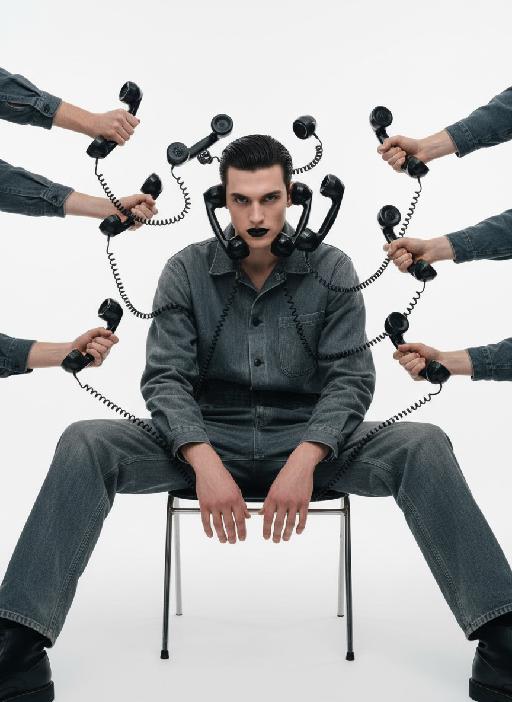
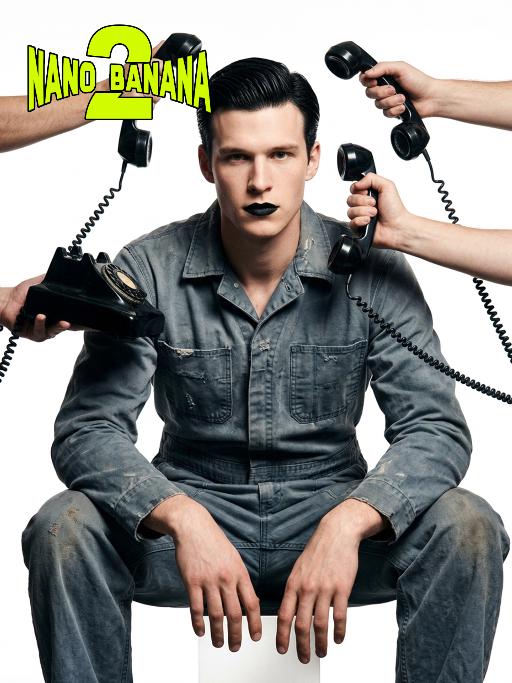
Telephone Ring AI effects generated image

Telephone Ring

"Shooting perspective and focal length: Frontal level view, using a medium telephoto lens (approximately 50mm), with an appropriate focal length, medium close-up shot, able to clearly present the upper body and hand details of the characters, and the picture has no obvious distortion. Equipment: Professional studio camera (such as Canon 5D series or Sony A7 series), combined with a studio lighting system. Character pose: The character is in a sitting position, with legs apart and knees bent, the upper body leaning forward and the head close to the camera; multiple arms extend from all around the frame, each hand holding an old-fashioned black wired telephone, multiple receivers randomly surround the character's head, creating a visual effect of being surrounded. Character expression: Eyes gaze at the camera, the gaze is slightly distant and cold, the facial expression is calm and undisturbed, conveying a restrained emotional tension. Lighting: Use studio hard light, the main light source comes from the front, supplemented by side lighting, forming a clear contrast of light and shade, highlighting the fabric texture and facial contours, the background is pure white, clean and without any color impurities. Style: Pioneer fashion photography, integrating surrealism and minimalism, creating an absurd yet highly tense atmosphere through strong visual impact. Clothing: A set of gray-blue distressed texture workwear, the fabric has fine textures, the fit is loose and firm, the lapel design combines toughness and retro charm. Hair style: Black short hair, using hair gel to comb backward, revealing a full forehead, the style is clean and neat with a sense of lines. Makeup: Matte texture pure black lipstick as the visual focus, the facial base makeup is even and transparent, only highlighting the lip color, the overall makeup is avant-garde and has a distinctive characteristic."

Lion Dance AI effects generated image

Lion Dance

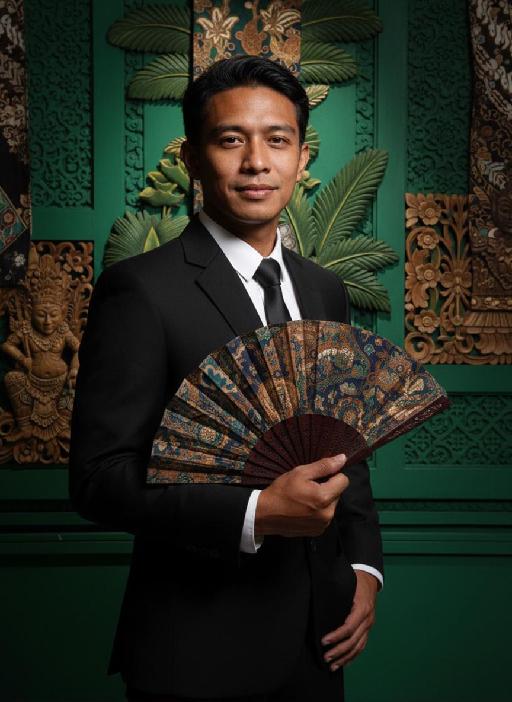
Strictly lock the identity of the uploaded portrait (preserve facial contours, native Indian skin tone, hairstyle, and age). Aspect ratio 3:4, hyper-realistic photography, high definition and exquisite details, advanced light and shadow: A 40-year-old Indonesian man with a solemn, dignified demeanor, in the sacred ritual moment of dotting the eyes for traditional Indonesian lion dance. The figure is positioned exactly in the center of the frame, as the absolute main subject occupying more than 80% of the canvas; only a tiny corner of the traditional Indonesian lion dance head peeks into the edge of the frame, with an extremely small proportion. He is dressed in exquisite traditional Indonesian lion dance costume with classic ethnic patterns and delicate decorations, holding a delicate painting brush, his fingertips gently touching the eye-dotting position of the lion head, his arm slightly raised with a calm and steady posture. The background is a super bustling and lively festive scene with soft slight bokeh—filled with crowds of people in festive attires, colorful traditional lanterns, festive streamers, and lively parade elements, with bright festive ambient light and vibrant street decorations, presenting an extremely dynamic and jubilant festive atmosphere. Soft natural light outlines the man's firm facial lines and delicate hand details, the man's solemn ritualistic state forms a striking contrast with the lively background, the overall color palette is rich and bright with a sense of hierarchy, and all details of the character and costume are clear and textured

Lens Heartbeat AI effects generated image

Lens Heartbeat

The uploaded figure (with unchanged facial features) forms a heart shape with both hands in front of the lens for a framed composition, featuring a shallow depth of field (the large, tilted hands in the foreground are slightly blurred). This is a portrait photoshoot in the ppgalclub style, with Japanese Shibuya Y2K fashion styling. Captured in a fisheye lens close-up (strong fisheye distortion with slight stretching at the frame edges) from a slightly low-angle perspective, the figure is centered to fill the entire frame. The figure has short, curly golden bob hair and bold makeup (thick black eyeliner + plump red lips + translucent pink-toned blush), leaning forward with the face facing the camera directly. The outfit includes a black leather vest with a fur collar, a white camisole, a red stud-embellished belt (with a cropped waist design), a golden cross necklace paired with multi-layered metal chokers, sequin-embellished nail art, pearl-encircled rings, and a small golden chain bag. The scene is set in a Shibuya underground passage at night, with dim artificial lighting and a high-intensity flash fired directly at the figure (creating stark light and shadow contrast, prominent highlights on the figure’s face, and a dark-toned background), plus blurred bokeh light spots in the background. The image features film grain texture, a highly saturated black/gold/red color scheme, and ultra-high-definition details; a black fisheye lens vignetting frames the entire image, and an orange vertical digital date watermark (2026:00:00) is added to the bottom right corner.

Battle

These two individuals had angry and serious expressions, raised their fists, and assumed a fighting stance. They began to engage in a fierce struggle, launching a fierce confrontation. They quickly and powerfully punched each other's faces (one person hit the other's face three times in a row with a powerful punch, and the other person, in an angry state, roared and forcefully hit back three times). They also kicked each other's bodies with their feet. The camera captured the intensity of their movements, focusing on the tension of their bodies and the impact force generated by each punch. The background remained still, and the camera followed the movements of the characters, causing the dynamic confrontation between the two fighters to stand out, with powerful punches, the state of the boxers, and an intense and tense atmosphere.

Load more

Next-Gen Multi-Model AI Video Architecture

Vivago AI isn't just one engine—it’s a unified hub for the world’s most advanced video AI. Whether you need cinematic realism or high-speed social content, we provide the right model for your creative vision.

Free Generate

Beauty and Dolphins

Vacation Time

Stellar Tear

Fish Tank Supervisor

Cinematic Quality & Precision Control

Enables 4K resolution with multi-lens motion control, generating delicate scene via text prompts for customized cinematography.​

TRY NOW

Dynamic AV Sync

Auto-generates original audio to avoid copyright issues. Build 3D immersive environments through layered sound design automatically.

TRY NOW

OpenAI Sora 2

​Advanced visual storytelling with unparalleled physics and consistency.

TRY NOW

Kling v2.6 Pro

Industry-leading cinematic image animation and motion control.

TRY NOW

Google Veo 3 & 3.1

Ultra-fast generation with enhanced realism for creative workflows.

TRY NOW

Vivago AI 2.0

Our proprietary model optimized for efficiency, speed, and cost-effective generation.

TRY NOW

Users' Voice

We listen carefully to the opinions of every user.
Free Generate
Contact Us
I tried the Lip Sync feature inside Vivago.ai’s AI Video Generator for my educational podcast, and the results were stunning! The avatar's lip movements perfectly matched my audio recording, creating a professional AI-generated video without complex editing. Compared with tools like OpenAI Sora 2 and Google Veo 3.1, Vivago Image-to-Video delivers fast, studio-quality results online. It saved me hours of post-production work.
ElenaM (Spain)
Vivago’s Image-to-Video AI transformed my marketing workflow. I uploaded a product image and described the launch scene in text, and it generated a 10-second cinematic AI video with background music and dynamic visuals. The output quality rivals Kling v2.6 Pro and Google Veo 3 Fast. It’s now my go-to AI video generator for social media ads and product campaigns.
KenjiT (Japan)
As a digital artist, I use Vivago.ai 2.0 daily for Image-to-Image and AI Image-to-Video creation. The e-book covers and animated visuals I generate for clients look cinematic and professional. Unlike many standalone AI tools, Vivago integrates multiple leading models into one platform, making it easier to create copyright-safe AI images and videos for publishing.
ChenL (China)
I tried the Lip Sync feature inside Vivago.ai’s AI Video Generator for my educational podcast, and the results were stunning! The avatar's lip movements perfectly matched my audio recording, creating a professional AI-generated video without complex editing. Compared with tools like OpenAI Sora 2 and Google Veo 3.1, Vivago Image-to-Video delivers fast, studio-quality results online. It saved me hours of post-production work.
ElenaM (Spain)
Vivago’s Image-to-Video AI transformed my marketing workflow. I uploaded a product image and described the launch scene in text, and it generated a 10-second cinematic AI video with background music and dynamic visuals. The output quality rivals Kling v2.6 Pro and Google Veo 3 Fast. It’s now my go-to AI video generator for social media ads and product campaigns.
KenjiT (Japan)
As a digital artist, I use Vivago.ai 2.0 daily for Image-to-Image and AI Image-to-Video creation. The e-book covers and animated visuals I generate for clients look cinematic and professional. Unlike many standalone AI tools, Vivago integrates multiple leading models into one platform, making it easier to create copyright-safe AI images and videos for publishing.
ChenL (China)
I absolutely love Vivago’s AI Image-to-Video Generator. As a travel blogger, static images often fail to capture real atmosphere, but Vivago helps me turn photos into vivid cinematic AI videos with motion effects. It feels comparable to OpenAI Sora 2 and Google Veo 3.1, but more accessible and faster for creators who need high-quality AI videos online.
LiamK (Australia)
I tried the Lip Sync feature inside Vivago.ai’s AI Video Generator for my educational podcast, and the results were stunning! The avatar's lip movements perfectly matched my audio recording, creating a professional AI-generated video without complex editing. Compared with tools like OpenAI Sora 2 and Google Veo 3.1, Vivago Image-to-Video delivers fast, studio-quality results online. It saved me hours of post-production work.
ElenaM (Spain)
Vivago’s Image-to-Video AI transformed my marketing workflow. I uploaded a product image and described the launch scene in text, and it generated a 10-second cinematic AI video with background music and dynamic visuals. The output quality rivals Kling v2.6 Pro and Google Veo 3 Fast. It’s now my go-to AI video generator for social media ads and product campaigns.
KenjiT (Japan)
As a digital artist, I use Vivago.ai 2.0 daily for Image-to-Image and AI Image-to-Video creation. The e-book covers and animated visuals I generate for clients look cinematic and professional. Unlike many standalone AI tools, Vivago integrates multiple leading models into one platform, making it easier to create copyright-safe AI images and videos for publishing.
ChenL (China)
I absolutely love Vivago’s AI Image-to-Video Generator. As a travel blogger, static images often fail to capture real atmosphere, but Vivago helps me turn photos into vivid cinematic AI videos with motion effects. It feels comparable to OpenAI Sora 2 and Google Veo 3.1, but more accessible and faster for creators who need high-quality AI videos online.
LiamK (Australia)
Using Vivago.ai’s Image-to-Video AI has greatly enhanced my classroom teaching. I transform textbook notes into historical AI videos with cinematic filters and dynamic animations. Compared with tools like Kling v2.6 Pro and Google Veo 3 Fast, Vivago offers faster generation and easier parameter control for educators who need reliable AI video creation.
RajivG (India)
I frequently create AI videos on Vivago and publish them on TikTok and YouTube Shorts. The AI video templates and trending content ideas help me produce viral-ready clips quickly. With Vivago’s integrated models—including advanced video engines similar to OpenAI Sora 2—I can generate anime-style and cinematic social media videos that drive high engagement.
MarieJ (Spain)
What attracts me most about Vivago.ai is not only the powerful AI Video Generator but also the active AIGC creator community. It combines AI Image-to-Video, Text-to-Video, and leading model integrations like Google Veo 3.1 into one creative platform.
TomW (India)
At first, I was hesitant about using AI video tools. But after trying Vivago Image-to-Video, I realized how easy it is to create professional AI-generated videos online. I just upload an image, add a short prompt, and adjust a few settings. The results are cinematic and copyright-safe, which is essential for commercial projects.
HectorC (Mexico)
Using Vivago.ai’s Image-to-Video AI has greatly enhanced my classroom teaching. I transform textbook notes into historical AI videos with cinematic filters and dynamic animations. Compared with tools like Kling v2.6 Pro and Google Veo 3 Fast, Vivago offers faster generation and easier parameter control for educators who need reliable AI video creation.
RajivG (India)
I frequently create AI videos on Vivago and publish them on TikTok and YouTube Shorts. The AI video templates and trending content ideas help me produce viral-ready clips quickly. With Vivago’s integrated models—including advanced video engines similar to OpenAI Sora 2—I can generate anime-style and cinematic social media videos that drive high engagement.
MarieJ (Spain)
What attracts me most about Vivago.ai is not only the powerful AI Video Generator but also the active AIGC creator community. It combines AI Image-to-Video, Text-to-Video, and leading model integrations like Google Veo 3.1 into one creative platform.
TomW (India)
At first, I was hesitant about using AI video tools. But after trying Vivago Image-to-Video, I realized how easy it is to create professional AI-generated videos online. I just upload an image, add a short prompt, and adjust a few settings. The results are cinematic and copyright-safe, which is essential for commercial projects.
HectorC (Mexico)