Image To Image

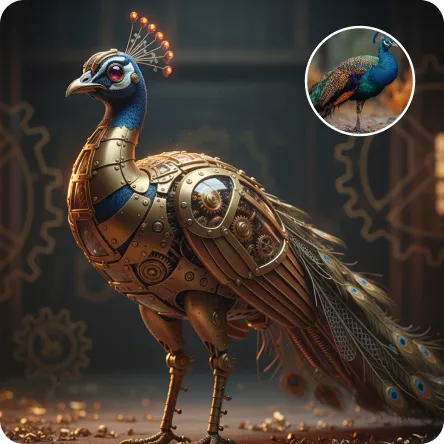
Transform objects into elegant steampunk mechanical art with VivaGO.ai. AI-powered conversion adds brass/bronze shells, exposed gears, pistons, and amber glass panels while preserving original silhouettes. Features crisp high-detail rendering, studio lighting, and clean functional design. Generate professional AI images instantly.

Use Template
arrow
Image To Image

FAQs

What are Effect Templates?

Effect Templates are predefined AI workflows that automatically transform static images into specific visual styles or animated formats, delivering consistent, high-quality results without manual adjustments.

How do I apply Effect Templates?

Select your preferred template > Upload an image > Generate. No text prompts required - templates handle all style parameters.

Where can I find more templates?

Explore 1000+ curated templates in our Explore Hub: https://vivago.ai/studio. New templates added weekly across categories.

What's the pricing?

Daily login grants 100 free credits. Exhausted credits? Choose: 1) Subscribe a membership plan, 2) Get a credit pack. Details: https://vivago.ai/subscribe

More From VIVAGO AI

Goldfish AI effects generated image

Goldfish

Underwater scene inside a large ecological fish tank, featuring the figure from the uploaded image (unchanged facial features, age and gender) with faint small freckles on the cheeks. Their hair floats and fans out in soft curls due to water buoyancy, with tiny water droplets clinging to the tips. Expression: Gaze fixed on the camera, lips slightly parted with a subtle breathy quality; eyebrows droop gently, conveying alienation and loneliness, with a taut jawline. Attire: Exquisitely tailored high-end summer couture, the fabric forming natural folds from water buoyancy, paired with sophisticated and delicate accessories. Composition: Close-up facial shot (the figure’s face occupies 80% of the frame). Multiple large orange-white/silver-white goldfish nuzzle the cheeks and circle the hair tips in an interactive way, with tiny air bubbles rising slowly beside the figure’s profile. Goldfish swim in the foreground with a blurred effect, and water ripples blur and smudge softly in the background. Shooting Angle: Eye-level close-up underwater perspective, with the lens positioned 3cm below the water surface to capture the broken light spots refracted by the water. Light & Shadow: Kodak Portra 400 film texture with fine yet distinct film grain and slight vignetting. Soft diffused cool cyan-green light filters through the underwater environment, with diamond-shaped light spots piercing through the water surface; weak light and shadow contrast yet gentle layered tones, with edges slightly blurred and smudged. Color Palette: A base of low-saturation dark tones (deep cyan + jet black + grayish green), accented by the warm orange-white/silver-white of the goldfish. A retro film tone with a subtle cyan-yellow cast, creating an overall hazy and lonely atmosphere, with striking contrast between light and shadow underwater.

Bikini AI effects generated image

Bikini

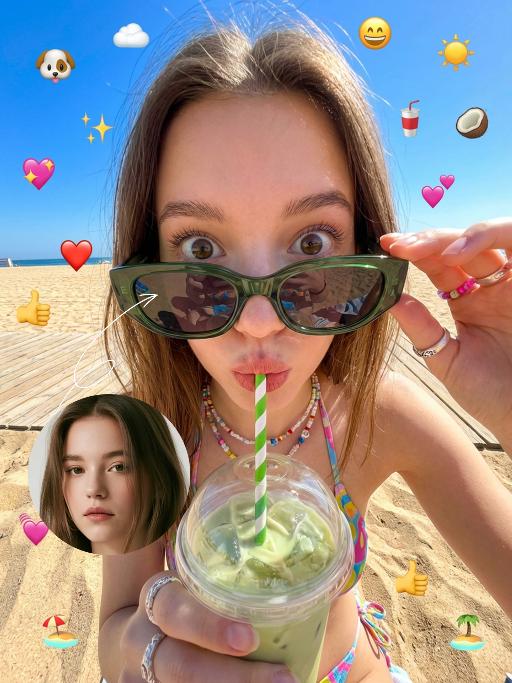
The figure from the uploaded image (unchanged facial features, age and gender, with natural facial retouching and a fresh sheer makeup look). An extreme close-up selfie shot from a first-person perspective, the figure stands close to the camera, captured with an iPhone 14 in a casual street photography style. The figure’s eyes are wide open, lips pouted and eyes round in an exaggerated wide stare, with vivid and playful facial expressions; they look straight at the camera, sipping a drink through a green-and-white striped straw. They are wearing a cute colorful bikini, accessorized with colorful Y2K-style jewelry and oversized dark green sunglasses – the sunglasses slip down to the tip of the nose, revealing the eyes, with the surrounding scenery reflected on the lenses. The figure holds a clear plastic cup filled with light green iced drink and ice cubes. The scene is bathed in bright outdoor sunlight, in clear daylight with soft shadows and vibrant natural light. Color palette: bright green, deep blue, light green, warm brown (wooden boardwalk), bright blue (sky). Background: beach, seaside sand, a sun-drenched boardwalk, with a vibrant and casual seaside vibe. The overall style features a dopamine color scheme, Y2K accessories and a distinct Y2K aesthetic. Adorable iPhone emoji-style stickers are randomly scattered around the figure and across the entire frame as decorations (🐶、☁️、✨、😄、☀️、🥥、🥤、💗、❤️、👍、🐶、🏖️、🏝️). The shot uses an ultra-wide-angle lens with extreme perspective, making the figure’s head appear oversized.

Holi Festival AI effects generated image

Holi Festival

The identity of the uploaded portrait is strictly preserved (retaining facial contours, authentic Indian skin tone, hairstyle and age), as is the original natural look of the Indian woman in the reference image. She has a delicate and fair face with a vermilion red bindi on her forehead, her jet-black hair styled into a high bun adorned with golden floral hair ornaments, and she wears exquisite gold earrings and a gold necklace. She is dressed in a vibrant traditional lehenga choli set: the blouse is a peacock blue embroidered cropped corset with golden patterns embellishing the cuffs and neckline; the skirt is a flared maxi with an orange-to-red gradient, paired with a gilded embroidered waistband. The skirt is dotted with colorful pom-pom trimmings, echoing the hues of Holi. Standing front-on, she holds a handful of bright yellow gulal in both hands and tosses it forward, with a brilliant smile on her face, bright eyes brimming with joy, and her body leaning slightly forward with the movement, exuding a vivid sense of dynamism. The scene is a lively Holi street celebration, where the surrounding crowd interacts with water guns and gulal, and colorful powder splatters in the air, forming a vivid, highly saturated multicolored backdrop. Lighting effect: Bright midday natural light renders the colors extremely saturated and vivid. The figure is enveloped in a halo of colored powder, with fine powder particles clearly visible on the edges of her hair and garments, capturing the authentic dynamic texture of a candid shot. Boasting 8K ultra-high definition resolution and commercial-grade portrait quality, the image features rich, bright and vivid colors and abundant fine details, highlighting the vibrant and joyful atmosphere of the festival.

Elephant Dance

The features of the figure in the uploaded image remain unchanged, standing in an anthropomorphic pose (upper limbs resting naturally on the waist, lower limbs standing on the ground). Adopting the Disney 3D animation style, bright and highly saturated vivid colors are used to create a soft, cute and chibi cartoon image with oversized bright eyes and long, slender eyelashes, and a sweet, endearing expression. The costume features Indian traditional festive style adornments and styling: a gorgeous forehead ornament with geometric patterns (in green, red, yellow and purple) plus colorful tassel beading; delicate traditional Indian colorful patterns on the face and nose; a shawl with fan-shaped patterns (in primary colors of red, purple and blue) trimmed with golden geometric motifs on the edges; green and white striped bands with golden beading worn on the limbs; and small colorful flower ornaments in the style of yellow base + red center + green trim dotted on the ears and body. The overall adornment is intricate with rich color clashing (blending hues of red, green, yellow, purple, blue and more), boasting ultra-realistic details, cinematic artistic effects and high-end artistic presentation.

Dark Pharaoh AI effects generated image

Dark Pharaoh

The character in the uploaded picture (unchanged facial features, gender and age). A striking young man embodying the persona of an ancient Egyptian pharaoh, captured in a hyper-realistic, cinematic portrait. He has long, dark curly hair, a chiseled jawline, and a direct, commanding gaze that exudes divine authority. He is bare-chested, showcasing a muscular physique. He wears an opulent, ornate headdress with large, fan-like golden and lapis lazuli blue wings, crowned with a central symbol. His neck is adorned with multiple layers of intricate golden pectoral necklaces, inlaid with vibrant lapis lazuli and carnelian, featuring sacred Egyptian motifs like scarabs. He wears detailed golden armbands and bracelets etched with hieroglyphics on both arms. A black, flowing fabric is draped over his left shoulder. His waist is cinched with a wide, elaborately decorated belt featuring gold, blue, and red inlays and hieroglyphic carvings. He walks forward with a regal, confident stride, radiating power and pharaonic grandeur. The setting is the grand interior of an ancient Egyptian palace, with towering stone columns, intricate hieroglyphic carvings on the walls, and shafts of golden light streaming through high windows. Blurred figures of attendants in similar golden attire follow in the background, enhancing the sense of scale and majesty. The image is rendered in a hyper-realistic, epic historical drama style, with dramatic, cinematic lighting that highlights the intricate details of the golden regalia, the texture of the fabric, and the weathered stone of the palace. The color palette is rich and opulent, featuring deep golds, vibrant blues, and earthy stone tones, creating a timeless, majestic, and awe-inspiring atmosphere. The overall aesthetic is detailed, lifelike, and reminiscent of a scene from a grand historical epic film

Hacker AI effects generated image

Hacker

A straight-on close-up headshot of the figure from the uploaded image (with unchanged facial features, age and gender), who sits centered and faces the camera directly, wearing a black hoodie with the hood up, their expression calm and focused. The figure’s face is cast in the green glow of code from a computer screen. A broad wash of soft, bright green side light slants in from the right side of the frame, creating a large-scale Tyndall effect that outlines their facial contours. The background features a blurred night view of the city in the rain outside the window (with traces of raindrops sliding down the glass), accompanied by warm bokeh lights; the foreground consists of a computer screen with glowing green code on it. Shot at eye level with a low-light, dark-toned palette, it embodies the dark-toned aesthetic of cyberpunk style. Main colors: black, blue-gray, neon green, low-saturation cool tones. Shallow depth of field blurs both the foreground and background, with the face in sharp focus. The work features an avant-garde fashion photography style, a film-like filter effect, and dramatic contrast between light and shadow.

Load more

Next-Gen Multi-Model AI Video Architecture

Vivago AI isn't just one engine—it’s a unified hub for the world’s most advanced video AI. Whether you need cinematic realism or high-speed social content, we provide the right model for your creative vision.

Free Generate

Beauty and Dolphins

Vacation Time

Stellar Tear

Fish Tank Supervisor

Cinematic Quality & Precision Control

Enables 4K resolution with multi-lens motion control, generating delicate scene via text prompts for customized cinematography.​

TRY NOW

Dynamic AV Sync

Auto-generates original audio to avoid copyright issues. Build 3D immersive environments through layered sound design automatically.

TRY NOW

OpenAI Sora 2

​Advanced visual storytelling with unparalleled physics and consistency.

TRY NOW

Kling v2.6 Pro

Industry-leading cinematic image animation and motion control.

TRY NOW

Google Veo 3 & 3.1

Ultra-fast generation with enhanced realism for creative workflows.

TRY NOW

Vivago AI 2.0

Our proprietary model optimized for efficiency, speed, and cost-effective generation.

TRY NOW

Users' Voice

We listen carefully to the opinions of every user.
Free Generate
Contact Us
I tried the Lip Sync feature inside Vivago.ai’s AI Video Generator for my educational podcast, and the results were stunning! The avatar's lip movements perfectly matched my audio recording, creating a professional AI-generated video without complex editing. Compared with tools like OpenAI Sora 2 and Google Veo 3.1, Vivago Image-to-Video delivers fast, studio-quality results online. It saved me hours of post-production work.
ElenaM (Spain)
Vivago’s Image-to-Video AI transformed my marketing workflow. I uploaded a product image and described the launch scene in text, and it generated a 10-second cinematic AI video with background music and dynamic visuals. The output quality rivals Kling v2.6 Pro and Google Veo 3 Fast. It’s now my go-to AI video generator for social media ads and product campaigns.
KenjiT (Japan)
As a digital artist, I use Vivago.ai 2.0 daily for Image-to-Image and AI Image-to-Video creation. The e-book covers and animated visuals I generate for clients look cinematic and professional. Unlike many standalone AI tools, Vivago integrates multiple leading models into one platform, making it easier to create copyright-safe AI images and videos for publishing.
ChenL (China)
I tried the Lip Sync feature inside Vivago.ai’s AI Video Generator for my educational podcast, and the results were stunning! The avatar's lip movements perfectly matched my audio recording, creating a professional AI-generated video without complex editing. Compared with tools like OpenAI Sora 2 and Google Veo 3.1, Vivago Image-to-Video delivers fast, studio-quality results online. It saved me hours of post-production work.
ElenaM (Spain)
Vivago’s Image-to-Video AI transformed my marketing workflow. I uploaded a product image and described the launch scene in text, and it generated a 10-second cinematic AI video with background music and dynamic visuals. The output quality rivals Kling v2.6 Pro and Google Veo 3 Fast. It’s now my go-to AI video generator for social media ads and product campaigns.
KenjiT (Japan)
As a digital artist, I use Vivago.ai 2.0 daily for Image-to-Image and AI Image-to-Video creation. The e-book covers and animated visuals I generate for clients look cinematic and professional. Unlike many standalone AI tools, Vivago integrates multiple leading models into one platform, making it easier to create copyright-safe AI images and videos for publishing.
ChenL (China)
I absolutely love Vivago’s AI Image-to-Video Generator. As a travel blogger, static images often fail to capture real atmosphere, but Vivago helps me turn photos into vivid cinematic AI videos with motion effects. It feels comparable to OpenAI Sora 2 and Google Veo 3.1, but more accessible and faster for creators who need high-quality AI videos online.
LiamK (Australia)
I tried the Lip Sync feature inside Vivago.ai’s AI Video Generator for my educational podcast, and the results were stunning! The avatar's lip movements perfectly matched my audio recording, creating a professional AI-generated video without complex editing. Compared with tools like OpenAI Sora 2 and Google Veo 3.1, Vivago Image-to-Video delivers fast, studio-quality results online. It saved me hours of post-production work.
ElenaM (Spain)
Vivago’s Image-to-Video AI transformed my marketing workflow. I uploaded a product image and described the launch scene in text, and it generated a 10-second cinematic AI video with background music and dynamic visuals. The output quality rivals Kling v2.6 Pro and Google Veo 3 Fast. It’s now my go-to AI video generator for social media ads and product campaigns.
KenjiT (Japan)
As a digital artist, I use Vivago.ai 2.0 daily for Image-to-Image and AI Image-to-Video creation. The e-book covers and animated visuals I generate for clients look cinematic and professional. Unlike many standalone AI tools, Vivago integrates multiple leading models into one platform, making it easier to create copyright-safe AI images and videos for publishing.
ChenL (China)
I absolutely love Vivago’s AI Image-to-Video Generator. As a travel blogger, static images often fail to capture real atmosphere, but Vivago helps me turn photos into vivid cinematic AI videos with motion effects. It feels comparable to OpenAI Sora 2 and Google Veo 3.1, but more accessible and faster for creators who need high-quality AI videos online.
LiamK (Australia)
Using Vivago.ai’s Image-to-Video AI has greatly enhanced my classroom teaching. I transform textbook notes into historical AI videos with cinematic filters and dynamic animations. Compared with tools like Kling v2.6 Pro and Google Veo 3 Fast, Vivago offers faster generation and easier parameter control for educators who need reliable AI video creation.
RajivG (India)
I frequently create AI videos on Vivago and publish them on TikTok and YouTube Shorts. The AI video templates and trending content ideas help me produce viral-ready clips quickly. With Vivago’s integrated models—including advanced video engines similar to OpenAI Sora 2—I can generate anime-style and cinematic social media videos that drive high engagement.
MarieJ (Spain)
What attracts me most about Vivago.ai is not only the powerful AI Video Generator but also the active AIGC creator community. It combines AI Image-to-Video, Text-to-Video, and leading model integrations like Google Veo 3.1 into one creative platform.
TomW (India)
At first, I was hesitant about using AI video tools. But after trying Vivago Image-to-Video, I realized how easy it is to create professional AI-generated videos online. I just upload an image, add a short prompt, and adjust a few settings. The results are cinematic and copyright-safe, which is essential for commercial projects.
HectorC (Mexico)
Using Vivago.ai’s Image-to-Video AI has greatly enhanced my classroom teaching. I transform textbook notes into historical AI videos with cinematic filters and dynamic animations. Compared with tools like Kling v2.6 Pro and Google Veo 3 Fast, Vivago offers faster generation and easier parameter control for educators who need reliable AI video creation.
RajivG (India)
I frequently create AI videos on Vivago and publish them on TikTok and YouTube Shorts. The AI video templates and trending content ideas help me produce viral-ready clips quickly. With Vivago’s integrated models—including advanced video engines similar to OpenAI Sora 2—I can generate anime-style and cinematic social media videos that drive high engagement.
MarieJ (Spain)
What attracts me most about Vivago.ai is not only the powerful AI Video Generator but also the active AIGC creator community. It combines AI Image-to-Video, Text-to-Video, and leading model integrations like Google Veo 3.1 into one creative platform.
TomW (India)
At first, I was hesitant about using AI video tools. But after trying Vivago Image-to-Video, I realized how easy it is to create professional AI-generated videos online. I just upload an image, add a short prompt, and adjust a few settings. The results are cinematic and copyright-safe, which is essential for commercial projects.
HectorC (Mexico)