Image to Image

Vibrant tree branch with diverse leaves—long, thin and large, rounded foliage—creates a captivating pattern for nature-inspired wallpapers. Artistic rendering against a cloudy sky backdrop highlights intricate details and natural beauty, offering depth and contrast in this visually striking, SEO-optimized image.

Recreate
arrow
Image to Image

FAQs

How to generate images/videos from text prompts?

Describe the visual content in natural language (e.g., 'A cyberpunk cat wearing neon goggles') and our AI models will create outputs. Complex prompts trigger multi-stage NLP parsing for enhanced accuracy.

How to refine unsatisfactory results?

Use our Prompt Bot - an AI-powered optimizer that suggests technical modifiers. Simply describe your ideas, desired changes ('more metallic texture'), then you will get optimized prompt variants.

When should I use reference images?

Upload references to: 1) Guide character consistency (e.g., faces/outfits), 2) Control motion patterns in videos using our feature matching algorithm. Supports JPG/PNG

What's the credit system?

Daily login grants 100 credits. Upgrade options: 1) Premium Membership, 2) Credit Packs. Details: https://vivago.ai/subscribe

More From VIVAGO AI

HoopFury

Replace the left-side ball-handling subject in the scene with the main subject from the user-uploaded reference image, and make that uploaded subject the only element that is changed in the entire image. The subject from the user’s reference image must be preserved exactly as-is, with no alterations whatsoever to any of its original identity-defining or appearance-defining attributes, including but not limited to: face, facial features, expression, vibe, age impression, gender traits, body proportions, species traits, skin/fur texture, hairstyle, hair color, clothing, accessories, silhouette, posture characteristics, and overall recognizability. Do not redesign the uploaded subject, do not beautify or stylize it, do not turn it into a cartoon, do not replace its clothes, do not add a basketball jersey, and do not make it resemble the original left character from the example image. The uploaded subject should simply be placed naturally into the left foreground ball-control position of the scene, occupying the role of the left-side dribbler, close to the camera, low-angle, with one hand/paw/limb touching or controlling the basketball, as if captured in a live game moment. However, the uploaded subject’s original appearance and outfit must remain completely unchanged. Everything except the left-side ball-handling subject must remain strictly locked and unchanged. The rest of the scene must be exactly as follows: A professional indoor basketball arena during a live game, with a packed crowd in the stands, strong game-night atmosphere, and a cinematic sports-photography look. The camera angle is low, close to the floor, and tightly framed, creating an immersive courtside perspective. The foreground shows a real wooden basketball court floor with visible texture and reflections, including a large NBA-style center-court logo / floor graphic area near the bottom foreground. On the right side of the frame, there is a large black-and-tan Rottweiler dog, realistic and muscular, standing very close to the left-side subject, with its head leaning in near the left subject as if tightly guarding or moving alongside it. This right-side Rottweiler must remain completely unchanged, including all of the following: realistic black-and-tan fur real dog anatomy a dark red / maroon basketball jersey visible “BULLS” text on the jersey visible number “24” on the jersey positioned in the right foreground body angled slightly toward the left/front head close to the left-side subject maintaining a tight, shoulder-to-shoulder, intimate defensive composition with the left-side subject The basketball must remain in the lower-left foreground, being touched or controlled by the left-side subject, with realistic leather texture and slight wear. The court floor must retain realistic wood grain and subtle reflections. The audience in the background must stay heavily blurred with shallow depth of field, with visible arena light bands, scoreboard signage, and soft bokeh highlights. Lighting should remain high-end indoor arena lighting with cinematic realism, crisp focus on the foreground subjects, shallow depth of field in the background, and a high-detail professional sports action photo aesthetic. The overall composition must remain a vertical frame, with a two-subject foreground arrangement, the uploaded subject controlling the ball on the left, the Rottweiler pressing close on the right, and an energetic blurred crowd in the background. Other than replacing the left-side ball-handling figure with the user’s uploaded subject, absolutely nothing else in the image may change. Quality requirements: ultra-realistic, photorealistic, highly detailed, sharp focus, cinematic sports photography, dynamic action moment, natural perspective, realistic lighting, shallow depth of field, high resolution, 4K, premium detail. English Negative Prompt Do not change the uploaded subject’s face, facial features, expression, hairstyle, hair color, clothing, accessories, body shape, age impression, gender traits, vibe, or species identity. Do not turn the uploaded subject into a cat. Do not automatically put the uploaded subject in a blue jersey. Do not copy the original left character’s appearance onto the uploaded subject. Do not change the right-side Rottweiler’s appearance, position, clothing, colors, pose, or scale. Do not remove the right-side dog. Do not replace the right-side dog with another animal or person. Do not change the basketball arena, crowd, wooden court, basketball position, camera angle, composition, depth of field, or lighting mood. Do not add a third character, extra props, extra players, extra animals, or extra basketballs. No cartoon style, no illustration style, no 3D render look, no low resolution, no blurry main subject, no anatomy errors, no extra limbs, no deformed face, no bad perspective, no subject cropping, no broken text, no incorrect jersey text, no clothing fusion, no body merge, no background displacement, no identity drift from the uploaded reference subject.


Samba AI effects generated image

Samba

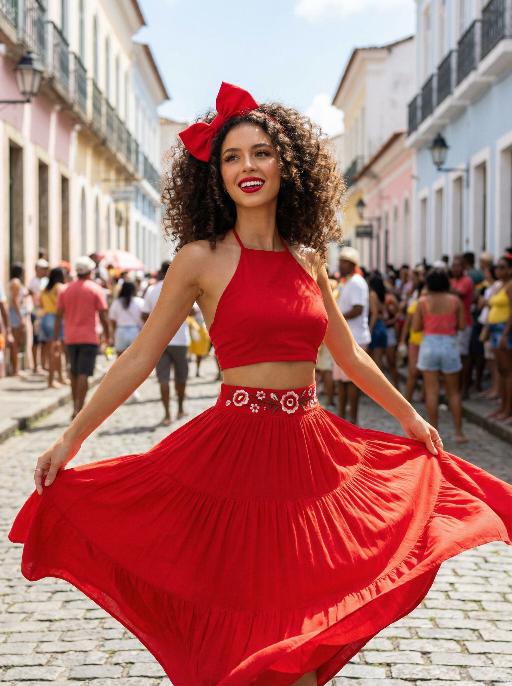
Use the exact same facial features, gender, and age as the uploaded image. Vibrant street celebration scene in a colorful colonial town, pastel-colored buildings lining a sunlit cobblestone street. Voluminous curly dark brown hair adorned with a large, bright red bow at the crown. Smooth, warm light tan skin with a luminous, dewy finish. Bold, glamorous makeup: defined brows, winged eyeliner, long voluminous lashes, glossy cherry-red lipstick, and a subtle golden highlight on the cheekbones. Form-fitting red halter crop top, paired with a flowing, tiered red maxi skirt. The waistband of the skirt features a white base with vibrant red floral embroidery. Dynamic, joyful movement: arms outstretched, skirt billowing dramatically, capturing the energy of a festive street dance. Background filled with a lively crowd of celebrants, soft focus to keep the subject prominent. Bright, clear daylight, cinematic color grading, high detail, 8K ultra-realistic, vibrant and festive atmosphere, no obvious personal pronouns.

Share Crisp

Image-to-image, keep the scene as realistic photography. Preserve the normal-sized opened snack bag, wooden floor, scattered chips inside and outside the bag, the front-facing camera angle toward the bag opening, and the overall composition. Replace the person inside the bag with 【universal subject】. The subject should appear shrunken down and hidden inside the snack bag, lying on the pile of chips and leaning the head and upper body out from the bag opening, while the rest of the body remains inside. One hand holds up a potato chip toward the camera. The expression is natural, relaxed, cute, and sligImage-to-image, keep the scene as realistic photography. Preserve the normal-sized opened snack bag, wooden floor, scattered chips inside and outside the bag, the front-facing camera angle toward the bag opening, and the overall composition. Replace the person inside the bag with 【universal subject】. The subject should appear shrunken down and hidden inside the snack bag, lying on the pile of chips and leaning the head and upper body out from the bag opening, while the rest of the body remains inside. One hand holds up a potato chip toward the camera. The expression is natural, relaxed, cute, and slightly playful. Sharp focus on the subject’s face and the chip in hand, with realistic detail on the bag edge and surrounding chips, shallow depth of field, soft natural lighting, highly realistic, uncanny, and like a real advertising photo.

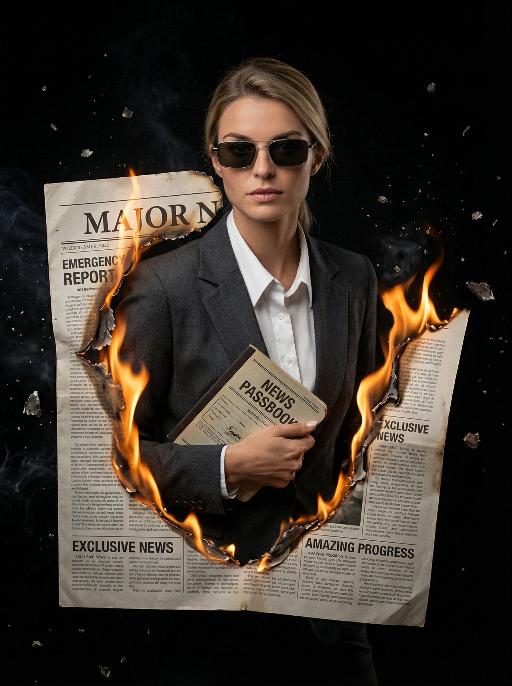
Journalist AI effects generated image

Journalist

Masterpiece, ultra-realistic 8K images, with extremely rich details. The picture is clear and sharp. The main figure in the picture is the person from the uploaded image (with unchanged facial features, gender and age). The image shows the image of a reporter wearing modern rectangular sunglasses, wearing a dark gray suit jacket, a white collar shirt neatly and stably, holding a vintage news passbook, breaking out from a jagged gap at the "Major News" section of the newspaper cover. The realistic orange-yellow flames lick the charred edges of the newspaper, the floating ashes, presenting a dramatic cinematic contrast effect, a melancholic and urgent aesthetic style, a cinematic news documentary style, shallow depth of field effect, a black empty background, rich details on the newspaper (titles such as "Emergency Report", "Exclusive News", "Amazing Progress"), dynamic composition, professional news photography.

Brazilian Dance

Medium-close-up shot (capturing the upper body of the person): Ultra-realistic portrait photography. The image uploaded (with the facial features, gender and age remaining unchanged) shows a person wearing a yellow strapless tank top with a Brazilian theme, featuring large green capital letters "BRASIL" and the national flag pattern of Brazil on the front, a short and low-cut design, a close-fitting and form-fitting silhouette. The fabric is soft cotton/nylon knitted texture. It is paired with black tight pants. The natural and relaxed expression and natural standing posture (without any props in hand) are maintained as in the original image. The background scene remains unchanged. The picture is clean and clear, with an 8K ultra-high-definition resolution. The skin texture and details of the clothing fabric are clear. The composition is centered.

Load more

Next-Gen Multi-Model AI Video Architecture

Vivago AI isn't just one engine—it’s a unified hub for the world’s most advanced video AI. Whether you need cinematic realism or high-speed social content, we provide the right model for your creative vision.

Free Generate

Beauty and Dolphins

Vacation Time

Stellar Tear

Fish Tank Supervisor

Cinematic Quality & Precision Control

Enables 4K resolution with multi-lens motion control, generating delicate scene via text prompts for customized cinematography.​

TRY NOW

Dynamic AV Sync

Auto-generates original audio to avoid copyright issues. Build 3D immersive environments through layered sound design automatically.

TRY NOW

OpenAI Sora 2

​Advanced visual storytelling with unparalleled physics and consistency.

TRY NOW

Kling v2.6 Pro

Industry-leading cinematic image animation and motion control.

TRY NOW

Google Veo 3 & 3.1

Ultra-fast generation with enhanced realism for creative workflows.

TRY NOW

Vivago AI 2.0

Our proprietary model optimized for efficiency, speed, and cost-effective generation.

TRY NOW

Users' Voice

We listen carefully to the opinions of every user.
Free Generate
Contact Us
I tried the Lip Sync feature inside Vivago.ai’s AI Video Generator for my educational podcast, and the results were stunning! The avatar's lip movements perfectly matched my audio recording, creating a professional AI-generated video without complex editing. Compared with tools like OpenAI Sora 2 and Google Veo 3.1, Vivago Image-to-Video delivers fast, studio-quality results online. It saved me hours of post-production work.
ElenaM (Spain)
Vivago’s Image-to-Video AI transformed my marketing workflow. I uploaded a product image and described the launch scene in text, and it generated a 10-second cinematic AI video with background music and dynamic visuals. The output quality rivals Kling v2.6 Pro and Google Veo 3 Fast. It’s now my go-to AI video generator for social media ads and product campaigns.
KenjiT (Japan)
As a digital artist, I use Vivago.ai 2.0 daily for Image-to-Image and AI Image-to-Video creation. The e-book covers and animated visuals I generate for clients look cinematic and professional. Unlike many standalone AI tools, Vivago integrates multiple leading models into one platform, making it easier to create copyright-safe AI images and videos for publishing.
ChenL (China)
I tried the Lip Sync feature inside Vivago.ai’s AI Video Generator for my educational podcast, and the results were stunning! The avatar's lip movements perfectly matched my audio recording, creating a professional AI-generated video without complex editing. Compared with tools like OpenAI Sora 2 and Google Veo 3.1, Vivago Image-to-Video delivers fast, studio-quality results online. It saved me hours of post-production work.
ElenaM (Spain)
Vivago’s Image-to-Video AI transformed my marketing workflow. I uploaded a product image and described the launch scene in text, and it generated a 10-second cinematic AI video with background music and dynamic visuals. The output quality rivals Kling v2.6 Pro and Google Veo 3 Fast. It’s now my go-to AI video generator for social media ads and product campaigns.
KenjiT (Japan)
As a digital artist, I use Vivago.ai 2.0 daily for Image-to-Image and AI Image-to-Video creation. The e-book covers and animated visuals I generate for clients look cinematic and professional. Unlike many standalone AI tools, Vivago integrates multiple leading models into one platform, making it easier to create copyright-safe AI images and videos for publishing.
ChenL (China)
I absolutely love Vivago’s AI Image-to-Video Generator. As a travel blogger, static images often fail to capture real atmosphere, but Vivago helps me turn photos into vivid cinematic AI videos with motion effects. It feels comparable to OpenAI Sora 2 and Google Veo 3.1, but more accessible and faster for creators who need high-quality AI videos online.
LiamK (Australia)
I tried the Lip Sync feature inside Vivago.ai’s AI Video Generator for my educational podcast, and the results were stunning! The avatar's lip movements perfectly matched my audio recording, creating a professional AI-generated video without complex editing. Compared with tools like OpenAI Sora 2 and Google Veo 3.1, Vivago Image-to-Video delivers fast, studio-quality results online. It saved me hours of post-production work.
ElenaM (Spain)
Vivago’s Image-to-Video AI transformed my marketing workflow. I uploaded a product image and described the launch scene in text, and it generated a 10-second cinematic AI video with background music and dynamic visuals. The output quality rivals Kling v2.6 Pro and Google Veo 3 Fast. It’s now my go-to AI video generator for social media ads and product campaigns.
KenjiT (Japan)
As a digital artist, I use Vivago.ai 2.0 daily for Image-to-Image and AI Image-to-Video creation. The e-book covers and animated visuals I generate for clients look cinematic and professional. Unlike many standalone AI tools, Vivago integrates multiple leading models into one platform, making it easier to create copyright-safe AI images and videos for publishing.
ChenL (China)
I absolutely love Vivago’s AI Image-to-Video Generator. As a travel blogger, static images often fail to capture real atmosphere, but Vivago helps me turn photos into vivid cinematic AI videos with motion effects. It feels comparable to OpenAI Sora 2 and Google Veo 3.1, but more accessible and faster for creators who need high-quality AI videos online.
LiamK (Australia)
Using Vivago.ai’s Image-to-Video AI has greatly enhanced my classroom teaching. I transform textbook notes into historical AI videos with cinematic filters and dynamic animations. Compared with tools like Kling v2.6 Pro and Google Veo 3 Fast, Vivago offers faster generation and easier parameter control for educators who need reliable AI video creation.
RajivG (India)
I frequently create AI videos on Vivago and publish them on TikTok and YouTube Shorts. The AI video templates and trending content ideas help me produce viral-ready clips quickly. With Vivago’s integrated models—including advanced video engines similar to OpenAI Sora 2—I can generate anime-style and cinematic social media videos that drive high engagement.
MarieJ (Spain)
What attracts me most about Vivago.ai is not only the powerful AI Video Generator but also the active AIGC creator community. It combines AI Image-to-Video, Text-to-Video, and leading model integrations like Google Veo 3.1 into one creative platform.
TomW (India)
At first, I was hesitant about using AI video tools. But after trying Vivago Image-to-Video, I realized how easy it is to create professional AI-generated videos online. I just upload an image, add a short prompt, and adjust a few settings. The results are cinematic and copyright-safe, which is essential for commercial projects.
HectorC (Mexico)
Using Vivago.ai’s Image-to-Video AI has greatly enhanced my classroom teaching. I transform textbook notes into historical AI videos with cinematic filters and dynamic animations. Compared with tools like Kling v2.6 Pro and Google Veo 3 Fast, Vivago offers faster generation and easier parameter control for educators who need reliable AI video creation.
RajivG (India)
I frequently create AI videos on Vivago and publish them on TikTok and YouTube Shorts. The AI video templates and trending content ideas help me produce viral-ready clips quickly. With Vivago’s integrated models—including advanced video engines similar to OpenAI Sora 2—I can generate anime-style and cinematic social media videos that drive high engagement.
MarieJ (Spain)
What attracts me most about Vivago.ai is not only the powerful AI Video Generator but also the active AIGC creator community. It combines AI Image-to-Video, Text-to-Video, and leading model integrations like Google Veo 3.1 into one creative platform.
TomW (India)
At first, I was hesitant about using AI video tools. But after trying Vivago Image-to-Video, I realized how easy it is to create professional AI-generated videos online. I just upload an image, add a short prompt, and adjust a few settings. The results are cinematic and copyright-safe, which is essential for commercial projects.
HectorC (Mexico)