Text to Image

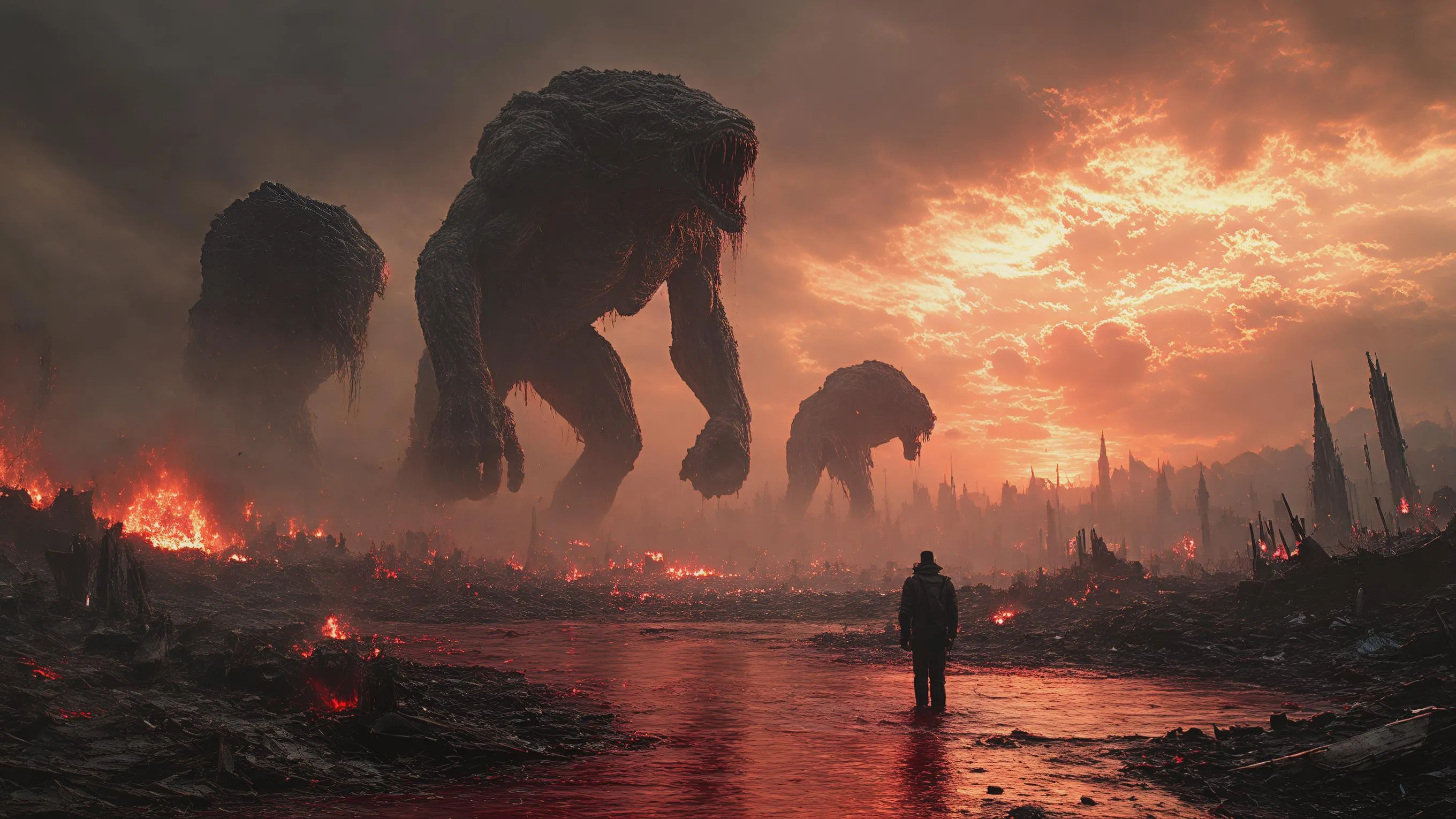
Generate apocalyptic AI art with vivago.ai. Create cinematic scenes of giants ruling a devastated world: burning landscapes, crushed cities, rivers of blood and ash. Dark mythological style, 16:9 scale. Transform text prompts into professional-grade visuals using AI image effects and editing tools.

Recreate
arrow
Text to Image

FAQs

How to generate images/videos from text prompts?

Describe the visual content in natural language (e.g., 'A cyberpunk cat wearing neon goggles') and our AI models will create outputs. Complex prompts trigger multi-stage NLP parsing for enhanced accuracy.

How to refine unsatisfactory results?

Use our Prompt Bot - an AI-powered optimizer that suggests technical modifiers. Simply describe your ideas, desired changes ('more metallic texture'), then you will get optimized prompt variants.

When should I use reference images?

Upload references to: 1) Guide character consistency (e.g., faces/outfits), 2) Control motion patterns in videos using our feature matching algorithm. Supports JPG/PNG

What's the credit system?

Daily login grants 100 credits. Upgrade options: 1) Premium Membership, 2) Credit Packs. Details: https://vivago.ai/subscribe

More From VIVAGO AI

On the water

Use the uploaded portrait for strict facial features, gender, skin color, pupil color, clothing, hairstyle and gender locking. Select the main characters from the uploaded pictures. Have a natural expression, face the camera, and show a relaxed state. The camera suddenly switches from the front to the back of the character, changing from a frontal shot to a rear shot. Action: Face the camera, maintain a natural expression, suddenly turn around and leap, run on the water surface, as if possessing Chinese martial arts skills. When the character starts flying, the posture is to spread both arms and be in a flying state. The camera follows the character running on the water surface. The scene becomes a vast sea level, with a dreamy and beautiful scenery, with clouds and the sky in the distance.

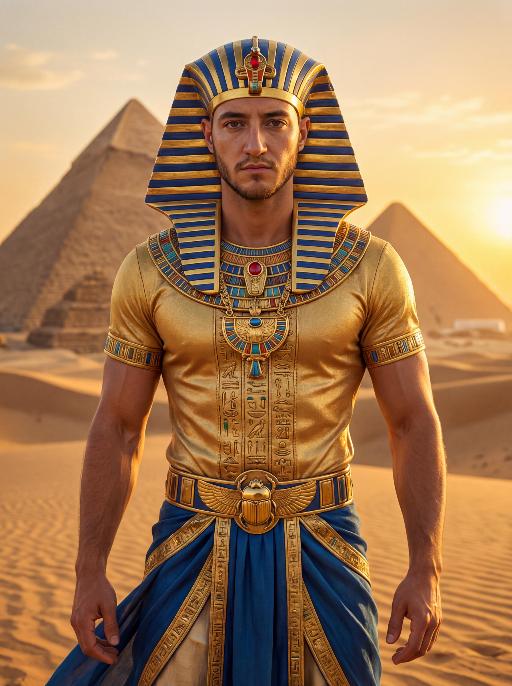
Pharaoh Gold AI effects generated image

Pharaoh Gold

The character in the uploaded picture (unchanged facial features, gender and age). A striking male model embodying the persona of an ancient Egyptian pharaoh, captured in a hyper-realistic portrait. He wears an ornate golden nemes headdress with blue and gold stripes, adorned with a central red gem. His gaze is direct and commanding, exuding a sense of divine authority and regal power. He wears a form-fitting, short-sleeved golden tunic with intricate hieroglyphic embroidery and colorful inlays, showcasing a chiseled, muscular physique beneath the luxurious fabric. His accessories are opulent: a massive, intricately carved golden pectoral necklace with colorful inlays, and a wide golden belt featuring a scarab motif at its center. He wears flowing blue fabric at his waist, trimmed with elaborate gold detailing. He stands regally in the vast, sun-drenched desert of ancient Egypt, his posture upright and confident, radiating primal strength and pharaonic grandeur. The setting is the iconic Egyptian desert, with the majestic pyramids rising in the distance against a clear, golden sky. The desert sand stretches out to the horizon, with the warm, hazy air of the desert surrounding him. The image is rendered in a hyper-realistic, true-to-life portrait photography style, with soft, natural golden-hour lighting that highlights the sheen of the gold, the texture of the fabric, and the stark beauty of the desert and pyramids. The color palette is rich and opulent, featuring deep golds, vibrant blues, and earthy browns, creating a timeless, majestic, and awe-inspiring atmosphere. The overall aesthetic is detailed, lifelike, and reminiscent of a high-fashion editorial photoshoot set in ancient Egypt

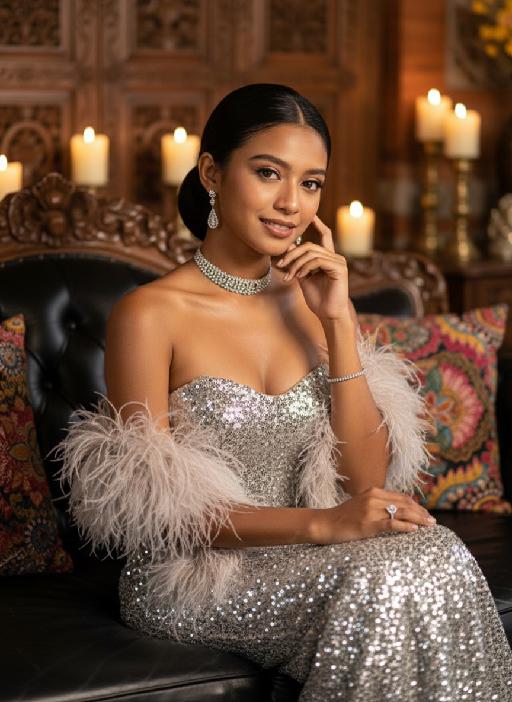
Vintage Charm AI effects generated image

Vintage Charm

Strictly lock the facial features of the uploaded portrait (preserve facial contours, native Indonesian skin tone, hairstyle and age). photorealistic 3:4 half-body portrait of an elegant 25-year-old Indonesian woman with delicate facial features, soft glamorous makeup, and sleek dark hair styled in a half-updo, wearing a silver sequined strapless gown with feathered shawl, adorned with a diamond choker, long diamond drop earrings, diamond rings and bracelet. She sits gracefully on a black leather sofa with one hand gently touching her cheek, set in a luxurious vintage interior with Balinese wooden carvings, batik wax-print fabric accents, warm golden ambient lighting, candlelight with soft bokeh, subtle Indonesian cultural details, ultra-detailed sequins and feather textures, cinematic texture, sophisticated Balinese luxury ambiance

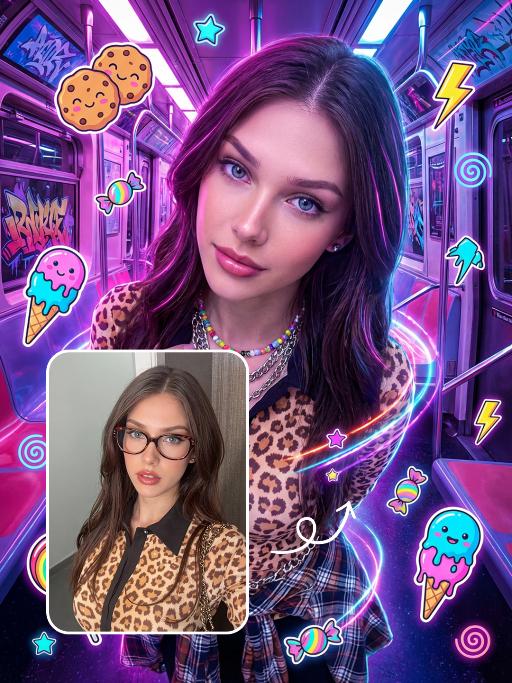
Punk Graffiti AI effects generated image

Punk Graffiti

先将上传的图片扩图成3:4比例的2k超清尺寸照片,然后将原图转换为垂直俯拍视角(俯视),半身人像,特写近景镜头从斜上方向下拍摄,主体为图中的人物形象特征保持不变,直视镜头,超写实摄影质感。背景是一个霓虹灯照亮的室内空间(类似于未来主义的地铁车厢),里面有着粉色/紫色的发光灯和涂鸦。写实美国人像、上半身写真、街头潮流服饰(豹纹、格纹元素潮流穿搭元素、佩戴彩色的配饰)、Y2K 在图像上覆盖上充满活力、可爱的卡通贴纸:微笑的饼干、滴着奶油的冰淇淋(蓝色/粉色)、棒棒糖、糖果、星星、闪电和漩涡。这些贴纸有着醒目的轮廓、鲜艳的霓虹色(粉色、蓝色、绿色、黄色)以及活泼的表情,与霓虹色的场景完美融合。整体风格融合了写实摄影与充满趣味的 Y2K 网络朋克美学元素,色彩饱和度高,霓虹灯效果耀眼,画面呈竖向构图。人物的皮肤轻微磨皮,皮肤自然美颜效果,面部妆容改成欧美流行风格的自然写实的潮流的妆容;人物的周围加上赛博的霓虹发光光效

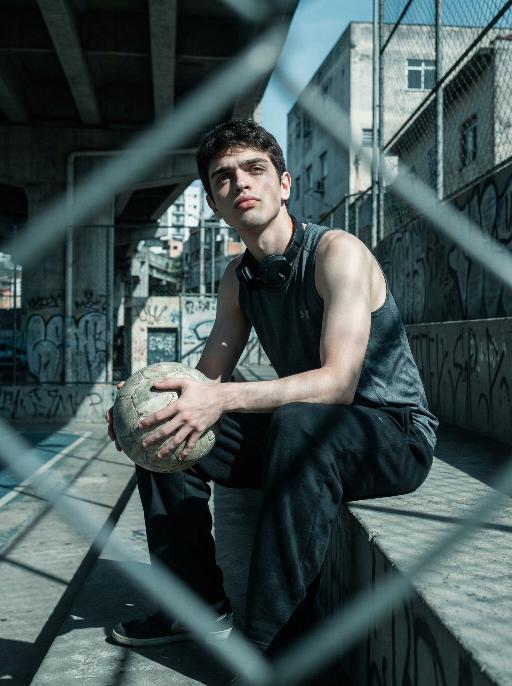
Street Youth AI effects generated image

Street Youth

Use the exact same facial features, gender, and age as the character in the uploaded image.Photorealistic urban soccer portrait in São Paulo, street culture style, industrial texture, strong sense of reality and perseverance. Setting: old community court under overpass, concrete stands, wire fence, graffiti walls, city buildings in background. Outfit: dark sports tank top or vintage club jersey, loose sweatpants or jeans, headphones or towel around neck, holding a worn football. Pose: facing forward directly, sitting on stadium stand with head slightly lowered in thought while gaze drifts upward toward the camera, or sitting upright facing forward with distinct shoulder lines, conveying struggle and toughness under urban pressure. Lighting: low saturation cool gray tone, cyan-blue shadows, natural warm skin contrast, strong chiaroscuro, hard light. Composition: medium to long shot, blurred wire fence foreground for layers, symmetrical composition or compressed space, horizontal frame, strict front-facing camera angle centered on the subject. Style: high detail, realistic skin texture, cinematic tone, 8K ultra-realistic, no text or watermarks.

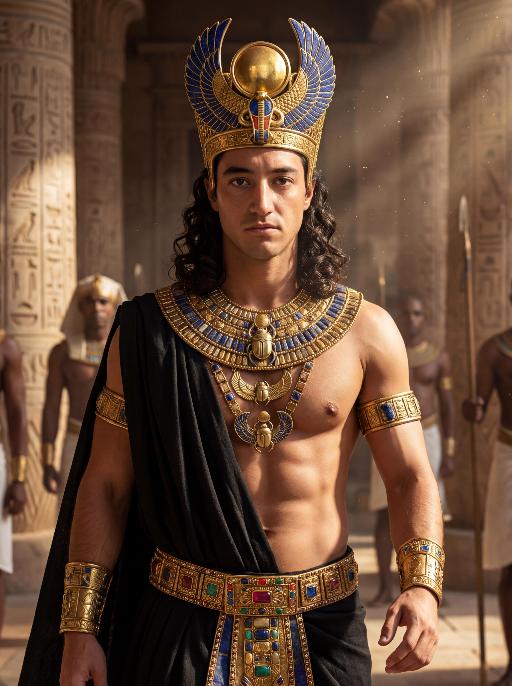
Dark Pharaoh AI effects generated image

Dark Pharaoh

The character in the uploaded picture (unchanged facial features, gender and age). A striking young man embodying the persona of an ancient Egyptian pharaoh, captured in a hyper-realistic, cinematic portrait. He has long, dark curly hair, a chiseled jawline, and a direct, commanding gaze that exudes divine authority. He is bare-chested, showcasing a muscular physique. He wears an opulent, ornate headdress with large, fan-like golden and lapis lazuli blue wings, crowned with a central symbol. His neck is adorned with multiple layers of intricate golden pectoral necklaces, inlaid with vibrant lapis lazuli and carnelian, featuring sacred Egyptian motifs like scarabs. He wears detailed golden armbands and bracelets etched with hieroglyphics on both arms. A black, flowing fabric is draped over his left shoulder. His waist is cinched with a wide, elaborately decorated belt featuring gold, blue, and red inlays and hieroglyphic carvings. He walks forward with a regal, confident stride, radiating power and pharaonic grandeur. The setting is the grand interior of an ancient Egyptian palace, with towering stone columns, intricate hieroglyphic carvings on the walls, and shafts of golden light streaming through high windows. Blurred figures of attendants in similar golden attire follow in the background, enhancing the sense of scale and majesty. The image is rendered in a hyper-realistic, epic historical drama style, with dramatic, cinematic lighting that highlights the intricate details of the golden regalia, the texture of the fabric, and the weathered stone of the palace. The color palette is rich and opulent, featuring deep golds, vibrant blues, and earthy stone tones, creating a timeless, majestic, and awe-inspiring atmosphere. The overall aesthetic is detailed, lifelike, and reminiscent of a scene from a grand historical epic film

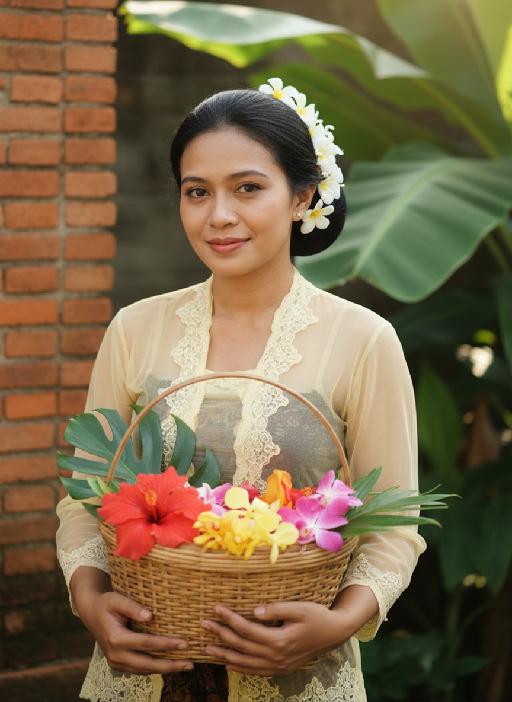
Kebaya AI effects generated image

Kebaya

Strictly lock the facial features of the uploaded portrait (preserve facial contours, native Indonesian skin tone, hairstyle and age). model occupies 3/4 of the frame, the model as the absolute dominant subject, close-up half-body portrait with minimal background space, no excessive empty space around the model, a charming half-body portrait of a young Indonesian lady in her early 20s, with a gentle smile and black hair elegantly updo decorated with white tiny flowers, dressed in a soft pale yellow sheer kebaya featuring delicate lace edging. She holds a rustic rattan basket brimming with colorful fresh blooms, set against a backdrop of a classic Indonesian red-brick dwelling with sprawling tropical banana foliage, bathed in soft golden natural sunlight, exuding a fresh, idyllic and authentic Indonesian rural charm, 3:4 aspect ratio, ultra-high detail, photorealistic

Love Yourself AI effects generated image

Love Yourself

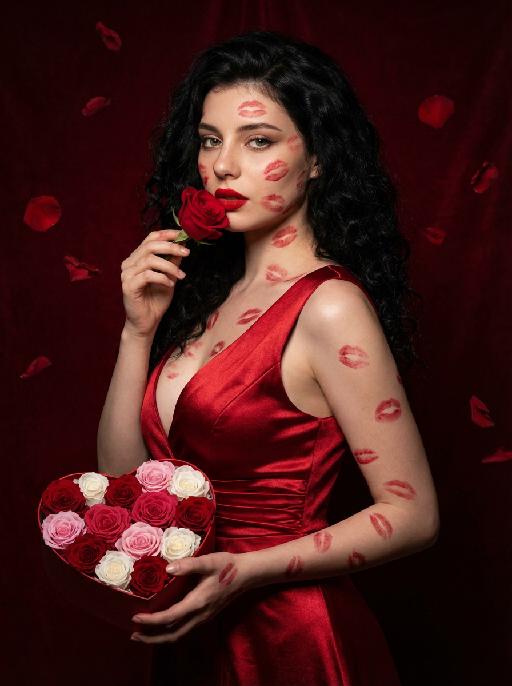
A charming and alluring figure in the uploaded picture (with unchanged facial features, gender and age), stands sideways and turns around, looking at the camera. She has long, fluffy, jet-black curly hair, exquisite eye makeup and a bright matte red lipstick. Red lipstick marks are all over her face, neck, chest and arms. She is wearing a luxurious deep V-neck red satin dress. One hand holds a heart-shaped box filled with various colored roses, and the other hand holds a rose placed near her mouth. Background: A dark red velvet texture studio background. Several red rose petals float slowly in the air in the background. Lighting hint: Low-key high-contrast dramatic light, soft directional highlights shining on her facial features and the satin dress, deep velvet-like shadows to enhance the sexy effect, with a cinematic sense of melancholy and depth. Tone hint: Rich, saturated deep red contrasts with dark black and soft charcoal gray, warm and passionate color combination, with subtle velvet texture in the shadow areas. Style: High-end fashion editing photography, highly realistic detail depiction, precise capture of skin texture and fabric luster, full of charm and allure Valentine's Day theme, with professional photography studio level, fashion pioneer photography.

Couple AI effects generated image

Couple

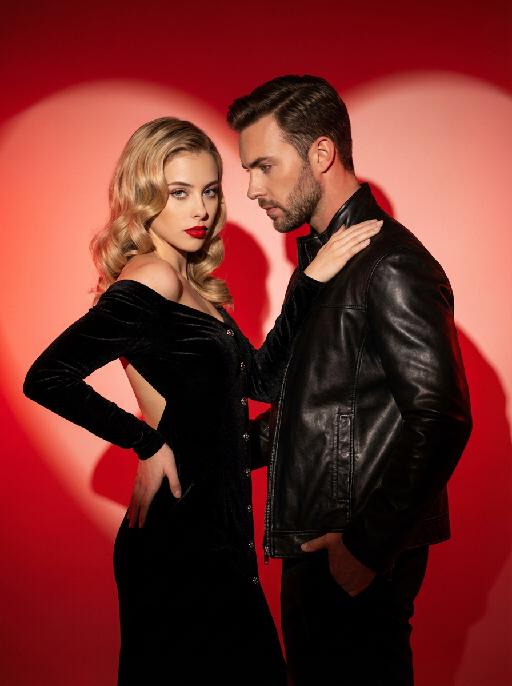
This charming couple posed in the studio for the photo: In the uploaded pictures, these individuals (with unchanged facial features, gender and age) were wearing a black velvet high-end custom high-shoulder back off-the-shoulder dress (wearing exquisite and sophisticated accessories), decorated with metal buttons, with red lips, having a retro wavy hairstyle, with one hand on their own hips and the other on their partner's shoulder (with unchanged facial features, gender and age), with a cold yet charming expression; The other person was wearing a stylish custom black leather jacket, one hand in the pocket, slightly leaning forward, naturally gazing at the other person, with a natural and elegant expression, presenting a natural and elegant atmosphere; The background was a red gradient color, with strong light and shadow contrast, heart-shaped bright red light and shadow, high-contrast warm tones, and sharp black-red color contrast, exuding the luxurious charm of old Hollywood, filled with a sexy and elegant atmosphere. This was a professional studio photo shoot, the photos were clear and sharp, with an avant-garde photography art style, the edges of the characters were illuminated by red lights.

Bags

A realistic Instagram-style lifestyle photo. A model is sitting casually in a modern walk-in closet, surrounded by neatly arranged clothes, handbags, and shoes. Model faces the camera naturally, holding a product (Refer to the pictures uploaded by the user) and introducing it with expressive hand gestures. Model`s mouth is slightly open, suggesting model is speaking to the viewer. The camera angle is slightly zoomed-in, showing model`s upper body, the product, and part of the stylish closet behind model. The background should remain clear and detailed, not blurred, so that the clothes, shelves, and accessories in the closet are visible. Lighting is soft and natural, enhancing the cozy and elegant atmosphere. The overall look should feel candid, authentic, and Instagram-worthy, as if part of a product introduction in a real closet setting.

Load more

Next-Gen Multi-Model AI Video Architecture

Vivago AI isn't just one engine—it’s a unified hub for the world’s most advanced video AI. Whether you need cinematic realism or high-speed social content, we provide the right model for your creative vision.

Free Generate

Beauty and Dolphins

Vacation Time

Stellar Tear

Fish Tank Supervisor

Cinematic Quality & Precision Control

Enables 4K resolution with multi-lens motion control, generating delicate scene via text prompts for customized cinematography.​

TRY NOW

Dynamic AV Sync

Auto-generates original audio to avoid copyright issues. Build 3D immersive environments through layered sound design automatically.

TRY NOW

OpenAI Sora 2

​Advanced visual storytelling with unparalleled physics and consistency.

TRY NOW

Kling v2.6 Pro

Industry-leading cinematic image animation and motion control.

TRY NOW

Google Veo 3 & 3.1

Ultra-fast generation with enhanced realism for creative workflows.

TRY NOW

Vivago AI 2.0

Our proprietary model optimized for efficiency, speed, and cost-effective generation.

TRY NOW

Users' Voice

We listen carefully to the opinions of every user.
Free Generate
Contact Us
I tried the Lip Sync feature inside Vivago.ai’s AI Video Generator for my educational podcast, and the results were stunning! The avatar's lip movements perfectly matched my audio recording, creating a professional AI-generated video without complex editing. Compared with tools like OpenAI Sora 2 and Google Veo 3.1, Vivago Image-to-Video delivers fast, studio-quality results online. It saved me hours of post-production work.
ElenaM (Spain)
Vivago’s Image-to-Video AI transformed my marketing workflow. I uploaded a product image and described the launch scene in text, and it generated a 10-second cinematic AI video with background music and dynamic visuals. The output quality rivals Kling v2.6 Pro and Google Veo 3 Fast. It’s now my go-to AI video generator for social media ads and product campaigns.
KenjiT (Japan)
As a digital artist, I use Vivago.ai 2.0 daily for Image-to-Image and AI Image-to-Video creation. The e-book covers and animated visuals I generate for clients look cinematic and professional. Unlike many standalone AI tools, Vivago integrates multiple leading models into one platform, making it easier to create copyright-safe AI images and videos for publishing.
ChenL (China)
I tried the Lip Sync feature inside Vivago.ai’s AI Video Generator for my educational podcast, and the results were stunning! The avatar's lip movements perfectly matched my audio recording, creating a professional AI-generated video without complex editing. Compared with tools like OpenAI Sora 2 and Google Veo 3.1, Vivago Image-to-Video delivers fast, studio-quality results online. It saved me hours of post-production work.
ElenaM (Spain)
Vivago’s Image-to-Video AI transformed my marketing workflow. I uploaded a product image and described the launch scene in text, and it generated a 10-second cinematic AI video with background music and dynamic visuals. The output quality rivals Kling v2.6 Pro and Google Veo 3 Fast. It’s now my go-to AI video generator for social media ads and product campaigns.
KenjiT (Japan)
As a digital artist, I use Vivago.ai 2.0 daily for Image-to-Image and AI Image-to-Video creation. The e-book covers and animated visuals I generate for clients look cinematic and professional. Unlike many standalone AI tools, Vivago integrates multiple leading models into one platform, making it easier to create copyright-safe AI images and videos for publishing.
ChenL (China)
I absolutely love Vivago’s AI Image-to-Video Generator. As a travel blogger, static images often fail to capture real atmosphere, but Vivago helps me turn photos into vivid cinematic AI videos with motion effects. It feels comparable to OpenAI Sora 2 and Google Veo 3.1, but more accessible and faster for creators who need high-quality AI videos online.
LiamK (Australia)
I tried the Lip Sync feature inside Vivago.ai’s AI Video Generator for my educational podcast, and the results were stunning! The avatar's lip movements perfectly matched my audio recording, creating a professional AI-generated video without complex editing. Compared with tools like OpenAI Sora 2 and Google Veo 3.1, Vivago Image-to-Video delivers fast, studio-quality results online. It saved me hours of post-production work.
ElenaM (Spain)
Vivago’s Image-to-Video AI transformed my marketing workflow. I uploaded a product image and described the launch scene in text, and it generated a 10-second cinematic AI video with background music and dynamic visuals. The output quality rivals Kling v2.6 Pro and Google Veo 3 Fast. It’s now my go-to AI video generator for social media ads and product campaigns.
KenjiT (Japan)
As a digital artist, I use Vivago.ai 2.0 daily for Image-to-Image and AI Image-to-Video creation. The e-book covers and animated visuals I generate for clients look cinematic and professional. Unlike many standalone AI tools, Vivago integrates multiple leading models into one platform, making it easier to create copyright-safe AI images and videos for publishing.
ChenL (China)
I absolutely love Vivago’s AI Image-to-Video Generator. As a travel blogger, static images often fail to capture real atmosphere, but Vivago helps me turn photos into vivid cinematic AI videos with motion effects. It feels comparable to OpenAI Sora 2 and Google Veo 3.1, but more accessible and faster for creators who need high-quality AI videos online.
LiamK (Australia)
Using Vivago.ai’s Image-to-Video AI has greatly enhanced my classroom teaching. I transform textbook notes into historical AI videos with cinematic filters and dynamic animations. Compared with tools like Kling v2.6 Pro and Google Veo 3 Fast, Vivago offers faster generation and easier parameter control for educators who need reliable AI video creation.
RajivG (India)
I frequently create AI videos on Vivago and publish them on TikTok and YouTube Shorts. The AI video templates and trending content ideas help me produce viral-ready clips quickly. With Vivago’s integrated models—including advanced video engines similar to OpenAI Sora 2—I can generate anime-style and cinematic social media videos that drive high engagement.
MarieJ (Spain)
What attracts me most about Vivago.ai is not only the powerful AI Video Generator but also the active AIGC creator community. It combines AI Image-to-Video, Text-to-Video, and leading model integrations like Google Veo 3.1 into one creative platform.
TomW (India)
At first, I was hesitant about using AI video tools. But after trying Vivago Image-to-Video, I realized how easy it is to create professional AI-generated videos online. I just upload an image, add a short prompt, and adjust a few settings. The results are cinematic and copyright-safe, which is essential for commercial projects.
HectorC (Mexico)
Using Vivago.ai’s Image-to-Video AI has greatly enhanced my classroom teaching. I transform textbook notes into historical AI videos with cinematic filters and dynamic animations. Compared with tools like Kling v2.6 Pro and Google Veo 3 Fast, Vivago offers faster generation and easier parameter control for educators who need reliable AI video creation.
RajivG (India)
I frequently create AI videos on Vivago and publish them on TikTok and YouTube Shorts. The AI video templates and trending content ideas help me produce viral-ready clips quickly. With Vivago’s integrated models—including advanced video engines similar to OpenAI Sora 2—I can generate anime-style and cinematic social media videos that drive high engagement.
MarieJ (Spain)
What attracts me most about Vivago.ai is not only the powerful AI Video Generator but also the active AIGC creator community. It combines AI Image-to-Video, Text-to-Video, and leading model integrations like Google Veo 3.1 into one creative platform.
TomW (India)
At first, I was hesitant about using AI video tools. But after trying Vivago Image-to-Video, I realized how easy it is to create professional AI-generated videos online. I just upload an image, add a short prompt, and adjust a few settings. The results are cinematic and copyright-safe, which is essential for commercial projects.
HectorC (Mexico)