Text to Image

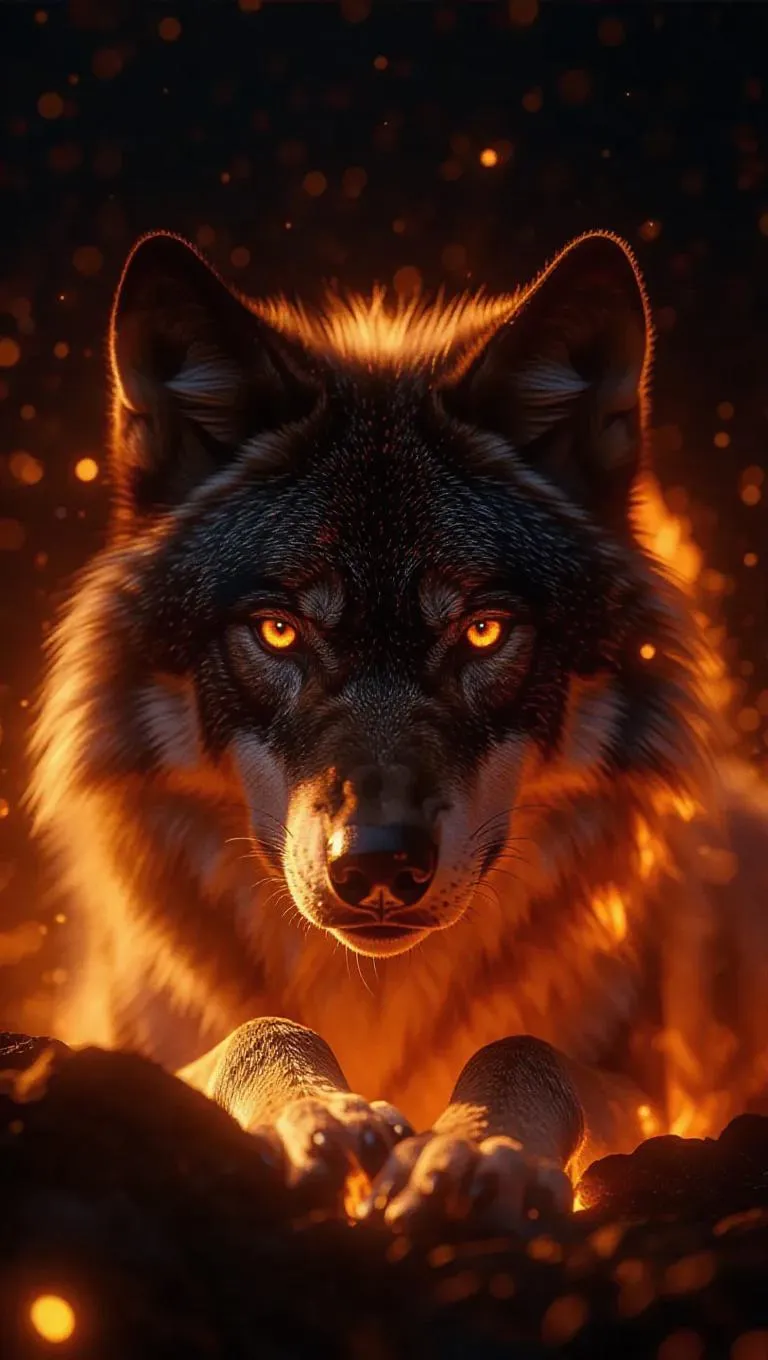
A majestic wolf composed entirely of flames, resting beneath a starry sky, glowing eyes, sparks trailing its movements, hyper-realistic, cinematic lighting.

Recreate
arrow
Text to Image

More From VIVAGO AI

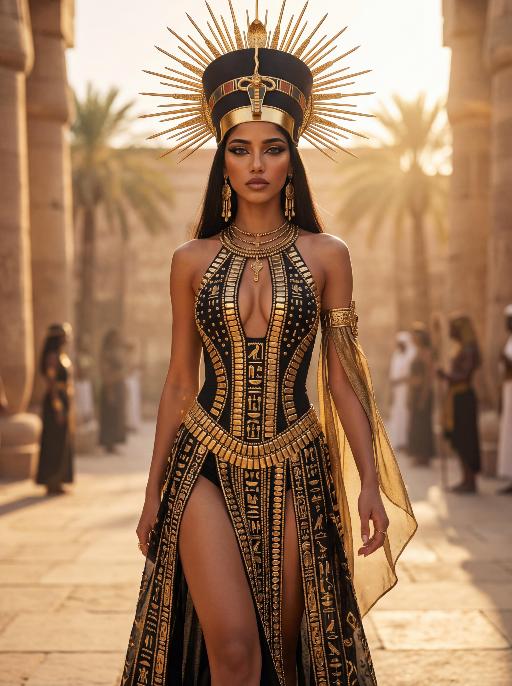
Solar Queen AI effects generated image

Solar Queen

The character in the uploaded picture (unchanged facial features, gender and age). A striking young woman embodying an ancient Egyptian-inspired high-fashion model, captured in a hyper-realistic, cinematic full-body portrait. She has long, straight dark hair, a regal, intense gaze, and bold, dramatic Egyptian-style makeup. She wears an opulent, sun-inspired ensemble in black and gold. Her head is adorned with a massive, elaborate headdress featuring a central black and gold crown, surrounded by radiating golden sun rays, creating a divine, solar aura. Her upper body is clad in a form-fitting, halter-style bodysuit with a deep, intricate cutout at the chest, crafted from black fabric and embellished with countless golden metallic plates, beads, and gemstones, forming geometric and hieroglyphic-inspired patterns. The bodysuit transitions into a high-slit skirt of the same black and gold design, cascading down her legs, revealing her thigh. She wears large, dangling golden earrings, multiple layered golden necklaces, and a detailed golden arm cuff on her right arm, from which a flowing black and gold fabric drapes. She walks forward with a confident, regal stride, her posture upright and commanding, radiating power, divine authority, and ancient mystique. The setting is a high-fashion runway set within a grand, sun-drenched ancient Egyptian courtyard. Massive stone columns and palm trees rise in the background, bathed in the warm, golden light of the setting sun, which creates a hazy, ethereal glow. Indistinct figures of other models in similar attire follow in the background, enhancing the sense of a grand procession. The image is rendered in a hyper-realistic, high-fashion editorial style, with sharp focus on the subject, soft bokeh on the background, and dramatic, cinematic lighting that accentuates the metallic sheen of the gold, the texture of the black fabric, and the intricate details of the headdress and embellishments. The color palette is rich and opulent, featuring deep blacks, radiant golds, and warm, sunlit tones, creating a timeless, powerful, and awe-inspiring atmosphere. The overall aesthetic is detailed, lifelike, and reminiscent of a cutting-edge fashion show set in ancient Egypt, blending historical grandeur with modern high fashion

Uncertainty

Hyper-realistic photography: The two uploaded images depict the characters in the same scene. The first character (with unchanged facial features, expressions and age) has long curly hair and light brown hair, touching the deep red wall beautifully and charmingly, wearing a tight and sexy red nightgown. The other character (with unchanged facial features, expressions and age) is wearing a smooth and loose black patterned shirt. There is an intimate and passionate eye contact between the two characters, creating a sexy and romantic atmosphere. The dim modern bedroom background features dark-colored bed sheets and red neon signs shining on the walls; lighting adjustment suggestion: high-end film-level lighting, strong contrast of light and dark, soft melancholic shadows, deep and rich shadows, subtle highlights on the skin, shallow depth of field, clearly focused on the couple; color tone suggestion: warm and melancholic color combination, mainly saturated red and dark black, natural skin with warm tones, rich immersive color grading, fashion-forward photography, extreme ambiguous atmosphere, high-definition film style. Dark interior and red light and shadow

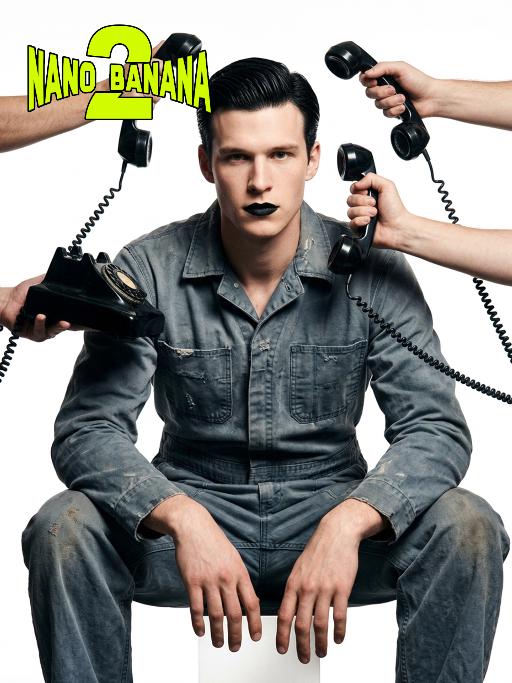
Telephone Ring AI effects generated image

Telephone Ring

Shooting perspective and focal length: Frontal level view, using a medium telephoto lens (approximately 50mm), with an appropriate focal length, medium close-up shot, able to clearly present the upper body and hand details of the characters, and the picture has no obvious distortion. Equipment: Professional studio camera (such as Canon 5D series or Sony A7 series), combined with a studio lighting system. Character pose: The character is in a sitting position, with legs apart and knees bent, the upper body leaning forward and the head close to the camera; multiple arms extend from all around the frame, each hand holding an old-fashioned black wired telephone, multiple receivers randomly surround the character's head, creating a visual effect of being surrounded. Character expression: Eyes gaze at the camera, the gaze is slightly distant and cold, the facial expression is calm and undisturbed, conveying a restrained emotional tension. Lighting: Use studio hard light, the main light source comes from the front, supplemented by side lighting, forming a clear contrast of light and shade, highlighting the fabric texture and facial contours, the background is pure white, clean and without any color impurities. Style: Pioneer fashion photography, integrating surrealism and minimalism, creating an absurd yet highly tense atmosphere through strong visual impact. Clothing: A set of gray-blue distressed texture workwear, the fabric has fine textures, the fit is loose and firm, the lapel design combines toughness and retro charm. Hair style: Black short hair, using hair gel to comb backward, revealing a full forehead, the style is clean and neat with a sense of lines. Makeup: Matte texture pure black lipstick as the visual focus, the facial base makeup is even and transparent, only highlighting the lip color, the overall makeup is avant-garde and has a distinctive characteristic.

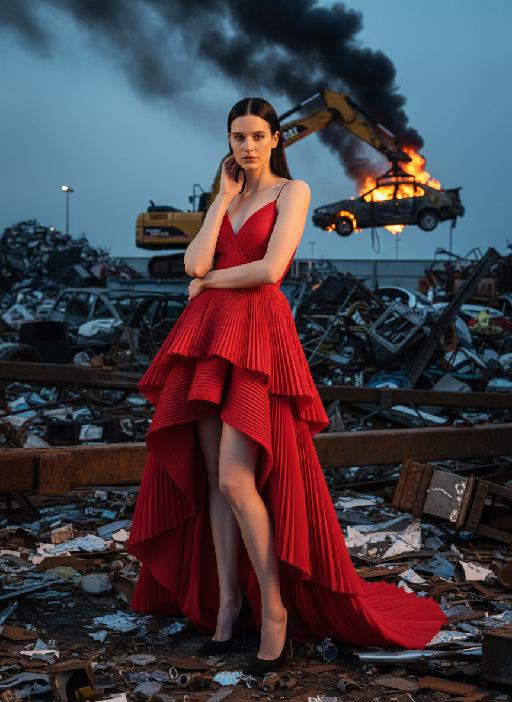
Industry AI effects generated image

Industry

The person in the uploaded picture (with unchanged facial features, age and gender) has a refined makeup style. She stands in a junk recycling station covered with distorted metal fragments, wearing a red high-cut and clearly layered high-end tailored pleated evening dress. Her black straight hair is neatly and smoothly styled. The makeup is clean and transparent, exuding a cold and elegant atmosphere; the posture is elegant: one hand is gently placed on the ear, the other arm is crossed over the waist, the body is slightly tilted towards the camera, the expression is cold and sharp, giving a sense of detachment. In the background, a yellow excavator lifts a burning car, with thick smoke billowing up. The shooting uses a professional full-frame camera, an 85mm medium telephoto lens, horizontal perspective, side backlighting at dusk, a strong contrast between warm and cool light, high contrast, rich colors, a fashionable editing style, surreal industrial aesthetics, cinematic visual tension, ultra-fine and realistic effects, avant-garde fashion photography, cinematic realistic effects, top-level strong contrast lighting effects (side backlighting, the facial edges of the person are illuminated).

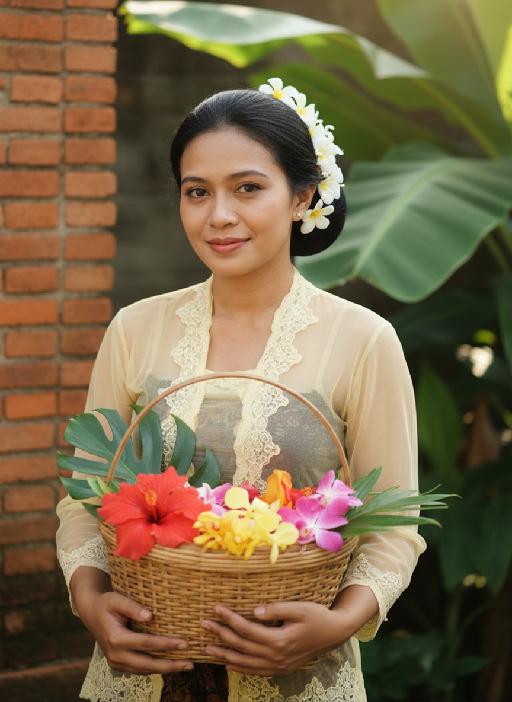
Kebaya AI effects generated image

Kebaya

Strictly lock the facial features of the uploaded portrait (preserve facial contours, native Indonesian skin tone, hairstyle and age). model occupies 3/4 of the frame, the model as the absolute dominant subject, close-up half-body portrait with minimal background space, no excessive empty space around the model, a charming half-body portrait of a young Indonesian lady in her early 20s, with a gentle smile and black hair elegantly updo decorated with white tiny flowers, dressed in a soft pale yellow sheer kebaya featuring delicate lace edging. She holds a rustic rattan basket brimming with colorful fresh blooms, set against a backdrop of a classic Indonesian red-brick dwelling with sprawling tropical banana foliage, bathed in soft golden natural sunlight, exuding a fresh, idyllic and authentic Indonesian rural charm, 3:4 aspect ratio, ultra-high detail, photorealistic

Three Frames

Film effect, three-screen split-frame photography (close-up, medium close-up, medium shot or long shot) in upper, middle and lower sections; cinematic Japanese-style film effect with three-screen split-frame photography in upper, middle and lower sections, set in a cold, lonely snowy scene on a clear day. A single figure with soft facial features, wearing an exquisitely tailored high-end red gown, a white mink fur hat and a white scarf, paired with sophisticated and textured accessories, stands in a vast white snowfield with snowflakes falling and snow accumulating on the scarf. The image boasts a strong cinematic texture. Upper screen: Extreme close-up of the head, with distinct individual eyelashes, fair and even skin, and snowflakes dotted on the eyelashes. Middle screen: Solo medium shot of the figure against the snowscape. Lower screen: Close-up of the figure leaning gently against a moose’s head with a soft smile, the details of the face and scarf in sharp focus, with a pale grey-blue sky and a single pine tree in the distance. Cinematic and realistic three-frame split-frame portrait: retain the facial features of the uploaded figure (with a fresh and translucent winter makeup look featuring silver shimmery eyeshadow, pink translucent blusher with fine glitter and light pink lip makeup—all on-trend winter styles in Western fashion, paired with a gentle and innocent expression, and fair, delicate skin). Soft diffused winter natural light highlights the soft texture of the skin and clothing. The figure leans affectionately beside a tame reindeer, with snow resting on the reindeer’s antlers and fur. The background features a snow-covered Christmas tree and an expanse of white snow, with fine snowflakes floating in the air. Soft natural cold light creates a fresh and translucent winter mood; a 50mm standard lens is used to preserve the delicate interactive details between the figure and the reindeer. The overall atmosphere is warm and healing, with ultra-high details and naturally saturated colors, in a horizontal composition. Avoid blurriness, disproportionate figure proportions and cluttered backgrounds.

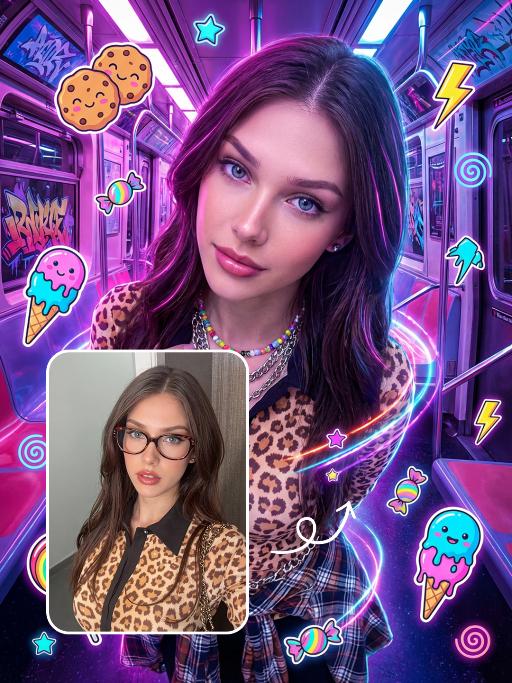
Punk Graffiti AI effects generated image

Punk Graffiti

先将上传的图片扩图成3:4比例的2k超清尺寸照片,然后将原图转换为垂直俯拍视角(俯视),半身人像,特写近景镜头从斜上方向下拍摄,主体为图中的人物形象特征保持不变,直视镜头,超写实摄影质感。背景是一个霓虹灯照亮的室内空间(类似于未来主义的地铁车厢),里面有着粉色/紫色的发光灯和涂鸦。写实美国人像、上半身写真、街头潮流服饰(豹纹、格纹元素潮流穿搭元素、佩戴彩色的配饰)、Y2K 在图像上覆盖上充满活力、可爱的卡通贴纸:微笑的饼干、滴着奶油的冰淇淋(蓝色/粉色)、棒棒糖、糖果、星星、闪电和漩涡。这些贴纸有着醒目的轮廓、鲜艳的霓虹色(粉色、蓝色、绿色、黄色)以及活泼的表情,与霓虹色的场景完美融合。整体风格融合了写实摄影与充满趣味的 Y2K 网络朋克美学元素,色彩饱和度高,霓虹灯效果耀眼,画面呈竖向构图。人物的皮肤轻微磨皮,皮肤自然美颜效果,面部妆容改成欧美流行风格的自然写实的潮流的妆容;人物的周围加上赛博的霓虹发光光效

Load more

Next-Gen Multi-Model AI Video Architecture

Vivago AI isn't just one engine—it’s a unified hub for the world’s most advanced video AI. Whether you need cinematic realism or high-speed social content, we provide the right model for your creative vision.

Free Generate

Beauty and Dolphins

Vacation Time

Stellar Tear

Fish Tank Supervisor

Cinematic Quality & Precision Control

Enables 4K resolution with multi-lens motion control, generating delicate scene via text prompts for customized cinematography.​

TRY NOW

Dynamic AV Sync

Auto-generates original audio to avoid copyright issues. Build 3D immersive environments through layered sound design automatically.

TRY NOW

OpenAI Sora 2

​Advanced visual storytelling with unparalleled physics and consistency.

TRY NOW

Kling v2.6 Pro

Industry-leading cinematic image animation and motion control.

TRY NOW

Google Veo 3 & 3.1

Ultra-fast generation with enhanced realism for creative workflows.

TRY NOW

Vivago AI 2.0

Our proprietary model optimized for efficiency, speed, and cost-effective generation.
TRY NOW

Users' Voice

We listen carefully to the opinions of every user.
Free Generate
Contact Us
I tried the Lip Sync feature inside Vivago.ai’s AI Video Generator for my educational podcast, and the results were stunning! The avatar's lip movements perfectly matched my audio recording, creating a professional AI-generated video without complex editing. Compared with tools like OpenAI Sora 2 and Google Veo 3.1, Vivago Image-to-Video delivers fast, studio-quality results online. It saved me hours of post-production work.
ElenaM (Spain)
Vivago’s Image-to-Video AI transformed my marketing workflow. I uploaded a product image and described the launch scene in text, and it generated a 10-second cinematic AI video with background music and dynamic visuals. The output quality rivals Kling v2.6 Pro and Google Veo 3 Fast. It’s now my go-to AI video generator for social media ads and product campaigns.
KenjiT (Japan)
As a digital artist, I use Vivago.ai 2.0 daily for Image-to-Image and AI Image-to-Video creation. The e-book covers and animated visuals I generate for clients look cinematic and professional. Unlike many standalone AI tools, Vivago integrates multiple leading models into one platform, making it easier to create copyright-safe AI images and videos for publishing.
ChenL (China)
I tried the Lip Sync feature inside Vivago.ai’s AI Video Generator for my educational podcast, and the results were stunning! The avatar's lip movements perfectly matched my audio recording, creating a professional AI-generated video without complex editing. Compared with tools like OpenAI Sora 2 and Google Veo 3.1, Vivago Image-to-Video delivers fast, studio-quality results online. It saved me hours of post-production work.
ElenaM (Spain)
Vivago’s Image-to-Video AI transformed my marketing workflow. I uploaded a product image and described the launch scene in text, and it generated a 10-second cinematic AI video with background music and dynamic visuals. The output quality rivals Kling v2.6 Pro and Google Veo 3 Fast. It’s now my go-to AI video generator for social media ads and product campaigns.
KenjiT (Japan)
As a digital artist, I use Vivago.ai 2.0 daily for Image-to-Image and AI Image-to-Video creation. The e-book covers and animated visuals I generate for clients look cinematic and professional. Unlike many standalone AI tools, Vivago integrates multiple leading models into one platform, making it easier to create copyright-safe AI images and videos for publishing.
ChenL (China)
I absolutely love Vivago’s AI Image-to-Video Generator. As a travel blogger, static images often fail to capture real atmosphere, but Vivago helps me turn photos into vivid cinematic AI videos with motion effects. It feels comparable to OpenAI Sora 2 and Google Veo 3.1, but more accessible and faster for creators who need high-quality AI videos online.
LiamK (Australia)
I tried the Lip Sync feature inside Vivago.ai’s AI Video Generator for my educational podcast, and the results were stunning! The avatar's lip movements perfectly matched my audio recording, creating a professional AI-generated video without complex editing. Compared with tools like OpenAI Sora 2 and Google Veo 3.1, Vivago Image-to-Video delivers fast, studio-quality results online. It saved me hours of post-production work.
ElenaM (Spain)
Vivago’s Image-to-Video AI transformed my marketing workflow. I uploaded a product image and described the launch scene in text, and it generated a 10-second cinematic AI video with background music and dynamic visuals. The output quality rivals Kling v2.6 Pro and Google Veo 3 Fast. It’s now my go-to AI video generator for social media ads and product campaigns.
KenjiT (Japan)
As a digital artist, I use Vivago.ai 2.0 daily for Image-to-Image and AI Image-to-Video creation. The e-book covers and animated visuals I generate for clients look cinematic and professional. Unlike many standalone AI tools, Vivago integrates multiple leading models into one platform, making it easier to create copyright-safe AI images and videos for publishing.
ChenL (China)
I absolutely love Vivago’s AI Image-to-Video Generator. As a travel blogger, static images often fail to capture real atmosphere, but Vivago helps me turn photos into vivid cinematic AI videos with motion effects. It feels comparable to OpenAI Sora 2 and Google Veo 3.1, but more accessible and faster for creators who need high-quality AI videos online.
LiamK (Australia)
Using Vivago.ai’s Image-to-Video AI has greatly enhanced my classroom teaching. I transform textbook notes into historical AI videos with cinematic filters and dynamic animations. Compared with tools like Kling v2.6 Pro and Google Veo 3 Fast, Vivago offers faster generation and easier parameter control for educators who need reliable AI video creation.
RajivG (India)
I frequently create AI videos on Vivago and publish them on TikTok and YouTube Shorts. The AI video templates and trending content ideas help me produce viral-ready clips quickly. With Vivago’s integrated models—including advanced video engines similar to OpenAI Sora 2—I can generate anime-style and cinematic social media videos that drive high engagement.
MarieJ (Spain)
What attracts me most about Vivago.ai is not only the powerful AI Video Generator but also the active AIGC creator community. It combines AI Image-to-Video, Text-to-Video, and leading model integrations like Google Veo 3.1 into one creative platform.
TomW (India)
At first, I was hesitant about using AI video tools. But after trying Vivago Image-to-Video, I realized how easy it is to create professional AI-generated videos online. I just upload an image, add a short prompt, and adjust a few settings. The results are cinematic and copyright-safe, which is essential for commercial projects.
HectorC (Mexico)
Using Vivago.ai’s Image-to-Video AI has greatly enhanced my classroom teaching. I transform textbook notes into historical AI videos with cinematic filters and dynamic animations. Compared with tools like Kling v2.6 Pro and Google Veo 3 Fast, Vivago offers faster generation and easier parameter control for educators who need reliable AI video creation.
RajivG (India)
I frequently create AI videos on Vivago and publish them on TikTok and YouTube Shorts. The AI video templates and trending content ideas help me produce viral-ready clips quickly. With Vivago’s integrated models—including advanced video engines similar to OpenAI Sora 2—I can generate anime-style and cinematic social media videos that drive high engagement.
MarieJ (Spain)
What attracts me most about Vivago.ai is not only the powerful AI Video Generator but also the active AIGC creator community. It combines AI Image-to-Video, Text-to-Video, and leading model integrations like Google Veo 3.1 into one creative platform.
TomW (India)
At first, I was hesitant about using AI video tools. But after trying Vivago Image-to-Video, I realized how easy it is to create professional AI-generated videos online. I just upload an image, add a short prompt, and adjust a few settings. The results are cinematic and copyright-safe, which is essential for commercial projects.
HectorC (Mexico)