Text to Image

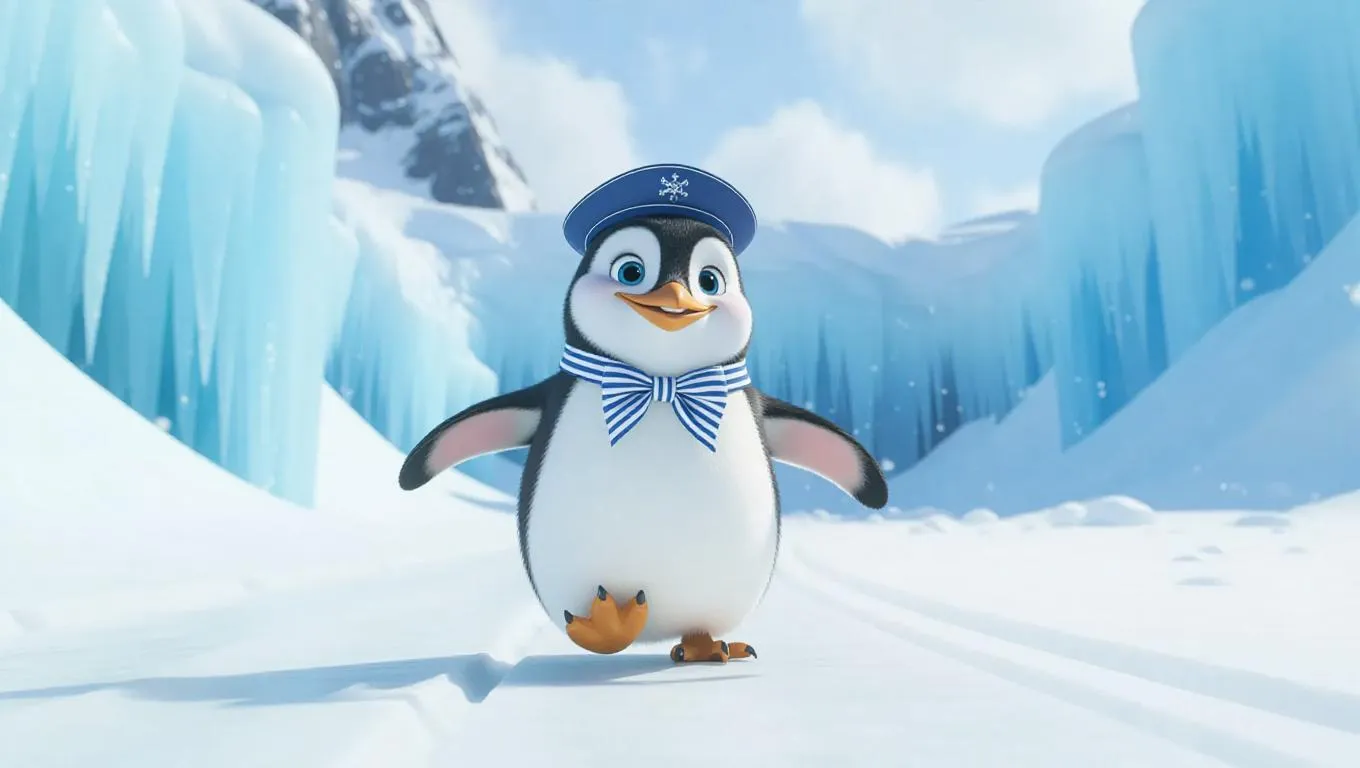
The quirky penguin sporting a little sailor outfit and striped bowtie waddles along the snowy runway with an energetic smile. It pauses momentarily to look around, taking in the beautiful ice-covered scenery and towering ice formations. The camera captures the lively bounce in its movements and the soft snowfall in the background.

Recreate
arrow
Text to Image

More From VIVAGO AI

GlamDance

"Create an AI-generated image based on the provided reference image. The subject's appearance (facial features, hairstyle, clothing, and overall temperament) should remain unchanged, as provided by the user, and the background must stay identical to the one in the reference image without modification. The posture of the subject should closely resemble the gesture in reference image 2, with the following detailed description: both hands are fully open, raised to shoulder height, with the palms facing forward and fingers spread out towards the screen. The left hand is slightly raised, with fingers slightly curled, while the palm remains open. A small amount of yellow paint is applied, evenly spread across the palm and part of the fingertips. The right hand is positioned similarly to the left, slightly more parallel to the body, with less finger curvature, and the palm faces the screen. A small amount of red paint is applied, evenly spread across the palm and fingertips. The paint on both hands should be evenly applied and natural, without excess, maintaining a relaxed and natural gesture. The background should match the environment from the reference image. The resulting image should have a higher resolution and finer textures, ensuring the paint on the hands looks natural and not overdone, while maintaining an artistic and relaxed style."

Reveller AI effects generated image

Reveller

Use the exact same facial features, gender, age, and natural skin tone as the character in the uploaded image. Do not alter, lighten, darken, or modify the original complexion in any way. Maintain his authentic skin color exactly as in the reference image. curly textured hair, radiant natural skin, and a confident, magnetic smile, standing proudly at Rio Carnival. wears an elaborate headdress made of large green and yellow feathers, with an ornate centerpiece featuring red, green, and gold jewel details. His face is painted with bold, symmetrical Carnival patterns in emerald green and vibrant yellow, with striking blue accents around the eyes, enhancing gaze. dressed in a shimmering emerald-green sequined vest that catches the light dramatically, partially open to reveal his athletic chest. Natural body highlights emphasize physique realistically without altering skin tone. Lighting: strong cinematic light contrast — warm golden sunlight illuminating one side of his face and torso, creating sculpted highlights, while preserving accurate skin color and natural undertones. Soft shadow adds depth and dimension without washing out or overexposing the complexion. Subtle rim lighting around the feathers enhances separation from the background. High dynamic range with true-to-life skin rendering. Background: a lively Rio street during Carnival, filled with a cheering crowd in colorful festive clothing. Confetti floats in the air. The crowd is slightly blurred (shallow depth of field), making the subject stand out sharply. Mood: vibrant, joyful, triumphant, powerful, charismatic. Style: high-resolution cinematic photography, poster-quality, ultra-sharp focus on subject, shallow depth of field, 85mm lens, HDR, rich saturated colors, dramatic contrast, professional fashion-editorial lighting, realistic skin texture, natural complexion fidelity, magazine cover composition.

Birthday Photo AI effects generated image

Birthday Photo

Drawing on the overall facial structure, three-dimensional facial features, skin tone range and age vibe of the uploaded model's image (without strict identity replication), a new female figure is created: a stunning woman with sophisticated elegance, graceful in appearance and self-assured in demeanor, exuding a warm, charming and blissful aura. She is wearing an upscale black off-the-shoulder corset dress with a form-fitting cut and clean, sharp lines; crafted from a premium, fine-textured material, it embodies a sleek yet understated fashion aesthetic. A delicate, petite tiara-style hair accessory adorns her hair, nestled like a princess’s finishing touch—its elegant and restrained design serves as a perfect focal point that elevates the entire look. She holds an exquisitely designed white cream cake with both hands, decorated with several lit candles whose soft, warm glow symbolizes birthday wishes and blessings. A warm, blissful smile graces her face, natural and sincere; her eyes are bright and gentle, fully conveying emotions of joy, contentment and being cherished. The overall atmosphere is intimate and lovely. The background is a solid dark gray hue, simple and uncluttered with no extraneous elements, making the figure’s silhouette and the cake the distinct focal points. The lighting adopts a modern photographic style with dramatic chiaroscuro: the key light illuminates the woman’s face and the cake centrally, while a rim light subtly outlines her figure’s contours. The background remains understated, further enhancing the layered dimensionality of the subject. The overall color palette is kept to a minimalist scheme, dominated by black, white and gray, rendering the frame restrained and sophisticated. The style is contemporary, fashionable and exquisite, with high-definition photorealistic quality, rich and well-defined details, naturally realistic skin texture, and clearly discernible textures of the dress and the cake. The image as a whole presents the visual effect of a high-end fashion birthday portrait.

Midnight Neon

Professional retro film-style portrait photography, with the first uploaded portrait used in the frame for strict identity consistency (unchanged facial features, hairstyle, skin tone and age). The figure’s face is naturally retouched for a flawless skin texture, paired with dramatic light and shadow contrast on the facial features. In this street photography portrait, the figure stands at the center of a bustling city street on a rainy night (the vibrant night view of Tokyo’s busy thoroughfares), captured in a close-up shot and positioned right at the frame’s center. The traffic flow in the background (vehicles and pedestrians speeding by to create blurred dynamic streaks) and neon lights feature dynamic motion blur effects, with smudged texture overlays to enhance the narrative mood. The dim lighting boasts high contrast; the wet road surfaces reflect warm orange glows and cool-toned neon light, with soft bokeh spots cast by street lamps and car headlights. Color palette: based on black and white tones, the neon hues are processed with high saturation, dominated by dark shades to create a striking contrast between warm and cool tones. The image is enhanced with film grain texture, depth of field breakup details, cinematic black aesthetic, and ultra-realistic, ultra-fine textures, plus a lifelike effect of raindrops splattering on the lens. Shot with a slow shutter speed, a large aperture and a low shutter setting; an orange vertical digital date watermark (2026:00:00) is added to the bottom right corner.

F-Photo AI effects generated image

F-Photo

Extreme close-up portrait, Head and shoulders close-up portrait (shot precisely to the chest): Professional fashion editing and photography, with an upscale and luxurious style. In the uploaded photos, the subjects (with their facial features, gender, hairstyle and age remaining unchanged) are wearing a clean, crisp sleeveless administrative jacket professional outfit, wearing an elegant ladies' watch on the wrist, looking fresh and refined, gentle and elegant. The subjects' makeup is elegant and refined, enhanced with facial whitening and skin smoothing retouching—achieving bright and fair skin tone, thorough blemish removal, a delicate and flawless complexion with soft radiance, while retaining appropriate facial texture. The subjects stand in a confident half-body pose, with one hand behind their backs, looking directly at the camera, smiling with a confident expression. The background is a pure and serene warm-toned beige (with the soft shadows of top-notch studio lighting), creating a clean and tidy visual effect, without any chaotic visual focus. The photography uses top-notch studio lighting, with the soft main light shaping the facial contours, while combining subtle backlighting to outline the hair and shoulder contours, avoiding strong shadows. The shooting uses a Sony A7R IV camera, paired with an 85mm f/1.4 dedicated lens. The photo has a shallow depth of field effect, highlighting the fabric textures (sleeveless administrative jacket texture, watch details) and skin details. This photo has 8K ultra-high resolution, with extremely high fidelity, using professional color grading technology, featuring subtle film grain effects, with a cinematic texture, showcasing the aesthetic concepts of photography pioneers, and is a work created by a top photographer, in line with the cover style of Vogue magazine, and without watermarks or text.

Noble Person AI effects generated image

Noble Person

The figure from the uploaded image (with consistent facial features, hair, skin tone and age) sits confidently on an ornate golden vintage chair, holding a glass of white wine in one hand, with the other hand resting elegantly and naturally on the chair. He looks at the camera with a confident, cold and elegant expression, dressed in a dark gray haute couture suit with a white shirt underneath and an elegant textured cravat. He wears sunglasses and a watch, exuding an air of refinement, calmness and self-assurance. The background is a luxurious hotel setting with warm lighting, hanging chandeliers and floral accents, creating a retro, elegant, noble and lavish atmosphere. Captured in a medium shot from a slightly low, side angle relative to the subject, the image presents a cinematic portrayal of stylish living, featuring portrait photography aesthetics and an avant-garde fashion photography art style, with high-end cinematic texture, ultra-high definition quality, an overall cool color tone, cinema-grade image quality, a film-like filter, and dramatic lighting contrast.

Load more

Next-Gen Multi-Model AI Video Architecture

Vivago AI isn't just one engine—it’s a unified hub for the world’s most advanced video AI. Whether you need cinematic realism or high-speed social content, we provide the right model for your creative vision.

Free Generate


Beauty and Dolphins


Vacation Time


Stellar Tear

Fish Tank Supervisor

Cinematic Quality & Precision Control

Enables 4K resolution with multi-lens motion control, generating delicate scene via text prompts for customized cinematography.​

TRY NOW

Dynamic AV Sync

Auto-generates original audio to avoid copyright issues. Build 3D immersive environments through layered sound design automatically.

TRY NOW

OpenAI Sora 2

​Advanced visual storytelling with unparalleled physics and consistency.

TRY NOW

Kling v2.6 Pro

Industry-leading cinematic image animation and motion control.

TRY NOW

Google Veo 3 & 3.1

Ultra-fast generation with enhanced realism for creative workflows.

TRY NOW

Vivago AI 2.0

Our proprietary model optimized for efficiency, speed, and cost-effective generation.

TRY NOW

Users' Voice

We listen carefully to the opinions of every user.
Free Generate
Contact Us
I tried the Lip Sync feature inside Vivago.ai’s AI Video Generator for my educational podcast, and the results were stunning! The avatar's lip movements perfectly matched my audio recording, creating a professional AI-generated video without complex editing. Compared with tools like OpenAI Sora 2 and Google Veo 3.1, Vivago Image-to-Video delivers fast, studio-quality results online. It saved me hours of post-production work.
ElenaM (Spain)
Vivago’s Image-to-Video AI transformed my marketing workflow. I uploaded a product image and described the launch scene in text, and it generated a 10-second cinematic AI video with background music and dynamic visuals. The output quality rivals Kling v2.6 Pro and Google Veo 3 Fast. It’s now my go-to AI video generator for social media ads and product campaigns.
KenjiT (Japan)
As a digital artist, I use Vivago.ai 2.0 daily for Image-to-Image and AI Image-to-Video creation. The e-book covers and animated visuals I generate for clients look cinematic and professional. Unlike many standalone AI tools, Vivago integrates multiple leading models into one platform, making it easier to create copyright-safe AI images and videos for publishing.
ChenL (China)
I tried the Lip Sync feature inside Vivago.ai’s AI Video Generator for my educational podcast, and the results were stunning! The avatar's lip movements perfectly matched my audio recording, creating a professional AI-generated video without complex editing. Compared with tools like OpenAI Sora 2 and Google Veo 3.1, Vivago Image-to-Video delivers fast, studio-quality results online. It saved me hours of post-production work.
ElenaM (Spain)
Vivago’s Image-to-Video AI transformed my marketing workflow. I uploaded a product image and described the launch scene in text, and it generated a 10-second cinematic AI video with background music and dynamic visuals. The output quality rivals Kling v2.6 Pro and Google Veo 3 Fast. It’s now my go-to AI video generator for social media ads and product campaigns.
KenjiT (Japan)
As a digital artist, I use Vivago.ai 2.0 daily for Image-to-Image and AI Image-to-Video creation. The e-book covers and animated visuals I generate for clients look cinematic and professional. Unlike many standalone AI tools, Vivago integrates multiple leading models into one platform, making it easier to create copyright-safe AI images and videos for publishing.
ChenL (China)
I absolutely love Vivago’s AI Image-to-Video Generator. As a travel blogger, static images often fail to capture real atmosphere, but Vivago helps me turn photos into vivid cinematic AI videos with motion effects. It feels comparable to OpenAI Sora 2 and Google Veo 3.1, but more accessible and faster for creators who need high-quality AI videos online.
LiamK (Australia)
I tried the Lip Sync feature inside Vivago.ai’s AI Video Generator for my educational podcast, and the results were stunning! The avatar's lip movements perfectly matched my audio recording, creating a professional AI-generated video without complex editing. Compared with tools like OpenAI Sora 2 and Google Veo 3.1, Vivago Image-to-Video delivers fast, studio-quality results online. It saved me hours of post-production work.
ElenaM (Spain)
Vivago’s Image-to-Video AI transformed my marketing workflow. I uploaded a product image and described the launch scene in text, and it generated a 10-second cinematic AI video with background music and dynamic visuals. The output quality rivals Kling v2.6 Pro and Google Veo 3 Fast. It’s now my go-to AI video generator for social media ads and product campaigns.
KenjiT (Japan)
As a digital artist, I use Vivago.ai 2.0 daily for Image-to-Image and AI Image-to-Video creation. The e-book covers and animated visuals I generate for clients look cinematic and professional. Unlike many standalone AI tools, Vivago integrates multiple leading models into one platform, making it easier to create copyright-safe AI images and videos for publishing.
ChenL (China)
I absolutely love Vivago’s AI Image-to-Video Generator. As a travel blogger, static images often fail to capture real atmosphere, but Vivago helps me turn photos into vivid cinematic AI videos with motion effects. It feels comparable to OpenAI Sora 2 and Google Veo 3.1, but more accessible and faster for creators who need high-quality AI videos online.
LiamK (Australia)
Using Vivago.ai’s Image-to-Video AI has greatly enhanced my classroom teaching. I transform textbook notes into historical AI videos with cinematic filters and dynamic animations. Compared with tools like Kling v2.6 Pro and Google Veo 3 Fast, Vivago offers faster generation and easier parameter control for educators who need reliable AI video creation.
RajivG (India)
I frequently create AI videos on Vivago and publish them on TikTok and YouTube Shorts. The AI video templates and trending content ideas help me produce viral-ready clips quickly. With Vivago’s integrated models—including advanced video engines similar to OpenAI Sora 2—I can generate anime-style and cinematic social media videos that drive high engagement.
MarieJ (Spain)
What attracts me most about Vivago.ai is not only the powerful AI Video Generator but also the active AIGC creator community. It combines AI Image-to-Video, Text-to-Video, and leading model integrations like Google Veo 3.1 into one creative platform.
TomW (India)
At first, I was hesitant about using AI video tools. But after trying Vivago Image-to-Video, I realized how easy it is to create professional AI-generated videos online. I just upload an image, add a short prompt, and adjust a few settings. The results are cinematic and copyright-safe, which is essential for commercial projects.
HectorC (Mexico)
Using Vivago.ai’s Image-to-Video AI has greatly enhanced my classroom teaching. I transform textbook notes into historical AI videos with cinematic filters and dynamic animations. Compared with tools like Kling v2.6 Pro and Google Veo 3 Fast, Vivago offers faster generation and easier parameter control for educators who need reliable AI video creation.
RajivG (India)
I frequently create AI videos on Vivago and publish them on TikTok and YouTube Shorts. The AI video templates and trending content ideas help me produce viral-ready clips quickly. With Vivago’s integrated models—including advanced video engines similar to OpenAI Sora 2—I can generate anime-style and cinematic social media videos that drive high engagement.
MarieJ (Spain)
What attracts me most about Vivago.ai is not only the powerful AI Video Generator but also the active AIGC creator community. It combines AI Image-to-Video, Text-to-Video, and leading model integrations like Google Veo 3.1 into one creative platform.
TomW (India)
At first, I was hesitant about using AI video tools. But after trying Vivago Image-to-Video, I realized how easy it is to create professional AI-generated videos online. I just upload an image, add a short prompt, and adjust a few settings. The results are cinematic and copyright-safe, which is essential for commercial projects.
HectorC (Mexico)