Text to Image

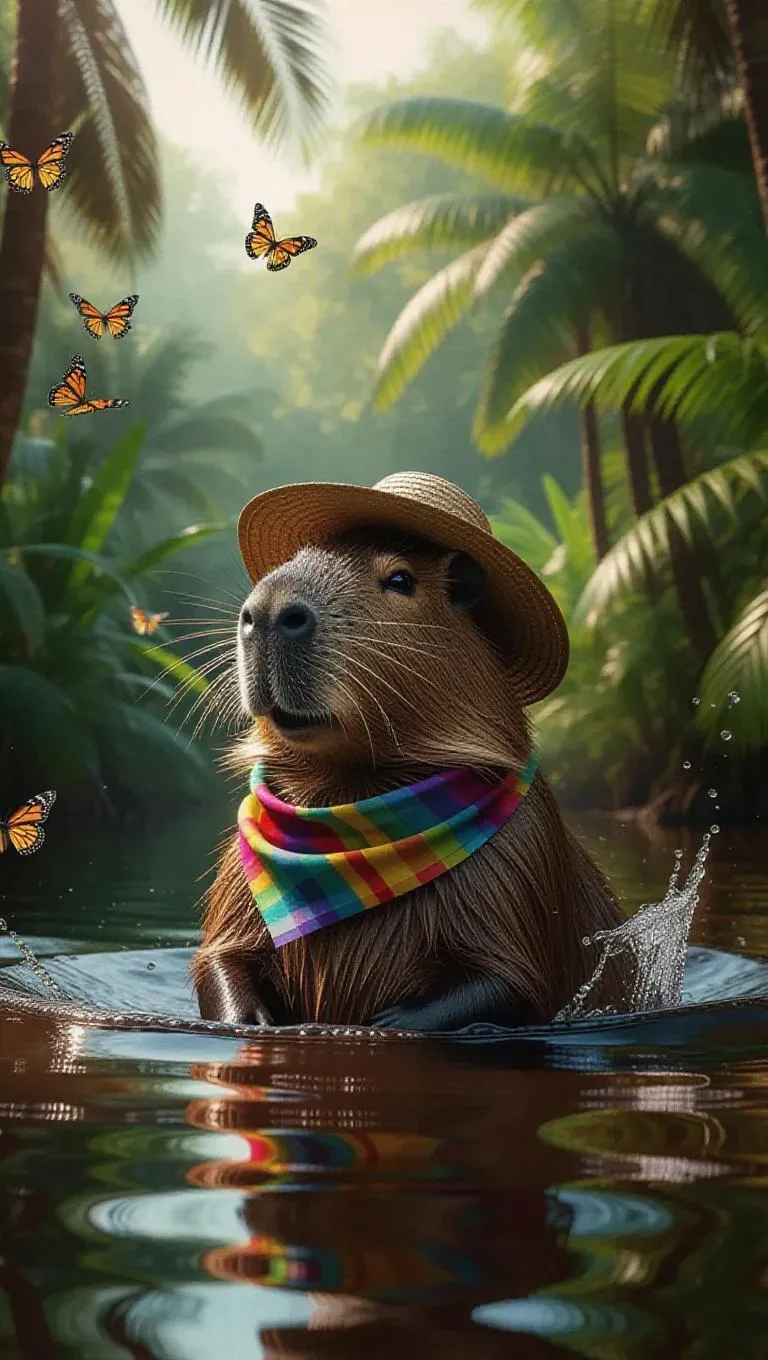
A curious capybara splashes in the cool waters of the Amazon River, its huge body bathing energetically. The capybara dons a colorful scarf and a sun hat, its eyes wide open in excitement. Surrounding it, lush ferns and towering palms frame the water's edge, their leaves shimmering in the sunlight. In the background, a flock of butterflies flutters by, their colors vibrant against the greenery. The atmosphere is refreshing and filled with the sounds of nature.

Recreate
arrow
Text to Image

More From VIVAGO AI

Uncertainty

Hyper-realistic photography: The two uploaded images depict the characters in the same scene. The first character (with unchanged facial features, expressions and age) has long curly hair and light brown hair, touching the deep red wall beautifully and charmingly, wearing a tight and sexy red nightgown. The other character (with unchanged facial features, expressions and age) is wearing a smooth and loose black patterned shirt. There is an intimate and passionate eye contact between the two characters, creating a sexy and romantic atmosphere. The dim modern bedroom background features dark-colored bed sheets and red neon signs shining on the walls; lighting adjustment suggestion: high-end film-level lighting, strong contrast of light and dark, soft melancholic shadows, deep and rich shadows, subtle highlights on the skin, shallow depth of field, clearly focused on the couple; color tone suggestion: warm and melancholic color combination, mainly saturated red and dark black, natural skin with warm tones, rich immersive color grading, fashion-forward photography, extreme ambiguous atmosphere, high-definition film style. Dark interior and red light and shadow

Polaroid

A photorealistic collage of two hand-held Polaroid photos placed randomly in a staggered upper and lower arrangement. The two photos feature different facial expressions and posing gestures of the subject(s): The main subject(s) in each Polaroid are the figure(s) from the uploaded image, with their facial features and the number of figures unchanged. The figure(s) wear a white fluffy Santa hat, a brown-and-white striped scarf, a white sweater adorned with golden star embellishments, and brown gloves—striking a pose of gently touching the cheek with one hand in one photo, and making a peace sign with one hand in the other. The background of each Polaroid is solid black, overlaid with white snowflake patterns and gold/black star motifs. The scene outside the Polaroids is set against a green Christmas tree, decorated with the words Merry Christmas in a gold glittering diamond texture and glossy red Christmas baubles. The lighting is warm-toned Christmas ambient light, creating a cozy winter vibe. The overall style features authentic Polaroid film texture with intact white Polaroid borders and rich fine details; the focus is sharp with a soft, blurred background. The edges of the Polaroid photos are accented with Christmas decorative elements, including gold star stickers and snowflake patterns.

Santa Claus

The facial features of the uploaded character remain unchanged. The scene transitions with both camera rotation and stunning explosive magic element effects—incorporating dazzling special effects during the transition, including shimmering golden particles, brilliant golden explosive magic effects, falling snowflakes, and swirling red ribbons. After spinning rapidly on the spot, the character’s outfit transforms into a cool version of Santa Claus attire. The character beams with a happy smile, dressed in a classic red-and-white Christmas suit trimmed with white fluff, wearing black sunglasses, a Santa hat, and carrying a large-capacity Christmas backpack stuffed with gifts on the back. The character rides a retro cruising motorcycle (Harley-style) speeding from the distance to the front of the screen. The motorcycle boasts a deep burgundy color paired with a metallic chrome finish, with its wheels in a burnout state and white smoke billowing from the ground. Scene: A nighttime European-style urban street lined with vintage buildings and warm yellow street lamps. The background features blurred vehicles and pedestrians, with the lights creating a beautiful bokeh effect. Style & Texture: Ultra-realistic style with high details and strong light-shadow contrast. Dynamic blur enhances the sense of motion, and the fluffy texture of the clothing as well as the metallic luster of the motorcycle are depicted in exquisite detail. The overall style showcases cutting-edge fashion photography and avant-garde art, reaching a film-level realistic standard.

Pyramids AI effects generated image

Pyramids

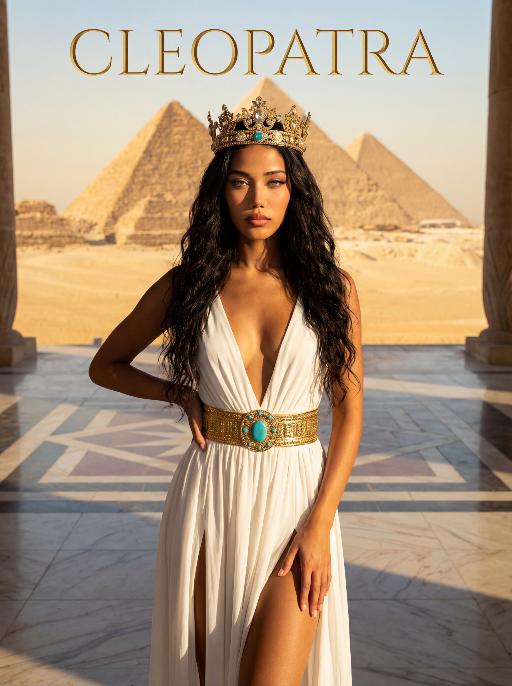
The character in the uploaded picture (unchanged facial features, gender and age). A striking woman embodying the persona of Cleopatra, captured in a medium shot . She stands regally in an ancient Egyptian landscape, her body angled gracefully to accentuate her figure. One hand lightly brushes the flowing fabric of her gown, while the other rests gently on her hip, exuding a sense of poised elegance and allure. She has long, wavy black hair cascading in soft waves, her eyes wide open, head held high, radiating supreme confidence and regal authority. On her head, she wears an ornate golden Egyptian crown, adorned with intricate details and gemstones. She wears a flowing, form-fitting white gown with a deep V-neckline and high slits, cinched at the waist with a wide, ornate golden belt featuring a large turquoise gem at its center. The setting is the vast, sun-drenched desert of ancient Egypt, with the iconic Egyptian pyramids rising majestically in the distance against a clear, golden sky. The air is warm and hazy, with the desert sand stretching out to the horizon. The floor is a polished marble surface with a geometric pattern. Above her, the word "CLEOPATRA" is displayed in an elegant, golden, serif font. The image is rendered in a cinematic, epic historical drama style, with dramatic, high-contrast lighting that highlights the sheen of the golden crown and belt, the flowing texture of the white gown, and the stark beauty of the desert and pyramids. The color palette is rich and warm, featuring golden sands, deep blues of the sky, and the pure white of the gown, creating a timeless, majestic, and awe-inspiring atmosphere. The overall aesthetic is detailed, evocative, and reminiscent of a grand historical epic

MUSIC BOX

Create a close-up of a 1/7 scale figure of the characters, placed on a circular rotating music box base. The music box should have intricate details, with a smooth, elegant design, emphasizing its fine craftsmanship. The figure should capture the character's pose, facial expression, and features in high detail, with realistic textures for the clothing, accessories, hair, and face. The close-up shot should focus on the figure and music box, highlighting the fine details, such as the sculpting of the character’s outfit and accessories. The background should be a dreamy, soft-focus display window, with a magical ambiance that suggests a whimsical atmosphere. Soft, natural lighting should enhance the refined and timeless feel of the scene, bringing attention to the figure and music box in the foreground.

Reveller AI effects generated image

Reveller

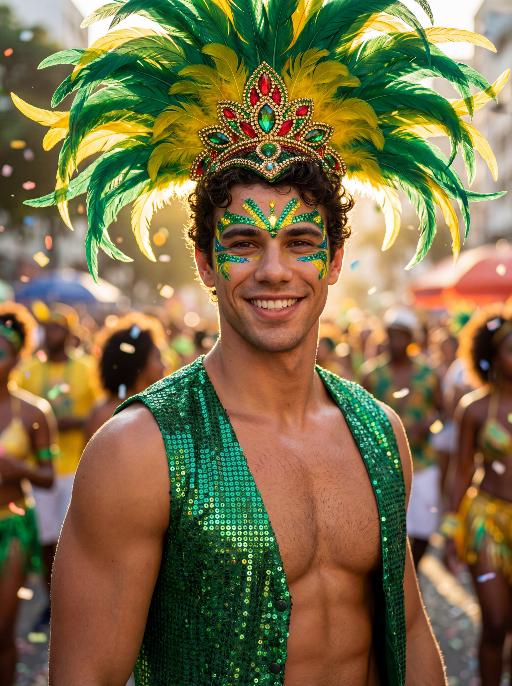
Use the exact same facial features, gender, age, and natural skin tone as the character in the uploaded image. Do not alter, lighten, darken, or modify the original complexion in any way. Maintain his authentic skin color exactly as in the reference image. curly textured hair, radiant natural skin, and a confident, magnetic smile, standing proudly at Rio Carnival. wears an elaborate headdress made of large green and yellow feathers, with an ornate centerpiece featuring red, green, and gold jewel details. His face is painted with bold, symmetrical Carnival patterns in emerald green and vibrant yellow, with striking blue accents around the eyes, enhancing gaze. dressed in a shimmering emerald-green sequined vest that catches the light dramatically, partially open to reveal his athletic chest. Natural body highlights emphasize physique realistically without altering skin tone. Lighting: strong cinematic light contrast — warm golden sunlight illuminating one side of his face and torso, creating sculpted highlights, while preserving accurate skin color and natural undertones. Soft shadow adds depth and dimension without washing out or overexposing the complexion. Subtle rim lighting around the feathers enhances separation from the background. High dynamic range with true-to-life skin rendering. Background: a lively Rio street during Carnival, filled with a cheering crowd in colorful festive clothing. Confetti floats in the air. The crowd is slightly blurred (shallow depth of field), making the subject stand out sharply. Mood: vibrant, joyful, triumphant, powerful, charismatic. Style: high-resolution cinematic photography, poster-quality, ultra-sharp focus on subject, shallow depth of field, 85mm lens, HDR, rich saturated colors, dramatic contrast, professional fashion-editorial lighting, realistic skin texture, natural complexion fidelity, magazine cover composition.

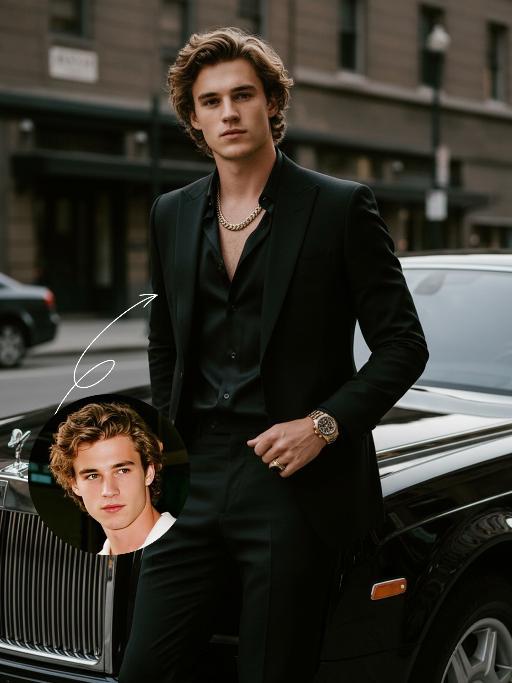
Elegant Gentle AI effects generated image

Elegant Gentle

Use the UPLOADED PORTRAIT for strict identity lock (keep face, hair, skin tone, age). Cinematic portrait of a man with a tall, dashing body, with the style of a mafia boss, standing alone with an aura of confidence and authority. He is beside a luxurious black Rolls-Royce car on a city street, a relaxed pose leaning against the car showing the Rolls-Royce logo with a classy style. All-black outfit: a neat suit, an open-collar black shirt with a luxurious necklace, formal pants, leather shoes, with a luxurious ring and a luxurious watch. His expression is serious and charismatic, radiating energy like a mafia boss. The atmosphere of the photo uses low saturation color grading with a dominance of pitch black and faded gray tones, giving a dark, elegant, and classy feel ala mafia movies. The background of the city building is blurred so that the main focus remains on the man and his car. Hyper-realistic, ultra-detailed, professional photography style.

Elephant Dance

The features of the figure in the uploaded image remain unchanged, standing in an anthropomorphic pose (upper limbs resting naturally on the waist, lower limbs standing on the ground). Adopting the Disney 3D animation style, bright and highly saturated vivid colors are used to create a soft, cute and chibi cartoon image with oversized bright eyes and long, slender eyelashes, and a sweet, endearing expression. The costume features Indian traditional festive style adornments and styling: a gorgeous forehead ornament with geometric patterns (in green, red, yellow and purple) plus colorful tassel beading; delicate traditional Indian colorful patterns on the face and nose; a shawl with fan-shaped patterns (in primary colors of red, purple and blue) trimmed with golden geometric motifs on the edges; green and white striped bands with golden beading worn on the limbs; and small colorful flower ornaments in the style of yellow base + red center + green trim dotted on the ears and body. The overall adornment is intricate with rich color clashing (blending hues of red, green, yellow, purple, blue and more), boasting ultra-realistic details, cinematic artistic effects and high-end artistic presentation.

Moving Figure

Create a 1/7 scale commercialized figure of the character in the illustration, in a realistic style and environment. Render the exact hairstyle and the same outfit with the uploaded figure. Render garments as molded plastic with engraved seams and sculpted folds; keep accessories as plastic parts. Fictionalize any brand text/logos while keeping layout and colors. Place the figure on a computer desk, using a circular transparent acrylic base without any text. On the Apple computer screen, display the Z Brush modeling process of the figure. Next to the Apple computer screen, place a BANDAl-style toy packaging box printed with the original artwork. The background shows a modern realistic room furnished with contemporary furniture, including a display cabinet filled with books, dolls, and scale figures, adding a casual and everyday atmosphere. Behind the Apple computer, place a desk lamp to add detail and depth to the scene.

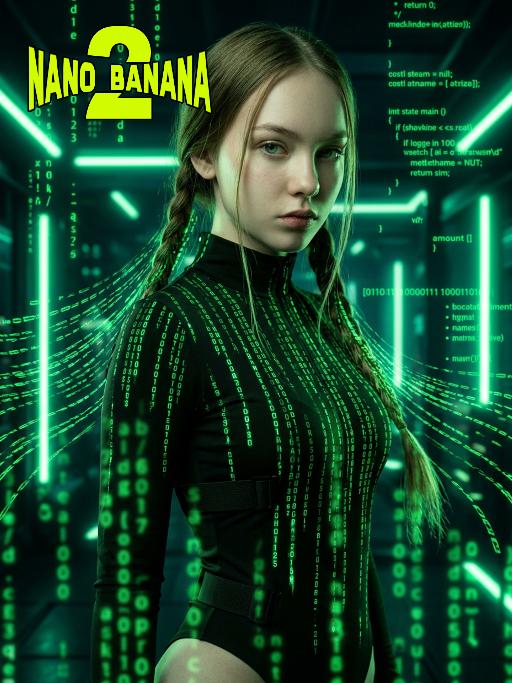
The Matrix AI effects generated image

The Matrix

Medium-close-up shot (showing the upper body of the protagonist, from above the thigh area): In the uploaded picture, the features (unchanged) and gender (also unchanged) of the character are clearly visible. Standing in the center of the frame, with a serious and cold expression, a flowing bright green digital coding stream is presented in his hair. Wearing a high-neck tight outfit, it is covered with a green matrix-like digital rain. It has a cyberpunk style, adopting the color scheme of "The Matrix", with a dark background, dramatic side light, and neon lights emitting bright green light, presenting a green matrix-like digital rain background in the dark environment. The skin texture is fine, the details are realistic, with a clear focus, a cinematic composition, and a style of avant-garde fashion photography. This is a masterpiece, of superior quality, surreal 8K image. There are also some green matrix-like digital rains in the foreground, with a large depth of field effect, and a wide aperture shooting.

Load more

Next-Gen Multi-Model AI Video Architecture

Vivago AI isn't just one engine—it’s a unified hub for the world’s most advanced video AI. Whether you need cinematic realism or high-speed social content, we provide the right model for your creative vision.

Free Generate

Beauty and Dolphins

Vacation Time

Stellar Tear

Fish Tank Supervisor

Cinematic Quality & Precision Control

Enables 4K resolution with multi-lens motion control, generating delicate scene via text prompts for customized cinematography.​

TRY NOW

Dynamic AV Sync

Auto-generates original audio to avoid copyright issues. Build 3D immersive environments through layered sound design automatically.

TRY NOW

OpenAI Sora 2

​Advanced visual storytelling with unparalleled physics and consistency.

TRY NOW

Kling v2.6 Pro

Industry-leading cinematic image animation and motion control.

TRY NOW

Google Veo 3 & 3.1

Ultra-fast generation with enhanced realism for creative workflows.

TRY NOW

Vivago AI 2.0

Our proprietary model optimized for efficiency, speed, and cost-effective generation.

TRY NOW

Users' Voice

We listen carefully to the opinions of every user.
Free Generate
Contact Us
I tried the Lip Sync feature inside Vivago.ai’s AI Video Generator for my educational podcast, and the results were stunning! The avatar's lip movements perfectly matched my audio recording, creating a professional AI-generated video without complex editing. Compared with tools like OpenAI Sora 2 and Google Veo 3.1, Vivago Image-to-Video delivers fast, studio-quality results online. It saved me hours of post-production work.
ElenaM (Spain)
Vivago’s Image-to-Video AI transformed my marketing workflow. I uploaded a product image and described the launch scene in text, and it generated a 10-second cinematic AI video with background music and dynamic visuals. The output quality rivals Kling v2.6 Pro and Google Veo 3 Fast. It’s now my go-to AI video generator for social media ads and product campaigns.
KenjiT (Japan)
As a digital artist, I use Vivago.ai 2.0 daily for Image-to-Image and AI Image-to-Video creation. The e-book covers and animated visuals I generate for clients look cinematic and professional. Unlike many standalone AI tools, Vivago integrates multiple leading models into one platform, making it easier to create copyright-safe AI images and videos for publishing.
ChenL (China)
I tried the Lip Sync feature inside Vivago.ai’s AI Video Generator for my educational podcast, and the results were stunning! The avatar's lip movements perfectly matched my audio recording, creating a professional AI-generated video without complex editing. Compared with tools like OpenAI Sora 2 and Google Veo 3.1, Vivago Image-to-Video delivers fast, studio-quality results online. It saved me hours of post-production work.
ElenaM (Spain)
Vivago’s Image-to-Video AI transformed my marketing workflow. I uploaded a product image and described the launch scene in text, and it generated a 10-second cinematic AI video with background music and dynamic visuals. The output quality rivals Kling v2.6 Pro and Google Veo 3 Fast. It’s now my go-to AI video generator for social media ads and product campaigns.
KenjiT (Japan)
As a digital artist, I use Vivago.ai 2.0 daily for Image-to-Image and AI Image-to-Video creation. The e-book covers and animated visuals I generate for clients look cinematic and professional. Unlike many standalone AI tools, Vivago integrates multiple leading models into one platform, making it easier to create copyright-safe AI images and videos for publishing.
ChenL (China)
I absolutely love Vivago’s AI Image-to-Video Generator. As a travel blogger, static images often fail to capture real atmosphere, but Vivago helps me turn photos into vivid cinematic AI videos with motion effects. It feels comparable to OpenAI Sora 2 and Google Veo 3.1, but more accessible and faster for creators who need high-quality AI videos online.
LiamK (Australia)
I tried the Lip Sync feature inside Vivago.ai’s AI Video Generator for my educational podcast, and the results were stunning! The avatar's lip movements perfectly matched my audio recording, creating a professional AI-generated video without complex editing. Compared with tools like OpenAI Sora 2 and Google Veo 3.1, Vivago Image-to-Video delivers fast, studio-quality results online. It saved me hours of post-production work.
ElenaM (Spain)
Vivago’s Image-to-Video AI transformed my marketing workflow. I uploaded a product image and described the launch scene in text, and it generated a 10-second cinematic AI video with background music and dynamic visuals. The output quality rivals Kling v2.6 Pro and Google Veo 3 Fast. It’s now my go-to AI video generator for social media ads and product campaigns.
KenjiT (Japan)
As a digital artist, I use Vivago.ai 2.0 daily for Image-to-Image and AI Image-to-Video creation. The e-book covers and animated visuals I generate for clients look cinematic and professional. Unlike many standalone AI tools, Vivago integrates multiple leading models into one platform, making it easier to create copyright-safe AI images and videos for publishing.
ChenL (China)
I absolutely love Vivago’s AI Image-to-Video Generator. As a travel blogger, static images often fail to capture real atmosphere, but Vivago helps me turn photos into vivid cinematic AI videos with motion effects. It feels comparable to OpenAI Sora 2 and Google Veo 3.1, but more accessible and faster for creators who need high-quality AI videos online.
LiamK (Australia)
Using Vivago.ai’s Image-to-Video AI has greatly enhanced my classroom teaching. I transform textbook notes into historical AI videos with cinematic filters and dynamic animations. Compared with tools like Kling v2.6 Pro and Google Veo 3 Fast, Vivago offers faster generation and easier parameter control for educators who need reliable AI video creation.
RajivG (India)
I frequently create AI videos on Vivago and publish them on TikTok and YouTube Shorts. The AI video templates and trending content ideas help me produce viral-ready clips quickly. With Vivago’s integrated models—including advanced video engines similar to OpenAI Sora 2—I can generate anime-style and cinematic social media videos that drive high engagement.
MarieJ (Spain)
What attracts me most about Vivago.ai is not only the powerful AI Video Generator but also the active AIGC creator community. It combines AI Image-to-Video, Text-to-Video, and leading model integrations like Google Veo 3.1 into one creative platform.
TomW (India)
At first, I was hesitant about using AI video tools. But after trying Vivago Image-to-Video, I realized how easy it is to create professional AI-generated videos online. I just upload an image, add a short prompt, and adjust a few settings. The results are cinematic and copyright-safe, which is essential for commercial projects.
HectorC (Mexico)
Using Vivago.ai’s Image-to-Video AI has greatly enhanced my classroom teaching. I transform textbook notes into historical AI videos with cinematic filters and dynamic animations. Compared with tools like Kling v2.6 Pro and Google Veo 3 Fast, Vivago offers faster generation and easier parameter control for educators who need reliable AI video creation.
RajivG (India)
I frequently create AI videos on Vivago and publish them on TikTok and YouTube Shorts. The AI video templates and trending content ideas help me produce viral-ready clips quickly. With Vivago’s integrated models—including advanced video engines similar to OpenAI Sora 2—I can generate anime-style and cinematic social media videos that drive high engagement.
MarieJ (Spain)
What attracts me most about Vivago.ai is not only the powerful AI Video Generator but also the active AIGC creator community. It combines AI Image-to-Video, Text-to-Video, and leading model integrations like Google Veo 3.1 into one creative platform.
TomW (India)
At first, I was hesitant about using AI video tools. But after trying Vivago Image-to-Video, I realized how easy it is to create professional AI-generated videos online. I just upload an image, add a short prompt, and adjust a few settings. The results are cinematic and copyright-safe, which is essential for commercial projects.
HectorC (Mexico)