Text to Image

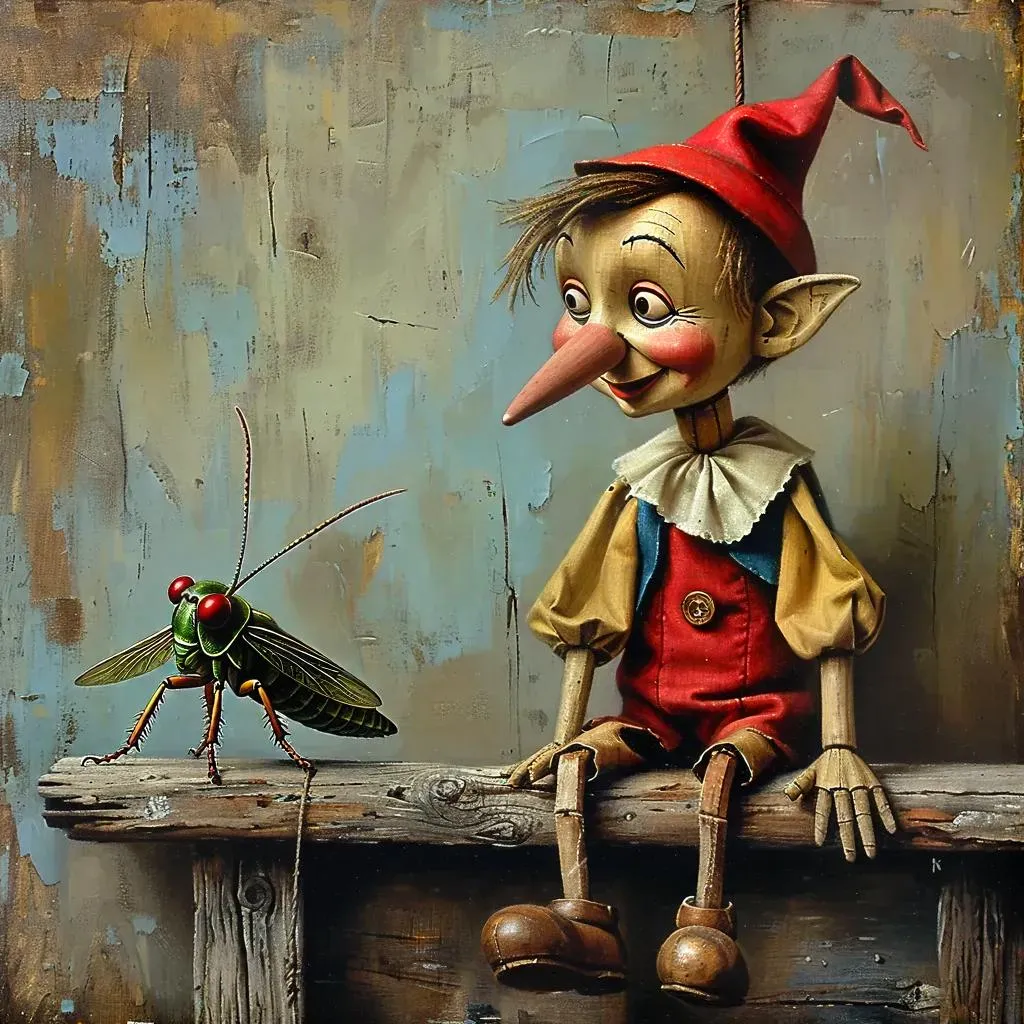
Craft haunting AI-generated surreal art with a weathered Pinocchio perched on a decaying ledge, grunge textures in blue, white, and brown. Dramatic lighting highlights his melancholic expression and the pensive Talking Cricket, evoking dark, foreboding narratives. Explore Vivago.ai's AI effects for moody, textured visuals blending whimsy and eerie storytelling.

Recreate
arrow
Text to Image

FAQs

How to generate images/videos from text prompts?

Describe the visual content in natural language (e.g., 'A cyberpunk cat wearing neon goggles') and our AI models will create outputs. Complex prompts trigger multi-stage NLP parsing for enhanced accuracy.

How to refine unsatisfactory results?

Use our Prompt Bot - an AI-powered optimizer that suggests technical modifiers. Simply describe your ideas, desired changes ('more metallic texture'), then you will get optimized prompt variants.

When should I use reference images?

Upload references to: 1) Guide character consistency (e.g., faces/outfits), 2) Control motion patterns in videos using our feature matching algorithm. Supports JPG/PNG

What's the credit system?

Daily login grants 100 credits. Upgrade options: 1) Premium Membership, 2) Credit Packs. Details: https://vivago.ai/subscribe

More From VIVAGO AI

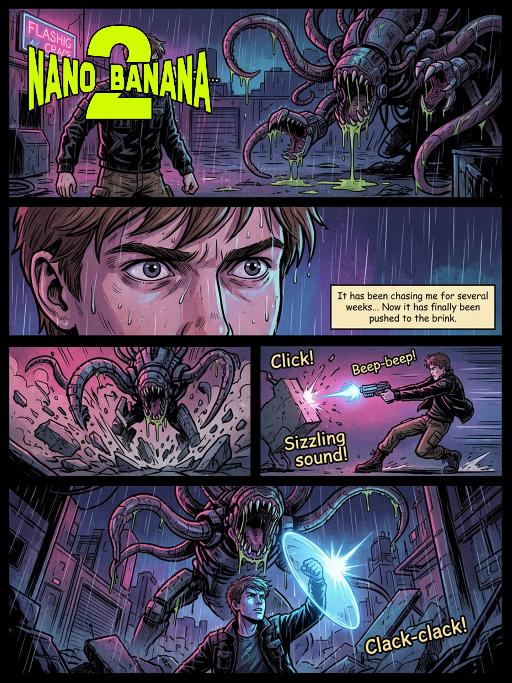
Storyboard AI effects generated image

Storyboard

American comic book pages, film narrative techniques, film storyboard aesthetic, dramatic widescreen composition, melancholic light-dark contrast and shadowing, high-contrast shadows, rough textures, dynamic action scenes, emotionally intense close-up shots, epic panoramic shots, retro-futuristic horror atmosphere, bold line art, soft color combinations with neon tones, professional comic book illustrations, 8K resolution, ultra-detailed environment, sound effects annotations, dialog boxes, film lens halos, depth-of-field effects. Page 1: A panoramic close-up shot of the night, in the picture is a rain-soaked and abandoned industrial area. A young heroic figure (with the character in the previous picture as the main body, maintaining facial features, gender, and age unchanged), with rough outlines, brown short hair, wearing a worn-out black tactical jacket, work pants, and combat boots), stands at the front of the picture, facing away from the flashing neon sign. His expression is stern, one hand holding a glowing plasma pistol. In the shadows, a huge mechanical monster creature looms - with twisted tentacles and metal mouths dripping viscous acid. Sound effect: "Whoo..." Page 2: Close-up shot of the protagonist's face, sweat and rain meeting on his forehead. His gaze is tightly fixed on the monster, his pupils enlarged due to fear and determination. Dialog box content: "It has been chasing me for several weeks... Now it has finally been pushed to the brink." Page 3: Medium shot showing the monster charging forward, its tentacles violently crashing against the concrete ground, raising a large amount of debris. The hero quickly turns sideways to dodge, shooting at close range. Sound effect: "Click!" "Beep-beep!" "Sizzling sound!" Page 4: Full-page opening shot, shot from the protagonist's perspective at a low angle. The monster stands high above him, opening its mouth to prepare to devour him. The protagonist raises a shining energy shield, the light shining on his face casting a desperate blue shadow. The industrial area collapses around them, rain pouring down. Sound effect: "Clack-clack!" -- Style: Film-style comic style -- Aspect ratio: 2.39:1 -- Color: Dim neon color -- Line drawing: Rough -- Shadows: Light-dark contrast -- Layout: Multiple-panel -- Character: 1 -- Monster: 1 -- Weapon: Plasma pistol -- Environment: Industrial ruins -- Atmosphere: Tense and terrifying -- Action: High energy -- Dialogue: Yes -- Sound effects: Yes -- Lens halo: Yes -- Depth of field: Yes

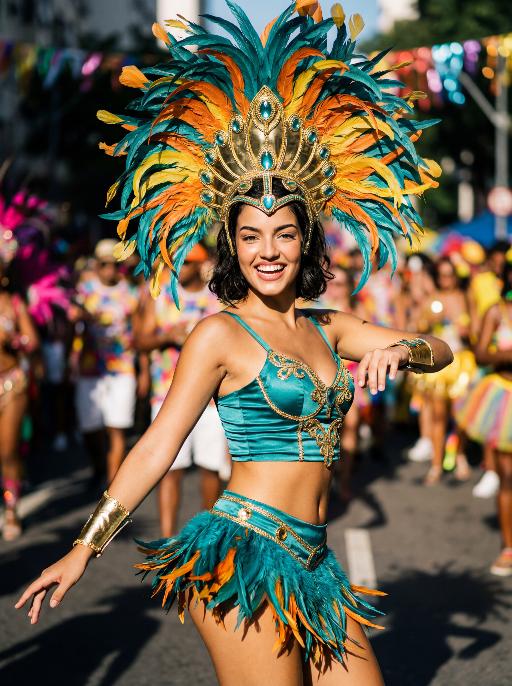
Street Carnival AI effects generated image

Street Carnival

The character in the uploaded picture (unchanged facial features, gender and age). Avant-garde portrait photography of a young Brazilian Carnival dancer, sharp focus on the subject, front-facing dynamic pose. has short wavy dark hair, warm brown eyes, and a genuine, joyful smile with visible teeth. wears an opulent Carnival costume: a towering, structured headdress crafted with layered iridescent teal, vivid tangerine, and sunflower yellow feathers, accented with polished gold metalwork and teal gemstone inlays. outfit features a form-fitting teal satin crop top with gold filigree trim, matching teal feather fringe mini skirt with gold hardware, and gold arm cuffs with teal bead detailing. Captured mid-dance on a sun-drenched Rio de Janeiro street during Carnival, one arm extended outward, the other bent at the elbow in a lively gesture. The background is heavily stylized with experimental shallow depth of field—blurred Carnival revellers in colorful costumes and festive street decorations create an abstract, textured backdrop. Pioneering photographic techniques: high-contrast natural daylight, bold color grading, hard directional light casting dramatic shadows, film grain texture, 35mm prime lens, f/1.4 aperture. The overall style is edgy, high-fashion avant-garde portraiture, ultra-detailed, 8K resolution, museum-quality, raw photographic aesthetic.

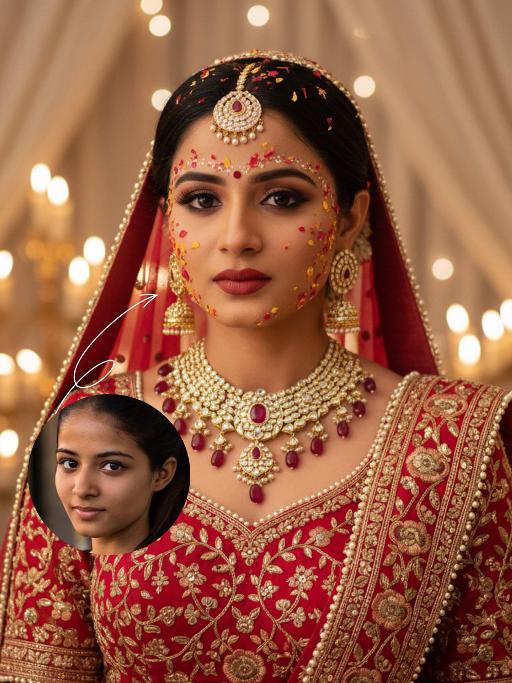
Bollywood AI effects generated image

Bollywood

The identity of the uploaded portrait is strictly preserved (retaining facial contours, authentic Indian skin tone, hairstyle and age). This is a close-up and bust portrait with a 3:4 aspect ratio, featuring a stunning traditional Indian bride around 30 years old with a gentle yet faintly sorrowful expression. Her makeup is exquisitely rich and dramatic: smoldering smoky eyes paired with a matte vintage red lip, a large red crystal bindi adorned on her forehead, and delicate red, yellow and gold Gulab Patti floral appliqués dotted across her forehead and cheeks, with a fresh, flawless and well-blended base makeup. Her jet-black hair is sleek and long (or styled into a neat chignon), with a rose-red dupatta edged with gold threadwork wrapped around her head; the dupatta is embroidered with intricate golden interlocking floral patterns along the hem and drapes softly over her shoulders. She is dressed in a red heavily hand-embroidered Lehenga Choli: the blouse is fully embellished with golden interlocking floral motifs and trimmed with a delicate pearl border. She wears large multi-layered openwork gold earrings with tiny dangling diamond accents, a stack of gold necklaces inlaid with rubies around her neck, and an ornate maang tikka encrusted with pearls and rubies atop her head. The background is a warm-hued wedding ceremony setting: soft candlelight (candles/fairy lights) glimmers all around, creamy white sheer drapes hang in hazy folds, and the blurred backdrop enhances the atmospheric feel. Bollywood cinematic lighting is adopted: warm golden soft light is cast from the side, outlining her facial contours and the delicate texture of the Gulab Patti, accentuating the luster of the gold jewelry, and creating a dreamy, hazy sense of ritual. The style is a vintage Bollywood bridal portrait, with rich, saturated colors, exquisitely detailed textures, and an immersive emotional atmosphere that evokes profound sentiment.

Snowfield

In the night snow, the figure from the uploaded image retains their original facial features and sits on the snow, wearing a sweater with white patterns, a red scarf, fluffy fleece pants and snow boots, holding a lit, sparkling handheld sparkler. The words "Hello 2026" are written in the snow. In the background, there are soft, blurred warm bokeh lights and blooming fireworks. The atmosphere is warm and healing, with a gentle light contrast between the cool blue-and-white snow scene and the warm sparks. Boasting rich details, the figure’s face is in sharp focus with natural shadows and realistic textures, exuding a sophisticated artistic photography aesthetic. Captured with an ultra-high-definition camera, the image features artistic photography styling, with the figure’s skin naturally retouched for a delicate finish. The shot is taken from a top-down perspective, with a full-screen realistic snowfall effect.

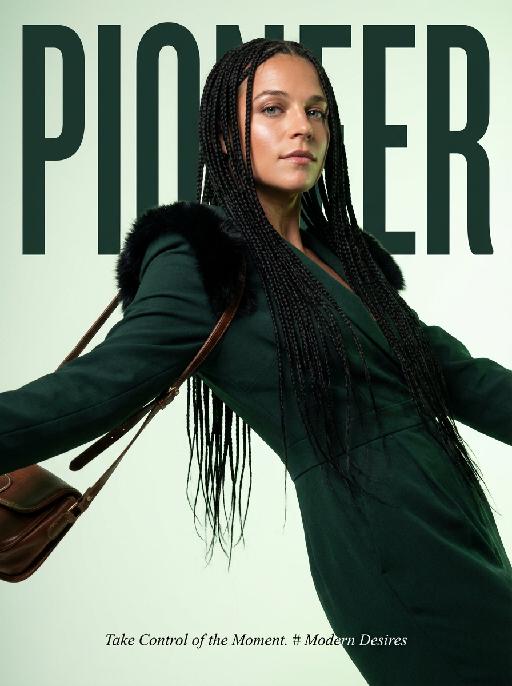
Magazine Cover AI effects generated image

Magazine Cover

This is the cover of the high-end fashion magazine series, with the title in a large, dark green font: "PIONEER". The figure is in front of the text, captured in a medium close-up shot. The cover showcases a radiant image (with no changes in facial features, gender, or age), presented through the uploaded picture. She has several flowing and slender black braids, wearing a well-tailored dark green outfit, with soft black fur decorations on the shoulders, holding a retro high-end custom cross-body bag, her body in an inclined hanging position, arms stretched out, with an enchanting expression and exquisite makeup. The background is a gradient of pale green, the strong contrast of light highlights the facial contours and hair texture. The focal length is 50mm, captured with a professional portrait camera, clear focus, using an elegant editing style, with modern and avant-garde aesthetics. The small and exquisite text layout adds the content: "Take Control of the Moment. # Modern Desires"

Advanced Image

Strict identity verification is carried out using the uploaded avatar (maintaining consistency in facial features, hair, skin tone and age). The composition frames the head and shoulders from the top of the head to the upper chest; the face is angled three-quarters to the left and slightly downward, with the chin gently tucked, eyes almost straight to the camera, a stern and cold expression, and lips firmly closed, featuring a sharp jawline and a straight nose. The short black hair is slightly tousled with a few strands falling onto the forehead, styled to have a subtle sheen to its texture. He is wearing a pure black long-sleeved turtleneck sweater with the collar snugly wrapped around the neck. Set against an off-white interior background, his left hand is raised with the index finger touching the temple, the other fingers curled, and a large, prominent silver signet ring adorns his finger, clearly visible against the black sleeve. Soft studio key light streams in from the upper left (the camera’s left), casting intense highlights on the left side of the face and deep shadows on the right side. The background gradients from grey to white, with a faint vertical gradient light strip on the right side. The entire image is in full black and white with no color, only grayscale tones, boasting extremely stark contrast and exquisitely sharp details. It features a studio lighting style, portrait photography aesthetics, and an avant-garde fashion black-and-white photography style.

Teddy bear AI effects generated image

Teddy bear

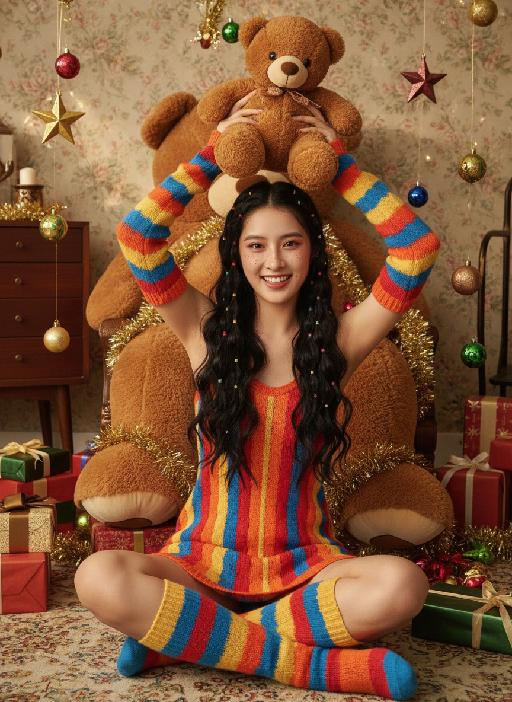
Strictly lock the facial features of the uploaded portrait (completely preserve facial contours, native skin tone, hairstyle and age); Christmas sweet and cool girl with long black curly hair and colorful hair ties, freckle makeup + reddish-brown eye makeup + glass lips, lively and playful expression, sitting cross-legged on the carpet, holding a brown teddy bear above her head with both hands, lively posture; wearing a red-orange-yellow-blue colorful striped knitted slip dress, paired with colorful striped knitted sleeves + color-block knitted long socks, full of retro childishness; background is a retro Christmas-style room with floral wallpaper + vintage wooden furniture, a giant brown plush teddy bear dominates the background, surrounded by scattered Christmas gift boxes, star ornaments, colorful balls and golden tinsel, soft warm light illuminating, full of Christmas atmosphere; overall retro Christmas + sweet and cool girl style photo, high saturation retro tones, high-definition texture, 8K ultra-clear, realistic human photography,

Travelling pets

The features of the figure in the uploaded image remain unchanged (the animal stands fully upright on its hind legs with a vertical torso and forelimbs hanging naturally at its sides; the original animal’s species, facial features and texture details are strictly preserved). The animal is dressed in a well-fitted black jacket, a matching pair of khaki cropped pants, retro hiking boots, and also wears a bucket hat with black-rimmed windproof sunglasses. The background is replaced with the scene of the Golden Mountains bathed in sunlight in Western Sichuan, with a glistening lake in front of the mountains reflecting the golden peaks. The figure stands on the shore in front of the lake, in an ultra-realistic photography style that blends avant-garde and fashion-forward pet photography aesthetics.

Load more

Next-Gen Multi-Model AI Video Architecture

Vivago AI isn't just one engine—it’s a unified hub for the world’s most advanced video AI. Whether you need cinematic realism or high-speed social content, we provide the right model for your creative vision.

Free Generate

Beauty and Dolphins

Vacation Time

Stellar Tear

Fish Tank Supervisor

Cinematic Quality & Precision Control

Enables 4K resolution with multi-lens motion control, generating delicate scene via text prompts for customized cinematography.​

TRY NOW

Dynamic AV Sync

Auto-generates original audio to avoid copyright issues. Build 3D immersive environments through layered sound design automatically.

TRY NOW

OpenAI Sora 2

​Advanced visual storytelling with unparalleled physics and consistency.

TRY NOW

Kling v2.6 Pro

Industry-leading cinematic image animation and motion control.

TRY NOW

Google Veo 3 & 3.1

Ultra-fast generation with enhanced realism for creative workflows.

TRY NOW

Vivago AI 2.0

Our proprietary model optimized for efficiency, speed, and cost-effective generation.

TRY NOW

Users' Voice

We listen carefully to the opinions of every user.
Free Generate
Contact Us
I tried the Lip Sync feature inside Vivago.ai’s AI Video Generator for my educational podcast, and the results were stunning! The avatar's lip movements perfectly matched my audio recording, creating a professional AI-generated video without complex editing. Compared with tools like OpenAI Sora 2 and Google Veo 3.1, Vivago Image-to-Video delivers fast, studio-quality results online. It saved me hours of post-production work.
ElenaM (Spain)
Vivago’s Image-to-Video AI transformed my marketing workflow. I uploaded a product image and described the launch scene in text, and it generated a 10-second cinematic AI video with background music and dynamic visuals. The output quality rivals Kling v2.6 Pro and Google Veo 3 Fast. It’s now my go-to AI video generator for social media ads and product campaigns.
KenjiT (Japan)
As a digital artist, I use Vivago.ai 2.0 daily for Image-to-Image and AI Image-to-Video creation. The e-book covers and animated visuals I generate for clients look cinematic and professional. Unlike many standalone AI tools, Vivago integrates multiple leading models into one platform, making it easier to create copyright-safe AI images and videos for publishing.
ChenL (China)
I tried the Lip Sync feature inside Vivago.ai’s AI Video Generator for my educational podcast, and the results were stunning! The avatar's lip movements perfectly matched my audio recording, creating a professional AI-generated video without complex editing. Compared with tools like OpenAI Sora 2 and Google Veo 3.1, Vivago Image-to-Video delivers fast, studio-quality results online. It saved me hours of post-production work.
ElenaM (Spain)
Vivago’s Image-to-Video AI transformed my marketing workflow. I uploaded a product image and described the launch scene in text, and it generated a 10-second cinematic AI video with background music and dynamic visuals. The output quality rivals Kling v2.6 Pro and Google Veo 3 Fast. It’s now my go-to AI video generator for social media ads and product campaigns.
KenjiT (Japan)
As a digital artist, I use Vivago.ai 2.0 daily for Image-to-Image and AI Image-to-Video creation. The e-book covers and animated visuals I generate for clients look cinematic and professional. Unlike many standalone AI tools, Vivago integrates multiple leading models into one platform, making it easier to create copyright-safe AI images and videos for publishing.
ChenL (China)
I absolutely love Vivago’s AI Image-to-Video Generator. As a travel blogger, static images often fail to capture real atmosphere, but Vivago helps me turn photos into vivid cinematic AI videos with motion effects. It feels comparable to OpenAI Sora 2 and Google Veo 3.1, but more accessible and faster for creators who need high-quality AI videos online.
LiamK (Australia)
I tried the Lip Sync feature inside Vivago.ai’s AI Video Generator for my educational podcast, and the results were stunning! The avatar's lip movements perfectly matched my audio recording, creating a professional AI-generated video without complex editing. Compared with tools like OpenAI Sora 2 and Google Veo 3.1, Vivago Image-to-Video delivers fast, studio-quality results online. It saved me hours of post-production work.
ElenaM (Spain)
Vivago’s Image-to-Video AI transformed my marketing workflow. I uploaded a product image and described the launch scene in text, and it generated a 10-second cinematic AI video with background music and dynamic visuals. The output quality rivals Kling v2.6 Pro and Google Veo 3 Fast. It’s now my go-to AI video generator for social media ads and product campaigns.
KenjiT (Japan)
As a digital artist, I use Vivago.ai 2.0 daily for Image-to-Image and AI Image-to-Video creation. The e-book covers and animated visuals I generate for clients look cinematic and professional. Unlike many standalone AI tools, Vivago integrates multiple leading models into one platform, making it easier to create copyright-safe AI images and videos for publishing.
ChenL (China)
I absolutely love Vivago’s AI Image-to-Video Generator. As a travel blogger, static images often fail to capture real atmosphere, but Vivago helps me turn photos into vivid cinematic AI videos with motion effects. It feels comparable to OpenAI Sora 2 and Google Veo 3.1, but more accessible and faster for creators who need high-quality AI videos online.
LiamK (Australia)
Using Vivago.ai’s Image-to-Video AI has greatly enhanced my classroom teaching. I transform textbook notes into historical AI videos with cinematic filters and dynamic animations. Compared with tools like Kling v2.6 Pro and Google Veo 3 Fast, Vivago offers faster generation and easier parameter control for educators who need reliable AI video creation.
RajivG (India)
I frequently create AI videos on Vivago and publish them on TikTok and YouTube Shorts. The AI video templates and trending content ideas help me produce viral-ready clips quickly. With Vivago’s integrated models—including advanced video engines similar to OpenAI Sora 2—I can generate anime-style and cinematic social media videos that drive high engagement.
MarieJ (Spain)
What attracts me most about Vivago.ai is not only the powerful AI Video Generator but also the active AIGC creator community. It combines AI Image-to-Video, Text-to-Video, and leading model integrations like Google Veo 3.1 into one creative platform.
TomW (India)
At first, I was hesitant about using AI video tools. But after trying Vivago Image-to-Video, I realized how easy it is to create professional AI-generated videos online. I just upload an image, add a short prompt, and adjust a few settings. The results are cinematic and copyright-safe, which is essential for commercial projects.
HectorC (Mexico)
Using Vivago.ai’s Image-to-Video AI has greatly enhanced my classroom teaching. I transform textbook notes into historical AI videos with cinematic filters and dynamic animations. Compared with tools like Kling v2.6 Pro and Google Veo 3 Fast, Vivago offers faster generation and easier parameter control for educators who need reliable AI video creation.
RajivG (India)
I frequently create AI videos on Vivago and publish them on TikTok and YouTube Shorts. The AI video templates and trending content ideas help me produce viral-ready clips quickly. With Vivago’s integrated models—including advanced video engines similar to OpenAI Sora 2—I can generate anime-style and cinematic social media videos that drive high engagement.
MarieJ (Spain)
What attracts me most about Vivago.ai is not only the powerful AI Video Generator but also the active AIGC creator community. It combines AI Image-to-Video, Text-to-Video, and leading model integrations like Google Veo 3.1 into one creative platform.
TomW (India)
At first, I was hesitant about using AI video tools. But after trying Vivago Image-to-Video, I realized how easy it is to create professional AI-generated videos online. I just upload an image, add a short prompt, and adjust a few settings. The results are cinematic and copyright-safe, which is essential for commercial projects.
HectorC (Mexico)