Image to Video

The character smoothly transforms into a classic playboy bunny girl sexy outfit and strikes a beautiful pose for the camera.

Recreate
arrow

More From VIVAGO AI

Elegant AI effects generated image

Elegant

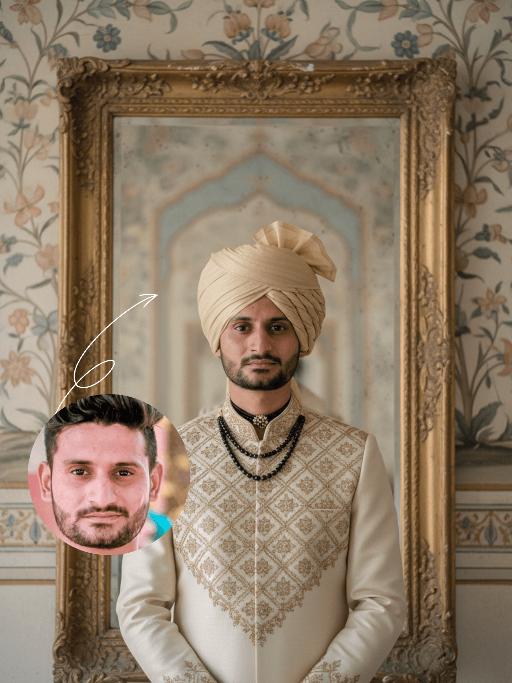
Strictly lock the uploaded portrait's identity (preserve facial contours, native Indian skin tone, hairstyle, age). Half-body portrait of a handsome young South Asian man with sharp features and a calm, regal demeanor. He wears a cream-and-gold traditional sherwani with intricate geometric embroidery, a matching soft gold turban, and a striking black beaded choker. Positioned before an 18th-century weathered carved mirror with a gilded frame, behind which lies a faded Mughal-style hand-painted mural in soft blues and golds. Soft, warm diffused light creates a cinematic atmosphere with delicate, layered shadows. The image exudes luxurious, retro romance, featuring a painterly film texture and a soft, desaturated palette of cream, gold, and light gray. Medium-format shot with shallow depth of field to highlight embroidery details and classical elegance

Samba

The image of a Brazilian samba dancer, with the same facial features, gender and age as in the uploaded picture. Fair and healthy skin, well-defined and exquisite facial features, thick black long curly hair, vibrant Carnival makeup, red lip with sequins; wearing classic Brazilian Carnival samba costume, in green, yellow and blue colors of the Brazilian flag, sequin feather bikini top, colorful fringed maxi skirt, golden feather headwear, metal waist chain accessory; dynamic samba dance posture, twisting waist and hips, flowing skirt, extended arms, dynamic vitality, graceful body lines; the background is the Rio Carnival scene, colorful floats, tropical palm trees, warm yellow stage lights. No other people should appear except the main figure. 8K ultra-high definition, realistic photography, cinematic texture, rich details, clear skin texture, high saturation colors, side backlighting to outline the outline, commercial blockbuster texture.

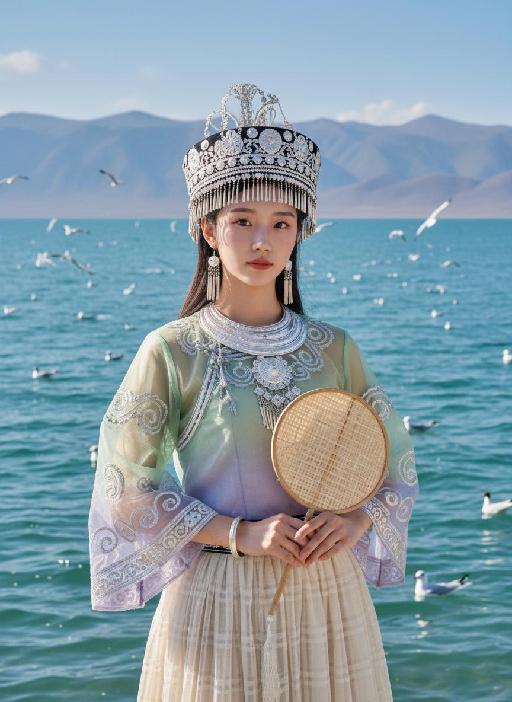
Seagull AI effects generated image

Seagull

Strictly lock facial features: fully preserving the original facial contours, skin texture, eye shape, lip shape, and youthful appearance with zero deviations allowed. Camera zoomed in for a tighter composition, eye-level perspective, half-body close-up (subject occupies 85% of the frame), a young East Asian woman with a gentle temperament stands facing forward, hands naturally holding a bamboo-woven round fan in front of her, posture dignified, expression gentle and calm, eyes soft looking at the camera; Facial state exactly as original: fresh nude makeup, transparent porcelain base, natural pink lips, soft eye makeup, no heavy colors. Sheer tulle clothing exactly as original: - Headdress: Traditional Miao silver headdress, black base with multiple layers of silver tassels and carvings, hanging pearl strings on both sides - Accessories: Multi-layered Miao silver collar, silver bracelets - Top: Sheer tulle Miao top with gradient from light green to light purple, round neck design, wide sleeves covered with scroll grass pattern embroidery, edged with silver patterns, presenting a light and semi-transparent texture - Skirt: Light beige sheer tulle plaid pleated long skirt, with strong drape and a light, flowing hem Lighting and image quality exactly as original: Bright outdoor natural light with soft diffusion, sheer tulle fabric showing transparent luster, silver ornaments showing natural highlights, high-definition and transparent image quality, fresh and soft colors, with delicate natural grain, restoring the film texture of the original image. Background exactly as original (partially cropped due to zoom): Plateau lake scene, azure blue water with sparkling waves, distant continuous gray-blue mountains, multiple black-headed gulls in the blue sky (some flying, some swimming on the water surface); the picture is dominated by light green, silver white and blue tones, strictly 1:1 replicate the original image's movements, clothing details and light and shadow atmosphere.

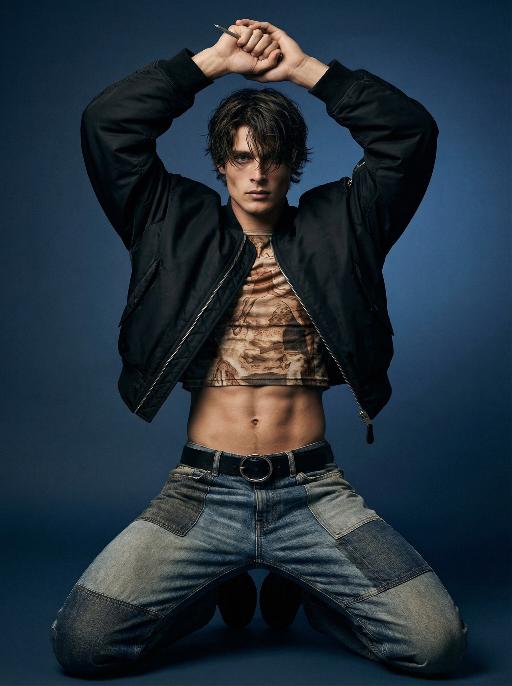
Edge of Form AI effects generated image

Edge of Form

Use the exact same facial features, gender, and age as the character in the uploaded image. Photorealistic full-body fashion portrait, exact same facial features, gender and age as the character in the uploaded image. Dark, tousled medium-length hair falling over the forehead. Dynamic, powerful kneeling pose with both knees on the ground, legs spread wide, torso upright, both arms raised above the head, hands clasped tightly together, a thin metallic object held between the fingers. Oversized cropped black bomber jacket left unzipped, paired with a form-fitting cropped top featuring intricate earth-toned vintage-inspired print, exposing a toned, defined midriff. Patchwork design jeans with mixed denim washes and textures, secured by a black belt with a prominent circular metallic buckle. Smooth gradient dark blue studio backdrop, minimalist and moody atmosphere. Dramatic directional studio lighting, soft key light sculpting muscle contours and clothing textures, creating deep shadows and subtle highlights. Intense, edgy, avant-garde high-fashion editorial mood. High-detail skin texture, cinematic lighting, shallow depth of field, 8K resolution, ultra-realistic, sharp focus on all details.

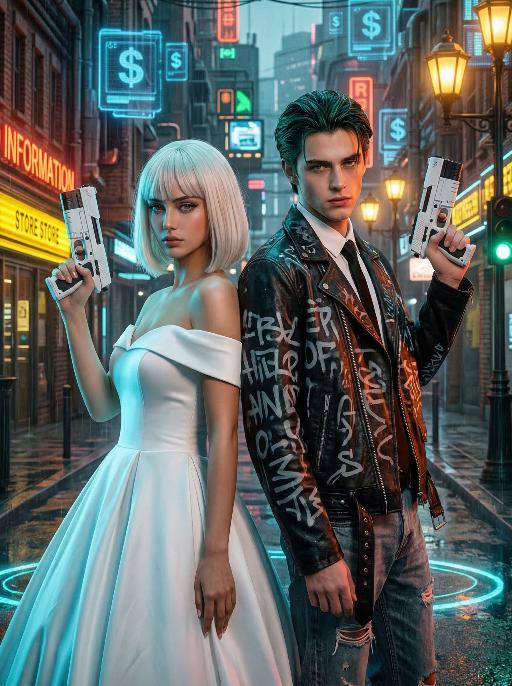
Cyber Couple AI effects generated image

Cyber Couple

High-end photorealistic cyberpunk-style portrait, strictly preserving the original facial features, gender, and age of the two individuals: The woman has short platinum-blonde hair with blunt bangs, delicate makeup, and a cold, sharp gaze; the man has dark greenish-black slicked-back hair, sharp facial features, and a stern expression. They stand back-to-back, each holding a futuristic white sci-fi firearm raised in their hands, looking directly at the camera with a cool, slightly detached demeanor. The woman wears a white off-the-shoulder ball gown wedding dress, elegant and minimalist, creating a stark contrast with the cyberpunk style. The man dons a black vintage riveted leather jacket printed with graffiti letters, layered over a white shirt and black tie, paired with vintage ripped jeans for a strong streetwear vibe. Background: A rainy neon-lit cyberpunk city street blending retro and futuristic elements: old brick buildings, glowing neon signs (red "RED INFORMATION", yellow reflective store signs, green traffic lights), floating blue holographic projections (dollar sign UI elements) in the air, warm yellow vintage street lamps interwoven with cool-toned electronic lights, and wet ground reflecting neon halos. Dense pipelines, electronic screens, and retro architectural details create a dystopian urban atmosphere. Lighting: High-contrast neon cyberpunk lighting, dominated by cyan-blue, orange-red, and warm yellow tones: cool side lighting outlines the figures, warm neon lights illuminate their faces, the ambient light is filled with grain and halos to simulate the diffuse reflection of humid rainy air, and strong light-dark contrast emphasizes the layering between the characters and the neon background. 8K ultra-realistic, cinematic quality, cyberpunk aesthetic, shot with a Sony A7R V camera paired with an 85mm f/1.4 lens, shallow depth of field, ultra-clear details of skin, hair, and clothing textures, with subtle film grain, no watermarks, no text, and no logos.

Glam Dance

"Create an AI-generated image based on the provided reference image. The subject's appearance (facial features, hairstyle, clothing, and overall temperament) should remain unchanged, as provided by the user, and the background must stay identical to the one in the reference image without modification. The posture of the subject should closely resemble the gesture in reference image 2, with the following detailed description: both hands are fully open, raised to shoulder height, with the palms facing forward and fingers spread out towards the screen. The left hand is slightly raised, with fingers slightly curled, while the palm remains open. A small amount of yellow paint is applied, evenly spread across the palm and part of the fingertips. The right hand is positioned similarly to the left, slightly more parallel to the body, with less finger curvature, and the palm faces the screen. A small amount of red paint is applied, evenly spread across the palm and fingertips. The paint on both hands should be evenly applied and natural, without excess, maintaining a relaxed and natural gesture. The background should match the environment from the reference image. The resulting image should have a higher resolution and finer textures, ensuring the paint on the hands looks natural and not overdone, while maintaining an artistic and relaxed style."

Flame AI effects generated image

Flame

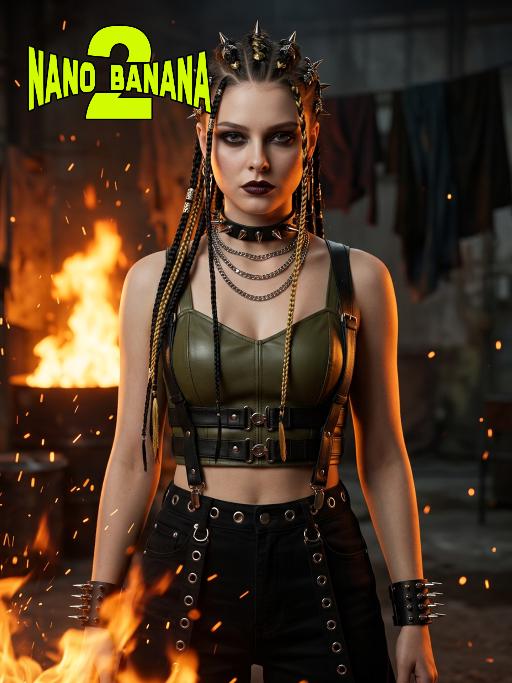
Medium-close-up shot (showing the upper body of the protagonist, shot from above the thighs): Using the exact same facial features, gender and age as the uploaded image. Ultra-realistic cyberpunk portrait, dark industrial style, intense and rebellious atmosphere, high detail, 8K super-realistic. Scene: Dim industrial space, with blazing dark orange flames in the background, black hanging fabrics, metal and rough textures. Hair: Long hair braided, with black and golden strands, styled with complex metal hair ornaments and spikes. Clothing: Olive green leather short top, paired with black leather suspenders, multiple yellow and black belts with metal clasps, high-waisted black leather pants, black leather ankle boots, with silver eyelets and laces. Accessories: Thick black leather necklace with metal rings and spikes, multiple silver chains hanging on the torso, black leather cuffs with metal nails, fingers wearing silver rings. Makeup: Smoke-like dark eyeshadow, bold dark lipstick, clear and sharp facial contours, intense and sharp eyes. Posture: Standing naturally, showing a dynamic and powerful posture. Lighting: Intense warm-toned firelight, casting orange light onto the skin and leather, high contrast, dark shadows, with flickering embers in the background. Composition: Medium shot, focusing clearly on the subject, shallow depth of field, the hot elements in the background blurred, bold and avant-garde color combination, no text or watermark. Wide aperture shooting, adding a lot of fire-burning effects in the foreground and the bottom of the frame, sparks flying special effects, the character's face illuminated by the fire, intense light and shadow contrast, avant-garde photography

Load more

Next-Gen Multi-Model AI Video Architecture

Vivago AI isn't just one engine—it’s a unified hub for the world’s most advanced video AI. Whether you need cinematic realism or high-speed social content, we provide the right model for your creative vision.

Free Generate

Beauty and Dolphins

Vacation Time

Stellar Tear

Fish Tank Supervisor

Cinematic Quality & Precision Control

Enables 4K resolution with multi-lens motion control, generating delicate scene via text prompts for customized cinematography.​

TRY NOW

Dynamic AV Sync

Auto-generates original audio to avoid copyright issues. Build 3D immersive environments through layered sound design automatically.

TRY NOW

OpenAI Sora 2

​Advanced visual storytelling with unparalleled physics and consistency.

TRY NOW

Kling v2.6 Pro

Industry-leading cinematic image animation and motion control.

TRY NOW

Google Veo 3 & 3.1

Ultra-fast generation with enhanced realism for creative workflows.

TRY NOW

Vivago AI 2.0

Our proprietary model optimized for efficiency, speed, and cost-effective generation.
TRY NOW

Users' Voice

We listen carefully to the opinions of every user.
Free Generate
Contact Us
I tried the Lip Sync feature inside Vivago.ai’s AI Video Generator for my educational podcast, and the results were stunning! The avatar's lip movements perfectly matched my audio recording, creating a professional AI-generated video without complex editing. Compared with tools like OpenAI Sora 2 and Google Veo 3.1, Vivago Image-to-Video delivers fast, studio-quality results online. It saved me hours of post-production work.
ElenaM (Spain)
Vivago’s Image-to-Video AI transformed my marketing workflow. I uploaded a product image and described the launch scene in text, and it generated a 10-second cinematic AI video with background music and dynamic visuals. The output quality rivals Kling v2.6 Pro and Google Veo 3 Fast. It’s now my go-to AI video generator for social media ads and product campaigns.
KenjiT (Japan)
As a digital artist, I use Vivago.ai 2.0 daily for Image-to-Image and AI Image-to-Video creation. The e-book covers and animated visuals I generate for clients look cinematic and professional. Unlike many standalone AI tools, Vivago integrates multiple leading models into one platform, making it easier to create copyright-safe AI images and videos for publishing.
ChenL (China)
I tried the Lip Sync feature inside Vivago.ai’s AI Video Generator for my educational podcast, and the results were stunning! The avatar's lip movements perfectly matched my audio recording, creating a professional AI-generated video without complex editing. Compared with tools like OpenAI Sora 2 and Google Veo 3.1, Vivago Image-to-Video delivers fast, studio-quality results online. It saved me hours of post-production work.
ElenaM (Spain)
Vivago’s Image-to-Video AI transformed my marketing workflow. I uploaded a product image and described the launch scene in text, and it generated a 10-second cinematic AI video with background music and dynamic visuals. The output quality rivals Kling v2.6 Pro and Google Veo 3 Fast. It’s now my go-to AI video generator for social media ads and product campaigns.
KenjiT (Japan)
As a digital artist, I use Vivago.ai 2.0 daily for Image-to-Image and AI Image-to-Video creation. The e-book covers and animated visuals I generate for clients look cinematic and professional. Unlike many standalone AI tools, Vivago integrates multiple leading models into one platform, making it easier to create copyright-safe AI images and videos for publishing.
ChenL (China)
I absolutely love Vivago’s AI Image-to-Video Generator. As a travel blogger, static images often fail to capture real atmosphere, but Vivago helps me turn photos into vivid cinematic AI videos with motion effects. It feels comparable to OpenAI Sora 2 and Google Veo 3.1, but more accessible and faster for creators who need high-quality AI videos online.
LiamK (Australia)
I tried the Lip Sync feature inside Vivago.ai’s AI Video Generator for my educational podcast, and the results were stunning! The avatar's lip movements perfectly matched my audio recording, creating a professional AI-generated video without complex editing. Compared with tools like OpenAI Sora 2 and Google Veo 3.1, Vivago Image-to-Video delivers fast, studio-quality results online. It saved me hours of post-production work.
ElenaM (Spain)
Vivago’s Image-to-Video AI transformed my marketing workflow. I uploaded a product image and described the launch scene in text, and it generated a 10-second cinematic AI video with background music and dynamic visuals. The output quality rivals Kling v2.6 Pro and Google Veo 3 Fast. It’s now my go-to AI video generator for social media ads and product campaigns.
KenjiT (Japan)
As a digital artist, I use Vivago.ai 2.0 daily for Image-to-Image and AI Image-to-Video creation. The e-book covers and animated visuals I generate for clients look cinematic and professional. Unlike many standalone AI tools, Vivago integrates multiple leading models into one platform, making it easier to create copyright-safe AI images and videos for publishing.
ChenL (China)
I absolutely love Vivago’s AI Image-to-Video Generator. As a travel blogger, static images often fail to capture real atmosphere, but Vivago helps me turn photos into vivid cinematic AI videos with motion effects. It feels comparable to OpenAI Sora 2 and Google Veo 3.1, but more accessible and faster for creators who need high-quality AI videos online.
LiamK (Australia)
Using Vivago.ai’s Image-to-Video AI has greatly enhanced my classroom teaching. I transform textbook notes into historical AI videos with cinematic filters and dynamic animations. Compared with tools like Kling v2.6 Pro and Google Veo 3 Fast, Vivago offers faster generation and easier parameter control for educators who need reliable AI video creation.
RajivG (India)
I frequently create AI videos on Vivago and publish them on TikTok and YouTube Shorts. The AI video templates and trending content ideas help me produce viral-ready clips quickly. With Vivago’s integrated models—including advanced video engines similar to OpenAI Sora 2—I can generate anime-style and cinematic social media videos that drive high engagement.
MarieJ (Spain)
What attracts me most about Vivago.ai is not only the powerful AI Video Generator but also the active AIGC creator community. It combines AI Image-to-Video, Text-to-Video, and leading model integrations like Google Veo 3.1 into one creative platform.
TomW (India)
At first, I was hesitant about using AI video tools. But after trying Vivago Image-to-Video, I realized how easy it is to create professional AI-generated videos online. I just upload an image, add a short prompt, and adjust a few settings. The results are cinematic and copyright-safe, which is essential for commercial projects.
HectorC (Mexico)
Using Vivago.ai’s Image-to-Video AI has greatly enhanced my classroom teaching. I transform textbook notes into historical AI videos with cinematic filters and dynamic animations. Compared with tools like Kling v2.6 Pro and Google Veo 3 Fast, Vivago offers faster generation and easier parameter control for educators who need reliable AI video creation.
RajivG (India)
I frequently create AI videos on Vivago and publish them on TikTok and YouTube Shorts. The AI video templates and trending content ideas help me produce viral-ready clips quickly. With Vivago’s integrated models—including advanced video engines similar to OpenAI Sora 2—I can generate anime-style and cinematic social media videos that drive high engagement.
MarieJ (Spain)
What attracts me most about Vivago.ai is not only the powerful AI Video Generator but also the active AIGC creator community. It combines AI Image-to-Video, Text-to-Video, and leading model integrations like Google Veo 3.1 into one creative platform.
TomW (India)
At first, I was hesitant about using AI video tools. But after trying Vivago Image-to-Video, I realized how easy it is to create professional AI-generated videos online. I just upload an image, add a short prompt, and adjust a few settings. The results are cinematic and copyright-safe, which is essential for commercial projects.
HectorC (Mexico)