Image to Video

Transform text into stunning visuals with vivago.ai's AI image/video generator. Explore curated effects, professional editing tools, and seamless creativity for high-quality content. Ideal for innovators and creators.

Recreate
arrow

FAQs

How do I animate static images using vivago.ai?

Upload any image (JPG/PNG), and our AI models will automatically detect content layers and generate 5/10-second video clips with dynamic motion patterns.

Can I control specific movement directions?

Yes. Combine image uploads with text prompts like 'swaying leaves left-to-right' or 'a girl waves her hands'.

What if AI-generated videos don't match my expectation?

Utilize iterative refinement cycles: 1) Try a few more times, 2) Modify prompts, 3) Visit the Explore section to use templates for more consistent results.

What membership benefits does Pro offer?

Pro membership offers better outcomes, more generation credits, and premium features. Details available at: https://vivago.ai/subscribe

More From VIVAGO AI

Christmas Eve

The subject is the figure in the uploaded image (with unchanged facial features), wearing a red Christmas hat, a red sweater with white snowflake patterns, a retro plaid Christmas midi skirt, and Christmas boots, standing naturally front-on in the center of the frame. The scene is set in front of a snow-covered rural wooden cabin, with a Christmas tree decorated with colorful fairy lights and baubles in the background, piles of exquisitely wrapped Christmas gifts on the ground, and snowflakes falling in the air. The scene is illuminated by warm yellow lighting (fairy lights on the cabin + Christmas tree lights), creating a warm and dreamy Christmas night atmosphere. Shot with an 85mm lens to highlight the soft texture of the figure’s fur, the knitted texture of the sweater, and the delicate details of the snowflakes in the image. 8K resolution with warm and saturated colors. Realistic photography style, full panoramic shot that shows the full body of the figure from the uploaded image.

Noble Person

The figure from the uploaded image (with consistent facial features, hair, skin tone and age) sits confidently on an ornate golden vintage chair, holding a glass of white wine in one hand, with the other hand resting elegantly and naturally on the chair. He looks at the camera with a confident, cold and elegant expression, dressed in a dark gray haute couture suit with a white shirt underneath and an elegant textured cravat. He wears sunglasses and a watch, exuding an air of refinement, calmness and self-assurance. The background is a luxurious hotel setting with warm lighting, hanging chandeliers and floral accents, creating a retro, elegant, noble and lavish atmosphere. Captured in a medium shot from a slightly low, side angle relative to the subject, the image presents a cinematic portrayal of stylish living, featuring portrait photography aesthetics and an avant-garde fashion photography art style, with high-end cinematic texture, ultra-high definition quality, an overall cool color tone, cinema-grade image quality, a film-like filter, and dramatic lighting contrast.

Hair Style AI effects generated image

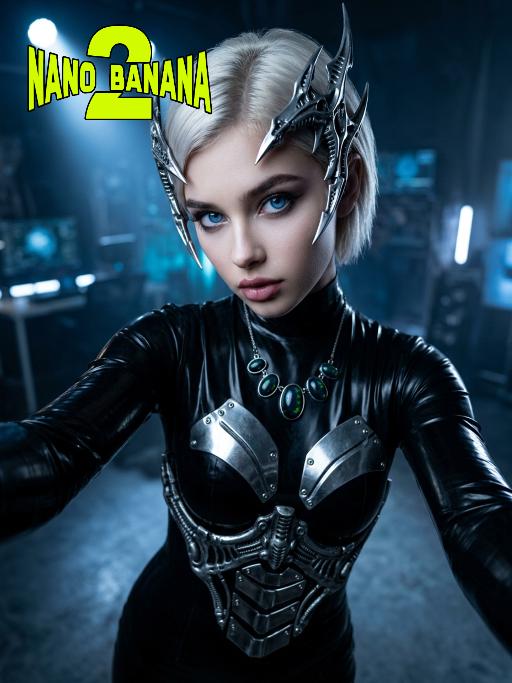
Hair Style

Medium close-up selfie shot: This is a set of fashion photography works with a futuristic theme, highlighting extremely futuristic silver metal headpieces and the model (the image of the model in this shot is consistent with the person in the uploaded picture, including facial features, gender and age). This is a fashion photography work belonging to the cyberpunk style. The model has platinum blonde, neatly trimmed short hair, wears a black latex tight-fitting dress, is equipped with silver metal armor plates, and has a Gothic-style exquisite makeup, exuding a sense of futurism and avant-garde. The accessories include sharp-edged biological mechanical headpieces and a necklace with glowing black opals. The model is in an energetic selfie pose, with her arms stretched forward to hold the camera, and the perspective is a high angle with a slight tilt. The background is a dark, melancholic photography studio, with cold blue spotlights penetrating the air. The overall style is simple, highly futuristic, and slightly intimidating. The photography effect is realistic, with a resolution of 8K, using film-level lighting.

Banana Man AI effects generated image

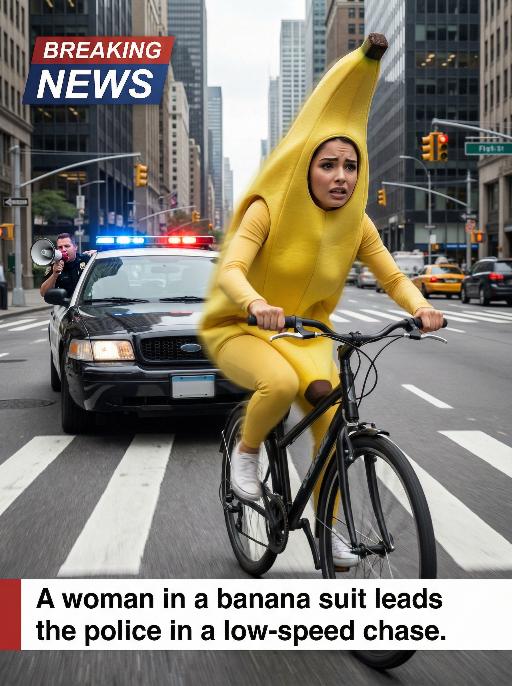
Banana Man

Ultra-realistic breaking news photo: In this uploaded photo, the figure (with unchanged facial features, gender and age) is wearing a full-body banana costume and is frantically riding a bicycle at high speed on a busy city street, with a frightened but determined expression on their face. The main subject is centered and prominent, and the main character occupies 80% of the frame, being closely pursued by a black police car with blue and red flashing lights. A police officer leans out of the car window and shouts loudly through a megaphone. The scene is set in the daytime, with skyscrapers, crosswalks and traffic signals in the background. The dynamic blur effect of the bicycle wheels and the police car conveys the tense atmosphere during the low-speed chase. There is a large title text in the upper left corner of the picture (with a style consistent with the design style of news live broadcasts): BREAKING NEWS; At the bottom, there is a text title layout (with a style consistent with the design style of news live broadcasts): A woman in a banana suit leads the police in a low-speed chase. Style: Ultra-realistic, cinematic, comedy style, high detail, 4K resolution.

Goodnight Kiss

This is a realistic and warm night scene picture, captured using a medium shot close-up technique, with a style similar to American family documentary photography. In the first uploaded picture, the figure (with facial features, gender and age unchanged, the edges presenting a bright and sacred glow) stands straight on a white children's bed. In the second uploaded picture, the figure is lying quietly on the bed, wearing a light blue shirt. The scene is set in a charming American rural children's bedroom: light blue walls, a warm yellow lamp on the white bedside table, a wooden shelf filled with stuffed toys, small potted plants and children's picture books. On the walls are children's paintings and hanging decorations, and translucent flower curtains let the soft moonlight in, creating a peaceful and intimate atmosphere, filled with family love.

With Deceased

Place the two characters from the uploaded pictures (with strict control over gender, age, clothing, and expression of sadness) in the same scene. The background is a beautiful scene of a warm yellow flower sea with a beautiful sunset. The sunlight shines on the characters' faces, illuminating them with a warm light, creating a warm and romantic atmosphere. The characters stand facing the camera in the middle of the frame, in a half-body close-up shot (the two shots uploaded are of them standing facing the camera). There is a bright light edge effect on the outline, with a smooth and natural transition. The picture quality is of a film level, with a realistic texture. It presents the texture of a reunion and memory. The shooting was done using a Canon 5D Mark IV full-frame camera and a 55mm f/1.4 wide-angle lens. The shallow depth of field effect was used. The warm-toned sunset natural light (golden dusk side backlight) was used to create a warm atmosphere. The high-resolution quality

Advanced Image

Strict identity verification is carried out using the uploaded avatar (maintaining consistency in facial features, hair, skin tone and age). The composition frames the head and shoulders from the top of the head to the upper chest; the face is angled three-quarters to the left and slightly downward, with the chin gently tucked, eyes almost straight to the camera, a stern and cold expression, and lips firmly closed, featuring a sharp jawline and a straight nose. The short black hair is slightly tousled with a few strands falling onto the forehead, styled to have a subtle sheen to its texture. He is wearing a pure black long-sleeved turtleneck sweater with the collar snugly wrapped around the neck. Set against an off-white interior background, his left hand is raised with the index finger touching the temple, the other fingers curled, and a large, prominent silver signet ring adorns his finger, clearly visible against the black sleeve. Soft studio key light streams in from the upper left (the camera’s left), casting intense highlights on the left side of the face and deep shadows on the right side. The background gradients from grey to white, with a faint vertical gradient light strip on the right side. The entire image is in full black and white with no color, only grayscale tones, boasting extremely stark contrast and exquisitely sharp details. It features a studio lighting style, portrait photography aesthetics, and an avant-garde fashion black-and-white photography style.

Boyfriend

In the uploaded picture, that person (with unchanged facial features, wearing a fine custom white high-end dress and adorned with exquisite luxurious accessories) is sitting, while beside him sits a handsome and elegant young man of the same ethnic background (wearing a fine custom black suit and wearing an expensive watch); under the glow of the setting sun, in this romantic scene, the two are sitting side by side on the terrace of an upscale restaurant, enjoying a romantic candlelight dinner. They are seated side by side at a table covered with a red tablecloth, with some exquisite food on the table, crystal wine glasses in front of them, a candle in the middle, a red rose vase in the center, rose petals scattered on the table, and behind them are many red flowers, exquisite golden "love" shape balloons and red decorative balloons. The background is an amazing city night view, with exquisite red Valentine's Day celebration balloons and romantic and warm lighting strings on the terrace; the edges of the entire picture present a soft and warm yellow heart-shaped particle light effect blur effect, filled with a warm and romantic Valentine's Day party atmosphere, just like bright colors, shallow depth of field effect, similar movie-like lighting, surrealistic photography, romantic and warm atmosphere, rich details, 8K resolution, the person's face illuminated by light, sharp contrast between light and dark, shallow depth of field effect.

Load more

Next-Gen Multi-Model AI Video Architecture

Vivago AI isn't just one engine—it’s a unified hub for the world’s most advanced video AI. Whether you need cinematic realism or high-speed social content, we provide the right model for your creative vision.

Free Generate

Beauty and Dolphins

Vacation Time

Stellar Tear

Fish Tank Supervisor

Cinematic Quality & Precision Control

Enables 4K resolution with multi-lens motion control, generating delicate scene via text prompts for customized cinematography.​

TRY NOW

Dynamic AV Sync

Auto-generates original audio to avoid copyright issues. Build 3D immersive environments through layered sound design automatically.

TRY NOW

OpenAI Sora 2

​Advanced visual storytelling with unparalleled physics and consistency.

TRY NOW

Kling v2.6 Pro

Industry-leading cinematic image animation and motion control.

TRY NOW

Google Veo 3 & 3.1

Ultra-fast generation with enhanced realism for creative workflows.

TRY NOW

Vivago AI 2.0

Our proprietary model optimized for efficiency, speed, and cost-effective generation.
TRY NOW

Users' Voice

We listen carefully to the opinions of every user.
Free Generate
Contact Us
I tried the Lip Sync feature inside Vivago.ai’s AI Video Generator for my educational podcast, and the results were stunning! The avatar's lip movements perfectly matched my audio recording, creating a professional AI-generated video without complex editing. Compared with tools like OpenAI Sora 2 and Google Veo 3.1, Vivago Image-to-Video delivers fast, studio-quality results online. It saved me hours of post-production work.
ElenaM (Spain)
Vivago’s Image-to-Video AI transformed my marketing workflow. I uploaded a product image and described the launch scene in text, and it generated a 10-second cinematic AI video with background music and dynamic visuals. The output quality rivals Kling v2.6 Pro and Google Veo 3 Fast. It’s now my go-to AI video generator for social media ads and product campaigns.
KenjiT (Japan)
As a digital artist, I use Vivago.ai 2.0 daily for Image-to-Image and AI Image-to-Video creation. The e-book covers and animated visuals I generate for clients look cinematic and professional. Unlike many standalone AI tools, Vivago integrates multiple leading models into one platform, making it easier to create copyright-safe AI images and videos for publishing.
ChenL (China)
I tried the Lip Sync feature inside Vivago.ai’s AI Video Generator for my educational podcast, and the results were stunning! The avatar's lip movements perfectly matched my audio recording, creating a professional AI-generated video without complex editing. Compared with tools like OpenAI Sora 2 and Google Veo 3.1, Vivago Image-to-Video delivers fast, studio-quality results online. It saved me hours of post-production work.
ElenaM (Spain)
Vivago’s Image-to-Video AI transformed my marketing workflow. I uploaded a product image and described the launch scene in text, and it generated a 10-second cinematic AI video with background music and dynamic visuals. The output quality rivals Kling v2.6 Pro and Google Veo 3 Fast. It’s now my go-to AI video generator for social media ads and product campaigns.
KenjiT (Japan)
As a digital artist, I use Vivago.ai 2.0 daily for Image-to-Image and AI Image-to-Video creation. The e-book covers and animated visuals I generate for clients look cinematic and professional. Unlike many standalone AI tools, Vivago integrates multiple leading models into one platform, making it easier to create copyright-safe AI images and videos for publishing.
ChenL (China)
I absolutely love Vivago’s AI Image-to-Video Generator. As a travel blogger, static images often fail to capture real atmosphere, but Vivago helps me turn photos into vivid cinematic AI videos with motion effects. It feels comparable to OpenAI Sora 2 and Google Veo 3.1, but more accessible and faster for creators who need high-quality AI videos online.
LiamK (Australia)
I tried the Lip Sync feature inside Vivago.ai’s AI Video Generator for my educational podcast, and the results were stunning! The avatar's lip movements perfectly matched my audio recording, creating a professional AI-generated video without complex editing. Compared with tools like OpenAI Sora 2 and Google Veo 3.1, Vivago Image-to-Video delivers fast, studio-quality results online. It saved me hours of post-production work.
ElenaM (Spain)
Vivago’s Image-to-Video AI transformed my marketing workflow. I uploaded a product image and described the launch scene in text, and it generated a 10-second cinematic AI video with background music and dynamic visuals. The output quality rivals Kling v2.6 Pro and Google Veo 3 Fast. It’s now my go-to AI video generator for social media ads and product campaigns.
KenjiT (Japan)
As a digital artist, I use Vivago.ai 2.0 daily for Image-to-Image and AI Image-to-Video creation. The e-book covers and animated visuals I generate for clients look cinematic and professional. Unlike many standalone AI tools, Vivago integrates multiple leading models into one platform, making it easier to create copyright-safe AI images and videos for publishing.
ChenL (China)
I absolutely love Vivago’s AI Image-to-Video Generator. As a travel blogger, static images often fail to capture real atmosphere, but Vivago helps me turn photos into vivid cinematic AI videos with motion effects. It feels comparable to OpenAI Sora 2 and Google Veo 3.1, but more accessible and faster for creators who need high-quality AI videos online.
LiamK (Australia)
Using Vivago.ai’s Image-to-Video AI has greatly enhanced my classroom teaching. I transform textbook notes into historical AI videos with cinematic filters and dynamic animations. Compared with tools like Kling v2.6 Pro and Google Veo 3 Fast, Vivago offers faster generation and easier parameter control for educators who need reliable AI video creation.
RajivG (India)
I frequently create AI videos on Vivago and publish them on TikTok and YouTube Shorts. The AI video templates and trending content ideas help me produce viral-ready clips quickly. With Vivago’s integrated models—including advanced video engines similar to OpenAI Sora 2—I can generate anime-style and cinematic social media videos that drive high engagement.
MarieJ (Spain)
What attracts me most about Vivago.ai is not only the powerful AI Video Generator but also the active AIGC creator community. It combines AI Image-to-Video, Text-to-Video, and leading model integrations like Google Veo 3.1 into one creative platform.
TomW (India)
At first, I was hesitant about using AI video tools. But after trying Vivago Image-to-Video, I realized how easy it is to create professional AI-generated videos online. I just upload an image, add a short prompt, and adjust a few settings. The results are cinematic and copyright-safe, which is essential for commercial projects.
HectorC (Mexico)
Using Vivago.ai’s Image-to-Video AI has greatly enhanced my classroom teaching. I transform textbook notes into historical AI videos with cinematic filters and dynamic animations. Compared with tools like Kling v2.6 Pro and Google Veo 3 Fast, Vivago offers faster generation and easier parameter control for educators who need reliable AI video creation.
RajivG (India)
I frequently create AI videos on Vivago and publish them on TikTok and YouTube Shorts. The AI video templates and trending content ideas help me produce viral-ready clips quickly. With Vivago’s integrated models—including advanced video engines similar to OpenAI Sora 2—I can generate anime-style and cinematic social media videos that drive high engagement.
MarieJ (Spain)
What attracts me most about Vivago.ai is not only the powerful AI Video Generator but also the active AIGC creator community. It combines AI Image-to-Video, Text-to-Video, and leading model integrations like Google Veo 3.1 into one creative platform.
TomW (India)
At first, I was hesitant about using AI video tools. But after trying Vivago Image-to-Video, I realized how easy it is to create professional AI-generated videos online. I just upload an image, add a short prompt, and adjust a few settings. The results are cinematic and copyright-safe, which is essential for commercial projects.
HectorC (Mexico)