With Deceased

Place the two characters from the uploaded pictures (with strict control over gender, age, clothing, and expression of sadness) in the same scene. The background is a beautiful scene of a warm yellow flower sea with a beautiful sunset. The sunlight shines on the characters' faces, illuminating them with a warm light, creating a warm and romantic atmosphere. The characters stand facing the camera in the middle of the frame, in a half-body close-up shot (the two shots uploaded are of them standing facing the camera). There is a bright light edge effect on the outline, with a smooth and natural transition. The picture quality is of a film level, with a realistic texture. It presents the texture of a reunion and memory. The shooting was done using a Canon 5D Mark IV full-frame camera and a 55mm f/1.4 wide-angle lens. The shallow depth of field effect was used. The warm-toned sunset natural light (golden dusk side backlight) was used to create a warm atmosphere. The high-resolution quality

Use Template
arrow

More From VIVAGO AI

Cross Earth

Cinematic realistic style. The reference subject stands firmly on the ground on the mountaintop platform at Christ the Redeemer, Corcovado Mountain. The subject’s feet must stay naturally in contact with the ground at the beginning, with correct body weight, correct standing posture, and no floating. The camera starts with a close-up on the subject’s face, makes a slight push-in, then smoothly and fully orbits upward, truly reaching directly above the subject’s head in a top-down angle, while the subject keeps looking up and following the camera naturally. Then from directly overhead, the camera seamlessly pulls backward and upward in one continuous shot, with no cuts and no jumps. First clearly reveal the subject standing on the ground, the platform, and the full Christ the Redeemer statue. Then expand smoothly to Corcovado Mountain, Rio de Janeiro, the bay, mountains, coastline, full Brazil, South America, and the world scale. Strict rule: the subject must never float above the ground at the beginning. No levitation, no hovering, no detached feet, no unrealistic body position. Strict rule: the Earth must not appear early. The Earth must only appear at the final stage, after the continuous upward transition through clouds and atmosphere. At the ending, the shot must finish on a complete full Earth, fully visible in the frame, not cropped, not partial, not half Earth, not hidden by framing. The final image must clearly show the entire Earth sphere as the ending hero shot. The Earth should be large, dominant, and centered, with beautiful realistic outer space around it: subtle Milky Way band, delicate nebulae, dense stars, deep space, elegant and believable astronomical realism. Focus on: subject firmly standing on the ground, full overhead orbit, Christ the Redeemer, no early Earth, smooth transition from real scene to outer space, final shot is a complete full Earth.

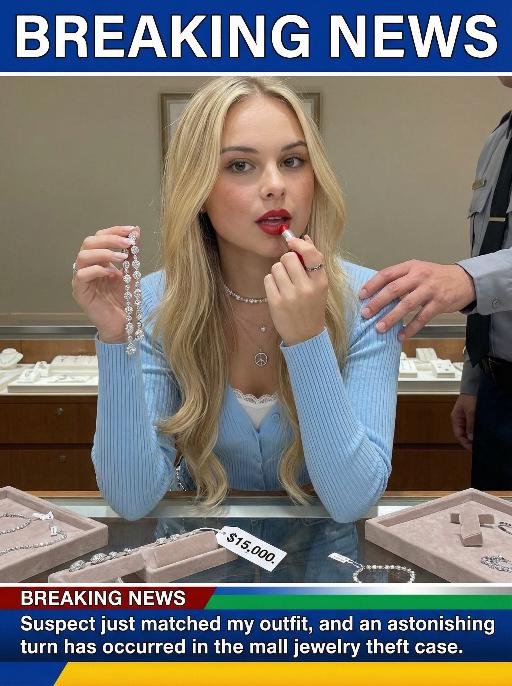
Jewelry Theft AI effects generated image

Jewelry Theft

An interesting breaking news photo has been released. In the picture, the person depicted (with their facial features, gender and age remaining unchanged) is caught in the act of stealing when she is captured on camera. One hand is holding a string of diamond earrings, and the other hand is holding a lipstick, as if nothing has happened as she is applying it to her lips. The main figure occupies 80% of the overall picture. The jewelry counter is in a mess, with velvet jewelry pads scattered around, and a fallen price tag that reads "$15,000". Outside the frame, a security guard's hand is reaching towards her shoulder. Above the picture, there is a prominent large headline text (blue background with white characters): BREAKING NEWS;Below the picture, there is a news text (in red, blue and black color combination): Suspect just matched my outfit and an astonishing turn has occurred in the mall jewelry theft case.

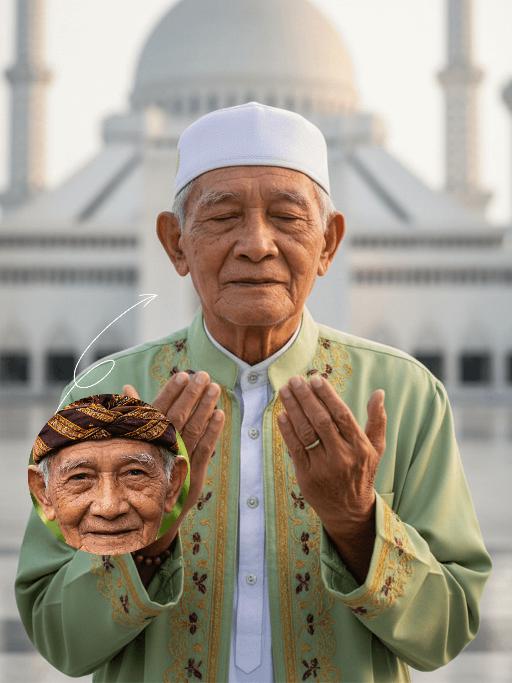
Solemn AI effects generated image

Solemn

Strictly lock the identity of the uploaded portrait (preserve facial contours, native Indian skin tone, hairstyle, and age). Half-body close-up (upper body-focused) of a devout elderly Muslim man (aged 60-70) during Eid al-Fitr morning prayers, with the subject occupying a larger proportion of the frame and framed tightly with minimal negative space at the top. His face proportion is moderate but prominent, he maintains a serene, pious expression with hands in standard prayer position, his upper body centered in the frame. The background clearly shows the grand architecture of Istiqlal Mosque in Jakarta, bathed in soft, warm morning backlight, with the background composition adjusted to avoid excessive top blank space. Photorealistic style, sharp focus on both the subject (clear facial details) and the mosque background, deep emotional depth, 4K ultra-clear resolution, well-balanced composition between subject and background

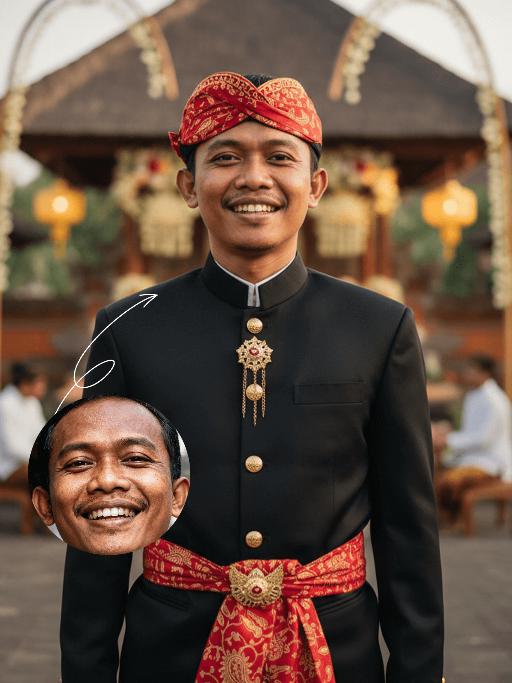
Batik Groom AI effects generated image

Batik Groom

Strictly lock the facial features of the uploaded portrait (preserve facial contours, native Indonesian skin tone, hairstyle and age). Extreme tight half-body close-up portrait, subject positioned in the upper two-thirds of the frame, occupying 90% of the vertical space, centered horizontally, hyper-realistic style, 4K ultra-high definition, soft warm golden hour tropical daylight, grand Balinese-Indonesian wedding atmosphere | A handsome young Indonesian groom with a warm, confident smile, standing front-facing in a modern-traditional wedding ensemble. He wears a tailored black Mandarin-collar jacket with polished gold button detailing, paired with a vibrant red batik-patterned (paisley motif) headwrap (iket) and waist sash (selendang) that drapes elegantly down his torso, plus a vintage gold chain with a fob accessory. The background is heavily blurred to prioritize the subject: a faint glimpse of the opulent Balinese wedding venue with a thatched-roof ceremonial pavilion (bale), tropical flower garlands, glowing traditional paper lanterns, and a distant crowd of guests in traditional attire, ensuring the focus remains entirely on the groom. Focus on the sharp tailoring of his outfit, the intricate batik patterns, and his joyful expression, with warm golden light enhancing the celebratory

HoopFury

Replace the left-side ball-handling subject in the scene with the main subject from the user-uploaded reference image, and make that uploaded subject the only element that is changed in the entire image. The subject from the user’s reference image must be preserved exactly as-is, with no alterations whatsoever to any of its original identity-defining or appearance-defining attributes, including but not limited to: face, facial features, expression, vibe, age impression, gender traits, body proportions, species traits, skin/fur texture, hairstyle, hair color, clothing, accessories, silhouette, posture characteristics, and overall recognizability. Do not redesign the uploaded subject, do not beautify or stylize it, do not turn it into a cartoon, do not replace its clothes, do not add a basketball jersey, and do not make it resemble the original left character from the example image. The uploaded subject should simply be placed naturally into the left foreground ball-control position of the scene, occupying the role of the left-side dribbler, close to the camera, low-angle, with one hand/paw/limb touching or controlling the basketball, as if captured in a live game moment. However, the uploaded subject’s original appearance and outfit must remain completely unchanged. Everything except the left-side ball-handling subject must remain strictly locked and unchanged. The rest of the scene must be exactly as follows: A professional indoor basketball arena during a live game, with a packed crowd in the stands, strong game-night atmosphere, and a cinematic sports-photography look. The camera angle is low, close to the floor, and tightly framed, creating an immersive courtside perspective. The foreground shows a real wooden basketball court floor with visible texture and reflections, including a large NBA-style center-court logo / floor graphic area near the bottom foreground. On the right side of the frame, there is a large black-and-tan Rottweiler dog, realistic and muscular, standing very close to the left-side subject, with its head leaning in near the left subject as if tightly guarding or moving alongside it. This right-side Rottweiler must remain completely unchanged, including all of the following: realistic black-and-tan fur real dog anatomy a dark red / maroon basketball jersey visible “BULLS” text on the jersey visible number “24” on the jersey positioned in the right foreground body angled slightly toward the left/front head close to the left-side subject maintaining a tight, shoulder-to-shoulder, intimate defensive composition with the left-side subject The basketball must remain in the lower-left foreground, being touched or controlled by the left-side subject, with realistic leather texture and slight wear. The court floor must retain realistic wood grain and subtle reflections. The audience in the background must stay heavily blurred with shallow depth of field, with visible arena light bands, scoreboard signage, and soft bokeh highlights. Lighting should remain high-end indoor arena lighting with cinematic realism, crisp focus on the foreground subjects, shallow depth of field in the background, and a high-detail professional sports action photo aesthetic. The overall composition must remain a vertical frame, with a two-subject foreground arrangement, the uploaded subject controlling the ball on the left, the Rottweiler pressing close on the right, and an energetic blurred crowd in the background. Other than replacing the left-side ball-handling figure with the user’s uploaded subject, absolutely nothing else in the image may change. Quality requirements: ultra-realistic, photorealistic, highly detailed, sharp focus, cinematic sports photography, dynamic action moment, natural perspective, realistic lighting, shallow depth of field, high resolution, 4K, premium detail. English Negative Prompt Do not change the uploaded subject’s face, facial features, expression, hairstyle, hair color, clothing, accessories, body shape, age impression, gender traits, vibe, or species identity. Do not turn the uploaded subject into a cat. Do not automatically put the uploaded subject in a blue jersey. Do not copy the original left character’s appearance onto the uploaded subject. Do not change the right-side Rottweiler’s appearance, position, clothing, colors, pose, or scale. Do not remove the right-side dog. Do not replace the right-side dog with another animal or person. Do not change the basketball arena, crowd, wooden court, basketball position, camera angle, composition, depth of field, or lighting mood. Do not add a third character, extra props, extra players, extra animals, or extra basketballs. No cartoon style, no illustration style, no 3D render look, no low resolution, no blurry main subject, no anatomy errors, no extra limbs, no deformed face, no bad perspective, no subject cropping, no broken text, no incorrect jersey text, no clothing fusion, no body merge, no background displacement, no identity drift from the uploaded reference subject.

Polaroid

A photorealistic collage of two hand-held Polaroid photos placed randomly in a staggered upper and lower arrangement. The two photos feature different facial expressions and posing gestures of the subject(s): The main subject(s) in each Polaroid are the figure(s) from the uploaded image, with their facial features and the number of figures unchanged. The figure(s) wear a white fluffy Santa hat, a brown-and-white striped scarf, a white sweater adorned with golden star embellishments, and brown gloves—striking a pose of gently touching the cheek with one hand in one photo, and making a peace sign with one hand in the other. The background of each Polaroid is solid black, overlaid with white snowflake patterns and gold/black star motifs. The scene outside the Polaroids is set against a green Christmas tree, decorated with the words Merry Christmas in a gold glittering diamond texture and glossy red Christmas baubles. The lighting is warm-toned Christmas ambient light, creating a cozy winter vibe. The overall style features authentic Polaroid film texture with intact white Polaroid borders and rich fine details; the focus is sharp with a soft, blurred background. The edges of the Polaroid photos are accented with Christmas decorative elements, including gold star stickers and snowflake patterns.

Load more

Next-Gen Multi-Model AI Video Architecture

Vivago AI isn't just one engine—it’s a unified hub for the world’s most advanced video AI. Whether you need cinematic realism or high-speed social content, we provide the right model for your creative vision.

Free Generate

Beauty and Dolphins

Vacation Time

Stellar Tear

Fish Tank Supervisor

Cinematic Quality & Precision Control

Enables 4K resolution with multi-lens motion control, generating delicate scene via text prompts for customized cinematography.​

TRY NOW

Dynamic AV Sync

Auto-generates original audio to avoid copyright issues. Build 3D immersive environments through layered sound design automatically.

TRY NOW

OpenAI Sora 2

​Advanced visual storytelling with unparalleled physics and consistency.

TRY NOW

Kling v2.6 Pro

Industry-leading cinematic image animation and motion control.

TRY NOW

Google Veo 3 & 3.1

Ultra-fast generation with enhanced realism for creative workflows.

TRY NOW

Vivago AI 2.0

Our proprietary model optimized for efficiency, speed, and cost-effective generation.

TRY NOW

Users' Voice

We listen carefully to the opinions of every user.
Free Generate
Contact Us
I tried the Lip Sync feature inside Vivago.ai’s AI Video Generator for my educational podcast, and the results were stunning! The avatar's lip movements perfectly matched my audio recording, creating a professional AI-generated video without complex editing. Compared with tools like OpenAI Sora 2 and Google Veo 3.1, Vivago Image-to-Video delivers fast, studio-quality results online. It saved me hours of post-production work.
ElenaM (Spain)
Vivago’s Image-to-Video AI transformed my marketing workflow. I uploaded a product image and described the launch scene in text, and it generated a 10-second cinematic AI video with background music and dynamic visuals. The output quality rivals Kling v2.6 Pro and Google Veo 3 Fast. It’s now my go-to AI video generator for social media ads and product campaigns.
KenjiT (Japan)
As a digital artist, I use Vivago.ai 2.0 daily for Image-to-Image and AI Image-to-Video creation. The e-book covers and animated visuals I generate for clients look cinematic and professional. Unlike many standalone AI tools, Vivago integrates multiple leading models into one platform, making it easier to create copyright-safe AI images and videos for publishing.
ChenL (China)
I tried the Lip Sync feature inside Vivago.ai’s AI Video Generator for my educational podcast, and the results were stunning! The avatar's lip movements perfectly matched my audio recording, creating a professional AI-generated video without complex editing. Compared with tools like OpenAI Sora 2 and Google Veo 3.1, Vivago Image-to-Video delivers fast, studio-quality results online. It saved me hours of post-production work.
ElenaM (Spain)
Vivago’s Image-to-Video AI transformed my marketing workflow. I uploaded a product image and described the launch scene in text, and it generated a 10-second cinematic AI video with background music and dynamic visuals. The output quality rivals Kling v2.6 Pro and Google Veo 3 Fast. It’s now my go-to AI video generator for social media ads and product campaigns.
KenjiT (Japan)
As a digital artist, I use Vivago.ai 2.0 daily for Image-to-Image and AI Image-to-Video creation. The e-book covers and animated visuals I generate for clients look cinematic and professional. Unlike many standalone AI tools, Vivago integrates multiple leading models into one platform, making it easier to create copyright-safe AI images and videos for publishing.
ChenL (China)
I absolutely love Vivago’s AI Image-to-Video Generator. As a travel blogger, static images often fail to capture real atmosphere, but Vivago helps me turn photos into vivid cinematic AI videos with motion effects. It feels comparable to OpenAI Sora 2 and Google Veo 3.1, but more accessible and faster for creators who need high-quality AI videos online.
LiamK (Australia)
I tried the Lip Sync feature inside Vivago.ai’s AI Video Generator for my educational podcast, and the results were stunning! The avatar's lip movements perfectly matched my audio recording, creating a professional AI-generated video without complex editing. Compared with tools like OpenAI Sora 2 and Google Veo 3.1, Vivago Image-to-Video delivers fast, studio-quality results online. It saved me hours of post-production work.
ElenaM (Spain)
Vivago’s Image-to-Video AI transformed my marketing workflow. I uploaded a product image and described the launch scene in text, and it generated a 10-second cinematic AI video with background music and dynamic visuals. The output quality rivals Kling v2.6 Pro and Google Veo 3 Fast. It’s now my go-to AI video generator for social media ads and product campaigns.
KenjiT (Japan)
As a digital artist, I use Vivago.ai 2.0 daily for Image-to-Image and AI Image-to-Video creation. The e-book covers and animated visuals I generate for clients look cinematic and professional. Unlike many standalone AI tools, Vivago integrates multiple leading models into one platform, making it easier to create copyright-safe AI images and videos for publishing.
ChenL (China)
I absolutely love Vivago’s AI Image-to-Video Generator. As a travel blogger, static images often fail to capture real atmosphere, but Vivago helps me turn photos into vivid cinematic AI videos with motion effects. It feels comparable to OpenAI Sora 2 and Google Veo 3.1, but more accessible and faster for creators who need high-quality AI videos online.
LiamK (Australia)
Using Vivago.ai’s Image-to-Video AI has greatly enhanced my classroom teaching. I transform textbook notes into historical AI videos with cinematic filters and dynamic animations. Compared with tools like Kling v2.6 Pro and Google Veo 3 Fast, Vivago offers faster generation and easier parameter control for educators who need reliable AI video creation.
RajivG (India)
I frequently create AI videos on Vivago and publish them on TikTok and YouTube Shorts. The AI video templates and trending content ideas help me produce viral-ready clips quickly. With Vivago’s integrated models—including advanced video engines similar to OpenAI Sora 2—I can generate anime-style and cinematic social media videos that drive high engagement.
MarieJ (Spain)
What attracts me most about Vivago.ai is not only the powerful AI Video Generator but also the active AIGC creator community. It combines AI Image-to-Video, Text-to-Video, and leading model integrations like Google Veo 3.1 into one creative platform.
TomW (India)
At first, I was hesitant about using AI video tools. But after trying Vivago Image-to-Video, I realized how easy it is to create professional AI-generated videos online. I just upload an image, add a short prompt, and adjust a few settings. The results are cinematic and copyright-safe, which is essential for commercial projects.
HectorC (Mexico)
Using Vivago.ai’s Image-to-Video AI has greatly enhanced my classroom teaching. I transform textbook notes into historical AI videos with cinematic filters and dynamic animations. Compared with tools like Kling v2.6 Pro and Google Veo 3 Fast, Vivago offers faster generation and easier parameter control for educators who need reliable AI video creation.
RajivG (India)
I frequently create AI videos on Vivago and publish them on TikTok and YouTube Shorts. The AI video templates and trending content ideas help me produce viral-ready clips quickly. With Vivago’s integrated models—including advanced video engines similar to OpenAI Sora 2—I can generate anime-style and cinematic social media videos that drive high engagement.
MarieJ (Spain)
What attracts me most about Vivago.ai is not only the powerful AI Video Generator but also the active AIGC creator community. It combines AI Image-to-Video, Text-to-Video, and leading model integrations like Google Veo 3.1 into one creative platform.
TomW (India)
At first, I was hesitant about using AI video tools. But after trying Vivago Image-to-Video, I realized how easy it is to create professional AI-generated videos online. I just upload an image, add a short prompt, and adjust a few settings. The results are cinematic and copyright-safe, which is essential for commercial projects.
HectorC (Mexico)