Image to Video

Create dynamic scenes with AI video effects – zoom in on a black ski mask's intense close-up, hold suspensefully, then seamlessly transition to Los Angeles cityscapes. Elevate your visuals with smooth fade-outs and cinematic AI-powered transitions on vivago.ai.

Recreate
arrow

FAQs

How to generate images/videos from text prompts?

Describe the visual content in natural language (e.g., 'A cyberpunk cat wearing neon goggles') and our AI models will create outputs. Complex prompts trigger multi-stage NLP parsing for enhanced accuracy.

How to refine unsatisfactory results?

Use our Prompt Bot - an AI-powered optimizer that suggests technical modifiers. Simply describe your ideas, desired changes ('more metallic texture'), then you will get optimized prompt variants.

When should I use reference images?

Upload references to: 1) Guide character consistency (e.g., faces/outfits), 2) Control motion patterns in videos using our feature matching algorithm. Supports JPG/PNG

What's the credit system?

Daily login grants 100 credits. Upgrade options: 1) Premium Membership, 2) Credit Packs. Details: https://vivago.ai/subscribe

More From VIVAGO AI

HoopFury

Replace the left-side ball-handling subject in the scene with the main subject from the user-uploaded reference image, and make that uploaded subject the only element that is changed in the entire image. The subject from the user’s reference image must be preserved exactly as-is, with no alterations whatsoever to any of its original identity-defining or appearance-defining attributes, including but not limited to: face, facial features, expression, vibe, age impression, gender traits, body proportions, species traits, skin/fur texture, hairstyle, hair color, clothing, accessories, silhouette, posture characteristics, and overall recognizability. Do not redesign the uploaded subject, do not beautify or stylize it, do not turn it into a cartoon, do not replace its clothes, do not add a basketball jersey, and do not make it resemble the original left character from the example image. The uploaded subject should simply be placed naturally into the left foreground ball-control position of the scene, occupying the role of the left-side dribbler, close to the camera, low-angle, with one hand/paw/limb touching or controlling the basketball, as if captured in a live game moment. However, the uploaded subject’s original appearance and outfit must remain completely unchanged. Everything except the left-side ball-handling subject must remain strictly locked and unchanged. The rest of the scene must be exactly as follows: A professional indoor basketball arena during a live game, with a packed crowd in the stands, strong game-night atmosphere, and a cinematic sports-photography look. The camera angle is low, close to the floor, and tightly framed, creating an immersive courtside perspective. The foreground shows a real wooden basketball court floor with visible texture and reflections, including a large NBA-style center-court logo / floor graphic area near the bottom foreground. On the right side of the frame, there is a large black-and-tan Rottweiler dog, realistic and muscular, standing very close to the left-side subject, with its head leaning in near the left subject as if tightly guarding or moving alongside it. This right-side Rottweiler must remain completely unchanged, including all of the following: realistic black-and-tan fur real dog anatomy a dark red / maroon basketball jersey visible “BULLS” text on the jersey visible number “24” on the jersey positioned in the right foreground body angled slightly toward the left/front head close to the left-side subject maintaining a tight, shoulder-to-shoulder, intimate defensive composition with the left-side subject The basketball must remain in the lower-left foreground, being touched or controlled by the left-side subject, with realistic leather texture and slight wear. The court floor must retain realistic wood grain and subtle reflections. The audience in the background must stay heavily blurred with shallow depth of field, with visible arena light bands, scoreboard signage, and soft bokeh highlights. Lighting should remain high-end indoor arena lighting with cinematic realism, crisp focus on the foreground subjects, shallow depth of field in the background, and a high-detail professional sports action photo aesthetic. The overall composition must remain a vertical frame, with a two-subject foreground arrangement, the uploaded subject controlling the ball on the left, the Rottweiler pressing close on the right, and an energetic blurred crowd in the background. Other than replacing the left-side ball-handling figure with the user’s uploaded subject, absolutely nothing else in the image may change. Quality requirements: ultra-realistic, photorealistic, highly detailed, sharp focus, cinematic sports photography, dynamic action moment, natural perspective, realistic lighting, shallow depth of field, high resolution, 4K, premium detail. English Negative Prompt Do not change the uploaded subject’s face, facial features, expression, hairstyle, hair color, clothing, accessories, body shape, age impression, gender traits, vibe, or species identity. Do not turn the uploaded subject into a cat. Do not automatically put the uploaded subject in a blue jersey. Do not copy the original left character’s appearance onto the uploaded subject. Do not change the right-side Rottweiler’s appearance, position, clothing, colors, pose, or scale. Do not remove the right-side dog. Do not replace the right-side dog with another animal or person. Do not change the basketball arena, crowd, wooden court, basketball position, camera angle, composition, depth of field, or lighting mood. Do not add a third character, extra props, extra players, extra animals, or extra basketballs. No cartoon style, no illustration style, no 3D render look, no low resolution, no blurry main subject, no anatomy errors, no extra limbs, no deformed face, no bad perspective, no subject cropping, no broken text, no incorrect jersey text, no clothing fusion, no body merge, no background displacement, no identity drift from the uploaded reference subject.

Nobleman

Cinematic shot transition with frontal angle throughout, capturing the full process smoothly: starting with the uploaded character standing frontally on the deck of a luxury cruise ship, one beautiful Indonesian woman stands directly beside him (frontal view) and attentively helps him put on a black and gold haute couture suit—gently slipping the jacket over his shoulders from the front, adjusting the lapel face-on, fastening cufflinks with delicate frontal movements, and arranging the black bow tie in full frontal perspective. Four other beautiful Indonesian women stand quietly in a neat frontal formation beside them, wearing luxurious gold sequined and embroidered traditional kebaya with matching songket skirts, holding small accessories to assist in the frontal frame. The scene transitions naturally in the same frontal angle: the character, now fully dressed, sits down slowly on a gold-embellished throne-like armchair (frontal view of the chair and character), picking up a champagne glass in one hand. The five Indonesian women then gather around him in a frontal arrangement—one stays directly beside him to tidy the suit hem from the front, while the others take elegant frontal postures around the armchair, forming a graceful frontal cluster. All people are adorned with exquisite gold jewelry and ornaments, fully displayed in frontal perspective. Bright natural daylight bathes the frontal scene, high-quality commercial photography, opulent and noble atmosphere, high-end luxury magazine cover style, cinematic lighting and shadows that highlight the frontal dynamic process and details. Dynamic and vivid frontal character movements, 4K ultra-high definition intricate details—capturing fabric texture, jewelry luster, and subtle facial expressions from the front. Photorealistic texture, steady focus that follows the frontal action flow, ensuring smooth shot transition without any circling or walking movements, emphasizing the frontal suit-fitting process, seating action, and final frontal clustered composition.

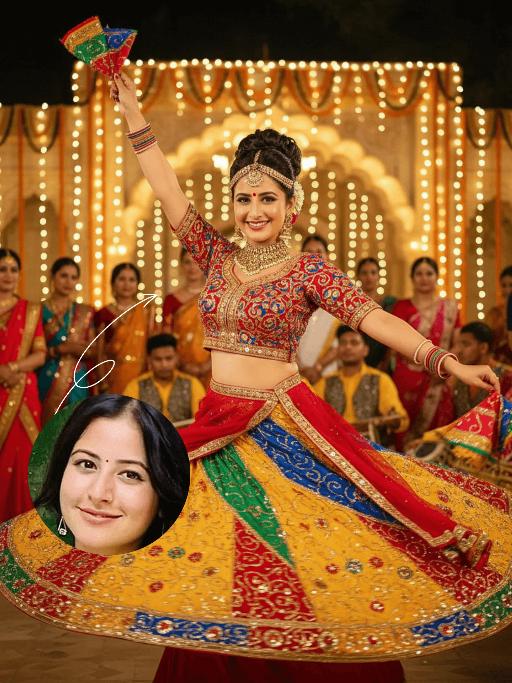
Vijayadashami AI effects generated image

Vijayadashami

The identity of the uploaded portrait is strictly preserved (retaining facial contours, authentic Indian skin tone, hairstyle and age). This is a bust portrait that captures the original natural features of the Indian woman in the reference image: she has a delicate and radiant face with a vermilion red bindi on her forehead, her jet-black long hair styled into a traditional high bun, and adorns herself with a golden crown-shaped hair ornament, as well as exquisite gold earrings and a necklace. She is dressed in a magnificent traditional Garba dance costume: the blouse is a cropped fitted top with contrasting peacock blue and bright red embroidery, fully embellished with golden patterns; the skirt is an ultra-flared multi-layered long dress featuring highly saturated hues of bright yellow, orange-red, emerald green and sapphire blue, covered in elaborate embroidery and sequins, with the hem billowing dramatically as she dances. A red sari belt cinches her waist, and she holds a rainbow-colored embroidered square scarf in each hand. Frozen in the climax of the dance, her body stretches and spins widely—one hand lifts a scarf high, the other extends outward, and the skirt fans out in a perfect circle. She wears a brilliant smile, her eyes bright and brimming with vitality, and her posture exudes both power and rhythmic grace. The scene is a nighttime celebration for Navratri/Dussehra, set against traditional Indian architecture adorned with dazzling fairy lights and flower arches. Around her are dancers and audiences in traditional attire, with musicians playing Tabla, Tambura and other classical Indian instruments, creating an exuberant and joyful atmosphere. Warm yellow festive lights stream down from above and the sides, casting a soft halo around her figure. The sequins and embroidery on her costume shimmer brilliantly in the light, and the motion blur of the colorful skirt hem amplifies the vitality and ambiance of the frame. Boasting 8K ultra-high definition resolution and commercial-grade portrait quality, the image features rich, saturated colors and crisp, distinct details, highlighting the fervor of the festival and the infectious power of the dance.

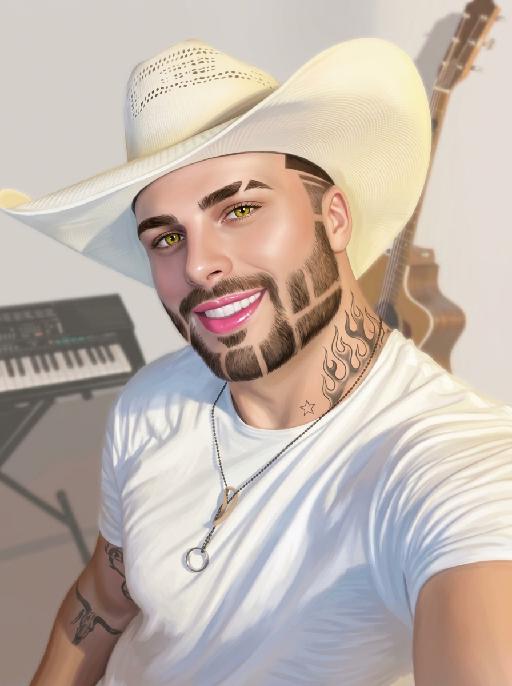
Goofy AI effects generated image

Goofy

The person's skin has a porcelain-like smoothness with a photo-retouching effect. The posture and facial features of the person in the uploaded picture remain unchanged (the posture is consistent, the hairstyle and clothing have not been modified, the hairstyle and clothing remain the same, and the picture background has not been altered). However, the triangular incision at the hairline + side straight shaving lines, sharp eyebrows + obvious broken eyebrows (with a mid-section cut-off gap) design, and also neat gaps with cut segments on the beard; the overall style of the entire picture has transformed into a portrait style that combines 60% digital painting style and 40% real photography style. The person's skin is as smooth and flawless as porcelain, having undergone deep beauty treatment. The eyes are gold-green contact lenses, the lips are painted with shiny pink lipstick, there is a tribal flame tattoo on the neck, and a small star tattoo on the collarbone. The background is the same as the original picture, with a bright filter added, presenting a low saturation and blurry effect, 8K resolution, and beautiful Instagram filter effect. The lines are simple and smooth, with a low overall contrast, a plain style but with bright and rich colors.

Kid Dance

"Create an AI-generated image based on the provided reference image. The subject's appearance (facial features, hairstyle, clothing, and overall temperament) should remain unchanged, as provided by the user, and the background must stay identical to the one in the reference image without modification. The posture of the subject should closely resemble the gesture in reference image 2, with the following detailed description: both hands are fully open, raised to shoulder height, with the palms facing forward and fingers spread out towards the screen. The left hand is slightly raised, with fingers slightly curled, while the palm remains open. A small amount of yellow paint is applied, evenly spread across the palm and part of the fingertips. The right hand is positioned similarly to the left, slightly more parallel to the body, with less finger curvature, and the palm faces the screen. A small amount of red paint is applied, evenly spread across the palm and fingertips. The paint on both hands should be evenly applied and natural, without excess, maintaining a relaxed and natural gesture. The background should match the environment from the reference image. The resulting image should have a higher resolution and finer textures, ensuring the paint on the hands looks natural and not overdone, while maintaining an artistic and relaxed style."

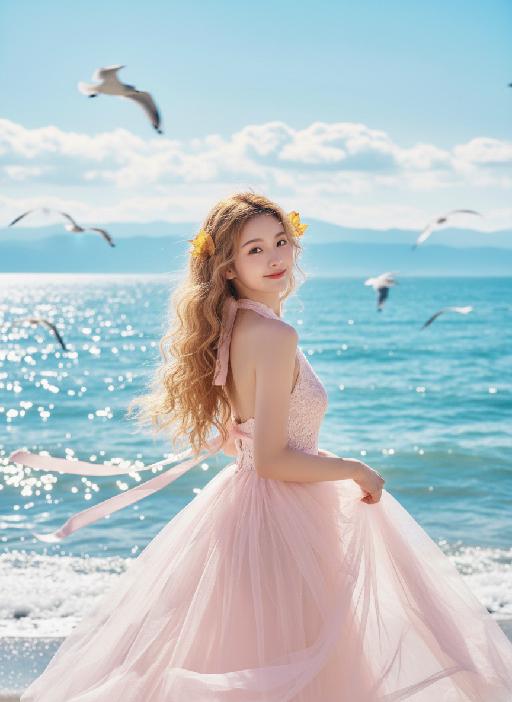
Blue Ocean AI effects generated image

Blue Ocean

Strictly lock the facial features of the uploaded portrait (completely preserve facial contours, native skin tone, hairstyle and age); young girl with light golden long curly hair, Korean sweet style looks, delicate facial features with clear nude makeup and light pink blush, gentle and lively eyes, smiling and looking back sideways, hair fluttering in the sea breeze; wearing a light pink lace halter tulle dress with a flowing skirt and pink ribbons fluttering in the wind; background is the blue Erhai Lake/seaside, sparkling sea with white waves, fluffy white clouds in the sky, flocks of seagulls flying freely, light cyan mountains in the distance; overall fresh and healing seaside atmosphere photo, soft and transparent natural light, high saturation fresh tones, cinematic lighting, motion blur (seagulls/hair), full of details, 8K ultra-clear, realistic human photography, flawless, Japanese fresh + Korean pictorial style

Sculpted Form AI effects generated image

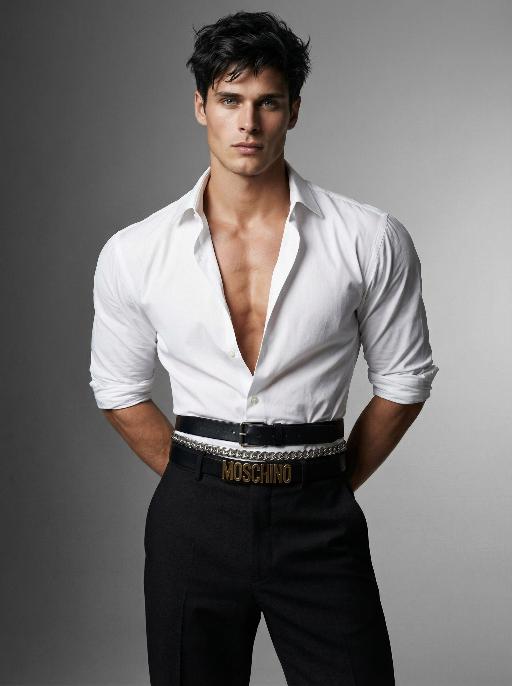
Sculpted Form

Use the exact same facial features, gender, and age as the character in the uploaded image. Photorealistic fashion studio portrait, half-body shot.Dark, slightly messy, textured hair with a modern, tousled style.The figure stands with both hands behind the back, head turned slightly to the left, gaze directed at the camera with a confident, intense expression.Wearing a crisp white dress shirt, unbuttoned at the chest to reveal a defined, muscular chest and collarbones, sleeves rolled up to the elbows. The shirt is tailored to accentuate extremely broad, sculpted shoulders, while the multiple layered belts cinch the waist tightly to create a dramatic, ultra-narrow waistline, emphasizing an extreme hourglass silhouette. Multiple layered belts cinch the waist: a wide black leather belt with a silver buckle, a silver chain belt, and a black belt with prominent gold lettering, creating a bold, edgy waist detail that further narrows the waist. High-waisted, tailored black trousers complete the look, tapering at the waist to enhance the contrast between broad shoulders and a narrow waist.Background is a seamless, gradient gray studio backdrop, transitioning from light to dark.Lighting is soft yet directional, with studio key light sculpting the facial features, muscular contours, and the dramatic contrast between broad shoulders and a narrow waist, creating subtle shadows and highlights on the skin and clothing.Overall mood is confident, intense, and high-fashion.High detail skin texture, cinematic lighting, shallow depth of field, 8K resolution, ultra-realistic, no text or watermarks.

Load more

Next-Gen Multi-Model AI Video Architecture

Vivago AI isn't just one engine—it’s a unified hub for the world’s most advanced video AI. Whether you need cinematic realism or high-speed social content, we provide the right model for your creative vision.

Free Generate

Beauty and Dolphins

Vacation Time

Stellar Tear

Fish Tank Supervisor

Cinematic Quality & Precision Control

Enables 4K resolution with multi-lens motion control, generating delicate scene via text prompts for customized cinematography.​

TRY NOW

Dynamic AV Sync

Auto-generates original audio to avoid copyright issues. Build 3D immersive environments through layered sound design automatically.

TRY NOW

OpenAI Sora 2

​Advanced visual storytelling with unparalleled physics and consistency.

TRY NOW

Kling v2.6 Pro

Industry-leading cinematic image animation and motion control.

TRY NOW

Google Veo 3 & 3.1

Ultra-fast generation with enhanced realism for creative workflows.

TRY NOW

Vivago AI 2.0

Our proprietary model optimized for efficiency, speed, and cost-effective generation.

TRY NOW

Users' Voice

We listen carefully to the opinions of every user.
Free Generate
Contact Us
I tried the Lip Sync feature inside Vivago.ai’s AI Video Generator for my educational podcast, and the results were stunning! The avatar's lip movements perfectly matched my audio recording, creating a professional AI-generated video without complex editing. Compared with tools like OpenAI Sora 2 and Google Veo 3.1, Vivago Image-to-Video delivers fast, studio-quality results online. It saved me hours of post-production work.
ElenaM (Spain)
Vivago’s Image-to-Video AI transformed my marketing workflow. I uploaded a product image and described the launch scene in text, and it generated a 10-second cinematic AI video with background music and dynamic visuals. The output quality rivals Kling v2.6 Pro and Google Veo 3 Fast. It’s now my go-to AI video generator for social media ads and product campaigns.
KenjiT (Japan)
As a digital artist, I use Vivago.ai 2.0 daily for Image-to-Image and AI Image-to-Video creation. The e-book covers and animated visuals I generate for clients look cinematic and professional. Unlike many standalone AI tools, Vivago integrates multiple leading models into one platform, making it easier to create copyright-safe AI images and videos for publishing.
ChenL (China)
I tried the Lip Sync feature inside Vivago.ai’s AI Video Generator for my educational podcast, and the results were stunning! The avatar's lip movements perfectly matched my audio recording, creating a professional AI-generated video without complex editing. Compared with tools like OpenAI Sora 2 and Google Veo 3.1, Vivago Image-to-Video delivers fast, studio-quality results online. It saved me hours of post-production work.
ElenaM (Spain)
Vivago’s Image-to-Video AI transformed my marketing workflow. I uploaded a product image and described the launch scene in text, and it generated a 10-second cinematic AI video with background music and dynamic visuals. The output quality rivals Kling v2.6 Pro and Google Veo 3 Fast. It’s now my go-to AI video generator for social media ads and product campaigns.
KenjiT (Japan)
As a digital artist, I use Vivago.ai 2.0 daily for Image-to-Image and AI Image-to-Video creation. The e-book covers and animated visuals I generate for clients look cinematic and professional. Unlike many standalone AI tools, Vivago integrates multiple leading models into one platform, making it easier to create copyright-safe AI images and videos for publishing.
ChenL (China)
I absolutely love Vivago’s AI Image-to-Video Generator. As a travel blogger, static images often fail to capture real atmosphere, but Vivago helps me turn photos into vivid cinematic AI videos with motion effects. It feels comparable to OpenAI Sora 2 and Google Veo 3.1, but more accessible and faster for creators who need high-quality AI videos online.
LiamK (Australia)
I tried the Lip Sync feature inside Vivago.ai’s AI Video Generator for my educational podcast, and the results were stunning! The avatar's lip movements perfectly matched my audio recording, creating a professional AI-generated video without complex editing. Compared with tools like OpenAI Sora 2 and Google Veo 3.1, Vivago Image-to-Video delivers fast, studio-quality results online. It saved me hours of post-production work.
ElenaM (Spain)
Vivago’s Image-to-Video AI transformed my marketing workflow. I uploaded a product image and described the launch scene in text, and it generated a 10-second cinematic AI video with background music and dynamic visuals. The output quality rivals Kling v2.6 Pro and Google Veo 3 Fast. It’s now my go-to AI video generator for social media ads and product campaigns.
KenjiT (Japan)
As a digital artist, I use Vivago.ai 2.0 daily for Image-to-Image and AI Image-to-Video creation. The e-book covers and animated visuals I generate for clients look cinematic and professional. Unlike many standalone AI tools, Vivago integrates multiple leading models into one platform, making it easier to create copyright-safe AI images and videos for publishing.
ChenL (China)
I absolutely love Vivago’s AI Image-to-Video Generator. As a travel blogger, static images often fail to capture real atmosphere, but Vivago helps me turn photos into vivid cinematic AI videos with motion effects. It feels comparable to OpenAI Sora 2 and Google Veo 3.1, but more accessible and faster for creators who need high-quality AI videos online.
LiamK (Australia)
Using Vivago.ai’s Image-to-Video AI has greatly enhanced my classroom teaching. I transform textbook notes into historical AI videos with cinematic filters and dynamic animations. Compared with tools like Kling v2.6 Pro and Google Veo 3 Fast, Vivago offers faster generation and easier parameter control for educators who need reliable AI video creation.
RajivG (India)
I frequently create AI videos on Vivago and publish them on TikTok and YouTube Shorts. The AI video templates and trending content ideas help me produce viral-ready clips quickly. With Vivago’s integrated models—including advanced video engines similar to OpenAI Sora 2—I can generate anime-style and cinematic social media videos that drive high engagement.
MarieJ (Spain)
What attracts me most about Vivago.ai is not only the powerful AI Video Generator but also the active AIGC creator community. It combines AI Image-to-Video, Text-to-Video, and leading model integrations like Google Veo 3.1 into one creative platform.
TomW (India)
At first, I was hesitant about using AI video tools. But after trying Vivago Image-to-Video, I realized how easy it is to create professional AI-generated videos online. I just upload an image, add a short prompt, and adjust a few settings. The results are cinematic and copyright-safe, which is essential for commercial projects.
HectorC (Mexico)
Using Vivago.ai’s Image-to-Video AI has greatly enhanced my classroom teaching. I transform textbook notes into historical AI videos with cinematic filters and dynamic animations. Compared with tools like Kling v2.6 Pro and Google Veo 3 Fast, Vivago offers faster generation and easier parameter control for educators who need reliable AI video creation.
RajivG (India)
I frequently create AI videos on Vivago and publish them on TikTok and YouTube Shorts. The AI video templates and trending content ideas help me produce viral-ready clips quickly. With Vivago’s integrated models—including advanced video engines similar to OpenAI Sora 2—I can generate anime-style and cinematic social media videos that drive high engagement.
MarieJ (Spain)
What attracts me most about Vivago.ai is not only the powerful AI Video Generator but also the active AIGC creator community. It combines AI Image-to-Video, Text-to-Video, and leading model integrations like Google Veo 3.1 into one creative platform.
TomW (India)
At first, I was hesitant about using AI video tools. But after trying Vivago Image-to-Video, I realized how easy it is to create professional AI-generated videos online. I just upload an image, add a short prompt, and adjust a few settings. The results are cinematic and copyright-safe, which is essential for commercial projects.
HectorC (Mexico)