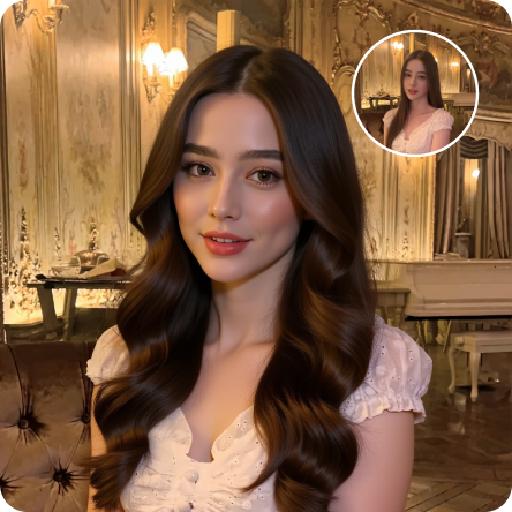
Curl Pop

Transform your photo into something extraordinary with AI. Try this AI transformation effect free on Vivago AI.

Use Template
arrow

FAQs

What are Effect Templates?

Effect Templates are predefined AI workflows that automatically transform static images into specific visual styles or animated formats, delivering consistent, high-quality results without manual adjustments.

How do I apply Effect Templates?

Select your preferred template > Upload an image > Generate. No text prompts required - templates handle all style parameters.

Where can I find more templates?

Explore 1000+ curated templates in our Explore Hub: https://vivago.ai/studio. New templates added weekly across categories.

What's the pricing?

Daily login grants 100 free credits. Exhausted credits? Choose: 1) Subscribe a membership plan, 2) Get a credit pack. Details: https://vivago.ai/subscribe

More From VIVAGO AI

Magazine Cover AI effects generated image

Magazine Cover

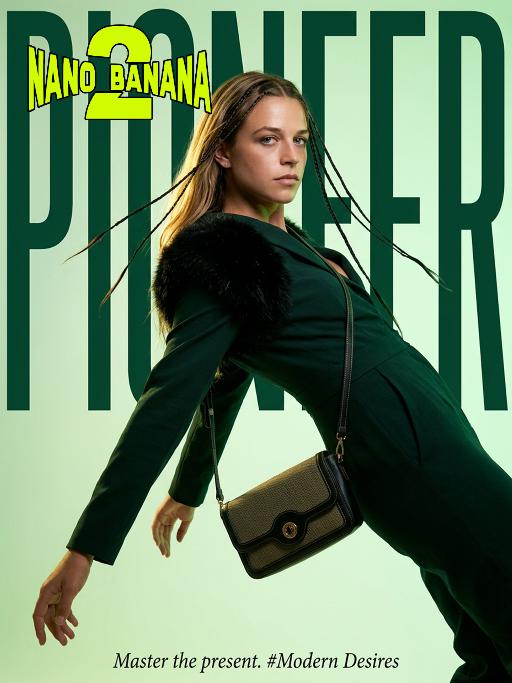
This is the cover of the high-end fashion magazine series, with the title presented in a large, deep green, design-oriented sans-serif font: "PIONEER". The figure is positioned in front of the text (occupying 80% of the overall picture) and is captured in a medium close-up shot. The cover presents a radiant scene (with no changes in facial features, gender, or age), presented through the uploaded image. The expression is serious and cool, with a few flowing and slender black braids, exquisite makeup, exceptionally good skin condition, wearing a well-tailored dark green outfit, with soft black fur decoration on the shoulders, holding a retro high-end custom crossbody bag, the body is in an inclined hanging position, the arms are stretched out, with a charming expression and exquisite makeup. The background is a gradient of light green, the strong contrast of light highlights the facial contours and hair texture. The focal length is 50mm, captured with a professional portrait camera, clear focus, using an elegant editing style, with modern and avant-garde aesthetic style. The exquisite small font layout adds to the content: "Master the present. #Modern Desires"

Princess AI effects generated image

Princess

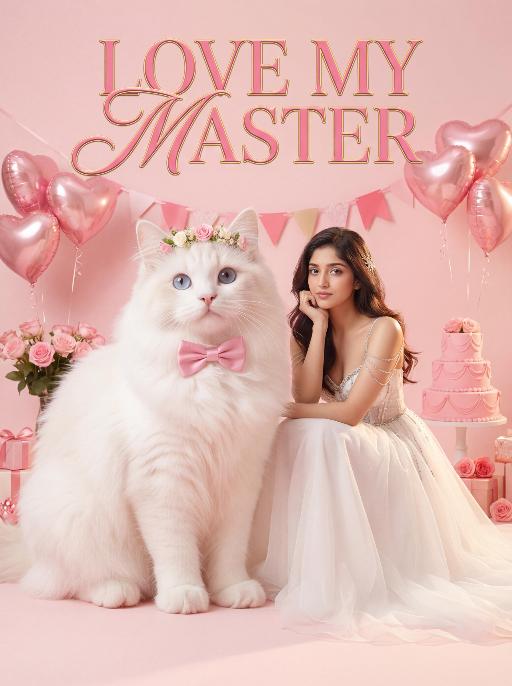
Surreal photography art: In the uploaded picture, the pet (with its features remaining the same, but its size transformed into a huge one with fluffy fur, occupying the left side of the picture and wearing cute accessories), and a person in the uploaded picture (with unchanged facial features, gender, and age) wearing an exquisite white high-end custom dress (wearing delicate accessories), places their chin on their hand and sits slightly on the ground beside the aforementioned pet, with the proportion of the pet and the person in the picture being 1 to 1; the color scheme is pink, with a natural realistic style, a photography studio photography style, the background is a simple pale pink clean photography studio background surface, surrounded by pink cakes and roses, with princess-style, Valentine's Day elements such as heart-shaped decorative balloons, a realistic pet photography style. High-key, soft, bright light, soft diffused shadows, warm low saturation tones (mutton white, pink, warm orange), creating a warm, intimate romantic Valentine's Day atmosphere between the pet and the person, fashionable avant-garde photography art, realistic film-level realistic effect, with a large title artistic design font: LOVE MY MASTER

Cool Boss AI effects generated image

Cool Boss

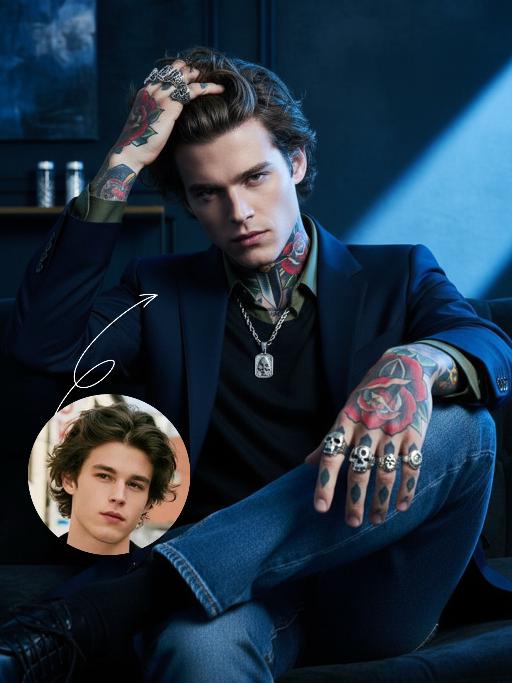
The first uploaded portrait is used for strict identity consistency (with unchanged facial features, hairstyle, skin tone and age). His body is covered in traditional American realistic tattoos – an intricate rose and dagger pattern adorns his neck, and delicate skull and poker card motifs feature on both hands, with sharp lines and rich, saturated colors. He wears multiple heavy metal-style rings on his fingers and a silver necklace. The frame employs dramatic lighting in bold blue and dark tones, with a large wash of soft side light slanting in from the right side of the frame to create an extensive tintype effect, which outlines his facial contours and the fine details of his tattoos. His facial expression is fraught with tension, and his eyes are as sharp as an eagle’s. Boasting 8K resolution, the overall style embodies high-end, fashion-forward artistic photography. The man, dressed in a tailored suit blazer set with a dark green shirt and matching suit trousers, sits on a sofa in an utterly relaxed posture. He stares directly at the camera, exuding poise and confidence. He then slowly shifts his weight, crossing one leg over the other, before running his fingers through his hair. The camera pans slightly to the left, capturing his subtle movements and the way light casts over his tattoos, further amplifying the dynamic feel of the frame.

Hollywood Star AI effects generated image

Hollywood Star

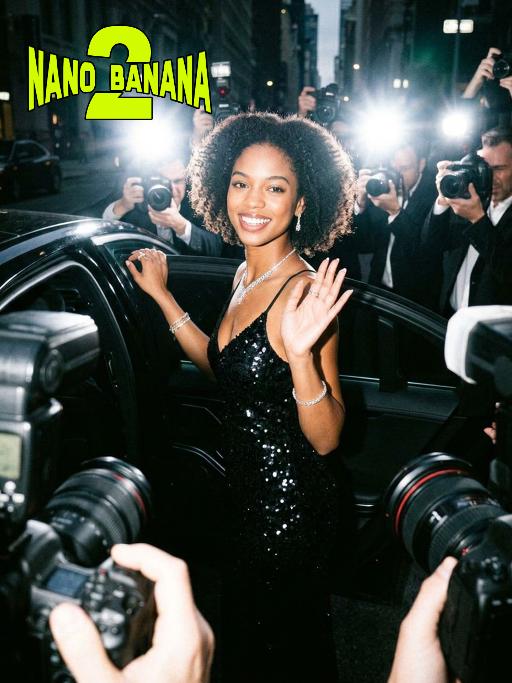
A medium close-up shot from a frontal perspective with a slight upward tilt, the camera angle is slightly tilted forward. This shot was taken using a professional full-frame digital SLR camera and a 50mm f/1.2 wide-angle fixed-focus lens. The uploaded image shows a person (with unchanged facial features, gender, age, and hairstyle), wearing a tight black sequined sexy dress and wearing high-end custom accessories. This figure is preparing to get into a black luxury car with open doors. The figure turns halfway and looks at the camera, raising one hand and making a gentle waving or shielding gesture. The person has a relaxed and confident smile on their face, with bright and expressive eyes. The scene is on a night-time city street, illuminated by a group of paparazzi and a large number of flashes, creating a high-contrast light and shadow effect, with shadows and bright highlights, and the foreground also includes cameras and flashes, creating the feeling that the celebrity figure is surrounded by paparazzi and cameras. This aesthetic style is the street style of Hollywood celebrity paparazzi, featuring grainy film texture, clear focus on the subject, blurred background and dark tones. The person's face is illuminated by the flash, and the makeup characteristic of the figure is exaggerated false eyelashes, clear cheekbones, nude matte lip color and bright highlights used to enhance the three-dimensionality; the picture adds dark corners at the four corners and bright parts in the middle, creating a strong contrast between light and shadow.

Princess AI effects generated image

Princess

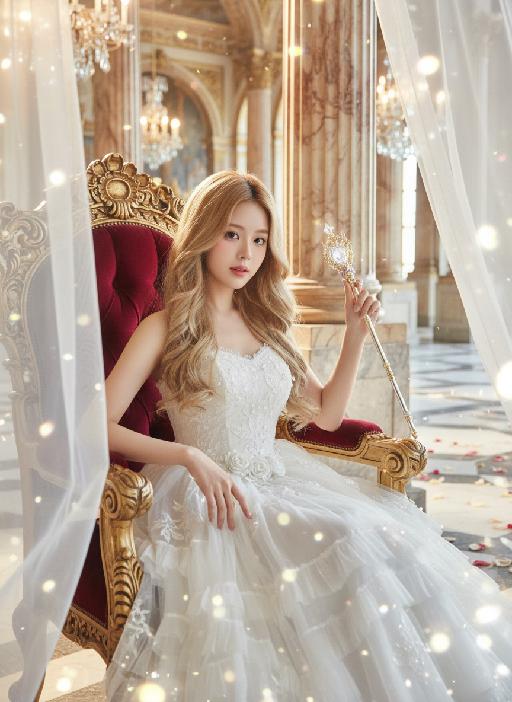
Strictly lock the facial features of the uploaded portrait (completely preserve facial contours, native skin tone, hairstyle and age); medium shot (bust-up), young girl with light golden long curly hair, Korean sweet style looks, delicate facial features with clear nude makeup and light pink blush, proud and elegant princess demeanor, sitting gracefully on an ornate throne with one hand resting lightly on the armrest and the other gently holding a delicate scepter/flower, head tilted slightly with a haughty yet gentle gaze; wearing a white strapless tulle dress with multi-layered flowing tulle skirt, delicate white lace embroidery and subtle pearl decorations, exuding a noble and dreamy fairy-tale princess aura; background is a magnificent and dreamy royal palace hall with towering marble columns, intricate golden carvings, soft warm chandelier light casting a glowing halo around her, sheer white tulle curtains fluttering gently, scattered rose petals on the marble floor, distant palace arches blurred into a soft bokeh effect, air filled with sparkling light particles; overall **dreamy fairy-tale + French retro + royal palace princess atmosphere photo, soft and ethereal ambient light, warm romantic film texture, high saturation dreamy tones, cinematic lighting with glowing rim light, motion blur (light particles/curtains), rich texture details, 8K ultra-clear, realistic human photography, flawless, full of magical and noble royal princess charm

Street Youth AI effects generated image

Street Youth

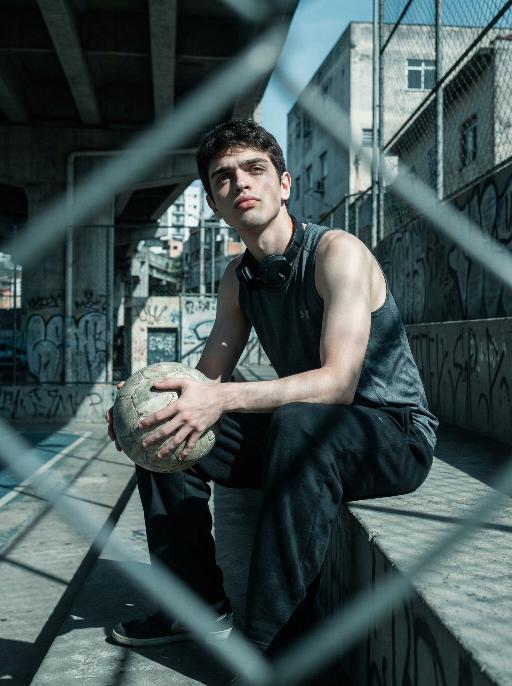
Use the exact same facial features, gender, and age as the character in the uploaded image.Photorealistic urban soccer portrait in São Paulo, street culture style, industrial texture, strong sense of reality and perseverance. Setting: old community court under overpass, concrete stands, wire fence, graffiti walls, city buildings in background. Outfit: dark sports tank top or vintage club jersey, loose sweatpants or jeans, headphones or towel around neck, holding a worn football. Pose: facing forward directly, sitting on stadium stand with head slightly lowered in thought while gaze drifts upward toward the camera, or sitting upright facing forward with distinct shoulder lines, conveying struggle and toughness under urban pressure. Lighting: low saturation cool gray tone, cyan-blue shadows, natural warm skin contrast, strong chiaroscuro, hard light. Composition: medium to long shot, blurred wire fence foreground for layers, symmetrical composition or compressed space, horizontal frame, strict front-facing camera angle centered on the subject. Style: high detail, realistic skin texture, cinematic tone, 8K ultra-realistic, no text or watermarks.

Miss Brazil AI effects generated image

Miss Brazil

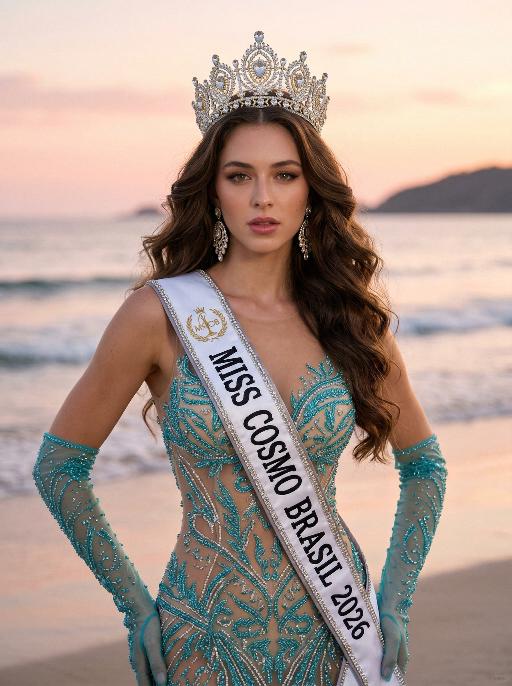
Use the exact same facial features, gender, and age as the uploaded image. A Brazilian beauty pageant titleholder with long, voluminous wavy dark brown hair, adorned with an elaborate, intricately bejeweled silver and gold crown featuring sparkling crystals and ornate detailing. A white satin sash with bold black text reading "MISS COSMO BRASIL 2026" is draped diagonally across the torso, accented with a small circular emblem at the top. The figure wears a form-fitting, sheer evening gown with a nude mesh base, intricately embroidered with shimmering turquoise and silver beaded patterns in swirling, organic motifs. Matching long, sheer turquoise beaded gloves extend to the forearms, mirroring the gown's design. Large, dangling chandelier-style earrings with clear crystals frame the face, complementing the crown's opulence. The setting is a golden-hour beach at sunset, with soft pink and orange hues painting the sky, gentle ocean waves lapping at the sandy shore, and a distant landmass visible on the horizon. Professional portrait photography, soft warm lighting, high detail, 8K ultra-realistic, glamorous pageant aesthetic, no harsh glares, shallow depth of field to emphasize the subject against the serene coastal backdrop.

Load more

Next-Gen Multi-Model AI Video Architecture

Vivago AI isn't just one engine—it’s a unified hub for the world’s most advanced video AI. Whether you need cinematic realism or high-speed social content, we provide the right model for your creative vision.

Free Generate

Beauty and Dolphins

Vacation Time

Stellar Tear

Fish Tank Supervisor

Cinematic Quality & Precision Control

Enables 4K resolution with multi-lens motion control, generating delicate scene via text prompts for customized cinematography.​

TRY NOW

Dynamic AV Sync

Auto-generates original audio to avoid copyright issues. Build 3D immersive environments through layered sound design automatically.

TRY NOW

OpenAI Sora 2

​Advanced visual storytelling with unparalleled physics and consistency.

TRY NOW

Kling v2.6 Pro

Industry-leading cinematic image animation and motion control.

TRY NOW

Google Veo 3 & 3.1

Ultra-fast generation with enhanced realism for creative workflows.

TRY NOW

Vivago AI 2.0

Our proprietary model optimized for efficiency, speed, and cost-effective generation.
TRY NOW

Users' Voice

We listen carefully to the opinions of every user.
Free Generate
Contact Us
I tried the Lip Sync feature inside Vivago.ai’s AI Video Generator for my educational podcast, and the results were stunning! The avatar's lip movements perfectly matched my audio recording, creating a professional AI-generated video without complex editing. Compared with tools like OpenAI Sora 2 and Google Veo 3.1, Vivago Image-to-Video delivers fast, studio-quality results online. It saved me hours of post-production work.
ElenaM (Spain)
Vivago’s Image-to-Video AI transformed my marketing workflow. I uploaded a product image and described the launch scene in text, and it generated a 10-second cinematic AI video with background music and dynamic visuals. The output quality rivals Kling v2.6 Pro and Google Veo 3 Fast. It’s now my go-to AI video generator for social media ads and product campaigns.
KenjiT (Japan)
As a digital artist, I use Vivago.ai 2.0 daily for Image-to-Image and AI Image-to-Video creation. The e-book covers and animated visuals I generate for clients look cinematic and professional. Unlike many standalone AI tools, Vivago integrates multiple leading models into one platform, making it easier to create copyright-safe AI images and videos for publishing.
ChenL (China)
I tried the Lip Sync feature inside Vivago.ai’s AI Video Generator for my educational podcast, and the results were stunning! The avatar's lip movements perfectly matched my audio recording, creating a professional AI-generated video without complex editing. Compared with tools like OpenAI Sora 2 and Google Veo 3.1, Vivago Image-to-Video delivers fast, studio-quality results online. It saved me hours of post-production work.
ElenaM (Spain)
Vivago’s Image-to-Video AI transformed my marketing workflow. I uploaded a product image and described the launch scene in text, and it generated a 10-second cinematic AI video with background music and dynamic visuals. The output quality rivals Kling v2.6 Pro and Google Veo 3 Fast. It’s now my go-to AI video generator for social media ads and product campaigns.
KenjiT (Japan)
As a digital artist, I use Vivago.ai 2.0 daily for Image-to-Image and AI Image-to-Video creation. The e-book covers and animated visuals I generate for clients look cinematic and professional. Unlike many standalone AI tools, Vivago integrates multiple leading models into one platform, making it easier to create copyright-safe AI images and videos for publishing.
ChenL (China)
I absolutely love Vivago’s AI Image-to-Video Generator. As a travel blogger, static images often fail to capture real atmosphere, but Vivago helps me turn photos into vivid cinematic AI videos with motion effects. It feels comparable to OpenAI Sora 2 and Google Veo 3.1, but more accessible and faster for creators who need high-quality AI videos online.
LiamK (Australia)
I tried the Lip Sync feature inside Vivago.ai’s AI Video Generator for my educational podcast, and the results were stunning! The avatar's lip movements perfectly matched my audio recording, creating a professional AI-generated video without complex editing. Compared with tools like OpenAI Sora 2 and Google Veo 3.1, Vivago Image-to-Video delivers fast, studio-quality results online. It saved me hours of post-production work.
ElenaM (Spain)
Vivago’s Image-to-Video AI transformed my marketing workflow. I uploaded a product image and described the launch scene in text, and it generated a 10-second cinematic AI video with background music and dynamic visuals. The output quality rivals Kling v2.6 Pro and Google Veo 3 Fast. It’s now my go-to AI video generator for social media ads and product campaigns.
KenjiT (Japan)
As a digital artist, I use Vivago.ai 2.0 daily for Image-to-Image and AI Image-to-Video creation. The e-book covers and animated visuals I generate for clients look cinematic and professional. Unlike many standalone AI tools, Vivago integrates multiple leading models into one platform, making it easier to create copyright-safe AI images and videos for publishing.
ChenL (China)
I absolutely love Vivago’s AI Image-to-Video Generator. As a travel blogger, static images often fail to capture real atmosphere, but Vivago helps me turn photos into vivid cinematic AI videos with motion effects. It feels comparable to OpenAI Sora 2 and Google Veo 3.1, but more accessible and faster for creators who need high-quality AI videos online.
LiamK (Australia)
Using Vivago.ai’s Image-to-Video AI has greatly enhanced my classroom teaching. I transform textbook notes into historical AI videos with cinematic filters and dynamic animations. Compared with tools like Kling v2.6 Pro and Google Veo 3 Fast, Vivago offers faster generation and easier parameter control for educators who need reliable AI video creation.
RajivG (India)
I frequently create AI videos on Vivago and publish them on TikTok and YouTube Shorts. The AI video templates and trending content ideas help me produce viral-ready clips quickly. With Vivago’s integrated models—including advanced video engines similar to OpenAI Sora 2—I can generate anime-style and cinematic social media videos that drive high engagement.
MarieJ (Spain)
What attracts me most about Vivago.ai is not only the powerful AI Video Generator but also the active AIGC creator community. It combines AI Image-to-Video, Text-to-Video, and leading model integrations like Google Veo 3.1 into one creative platform.
TomW (India)
At first, I was hesitant about using AI video tools. But after trying Vivago Image-to-Video, I realized how easy it is to create professional AI-generated videos online. I just upload an image, add a short prompt, and adjust a few settings. The results are cinematic and copyright-safe, which is essential for commercial projects.
HectorC (Mexico)
Using Vivago.ai’s Image-to-Video AI has greatly enhanced my classroom teaching. I transform textbook notes into historical AI videos with cinematic filters and dynamic animations. Compared with tools like Kling v2.6 Pro and Google Veo 3 Fast, Vivago offers faster generation and easier parameter control for educators who need reliable AI video creation.
RajivG (India)
I frequently create AI videos on Vivago and publish them on TikTok and YouTube Shorts. The AI video templates and trending content ideas help me produce viral-ready clips quickly. With Vivago’s integrated models—including advanced video engines similar to OpenAI Sora 2—I can generate anime-style and cinematic social media videos that drive high engagement.
MarieJ (Spain)
What attracts me most about Vivago.ai is not only the powerful AI Video Generator but also the active AIGC creator community. It combines AI Image-to-Video, Text-to-Video, and leading model integrations like Google Veo 3.1 into one creative platform.
TomW (India)
At first, I was hesitant about using AI video tools. But after trying Vivago Image-to-Video, I realized how easy it is to create professional AI-generated videos online. I just upload an image, add a short prompt, and adjust a few settings. The results are cinematic and copyright-safe, which is essential for commercial projects.
HectorC (Mexico)