Image to Image

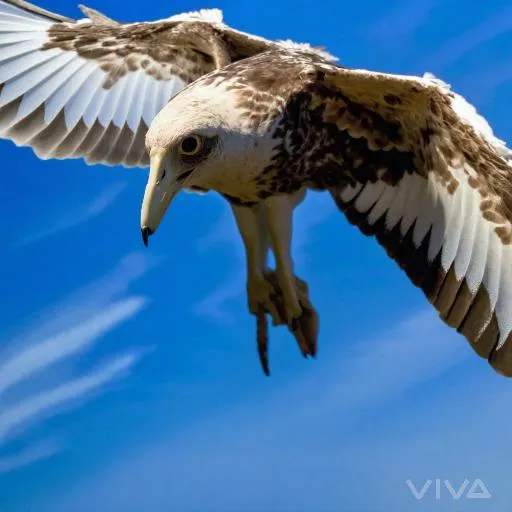
Capture majestic large bird in flight with wide wingspan, showcasing striking white-gray feather patterns against deep blue sky. Tranquil, cloudless backdrop evokes freedom. Generated using vivago.ai's professional-grade AI tools for vibrant, detailed nature imagery. Ideal for wallpapers, nature art, and digital projects.

Recreate
arrow
Image to Image

FAQs

How to generate images/videos from text prompts?

Describe the visual content in natural language (e.g., 'A cyberpunk cat wearing neon goggles') and our AI models will create outputs. Complex prompts trigger multi-stage NLP parsing for enhanced accuracy.

How to refine unsatisfactory results?

Use our Prompt Bot - an AI-powered optimizer that suggests technical modifiers. Simply describe your ideas, desired changes ('more metallic texture'), then you will get optimized prompt variants.

When should I use reference images?

Upload references to: 1) Guide character consistency (e.g., faces/outfits), 2) Control motion patterns in videos using our feature matching algorithm. Supports JPG/PNG

What's the credit system?

Daily login grants 100 credits. Upgrade options: 1) Premium Membership, 2) Credit Packs. Details: https://vivago.ai/subscribe

More From VIVAGO AI

Image to Video

"The scene begins with a medium or close-up shot, clearly revealing the subject(s) from the image standing and dancing within the frame.\nAs the camera slowly pulls back, the full bodies of all the animals are gradually revealed. At the same time, they all stand upright and are dressed in bunny-girl-inspired outfits.\nThey begin to dance in an anthropomorphic manner: standing on two legs with their front paws placed on their hips, elegantly swaying their hips from side to side with a soft, subtly seductive rhythm. Their facial expressions are lively and playful, maintaining direct eye contact with the camera, accompanied by slight nods or head tilts to enhance the sense of interaction with the viewer.\nAll animals wear coordinated bunny-girl-themed costumes (with possible slight variations in color and details), which include:\nA form-fitting, waist-cinching bunny-style corset\nA veil or bunny ear accessory worn on the head\nA light, sheer scarf tied around the waist that flutters naturally with their dance movements\nNote:\nThe exact number of subjects must be determined based on the uploaded image.\nThe subject count could be one or multiple—please identify the precise number and use it clearly in the description."

Image To Video

Create a 1/7 scale commercialized figure of the character in the illustration, in a realistic style and environment. Render the exact hairstyle and the same outfit with the uploaded figure. Render garments as molded plastic with engraved seams and sculpted folds; keep accessories as plastic parts. Fictionalize any brand text/logos while keeping layout and colors. Place the figure on a computer desk, using a circular transparent acrylic base without any text. On the Apple computer screen, display the Z Brush modeling process of the figure. Next to the Apple computer screen, place a BANDAl-style toy packaging box printed with the original artwork. The background shows a modern realistic room furnished with contemporary furniture, including a display cabinet filled with books, dolls, and scale figures, adding a casual and everyday atmosphere. Behind the Apple computer, place a desk lamp to add detail and depth to the scene.

Battle

These two individuals had angry and serious expressions, raised their fists, and assumed a fighting stance. They began to engage in a fierce struggle, launching a fierce confrontation. They quickly and powerfully punched each other's faces (one person hit the other's face three times in a row with a powerful punch, and the other person, in an angry state, roared and forcefully hit back three times). They also kicked each other's bodies with their feet. The camera captured the intensity of their movements, focusing on the tension of their bodies and the impact force generated by each punch. The background remained still, and the camera followed the movements of the characters, causing the dynamic confrontation between the two fighters to stand out, with powerful punches, the state of the boxers, and an intense and tense atmosphere.

Load more

Next-Gen Multi-Model AI Video Architecture

Vivago AI isn't just one engine—it’s a unified hub for the world’s most advanced video AI. Whether you need cinematic realism or high-speed social content, we provide the right model for your creative vision.

Free Generate

Beauty and Dolphins

Vacation Time

Stellar Tear

Fish Tank Supervisor

Cinematic Quality & Precision Control

Enables 4K resolution with multi-lens motion control, generating delicate scene via text prompts for customized cinematography.​

TRY NOW

Dynamic AV Sync

Auto-generates original audio to avoid copyright issues. Build 3D immersive environments through layered sound design automatically.

TRY NOW

OpenAI Sora 2

​Advanced visual storytelling with unparalleled physics and consistency.

TRY NOW

Kling v2.6 Pro

Industry-leading cinematic image animation and motion control.

TRY NOW

Google Veo 3 & 3.1

Ultra-fast generation with enhanced realism for creative workflows.

TRY NOW

Vivago AI 2.0

Our proprietary model optimized for efficiency, speed, and cost-effective generation.

TRY NOW

Users' Voice

We listen carefully to the opinions of every user.
Free Generate
Contact Us
I tried the Lip Sync feature inside Vivago.ai’s AI Video Generator for my educational podcast, and the results were stunning! The avatar's lip movements perfectly matched my audio recording, creating a professional AI-generated video without complex editing. Compared with tools like OpenAI Sora 2 and Google Veo 3.1, Vivago Image-to-Video delivers fast, studio-quality results online. It saved me hours of post-production work.
ElenaM (Spain)
Vivago’s Image-to-Video AI transformed my marketing workflow. I uploaded a product image and described the launch scene in text, and it generated a 10-second cinematic AI video with background music and dynamic visuals. The output quality rivals Kling v2.6 Pro and Google Veo 3 Fast. It’s now my go-to AI video generator for social media ads and product campaigns.
KenjiT (Japan)
As a digital artist, I use Vivago.ai 2.0 daily for Image-to-Image and AI Image-to-Video creation. The e-book covers and animated visuals I generate for clients look cinematic and professional. Unlike many standalone AI tools, Vivago integrates multiple leading models into one platform, making it easier to create copyright-safe AI images and videos for publishing.
ChenL (China)
I tried the Lip Sync feature inside Vivago.ai’s AI Video Generator for my educational podcast, and the results were stunning! The avatar's lip movements perfectly matched my audio recording, creating a professional AI-generated video without complex editing. Compared with tools like OpenAI Sora 2 and Google Veo 3.1, Vivago Image-to-Video delivers fast, studio-quality results online. It saved me hours of post-production work.
ElenaM (Spain)
Vivago’s Image-to-Video AI transformed my marketing workflow. I uploaded a product image and described the launch scene in text, and it generated a 10-second cinematic AI video with background music and dynamic visuals. The output quality rivals Kling v2.6 Pro and Google Veo 3 Fast. It’s now my go-to AI video generator for social media ads and product campaigns.
KenjiT (Japan)
As a digital artist, I use Vivago.ai 2.0 daily for Image-to-Image and AI Image-to-Video creation. The e-book covers and animated visuals I generate for clients look cinematic and professional. Unlike many standalone AI tools, Vivago integrates multiple leading models into one platform, making it easier to create copyright-safe AI images and videos for publishing.
ChenL (China)
I absolutely love Vivago’s AI Image-to-Video Generator. As a travel blogger, static images often fail to capture real atmosphere, but Vivago helps me turn photos into vivid cinematic AI videos with motion effects. It feels comparable to OpenAI Sora 2 and Google Veo 3.1, but more accessible and faster for creators who need high-quality AI videos online.
LiamK (Australia)
I tried the Lip Sync feature inside Vivago.ai’s AI Video Generator for my educational podcast, and the results were stunning! The avatar's lip movements perfectly matched my audio recording, creating a professional AI-generated video without complex editing. Compared with tools like OpenAI Sora 2 and Google Veo 3.1, Vivago Image-to-Video delivers fast, studio-quality results online. It saved me hours of post-production work.
ElenaM (Spain)
Vivago’s Image-to-Video AI transformed my marketing workflow. I uploaded a product image and described the launch scene in text, and it generated a 10-second cinematic AI video with background music and dynamic visuals. The output quality rivals Kling v2.6 Pro and Google Veo 3 Fast. It’s now my go-to AI video generator for social media ads and product campaigns.
KenjiT (Japan)
As a digital artist, I use Vivago.ai 2.0 daily for Image-to-Image and AI Image-to-Video creation. The e-book covers and animated visuals I generate for clients look cinematic and professional. Unlike many standalone AI tools, Vivago integrates multiple leading models into one platform, making it easier to create copyright-safe AI images and videos for publishing.
ChenL (China)
I absolutely love Vivago’s AI Image-to-Video Generator. As a travel blogger, static images often fail to capture real atmosphere, but Vivago helps me turn photos into vivid cinematic AI videos with motion effects. It feels comparable to OpenAI Sora 2 and Google Veo 3.1, but more accessible and faster for creators who need high-quality AI videos online.
LiamK (Australia)
Using Vivago.ai’s Image-to-Video AI has greatly enhanced my classroom teaching. I transform textbook notes into historical AI videos with cinematic filters and dynamic animations. Compared with tools like Kling v2.6 Pro and Google Veo 3 Fast, Vivago offers faster generation and easier parameter control for educators who need reliable AI video creation.
RajivG (India)
I frequently create AI videos on Vivago and publish them on TikTok and YouTube Shorts. The AI video templates and trending content ideas help me produce viral-ready clips quickly. With Vivago’s integrated models—including advanced video engines similar to OpenAI Sora 2—I can generate anime-style and cinematic social media videos that drive high engagement.
MarieJ (Spain)
What attracts me most about Vivago.ai is not only the powerful AI Video Generator but also the active AIGC creator community. It combines AI Image-to-Video, Text-to-Video, and leading model integrations like Google Veo 3.1 into one creative platform.
TomW (India)
At first, I was hesitant about using AI video tools. But after trying Vivago Image-to-Video, I realized how easy it is to create professional AI-generated videos online. I just upload an image, add a short prompt, and adjust a few settings. The results are cinematic and copyright-safe, which is essential for commercial projects.
HectorC (Mexico)
Using Vivago.ai’s Image-to-Video AI has greatly enhanced my classroom teaching. I transform textbook notes into historical AI videos with cinematic filters and dynamic animations. Compared with tools like Kling v2.6 Pro and Google Veo 3 Fast, Vivago offers faster generation and easier parameter control for educators who need reliable AI video creation.
RajivG (India)
I frequently create AI videos on Vivago and publish them on TikTok and YouTube Shorts. The AI video templates and trending content ideas help me produce viral-ready clips quickly. With Vivago’s integrated models—including advanced video engines similar to OpenAI Sora 2—I can generate anime-style and cinematic social media videos that drive high engagement.
MarieJ (Spain)
What attracts me most about Vivago.ai is not only the powerful AI Video Generator but also the active AIGC creator community. It combines AI Image-to-Video, Text-to-Video, and leading model integrations like Google Veo 3.1 into one creative platform.
TomW (India)
At first, I was hesitant about using AI video tools. But after trying Vivago Image-to-Video, I realized how easy it is to create professional AI-generated videos online. I just upload an image, add a short prompt, and adjust a few settings. The results are cinematic and copyright-safe, which is essential for commercial projects.
HectorC (Mexico)