Text to Image

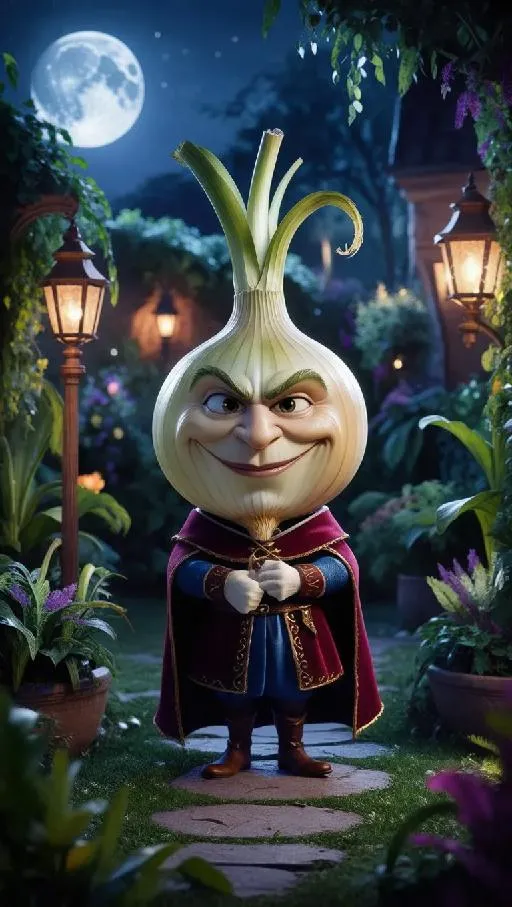
Transform your vision into vivid AI art with a fearsome-faced onion in medieval attire, glowing in a mystical moonlit garden. Explore Pop Art, Pixar-inspired 3D, or realistic styles on VivaGo.ai. Craft vibrant greenery, lantern-lit whimsy, and enchanted atmospheres effortlessly. Elevate your storytelling with professional-grade AI effects for magical, fairy-tale visuals. Unleash creativity in seconds!

Recreate
arrow
Text to Image

FAQs

How to generate images/videos from text prompts?

Describe the visual content in natural language (e.g., 'A cyberpunk cat wearing neon goggles') and our AI models will create outputs. Complex prompts trigger multi-stage NLP parsing for enhanced accuracy.

How to refine unsatisfactory results?

Use our Prompt Bot - an AI-powered optimizer that suggests technical modifiers. Simply describe your ideas, desired changes ('more metallic texture'), then you will get optimized prompt variants.

When should I use reference images?

Upload references to: 1) Guide character consistency (e.g., faces/outfits), 2) Control motion patterns in videos using our feature matching algorithm. Supports JPG/PNG

What's the credit system?

Daily login grants 100 credits. Upgrade options: 1) Premium Membership, 2) Credit Packs. Details: https://vivago.ai/subscribe

More From VIVAGO AI

Cross Earth

"Generate based on the user-uploaded reference image while preserving the subject’s core identity and recognizable features. This includes but is not limited to: subject category, facial structure, proportions, eye characteristics, fur/skin/material texture, color distribution, body traits, age impression, temperament, clothing traits, accessories, and overall recognizability. Whether the uploaded subject is a cat, dog, man, woman, baby, animal, toy, doll, or any other kind of subject, it must remain the same subject. Do not replace its identity, do not significantly alter the face, and do not remove its most recognizable features. Transform the subject into a travel souvenir portrait taken at Christ the Redeemer in Rio de Janeiro, Brazil, on top of Corcovado Mountain. The location must be explicit and fixed: the massive Christ the Redeemer statue must appear clearly in the background, with its stone structure and outstretched arms visible behind the subject, positioned slightly left-behind or directly behind at a higher elevation. The surrounding view must show the elevated panoramic landscape of Rio de Janeiro, including the city below, the bay, water, islands, mountain forms, coastline, and the iconic mountain-and-sea urban geography. The setting must clearly look like the observation area on Corcovado Mountain, and must not be changed into any other city, statue, monument, or mountain viewpoint. The subject should stand in the foreground near the camera in a sightseeing photo pose. If the subject is human or humanoid, use a semi-profile standing pose: the body is turned slightly away or sideways, while the head turns back toward the camera with a smile, creating a natural travel-photo feeling. If the subject is an animal, pet, or non-human figure, adapt it into a cute upright or semi-upright display pose suitable for the same setting, with the body angled slightly sideways and the head turned toward the camera, creating a “looking back at the camera” travel-photo effect. The overall pose should feel natural, relaxed, friendly, and photogenic, like a tourist landmark portrait. The subject’s outfit should remain as close as possible to the original uploaded image. If minimal scene adaptation is needed, only make very slight natural adjustments, but do not change the clothing type, main colors, mood, or recognizability. Do not force a costume change, do not add excessive accessories, and do not break the subject’s identity. The background must be strongly locked to the Christ the Redeemer viewpoint: the large Christ the Redeemer statue is clearly visible behind the subject; below is the panoramic cityscape of Rio de Janeiro with dense urban buildings; farther away there is a visible bay, water, islands, hills, and iconic coastal geography; the perspective is clearly elevated and scenic, like a famous tourist lookout; the sky is clear blue with warm sunlight; the image should feel like real travel photography, not studio photography or a generic artificial backdrop.** Composition should be vertical, medium-to-half-body, three-quarter-body, or full-body framing. The subject should preferably stand on the right or front-right side of the frame so the Christ the Redeemer statue can remain clearly visible in the background for a classic tourist-photo composition. The camera is eye-level or slightly low. The subject must be sharp, and the landmark must remain clearly recognizable. Depth of field should be natural, without overly blurring the statue or city skyline. Lighting should be natural daylight, preferably warm afternoon or golden-hour sunlight. Skin/fur/material rendering should be realistic, with a clear, bright, airy image. Colors should be vivid but not exaggerated. The overall style should be high-quality realistic travel photography with a subtle polished commercial feel. Key constraints: The uploaded subject’s core identity and recognizability must remain intact; do not replace or redesign the subject; The location must be fixed at Christ the Redeemer, Rio de Janeiro, Brazil, on Corcovado Mountain; The background must clearly include the Christ the Redeemer statue and the panoramic cityscape of Rio; The subject must appear in a natural travel souvenir / landmark photo pose; Must work for all species and subject types; The final result should resemble a real travel photograph."

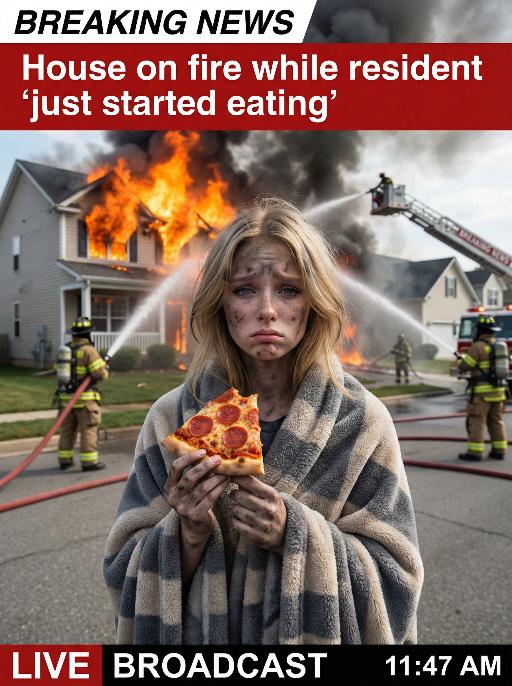
House On Fire AI effects generated image

House On Fire

This is a realistic breaking news photo. In the middle of the picture is the uploaded figure (with the facial features, gender and age unchanged), standing in the middle of the frame, with coal dust all over his face, looking sad. He is wrapped in a gray and beige striped plush blanket and holding a slice of Italian pepperoni pizza, looking confused and sad. In the background, a two-story suburban house is engulfed in flames, and firefighters are using water hoses to put out the fire. The silhouette of a fire engine can be seen. The scene takes place on a residential street during the day. Above there is a prominent large red and white news headline: "BREAKING NEWS". In the middle and lower part of the picture, there is a news caption that reads: "House on fire while resident 'just started eating'", "LIVE BROADCAST", "11:47 AM".

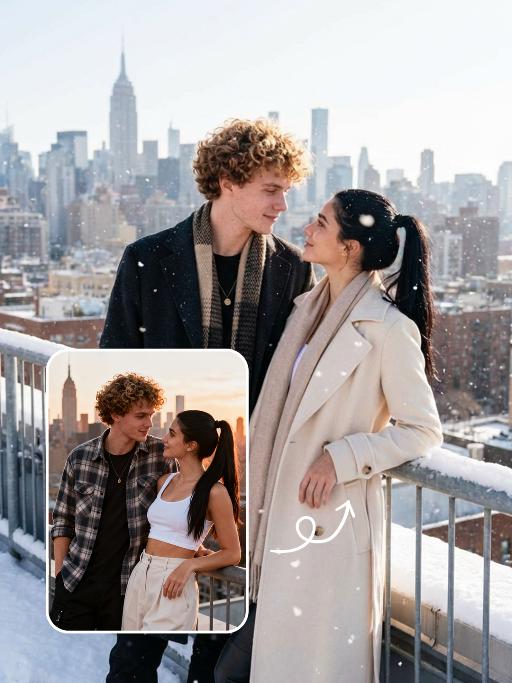
Snow Scene AI effects generated image

Snow Scene

Preserve the facial features of the figure in the image and transform the scene into a photo-realistic romantic winter snow photograph: the figure is wearing a matte black wool knee-length overcoat paired with a thick knit scarf in an interwoven coffee-brown and off-white check pattern (or a matte off-white wool waist-cinched double-breasted coat with gold buttons paired with a matching cashmere mid-length tassel scarf), set against a romantic outdoor scene with heavy snow falling. The lighting is bright natural light (noon sunlight), creating an exquisite and high-end atmosphere. Shoot with a 24mm wide-angle lens to highlight the immersive ambiance of the romantic realistic scene. Scene: Vintage red brick rooftops with light snow traces, frosted silver-toned metal railings with slightly melted snow on the edges; the New York skyline in the background, featuring a scattered mix of light gray glass curtain wall skyscrapers and vintage brownstone buildings with the clear spire of the Empire State Building, and fine snow falling gently. Photography: 85mm f/2.8 lens, winter side light, film texture, cool color tones. Image Quality: 8K ultra-detailed, realistic light and shadow. Atmosphere: A romantic and warm urban architectural snow scene bathed in the afterglow of the setting sun. Shooting Angle: Eye-level with a slight bird's-eye perspective.

Football Photo AI effects generated image

Football Photo

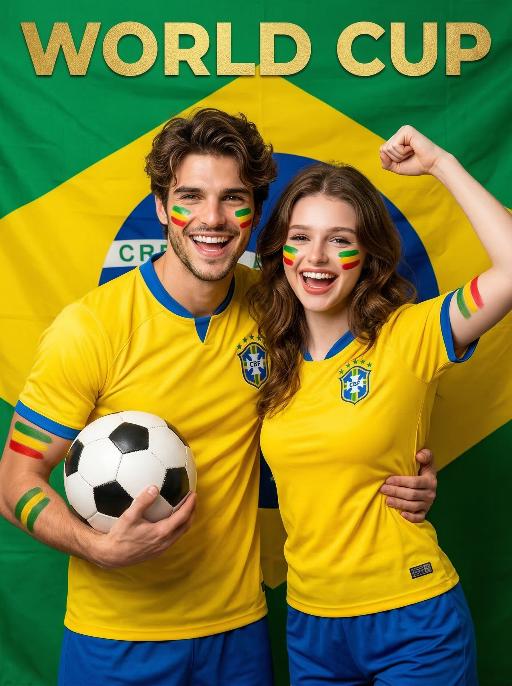
Medium-close-up shot (showing the upper body of the characters): In the two uploaded photos, the two individuals (with unchanged facial features, number of characters, gender and age) are standing in the same scene, smiling, with exquisite makeup, and their cheeks and arms are painted with facial makeup (green, yellow and red stripes), resembling the pattern of the Brazilian flag. They are wearing the authentic Brazilian national football team uniform (yellow top with blue collar/trim, blue shorts), holding the classic black and white football ball, making energetic victory celebration poses (arms embracing each other, cheering, happily grinning), standing in front of a huge, wrinkled Brazilian flag background, with the golden "World Cup" text at the top, with fashionable portrait photography, high saturation, bright and soft studio lighting, high detail, 8K resolution, vertical composition, vibrant World Cup victory atmosphere, clear focus.

Shark Dance

Main scene: The image in the uploaded picture (species, age, gender remain unchanged, presented in an anthropomorphic standing posture with the front two paws raised and the back two legs standing), beside it are four similar cute cats in an anthropomorphic standing posture standing neatly and evenly beside it (including Persian cats, orange cats, silver gradient cats and golden gradient cats), all characters (height proportions remain consistent) are wearing different cute cartoon jumpsuits (cartoon character pajamas, with bees, tigers, dinosaurs, seals, pandas) in plush fabric (revealing the characters' faces), ultra-realistic three-dimensional rendering, cute and soothing style, the protagonist occupies 80% of the main space of the picture, evenly distributed in the center of the picture, presented in a frontal standing posture, with natural front-back layers; using mid-shot horizontal composition, shot from a horizontal perspective at the same height as the protagonist's image; the light is a soft indoor diffusion effect, the transition of light and shadow is natural, without strong contrast, overall bright and warm; the clothing uses fresh and bright colors (yellow, green, blue, brown), the background is a warm and cute living room environment, background elements account for 20% of the picture; rich details, fluffy and fine fur texture, clear clothing texture, 8K high resolution, bright and harmonious picture colors.

Dates&Quran AI effects generated image

Dates&Quran

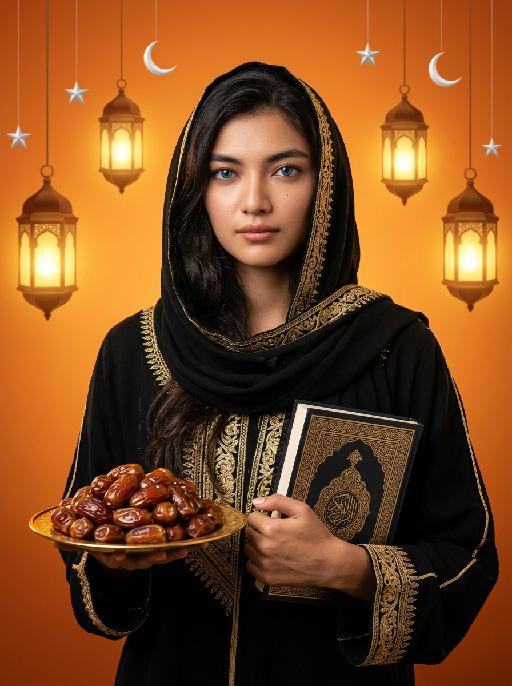
Maintain the exact same facial features, gender, and age as the person in the uploaded image. Elegant black abaya with intricate gold embroidery along edges, cuffs, and headscarf border. Long dark hair partially covered by black headscarf, striking blue eyes, soft natural makeup. Slightly sideways standing pose, gaze directed straight at the camera with extreme piety and reverence, soft devout expression, as if in quiet prayer or contemplation. One hand holds a golden plate filled with plump, glossy dates; the other hand rests gently on a decorated Quran with elaborate Islamic geometric and floral patterns. Background: warm gradient orange, hanging ornate glowing Arabic lanterns (fanous), scattered white crescent moon and silver stars. Cinematic warm lighting, soft golden glow, high contrast, detailed textures, 8K photorealistic portrait, elegant and serene, deeply reverent atmosphere.

Bali style AI effects generated image

Bali style

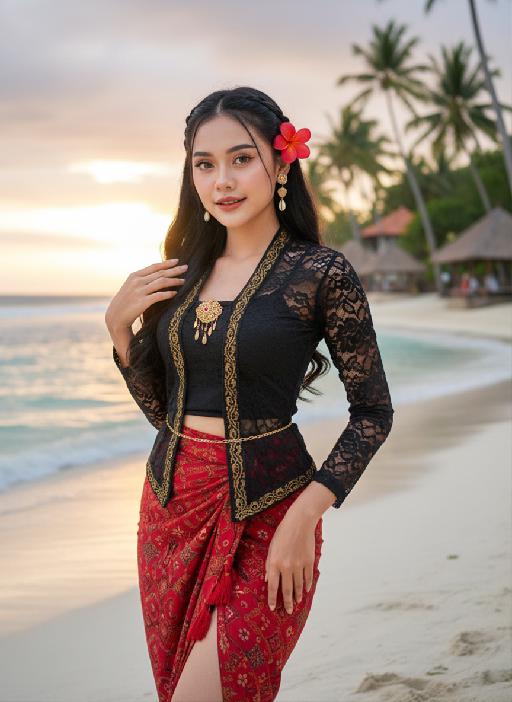
Strictly lock the facial features of the uploaded portrait (preserve facial contours, native Indonesian skin tone, hairstyle and age completely)Strictly restore the classic Indonesian facial features and warm native medium wheat skin tone, young stunning Indonesian beauty in her 20s, three-dimensional delicate features, bright charming eyes, glossy honey lips with a slight smile, healthy glowing skin with natural tropical luster; half bohemian braided long black wavy hair, a bright red plumeria (Indonesian national flower) pinned behind the ear, a few loose hair strands framing the face; wearing a sexy improved Indonesian traditional costume - slim cropped black lace kebaya top with gold batik trim, high-waisted split-side red batik sarong skirt with tassel details, wrapping the graceful curvy figure, accessorized with delicate Balinese gold shell drop earrings, a thin gold waist chain, and hand-woven Indonesian beaded anklets; standing on the white sand beach of Bali Indonesia, with turquoise rolling ocean waves, swaying tall coconut trees, and a few Balinese traditional thatched pavilions in the background, soft tropical sunset golden glow spreading over the sea, the figure is in the center of the frame with a large proportion, close-up shot from the thigh up, confident and charming posture with one hand lightly lifting the sarong skirt and the other hand touching the plumeria behind the ear; dappled coconut leaf shadows falling on the body, soft backlight outlining the figure's delicate silhouette, warm orange-pink tropical sunset light, rich saturated colors with Indonesian tropical style; 3:4 vertical composition, ultra-realistic photography style, 8K high definition, hyper-detailed fabric texture (lace/ batik/ sarong), clear water and sand details, cinematic soft focus, sexy tropical allure, bold and hot temperament, strong authentic Indonesian exotic charm, classic Bali beach romantic atmosphere

Load more

Next-Gen Multi-Model AI Video Architecture

Vivago AI isn't just one engine—it’s a unified hub for the world’s most advanced video AI. Whether you need cinematic realism or high-speed social content, we provide the right model for your creative vision.

Free Generate

Beauty and Dolphins

Vacation Time

Stellar Tear

Fish Tank Supervisor

Cinematic Quality & Precision Control

Enables 4K resolution with multi-lens motion control, generating delicate scene via text prompts for customized cinematography.​

TRY NOW

Dynamic AV Sync

Auto-generates original audio to avoid copyright issues. Build 3D immersive environments through layered sound design automatically.

TRY NOW

OpenAI Sora 2

​Advanced visual storytelling with unparalleled physics and consistency.

TRY NOW

Kling v2.6 Pro

Industry-leading cinematic image animation and motion control.

TRY NOW

Google Veo 3 & 3.1

Ultra-fast generation with enhanced realism for creative workflows.

TRY NOW

Vivago AI 2.0

Our proprietary model optimized for efficiency, speed, and cost-effective generation.

TRY NOW

Users' Voice

We listen carefully to the opinions of every user.
Free Generate
Contact Us
I tried the Lip Sync feature inside Vivago.ai’s AI Video Generator for my educational podcast, and the results were stunning! The avatar's lip movements perfectly matched my audio recording, creating a professional AI-generated video without complex editing. Compared with tools like OpenAI Sora 2 and Google Veo 3.1, Vivago Image-to-Video delivers fast, studio-quality results online. It saved me hours of post-production work.
ElenaM (Spain)
Vivago’s Image-to-Video AI transformed my marketing workflow. I uploaded a product image and described the launch scene in text, and it generated a 10-second cinematic AI video with background music and dynamic visuals. The output quality rivals Kling v2.6 Pro and Google Veo 3 Fast. It’s now my go-to AI video generator for social media ads and product campaigns.
KenjiT (Japan)
As a digital artist, I use Vivago.ai 2.0 daily for Image-to-Image and AI Image-to-Video creation. The e-book covers and animated visuals I generate for clients look cinematic and professional. Unlike many standalone AI tools, Vivago integrates multiple leading models into one platform, making it easier to create copyright-safe AI images and videos for publishing.
ChenL (China)
I tried the Lip Sync feature inside Vivago.ai’s AI Video Generator for my educational podcast, and the results were stunning! The avatar's lip movements perfectly matched my audio recording, creating a professional AI-generated video without complex editing. Compared with tools like OpenAI Sora 2 and Google Veo 3.1, Vivago Image-to-Video delivers fast, studio-quality results online. It saved me hours of post-production work.
ElenaM (Spain)
Vivago’s Image-to-Video AI transformed my marketing workflow. I uploaded a product image and described the launch scene in text, and it generated a 10-second cinematic AI video with background music and dynamic visuals. The output quality rivals Kling v2.6 Pro and Google Veo 3 Fast. It’s now my go-to AI video generator for social media ads and product campaigns.
KenjiT (Japan)
As a digital artist, I use Vivago.ai 2.0 daily for Image-to-Image and AI Image-to-Video creation. The e-book covers and animated visuals I generate for clients look cinematic and professional. Unlike many standalone AI tools, Vivago integrates multiple leading models into one platform, making it easier to create copyright-safe AI images and videos for publishing.
ChenL (China)
I absolutely love Vivago’s AI Image-to-Video Generator. As a travel blogger, static images often fail to capture real atmosphere, but Vivago helps me turn photos into vivid cinematic AI videos with motion effects. It feels comparable to OpenAI Sora 2 and Google Veo 3.1, but more accessible and faster for creators who need high-quality AI videos online.
LiamK (Australia)
I tried the Lip Sync feature inside Vivago.ai’s AI Video Generator for my educational podcast, and the results were stunning! The avatar's lip movements perfectly matched my audio recording, creating a professional AI-generated video without complex editing. Compared with tools like OpenAI Sora 2 and Google Veo 3.1, Vivago Image-to-Video delivers fast, studio-quality results online. It saved me hours of post-production work.
ElenaM (Spain)
Vivago’s Image-to-Video AI transformed my marketing workflow. I uploaded a product image and described the launch scene in text, and it generated a 10-second cinematic AI video with background music and dynamic visuals. The output quality rivals Kling v2.6 Pro and Google Veo 3 Fast. It’s now my go-to AI video generator for social media ads and product campaigns.
KenjiT (Japan)
As a digital artist, I use Vivago.ai 2.0 daily for Image-to-Image and AI Image-to-Video creation. The e-book covers and animated visuals I generate for clients look cinematic and professional. Unlike many standalone AI tools, Vivago integrates multiple leading models into one platform, making it easier to create copyright-safe AI images and videos for publishing.
ChenL (China)
I absolutely love Vivago’s AI Image-to-Video Generator. As a travel blogger, static images often fail to capture real atmosphere, but Vivago helps me turn photos into vivid cinematic AI videos with motion effects. It feels comparable to OpenAI Sora 2 and Google Veo 3.1, but more accessible and faster for creators who need high-quality AI videos online.
LiamK (Australia)
Using Vivago.ai’s Image-to-Video AI has greatly enhanced my classroom teaching. I transform textbook notes into historical AI videos with cinematic filters and dynamic animations. Compared with tools like Kling v2.6 Pro and Google Veo 3 Fast, Vivago offers faster generation and easier parameter control for educators who need reliable AI video creation.
RajivG (India)
I frequently create AI videos on Vivago and publish them on TikTok and YouTube Shorts. The AI video templates and trending content ideas help me produce viral-ready clips quickly. With Vivago’s integrated models—including advanced video engines similar to OpenAI Sora 2—I can generate anime-style and cinematic social media videos that drive high engagement.
MarieJ (Spain)
What attracts me most about Vivago.ai is not only the powerful AI Video Generator but also the active AIGC creator community. It combines AI Image-to-Video, Text-to-Video, and leading model integrations like Google Veo 3.1 into one creative platform.
TomW (India)
At first, I was hesitant about using AI video tools. But after trying Vivago Image-to-Video, I realized how easy it is to create professional AI-generated videos online. I just upload an image, add a short prompt, and adjust a few settings. The results are cinematic and copyright-safe, which is essential for commercial projects.
HectorC (Mexico)
Using Vivago.ai’s Image-to-Video AI has greatly enhanced my classroom teaching. I transform textbook notes into historical AI videos with cinematic filters and dynamic animations. Compared with tools like Kling v2.6 Pro and Google Veo 3 Fast, Vivago offers faster generation and easier parameter control for educators who need reliable AI video creation.
RajivG (India)
I frequently create AI videos on Vivago and publish them on TikTok and YouTube Shorts. The AI video templates and trending content ideas help me produce viral-ready clips quickly. With Vivago’s integrated models—including advanced video engines similar to OpenAI Sora 2—I can generate anime-style and cinematic social media videos that drive high engagement.
MarieJ (Spain)
What attracts me most about Vivago.ai is not only the powerful AI Video Generator but also the active AIGC creator community. It combines AI Image-to-Video, Text-to-Video, and leading model integrations like Google Veo 3.1 into one creative platform.
TomW (India)
At first, I was hesitant about using AI video tools. But after trying Vivago Image-to-Video, I realized how easy it is to create professional AI-generated videos online. I just upload an image, add a short prompt, and adjust a few settings. The results are cinematic and copyright-safe, which is essential for commercial projects.
HectorC (Mexico)