Text to Image

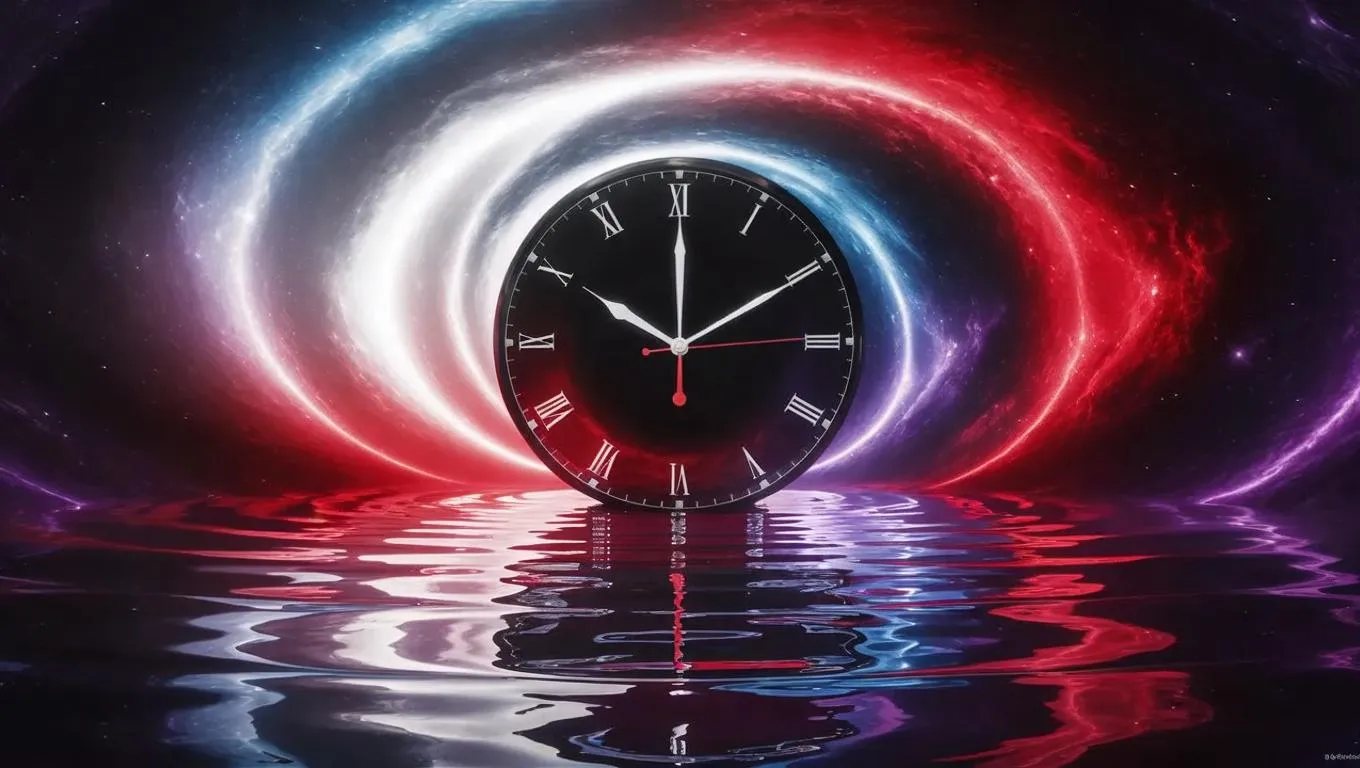
Explore AI-generated surreal art with VivaGo: a paradoxical black hole void blends white, red, purple, and blue hues. A cosmic clock of red energy displays cryptic symbols, embodying time's paradox. The ripple-reflective floor mirrors this enigmatic realm. Create mesmerizing, otherworldly visuals using AI-powered tools for professional-grade surrealism.

Recreate
arrow
Text to Image

FAQs

How to generate images/videos from text prompts?

Describe the visual content in natural language (e.g., 'A cyberpunk cat wearing neon goggles') and our AI models will create outputs. Complex prompts trigger multi-stage NLP parsing for enhanced accuracy.

How to refine unsatisfactory results?

Use our Prompt Bot - an AI-powered optimizer that suggests technical modifiers. Simply describe your ideas, desired changes ('more metallic texture'), then you will get optimized prompt variants.

When should I use reference images?

Upload references to: 1) Guide character consistency (e.g., faces/outfits), 2) Control motion patterns in videos using our feature matching algorithm. Supports JPG/PNG

What's the credit system?

Daily login grants 100 credits. Upgrade options: 1) Premium Membership, 2) Credit Packs. Details: https://vivago.ai/subscribe

More From VIVAGO AI

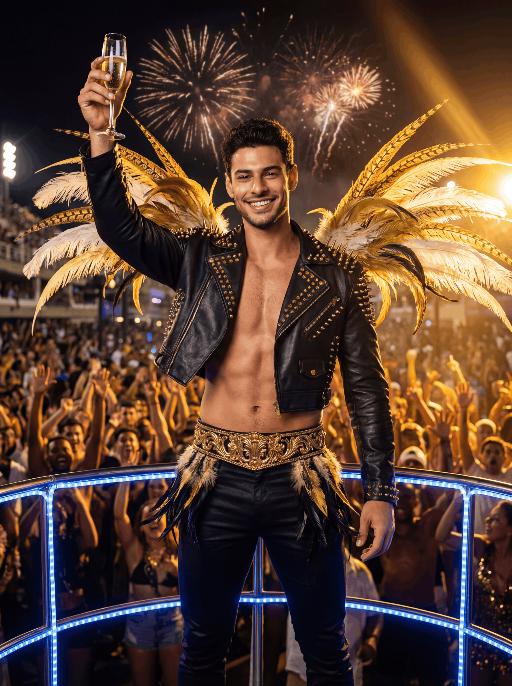
Float Toast AI effects generated image

Float Toast

The character in the uploaded picture (unchanged facial features, gender and age). with short dark hair, light stubble, strong jawline, expressive eyebrows, and a bright confident smile, facing the camera directly. standing triumphantly on a Carnival float at night, raising a champagne flute high in celebration. wears a black leather cropped jacket decorated with gold studs and spikes, partially open at the chest, paired with fitted black pants and a wide ornate gold belt with intricate detailing. Black-and-gold feathered accents decorate hips, and large golden and white feathers extend dramatically from shoulders.Behind is a massive cheering Carnival crowd, hands raised in excitement. Fireworks explode in the dark night sky. Powerful golden stage lights beam across the scene, creating dramatic rim lighting and warm highlights. A blue LED-lit railing frames the foreground. The atmosphere is electrifying, luxurious, and celebratory. High-resolution cinematic photography, dramatic lighting, ultra-sharp focus, shallow depth of field, rich saturated colors, dynamic contrast, professional festival photography, 85mm lens, f/1.8, HDR, ultra-detailed skin texture

No Batidão

An ultra-realistic photo, after being uploaded, the image (with unchanged facial features, gender and age) shows a confident expression, wearing a short yellow football jersey with green borders, featuring the bold green "Brazil" Text and the Brazilian national team logo on the chest, paired with a yellow pleated mini skirt, a green belt around the waist, and the team logo, white knee-length stockings, standing on a concrete sidewalk in the style of a Rio de Janeiro slum area, in front of a vibrant street art wall covered with graffiti (including the Brazilian flag pattern, football player illustrations, and colorful urban street art), presenting a natural daylight effect like in a movie, with high contrast, rough urban aesthetic style, clear focus, 8K resolution, fine texture, and full of the authentic Brazilian street culture atmosphere.

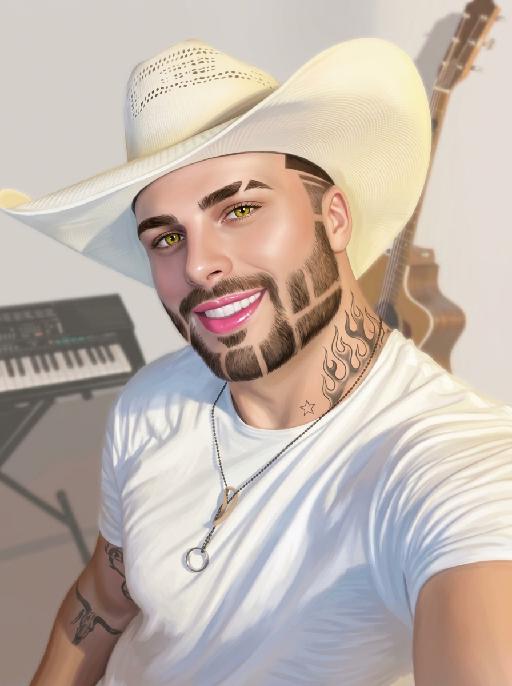
Goofy AI effects generated image

Goofy

The person's skin has a porcelain-like smoothness with a photo-retouching effect. The posture and facial features of the person in the uploaded picture remain unchanged (the posture is consistent, the hairstyle and clothing have not been modified, the hairstyle and clothing remain the same, and the picture background has not been altered). However, the triangular incision at the hairline + side straight shaving lines, sharp eyebrows + obvious broken eyebrows (with a mid-section cut-off gap) design, and also neat gaps with cut segments on the beard; the overall style of the entire picture has transformed into a portrait style that combines 60% digital painting style and 40% real photography style. The person's skin is as smooth and flawless as porcelain, having undergone deep beauty treatment. The eyes are gold-green contact lenses, the lips are painted with shiny pink lipstick, there is a tribal flame tattoo on the neck, and a small star tattoo on the collarbone. The background is the same as the original picture, with a bright filter added, presenting a low saturation and blurry effect, 8K resolution, and beautiful Instagram filter effect. The lines are simple and smooth, with a low overall contrast, a plain style but with bright and rich colors.

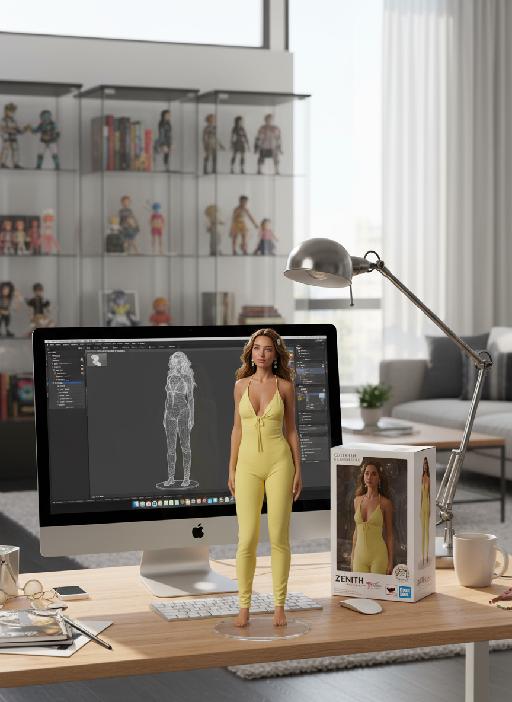
Dance Softly

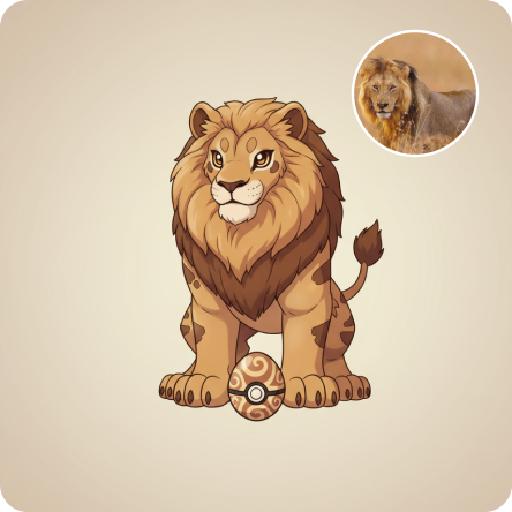
Strictly lock the subject identity from the reference image: preserve the original species, original identity, original face/facial structure, fur color or skin tone, markings/patterns, body proportions, age impression, gender vibe, eye color, ear/nose/mouth details, hairstyle or fur length and texture, and all unique recognizable traits. The generated result must remain instantly recognizable as the exact same subject from the reference image. Do not change the species, do not replace the subject with another person or another animal, do not lose likeness, do not replace the face. Only transform pose, clothing, accessories, environment, and cinematic presentation. Transform the subject into a full-body standing pose on top of a modern desktop, facing the camera, centered in frame, standing upright on both feet or hind legs, with both arms/front limbs slightly raised in a cute dancing, playful bouncing, or charming interactive pose. The expression should be soft, adorable, natural, and camera-facing. The overall mood should be cute, polished, healing, stylish, lightly anthropomorphic in pose only, while fully preserving the original species and recognizable appearance. Clothing rule must be strict: If the reference subject is a pet, animal, bird, or non-human creature, it must wear a cute full top and small pants/shorts/overalls/full little outfit. The outfit should be adorable, clean, stylish, modest, and properly fitted to the subject’s body. No nudity, no exposed private areas, no bare body presentation, no “only accessories without clothing.” Prefer soft colors such as cream, blush pink, light gray, beige. Keep the outfit simple and refined, and do not hide the subject’s key facial features or recognizable traits. If the reference subject is a human, keep them in a tasteful, cute, clean, stylish full outfit that matches the same adorable desk-setup aesthetic, with no revealing clothing and no identity distortion. Add a pair of soft pink glowing cat-ear over-ear headphones. The headphones should feel premium, dreamy, cute, slightly futuristic, and fashionable, with subtle clean glow accents. Do not let the headphones cover the eyes, face, or key recognizable features. Environment: place the subject in a premium modern computer desk setup scene. The subject stands on the center of the desk, with a large monitor behind them showing a dark or black screen. Add a clean keyboard, elegant small tech accessories, optional crystal or glass decorative objects, and a tidy minimalist desktop environment. The overall atmosphere should be clean, stylish, luxurious, soft, cozy, social-media-friendly, streamer/gaming desk aesthetic. Use a palette of cream white, soft gray, blush pink, and silver, with a gentle feminine tech vibe and minimalist premium styling. Composition: vertical 9:16, full-body visible, no cropping of feet, head, ears, or limbs, subject centered, slightly low-angle or subtly upward eye-level perspective to enhance the cute standing pose. Use shallow depth of field, with the subject sharp and crisp, and the background softly blurred while still readable as a premium desk setup. Lighting and rendering: use soft studio lighting, clear facial illumination, refined body contour light, highly realistic fur/skin/clothing/material textures. The overall style should be ultra detailed, photorealistic, cinematic, high-end commercial quality, cute but realistic. Quality tags: ultra detailed, photorealistic, realistic fur or skin texture, detailed clothing fabric, premium accessories, soft studio lighting, soft shadows, cinematic realism, adorable aesthetic, high-end commercial render, clean luxury desk setup. Style emphasis keywords: same subject, same species, identity preserved, original appearance locked, cute standing pose, playful dance pose, pink glowing cat-ear headphones, pets wearing a cute top and small pants, full outfit, premium computer desk setup, monitor background, minimalist luxury desktop, soft studio lighting, realistic kawaii aesthetic, healing and polished visual style. English Negative Prompt: do not change species, do not replace the subject with another person or another animal, no face replacement, no identity loss, no lost markings, no wrong fur color, no wrong skin tone, no extra limbs, no extra heads, no deformed anatomy, no fused limbs, no asymmetrical eyes, no distorted ears, no face collapse, no blur, no low resolution, no body crop, no messy background, no dirty desk, no horror, no uncanny expression, no excessive cartoon style, no nudity, no exposed private areas, no bare pet body, no accessories-only styling, no overly short clothes, no visible sensitive parts, do not let the headphones block the eyes or key facial features, no watermark, no text, no logo, no overexposure, no underexposure.

FinalGlam

Use the exact same facial features, gender, and age as the character in the uploaded image. Masterpiece, best quality, ultra-detailed, photorealistic full-body shot, a stunning Brazilian woman dancing samba at Rio Carnival, energetic and graceful dance pose, long wavy dark hair, beautiful facial features, glamorous carnival makeup, golden tan skin, wearing a luxurious and vibrant Rio Carnival costume: sequined and beaded bodysuit in green, yellow, and blue, long elegant skirt that fully covers the hips and buttocks (no exposure, modest and decent), large dramatic feather headdress with gold and blue feathers, feathered hip details (subtly integrated with the skirt, no exposed skin), sparkling jewelry. Background is the lively Sambadrome at night, colorful lights, cheering crowd, fireworks in the night sky, festive confetti floating in the air, dynamic motion blur, warm cinematic lighting, strong rim light, vibrant saturated colors, shallow depth of field, 8K, ultra-realistic.

Load more

Next-Gen Multi-Model AI Video Architecture

Vivago AI isn't just one engine—it’s a unified hub for the world’s most advanced video AI. Whether you need cinematic realism or high-speed social content, we provide the right model for your creative vision.

Free Generate

Beauty and Dolphins

Vacation Time

Stellar Tear

Fish Tank Supervisor

Cinematic Quality & Precision Control

Enables 4K resolution with multi-lens motion control, generating delicate scene via text prompts for customized cinematography.​

TRY NOW

Dynamic AV Sync

Auto-generates original audio to avoid copyright issues. Build 3D immersive environments through layered sound design automatically.

TRY NOW

OpenAI Sora 2

​Advanced visual storytelling with unparalleled physics and consistency.

TRY NOW

Kling v2.6 Pro

Industry-leading cinematic image animation and motion control.

TRY NOW

Google Veo 3 & 3.1

Ultra-fast generation with enhanced realism for creative workflows.

TRY NOW

Vivago AI 2.0

Our proprietary model optimized for efficiency, speed, and cost-effective generation.

TRY NOW

Users' Voice

We listen carefully to the opinions of every user.
Free Generate
Contact Us
I tried the Lip Sync feature inside Vivago.ai’s AI Video Generator for my educational podcast, and the results were stunning! The avatar's lip movements perfectly matched my audio recording, creating a professional AI-generated video without complex editing. Compared with tools like OpenAI Sora 2 and Google Veo 3.1, Vivago Image-to-Video delivers fast, studio-quality results online. It saved me hours of post-production work.
ElenaM (Spain)
Vivago’s Image-to-Video AI transformed my marketing workflow. I uploaded a product image and described the launch scene in text, and it generated a 10-second cinematic AI video with background music and dynamic visuals. The output quality rivals Kling v2.6 Pro and Google Veo 3 Fast. It’s now my go-to AI video generator for social media ads and product campaigns.
KenjiT (Japan)
As a digital artist, I use Vivago.ai 2.0 daily for Image-to-Image and AI Image-to-Video creation. The e-book covers and animated visuals I generate for clients look cinematic and professional. Unlike many standalone AI tools, Vivago integrates multiple leading models into one platform, making it easier to create copyright-safe AI images and videos for publishing.
ChenL (China)
I tried the Lip Sync feature inside Vivago.ai’s AI Video Generator for my educational podcast, and the results were stunning! The avatar's lip movements perfectly matched my audio recording, creating a professional AI-generated video without complex editing. Compared with tools like OpenAI Sora 2 and Google Veo 3.1, Vivago Image-to-Video delivers fast, studio-quality results online. It saved me hours of post-production work.
ElenaM (Spain)
Vivago’s Image-to-Video AI transformed my marketing workflow. I uploaded a product image and described the launch scene in text, and it generated a 10-second cinematic AI video with background music and dynamic visuals. The output quality rivals Kling v2.6 Pro and Google Veo 3 Fast. It’s now my go-to AI video generator for social media ads and product campaigns.
KenjiT (Japan)
As a digital artist, I use Vivago.ai 2.0 daily for Image-to-Image and AI Image-to-Video creation. The e-book covers and animated visuals I generate for clients look cinematic and professional. Unlike many standalone AI tools, Vivago integrates multiple leading models into one platform, making it easier to create copyright-safe AI images and videos for publishing.
ChenL (China)
I absolutely love Vivago’s AI Image-to-Video Generator. As a travel blogger, static images often fail to capture real atmosphere, but Vivago helps me turn photos into vivid cinematic AI videos with motion effects. It feels comparable to OpenAI Sora 2 and Google Veo 3.1, but more accessible and faster for creators who need high-quality AI videos online.
LiamK (Australia)
I tried the Lip Sync feature inside Vivago.ai’s AI Video Generator for my educational podcast, and the results were stunning! The avatar's lip movements perfectly matched my audio recording, creating a professional AI-generated video without complex editing. Compared with tools like OpenAI Sora 2 and Google Veo 3.1, Vivago Image-to-Video delivers fast, studio-quality results online. It saved me hours of post-production work.
ElenaM (Spain)
Vivago’s Image-to-Video AI transformed my marketing workflow. I uploaded a product image and described the launch scene in text, and it generated a 10-second cinematic AI video with background music and dynamic visuals. The output quality rivals Kling v2.6 Pro and Google Veo 3 Fast. It’s now my go-to AI video generator for social media ads and product campaigns.
KenjiT (Japan)
As a digital artist, I use Vivago.ai 2.0 daily for Image-to-Image and AI Image-to-Video creation. The e-book covers and animated visuals I generate for clients look cinematic and professional. Unlike many standalone AI tools, Vivago integrates multiple leading models into one platform, making it easier to create copyright-safe AI images and videos for publishing.
ChenL (China)
I absolutely love Vivago’s AI Image-to-Video Generator. As a travel blogger, static images often fail to capture real atmosphere, but Vivago helps me turn photos into vivid cinematic AI videos with motion effects. It feels comparable to OpenAI Sora 2 and Google Veo 3.1, but more accessible and faster for creators who need high-quality AI videos online.
LiamK (Australia)
Using Vivago.ai’s Image-to-Video AI has greatly enhanced my classroom teaching. I transform textbook notes into historical AI videos with cinematic filters and dynamic animations. Compared with tools like Kling v2.6 Pro and Google Veo 3 Fast, Vivago offers faster generation and easier parameter control for educators who need reliable AI video creation.
RajivG (India)
I frequently create AI videos on Vivago and publish them on TikTok and YouTube Shorts. The AI video templates and trending content ideas help me produce viral-ready clips quickly. With Vivago’s integrated models—including advanced video engines similar to OpenAI Sora 2—I can generate anime-style and cinematic social media videos that drive high engagement.
MarieJ (Spain)
What attracts me most about Vivago.ai is not only the powerful AI Video Generator but also the active AIGC creator community. It combines AI Image-to-Video, Text-to-Video, and leading model integrations like Google Veo 3.1 into one creative platform.
TomW (India)
At first, I was hesitant about using AI video tools. But after trying Vivago Image-to-Video, I realized how easy it is to create professional AI-generated videos online. I just upload an image, add a short prompt, and adjust a few settings. The results are cinematic and copyright-safe, which is essential for commercial projects.
HectorC (Mexico)
Using Vivago.ai’s Image-to-Video AI has greatly enhanced my classroom teaching. I transform textbook notes into historical AI videos with cinematic filters and dynamic animations. Compared with tools like Kling v2.6 Pro and Google Veo 3 Fast, Vivago offers faster generation and easier parameter control for educators who need reliable AI video creation.
RajivG (India)
I frequently create AI videos on Vivago and publish them on TikTok and YouTube Shorts. The AI video templates and trending content ideas help me produce viral-ready clips quickly. With Vivago’s integrated models—including advanced video engines similar to OpenAI Sora 2—I can generate anime-style and cinematic social media videos that drive high engagement.
MarieJ (Spain)
What attracts me most about Vivago.ai is not only the powerful AI Video Generator but also the active AIGC creator community. It combines AI Image-to-Video, Text-to-Video, and leading model integrations like Google Veo 3.1 into one creative platform.
TomW (India)
At first, I was hesitant about using AI video tools. But after trying Vivago Image-to-Video, I realized how easy it is to create professional AI-generated videos online. I just upload an image, add a short prompt, and adjust a few settings. The results are cinematic and copyright-safe, which is essential for commercial projects.
HectorC (Mexico)