Text to Image

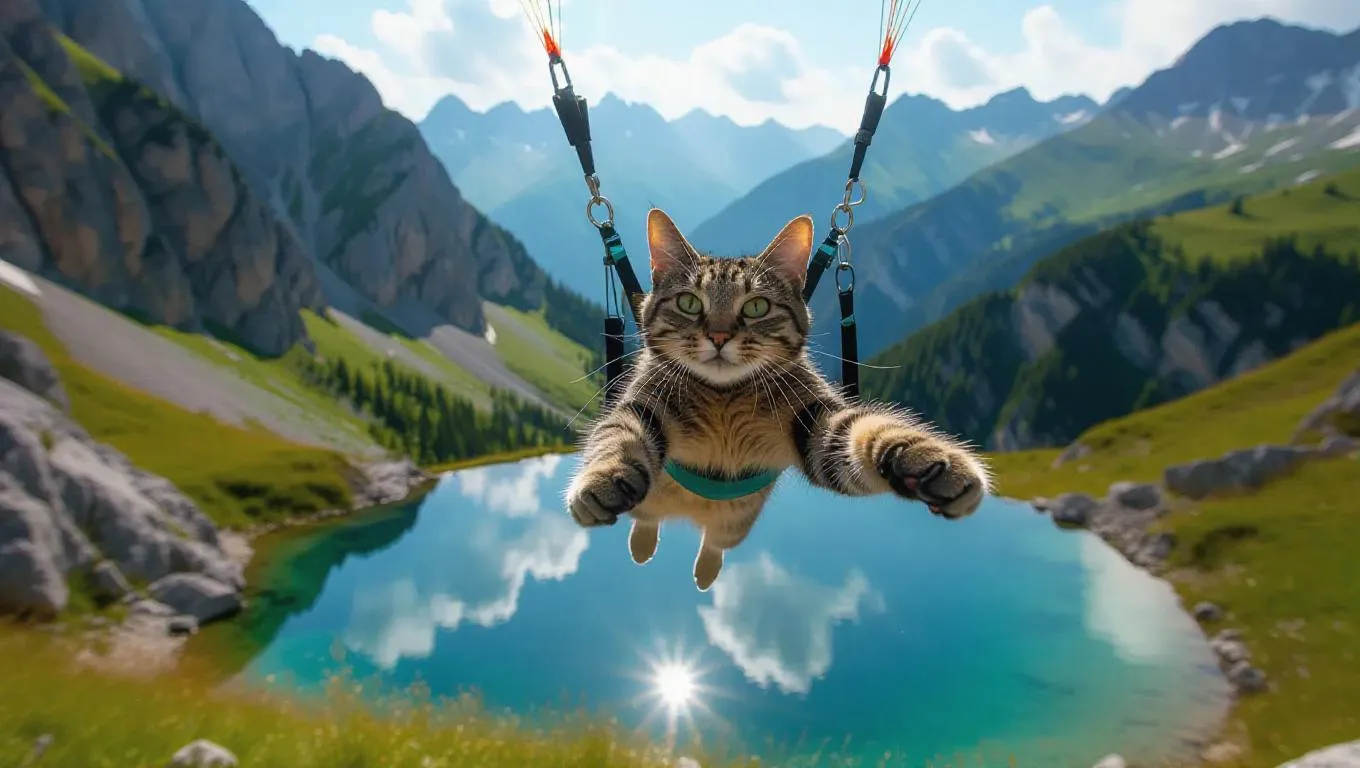
The cat hang glides through the shot giving a bright smile and a wave, with a shimmering pond nestled in the valley.

Recreate
arrow
Text to Image

More From VIVAGO AI

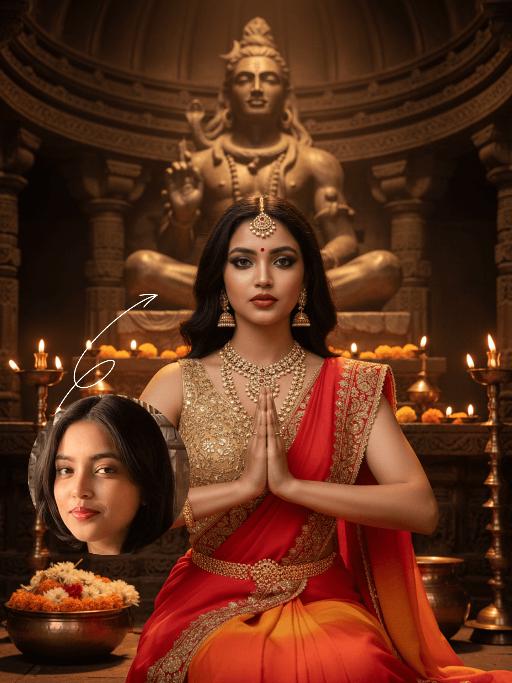
Goddess AI effects generated image

Goddess

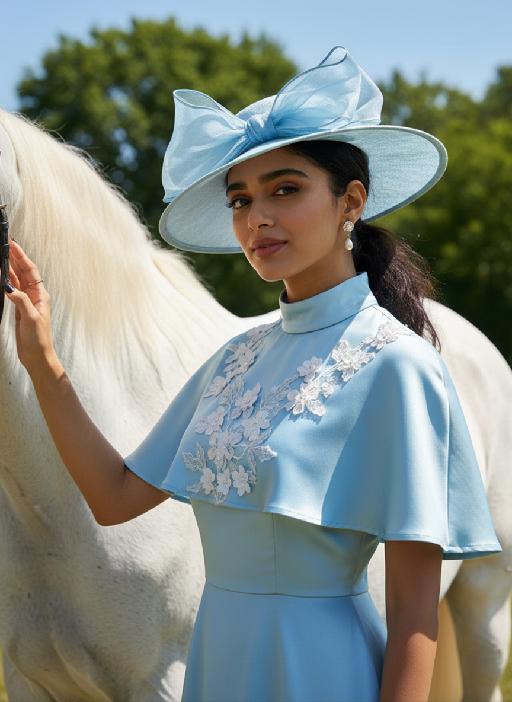
The identity of the uploaded portrait is strictly preserved (retaining facial contours, authentic Indian skin tone, hairstyle and age). This is a bust portrait featuring a young Indian woman (aged 20-25) embodying a goddess, with a sacred and solemn demeanor and highly ritualistic makeup: smoldering smoky eyes with a profound, icy allure, paired with a matte true red lip, and a teardrop-shaped red bindi adorned between her brows. Her voluminous black wavy curls fall naturally, and an ornate maang tikka inlaid with rubies and micro-diamonds rests on her forehead, exuding the solemnity of a divine being. She is dressed in a sacred sari with a red-to-orange gradient: the sleeveless blouse is fully embroidered with golden interlocking floral patterns, the sari’s edge is trimmed with woven gold, and an intricately carved gold waist chain cinches her waist. She adorns herself with a full set of elaborate heavy gold jewelry, including multi-layered openwork carved necklaces, dangling gold earrings, and multiple pairs of bangles and arm cuffs, all embodying unparalleled luxury and divine grace. She sits upright before the altar of a millennial Hindu temple, with her hands pressed together in Anjali Mudra, her gaze fixed firmly on the camera with unwavering resolve. The background is the interior of an ancient Hindu temple, featuring dark brown bronze domes and carved stone pillars, with a statue of Shiva standing in the distance. The altar is adorned with brass candlesticks and offering bowls brimming with marigolds and jasmine, and the flickering candlelight casts a sacred aura over the scene. Epic cinematic lighting is employed: warm golden backlight outlines her figure and gilds her hair with a shimmering halo, making each strand glint with golden light; side light illuminates her facial features and the intricate textures of her attire, with dramatic contrast between light and shadow that accentuates her divine radiance. The style is a religious-themed portrait blending realism and mythology, boasting ultra-high definition and exquisite detail, rich and saturated colors, and an immersive, all-encompassing atmosphere – as if the goddess has stepped straight out of an Indian epic. The overall impression is one of sacred magnificence and dazzling radiance.

Arrest AI effects generated image

Arrest

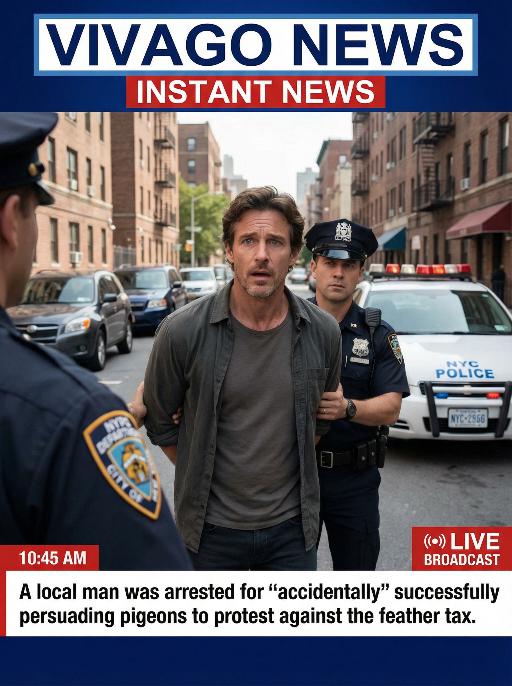
Realistic real-time news screenshot: The main subject is the depicted person (with unchanged facial features, gender and age). The expression is shocked and confused. The person was arrested by two New York City police officers on a street in the city. The police tied his hands behind his back. The main figure occupies 80% of the overall picture. The background is a typical New York City street, featuring brick apartment buildings, parked vehicles and a New York City police car. Daylight natural light, over-the-shoulder news camera angle. There is a news caption at the bottom of the picture, stating: A local man was arrested for 'accidentally' successfully persuading pigeons to protest against the feather tax. There is a large title caption at the top of the picture: VIVAGO NEWS INSTANT NEWS. At the corner, there is a timestamp: 10:45 AM. Live broadcast. With a realistic news photography style, rich details, 8K resolution, and a cinematic aesthetic of news clips.

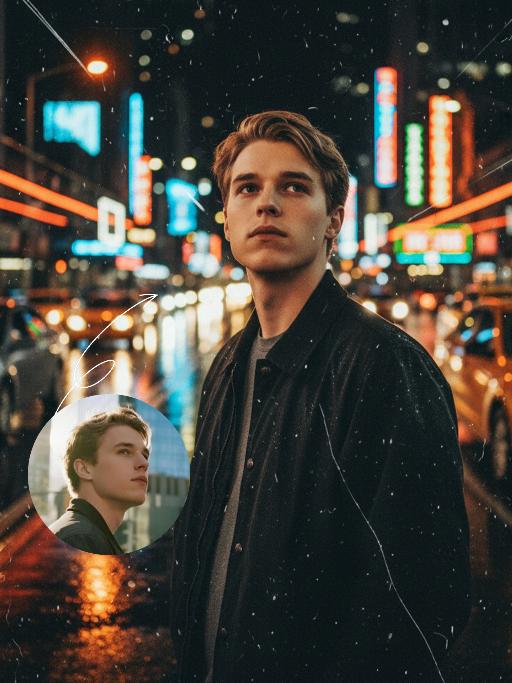
Midnight Neon AI effects generated image

Midnight Neon

Professional retro film-style portrait photography, with the first uploaded portrait used in the frame for strict identity consistency (unchanged facial features, hairstyle, skin tone and age). The figure’s face is naturally retouched for a flawless skin texture, paired with dramatic light and shadow contrast on the facial features. In this street photography portrait, the figure stands at the center of a bustling city street on a rainy night (the vibrant night view of Tokyo’s busy thoroughfares), captured in a close-up shot and positioned right at the frame’s center. The traffic flow in the background (vehicles and pedestrians speeding by to create blurred dynamic streaks) and neon lights feature dynamic motion blur effects, with smudged texture overlays to enhance the narrative mood. The dim lighting boasts high contrast; the wet road surfaces reflect warm orange glows and cool-toned neon light, with soft bokeh spots cast by street lamps and car headlights. Color palette: based on black and white tones, the neon hues are processed with high saturation, dominated by dark shades to create a striking contrast between warm and cool tones. The image is enhanced with film grain texture, depth of field breakup details, cinematic black aesthetic, and ultra-realistic, ultra-fine textures, plus a lifelike effect of raindrops splattering on the lens. Shot with a slow shutter speed, a large aperture and a low shutter setting; an orange vertical digital date watermark (2026:00:00) is added to the bottom right corner.

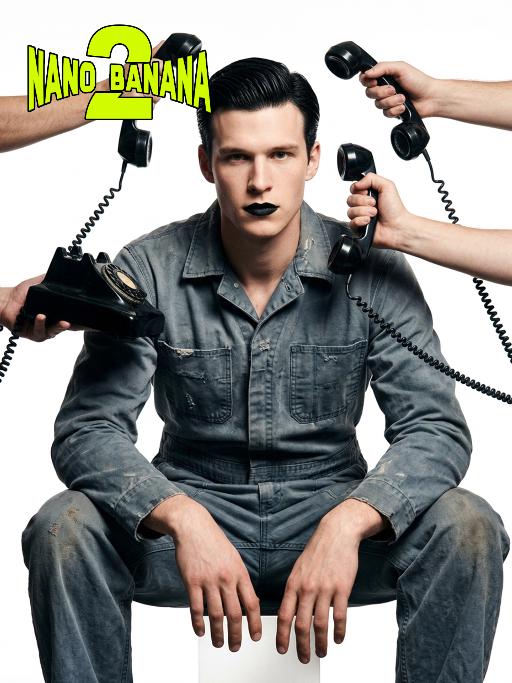
Telephone Ring AI effects generated image

Telephone Ring

Shooting perspective and focal length: Frontal level view, using a medium telephoto lens (approximately 50mm), with an appropriate focal length, medium close-up shot, able to clearly present the upper body and hand details of the characters, and the picture has no obvious distortion. Equipment: Professional studio camera (such as Canon 5D series or Sony A7 series), combined with a studio lighting system. Character pose: The character is in a sitting position, with legs apart and knees bent, the upper body leaning forward and the head close to the camera; multiple arms extend from all around the frame, each hand holding an old-fashioned black wired telephone, multiple receivers randomly surround the character's head, creating a visual effect of being surrounded. Character expression: Eyes gaze at the camera, the gaze is slightly distant and cold, the facial expression is calm and undisturbed, conveying a restrained emotional tension. Lighting: Use studio hard light, the main light source comes from the front, supplemented by side lighting, forming a clear contrast of light and shade, highlighting the fabric texture and facial contours, the background is pure white, clean and without any color impurities. Style: Pioneer fashion photography, integrating surrealism and minimalism, creating an absurd yet highly tense atmosphere through strong visual impact. Clothing: A set of gray-blue distressed texture workwear, the fabric has fine textures, the fit is loose and firm, the lapel design combines toughness and retro charm. Hair style: Black short hair, using hair gel to comb backward, revealing a full forehead, the style is clean and neat with a sense of lines. Makeup: Matte texture pure black lipstick as the visual focus, the facial base makeup is even and transparent, only highlighting the lip color, the overall makeup is avant-garde and has a distinctive characteristic.

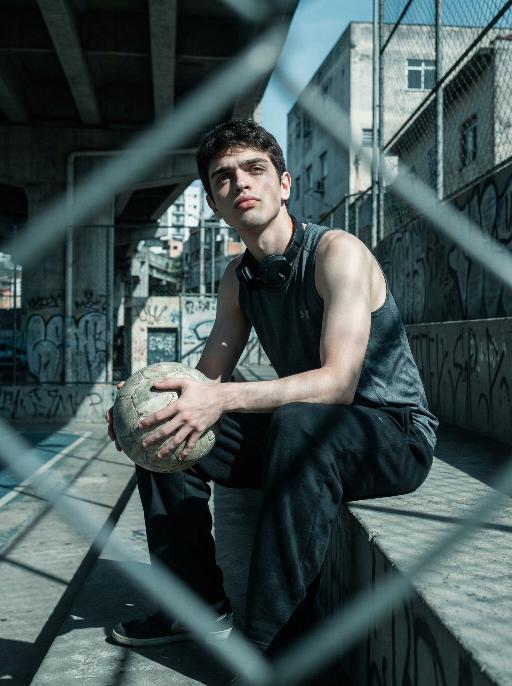
Street Youth AI effects generated image

Street Youth

Use the exact same facial features, gender, and age as the character in the uploaded image.Photorealistic urban soccer portrait in São Paulo, street culture style, industrial texture, strong sense of reality and perseverance. Setting: old community court under overpass, concrete stands, wire fence, graffiti walls, city buildings in background. Outfit: dark sports tank top or vintage club jersey, loose sweatpants or jeans, headphones or towel around neck, holding a worn football. Pose: facing forward directly, sitting on stadium stand with head slightly lowered in thought while gaze drifts upward toward the camera, or sitting upright facing forward with distinct shoulder lines, conveying struggle and toughness under urban pressure. Lighting: low saturation cool gray tone, cyan-blue shadows, natural warm skin contrast, strong chiaroscuro, hard light. Composition: medium to long shot, blurred wire fence foreground for layers, symmetrical composition or compressed space, horizontal frame, strict front-facing camera angle centered on the subject. Style: high detail, realistic skin texture, cinematic tone, 8K ultra-realistic, no text or watermarks.

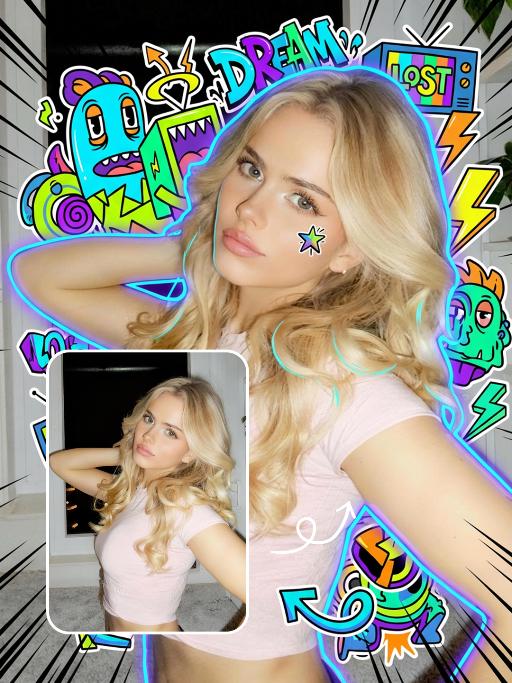
Trendy Stickers AI effects generated image

Trendy Stickers

先将上传的图片扩图成3:4的2k超轻尺寸,然后在图片上加入创意涂鸦内容:不要使用固定元素,而是生成与您所识别的视觉主题相匹配的插画元素。如果是酷炫/前卫风格:可以使用箭头、螺栓、涂鸦标签、失真形状、广播盒或抽象的街头艺术怪兽。如果是可爱/甜蜜风格:可以使用独特的角色、心形、星星、糖果、闪光效果和圆形的有机形状。如果选择“虚幻”风格:运用流畅的线条、花瓣、天体以及神奇的漩涡元素。加入的元素风格:平面二维矢量图,粗犷的轮廓,类似贴纸的美感。鲜艳的色彩与写实照片形成对比或相得益彰。 画面的四个边角加入少量的短小的随机黑色动感的漫画式速度线条;人物的周围加上赛博的霓虹发光光效,人物的面部加入一个小涂鸦元素,人物的皮肤轻微磨皮,皮肤自然美颜效果,面部妆容改成欧美流行风格的自然写实的潮流的妆容;写实的人物与写实的场景风格保持不变。

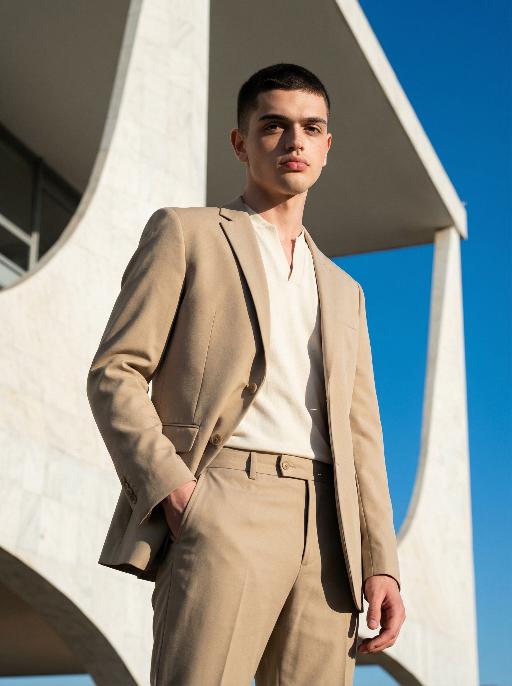
Brasília AI effects generated image

Brasília

Use the exact same facial features, gender, and age as the character in the uploaded image. Photorealistic modernist fashion portrait, Brasilia architectural aesthetic, Oscar Niemeyer style, rational, restrained, structural beauty. Setting: in front of massive white concrete curved structures, vast empty space, clean geometric lines, extremely clear blue sky, minimalist powerful architectural background. Outfit: structured sand or ivory white suit with sharp silhouette, minimalist collarless inner top or clean high-neck base, neat short haircut, refined facial features, no obvious accessories, pure and minimalist style. Pose & Expression: subject height occupies 9/10 of the frame, clear and detailed facial state — natural relaxed gaze, subtle calm expression, distinct facial contours and skin texture visible; dynamic posture with slight movement: one hand naturally hanging by the side, the other gently resting on the suit pocket, shoulder slightly tilted, body with a relaxed yet upright stance, adding subtle dynamism without losing restraint. Lighting: strong side light with clear rim light, distinct shadows cast on the building surface and the subject’s body, high contrast without loss of details, key light highlighting facial features to ensure clarity. Color tone: high dynamic range, cool white and highly pure blue sky, naturally slightly warm skin tone, sharp image, clear contrast. Composition: low-angle upward shot, 35mm or 50mm lens with mild wide perspective, close camera distance, strong architectural presence and sense of power, sharp focus on the subject’s face and upper body. Style: high detail, realistic skin texture, commercial fashion aesthetic, 8K ultra-realistic, no text or watermarks.

Load more

Next-Gen Multi-Model AI Video Architecture

Vivago AI isn't just one engine—it’s a unified hub for the world’s most advanced video AI. Whether you need cinematic realism or high-speed social content, we provide the right model for your creative vision.

Free Generate

Beauty and Dolphins

Vacation Time

Stellar Tear

Fish Tank Supervisor

Cinematic Quality & Precision Control

Enables 4K resolution with multi-lens motion control, generating delicate scene via text prompts for customized cinematography.​

TRY NOW

Dynamic AV Sync

Auto-generates original audio to avoid copyright issues. Build 3D immersive environments through layered sound design automatically.

TRY NOW

OpenAI Sora 2

​Advanced visual storytelling with unparalleled physics and consistency.

TRY NOW

Kling v2.6 Pro

Industry-leading cinematic image animation and motion control.

TRY NOW

Google Veo 3 & 3.1

Ultra-fast generation with enhanced realism for creative workflows.

TRY NOW

Vivago AI 2.0

Our proprietary model optimized for efficiency, speed, and cost-effective generation.
TRY NOW

Users' Voice

We listen carefully to the opinions of every user.
Free Generate
Contact Us
I tried the Lip Sync feature inside Vivago.ai’s AI Video Generator for my educational podcast, and the results were stunning! The avatar's lip movements perfectly matched my audio recording, creating a professional AI-generated video without complex editing. Compared with tools like OpenAI Sora 2 and Google Veo 3.1, Vivago Image-to-Video delivers fast, studio-quality results online. It saved me hours of post-production work.
ElenaM (Spain)
Vivago’s Image-to-Video AI transformed my marketing workflow. I uploaded a product image and described the launch scene in text, and it generated a 10-second cinematic AI video with background music and dynamic visuals. The output quality rivals Kling v2.6 Pro and Google Veo 3 Fast. It’s now my go-to AI video generator for social media ads and product campaigns.
KenjiT (Japan)
As a digital artist, I use Vivago.ai 2.0 daily for Image-to-Image and AI Image-to-Video creation. The e-book covers and animated visuals I generate for clients look cinematic and professional. Unlike many standalone AI tools, Vivago integrates multiple leading models into one platform, making it easier to create copyright-safe AI images and videos for publishing.
ChenL (China)
I tried the Lip Sync feature inside Vivago.ai’s AI Video Generator for my educational podcast, and the results were stunning! The avatar's lip movements perfectly matched my audio recording, creating a professional AI-generated video without complex editing. Compared with tools like OpenAI Sora 2 and Google Veo 3.1, Vivago Image-to-Video delivers fast, studio-quality results online. It saved me hours of post-production work.
ElenaM (Spain)
Vivago’s Image-to-Video AI transformed my marketing workflow. I uploaded a product image and described the launch scene in text, and it generated a 10-second cinematic AI video with background music and dynamic visuals. The output quality rivals Kling v2.6 Pro and Google Veo 3 Fast. It’s now my go-to AI video generator for social media ads and product campaigns.
KenjiT (Japan)
As a digital artist, I use Vivago.ai 2.0 daily for Image-to-Image and AI Image-to-Video creation. The e-book covers and animated visuals I generate for clients look cinematic and professional. Unlike many standalone AI tools, Vivago integrates multiple leading models into one platform, making it easier to create copyright-safe AI images and videos for publishing.
ChenL (China)
I absolutely love Vivago’s AI Image-to-Video Generator. As a travel blogger, static images often fail to capture real atmosphere, but Vivago helps me turn photos into vivid cinematic AI videos with motion effects. It feels comparable to OpenAI Sora 2 and Google Veo 3.1, but more accessible and faster for creators who need high-quality AI videos online.
LiamK (Australia)
I tried the Lip Sync feature inside Vivago.ai’s AI Video Generator for my educational podcast, and the results were stunning! The avatar's lip movements perfectly matched my audio recording, creating a professional AI-generated video without complex editing. Compared with tools like OpenAI Sora 2 and Google Veo 3.1, Vivago Image-to-Video delivers fast, studio-quality results online. It saved me hours of post-production work.
ElenaM (Spain)
Vivago’s Image-to-Video AI transformed my marketing workflow. I uploaded a product image and described the launch scene in text, and it generated a 10-second cinematic AI video with background music and dynamic visuals. The output quality rivals Kling v2.6 Pro and Google Veo 3 Fast. It’s now my go-to AI video generator for social media ads and product campaigns.
KenjiT (Japan)
As a digital artist, I use Vivago.ai 2.0 daily for Image-to-Image and AI Image-to-Video creation. The e-book covers and animated visuals I generate for clients look cinematic and professional. Unlike many standalone AI tools, Vivago integrates multiple leading models into one platform, making it easier to create copyright-safe AI images and videos for publishing.
ChenL (China)
I absolutely love Vivago’s AI Image-to-Video Generator. As a travel blogger, static images often fail to capture real atmosphere, but Vivago helps me turn photos into vivid cinematic AI videos with motion effects. It feels comparable to OpenAI Sora 2 and Google Veo 3.1, but more accessible and faster for creators who need high-quality AI videos online.
LiamK (Australia)
Using Vivago.ai’s Image-to-Video AI has greatly enhanced my classroom teaching. I transform textbook notes into historical AI videos with cinematic filters and dynamic animations. Compared with tools like Kling v2.6 Pro and Google Veo 3 Fast, Vivago offers faster generation and easier parameter control for educators who need reliable AI video creation.
RajivG (India)
I frequently create AI videos on Vivago and publish them on TikTok and YouTube Shorts. The AI video templates and trending content ideas help me produce viral-ready clips quickly. With Vivago’s integrated models—including advanced video engines similar to OpenAI Sora 2—I can generate anime-style and cinematic social media videos that drive high engagement.
MarieJ (Spain)
What attracts me most about Vivago.ai is not only the powerful AI Video Generator but also the active AIGC creator community. It combines AI Image-to-Video, Text-to-Video, and leading model integrations like Google Veo 3.1 into one creative platform.
TomW (India)
At first, I was hesitant about using AI video tools. But after trying Vivago Image-to-Video, I realized how easy it is to create professional AI-generated videos online. I just upload an image, add a short prompt, and adjust a few settings. The results are cinematic and copyright-safe, which is essential for commercial projects.
HectorC (Mexico)
Using Vivago.ai’s Image-to-Video AI has greatly enhanced my classroom teaching. I transform textbook notes into historical AI videos with cinematic filters and dynamic animations. Compared with tools like Kling v2.6 Pro and Google Veo 3 Fast, Vivago offers faster generation and easier parameter control for educators who need reliable AI video creation.
RajivG (India)
I frequently create AI videos on Vivago and publish them on TikTok and YouTube Shorts. The AI video templates and trending content ideas help me produce viral-ready clips quickly. With Vivago’s integrated models—including advanced video engines similar to OpenAI Sora 2—I can generate anime-style and cinematic social media videos that drive high engagement.
MarieJ (Spain)
What attracts me most about Vivago.ai is not only the powerful AI Video Generator but also the active AIGC creator community. It combines AI Image-to-Video, Text-to-Video, and leading model integrations like Google Veo 3.1 into one creative platform.
TomW (India)
At first, I was hesitant about using AI video tools. But after trying Vivago Image-to-Video, I realized how easy it is to create professional AI-generated videos online. I just upload an image, add a short prompt, and adjust a few settings. The results are cinematic and copyright-safe, which is essential for commercial projects.
HectorC (Mexico)